Asset management April, that’s what we should call this month. At the heel of our Premium launch, we’re already rolling out enhancements to our asset management module. We’re religious about our feature releases and updates because that’s how we keep the Desk365 platform updated, relevant, and at the forefront of meaningful innovation.
We’re kicking off the new quarter strong, read on to find out what’s new.
QR and bar codes within asset management
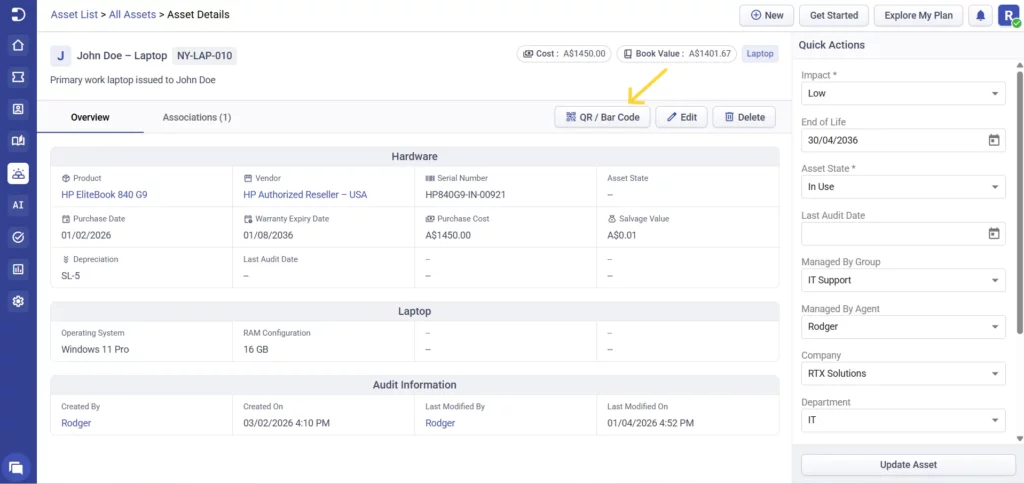
One of the biggest improvements this week is inasset management. You can now generateQR codes and barcodesfor your assets directly from the asset details, making it much easier to access all the asset details with a quick scan instead of manually searching.
This is especially useful for teams managing physical devices across locations.
You can also bulk generate QR codes for multiple assets at once, saving time when setting up or updating your inventory.
In addition to this, agents and users can now associate assets while creating a ticket, whether it’s from the agent portal, support portal, or the support bot.
For contacts, this works when they are logged in to the support portal or support bot and ensures only their assets are shown, giving agents better context right from the start.
The asset module is now available on mobile devices, so your team can view and manage assets on the go, while settings continue to remain accessible via desktop.
Keep an eye out, we’re continuously improving asset management to make it more efficient and user-friendly for your team.
We’ve introduced acredits usage historysection where you can view conversations from the last seven days, including chat history, credits consumed, and which AI Agent handled the interaction. This makes it easier to understand how your AI Agents are being used.
Alongside this,we’ve also made useful improvements to AI Agents to give you more control and visibility. You can now choose whether the chat widget should automatically pop open when a user visits the support portal or the website for the first time. This helps make users aware that support is readily available without them needing to look for it.
We’ve also improved overall response quality, and AI Agent replies now include source references for better transparency and accuracy.
Innovation doesn’t stop at Desk365. Over the next few months, our roadmap includes plans to strengthen the AI Agents so they contribute measurably to your support team.
For teams using APIs, we’ve added new endpoints that allow you to update and delete time entries using the Time Entry ID, along with the ability to start or stop timers programmatically. This gives you more flexibility when integrating Desk365 with other tools or automating workflows.
We’ve also expanded language support to help you serve a wider audience, with Malay and Urdu now available in the support portal, and UK English, European Portuguese, and Spain Spanish added to the support bot.