

You are comparing help desk platforms for your IT team, and ServiceDesk Plus is on the shortlist partly because ManageEngine actually publishes its prices, unlike ServiceNow or plenty of other IT service management (ITSM) vendors that make you talk to sales before you see a number. That transparency is real. The sticker price on the page is still not the whole story.
Three decisions change what you actually pay: which edition, cloud or on-premises, and whether your team ends up needing any of the five ITIL add-ons most growing IT departments want within the first year. Skip past any one of those while you are comparing vendors, and the number you are using to judge ServiceDesk Plus against the rest of your shortlist will not match what an actual invoice looks like.
This guide breaks down what ServiceDesk Plus actually costs on cloud and on-premises, edition by edition, what the add-ons add up to once you need real ITIL depth, and where the numbers land against Freshservice, ServiceNow, and Desk365, so you can weigh it against the rest of your shortlist on equal footing.
How much does ManageEngine ServiceDesk Plus cost
Pricing below is current as of August 2026. ServiceDesk Plus is priced per technician, not per end user. You pay for the people resolving tickets. Employees submitting requests do not count toward your bill, no matter how many of them there are.
Three editions cover different depth of IT service management (ITSM): Standard, Professional, and Enterprise. Cloud is billed monthly per technician. On-premises works differently: ManageEngine licenses it in technician bands, billed annually, and the per-technician cost drops as the band gets bigger. Both cloud and on-premises also carry a language toggle, English or multilingual, that changes the price at every tier.
Cloud pricing
| Edition | English | Multilingual |
|---|---|---|
| Standard | $13/technician/month ($156/technician/year) | $16/technician/month ($192/technician/year) |
| Professional | $27/technician/month ($324/technician/year) | $34/technician/month ($408/technician/year) |
| Enterprise | $67/technician/month ($804/technician/year) | $79/technician/month ($948/technician/year) |
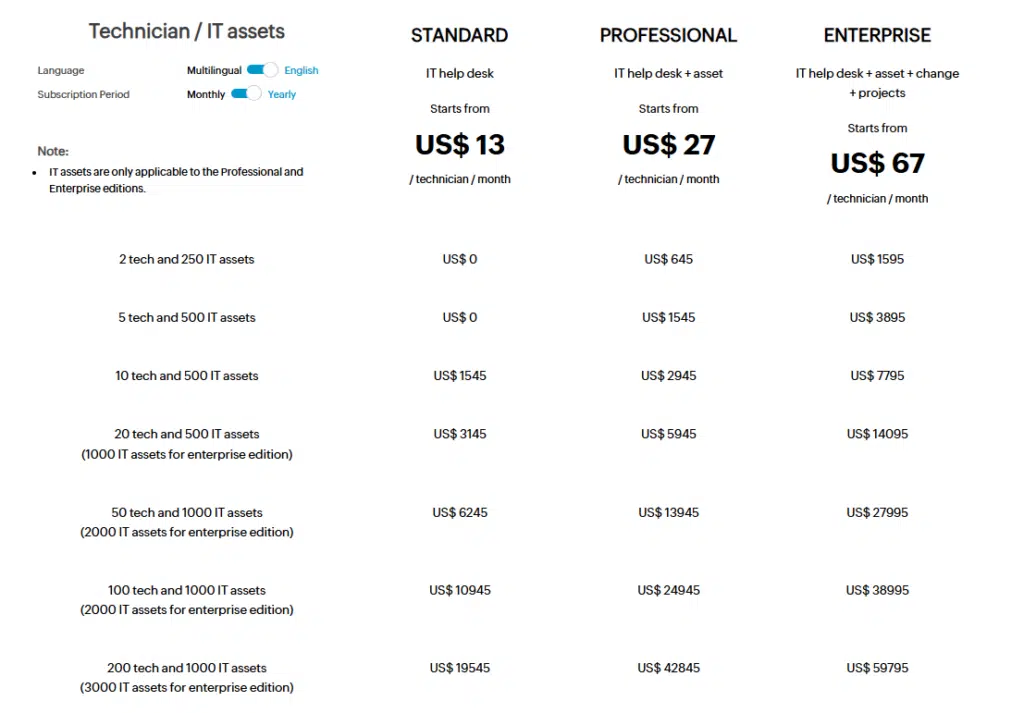
Cloud multilingual runs 18% to 26% above English, depending on the edition, which lines up with the roughly 20% multilingual premium on the on-premises side below.
On-premises pricing, entry band
| Edition | English | Multilingual |
|---|---|---|
| Standard | $120/technician/year | $145/technician/year |
| Professional | $248/technician/year | $298/technician/year |
| Enterprise | $598/technician/year | $723/technician/year |
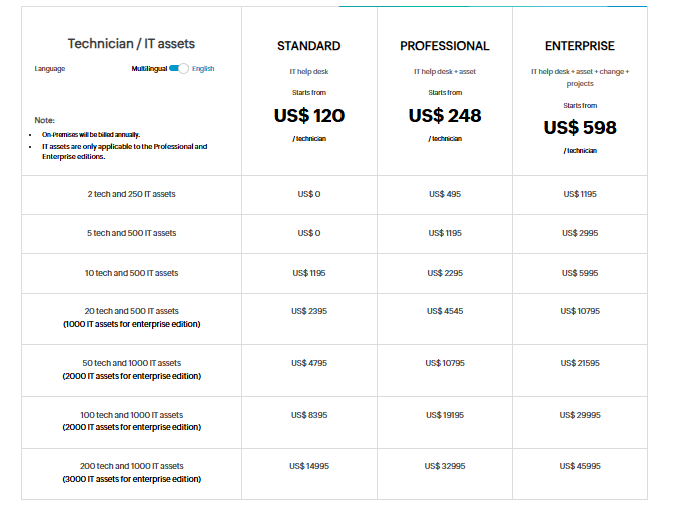
Multilingual runs about 20% above English at every edition on-premises, the same pattern as cloud above.
On-premises pricing, by technician count
On-premises pricing is not one number. It is a table of bands, and the per-technician cost drops as the band gets bigger. Here is the full table for English.
| Technicians | Standard | Professional | Enterprise |
|---|---|---|---|
| 2 | Free | $495 | $1,195 |
| 5 | Free | $1,195 | $2,995 |
| 10 | $1,195 | $2,295 | $5,995 |
| 20 | $2,395 | $4,545 | $10,795 |
| 50 | $4,795 | $10,795 | $21,595 |
| 100 | $8,395 | $19,195 | $29,995 |
| 200 | $14,995 | $32,995 | $45,995 |
And the same table for multilingual
| Technicians | Standard | Professional | Enterprise |
|---|---|---|---|
| 2 | Free | $595 | $1,445 |
| 5 | Free | $1,445 | $3,595 |
| 10 | $1,445 | $2,745 | $7,195 |
| 20 | $2,895 | $5,495 | $12,945 |
| 50 | $5,745 | $12,945 | $25,945 |
| 100 | $10,545 | $23,045 | $35,995 |
| 200 | $17,995 | $39,595 | $55,195 |
Find your technician count in either table, and that annual number is the real on-premises price, not a monthly rate multiplied out. A handful of pricing guides skip this table entirely and quote $13, $27, and $67 as a flat monthly on-premises rate. Those are actually ManageEngine’s cloud English prices, not on-premises figures at all, so double-check any comparison chart that uses those three numbers for on-premises.
ServiceDesk Plus editions, plan by plan
Standard edition
Standard is the entry point, and the only edition ManageEngine offers for free. It covers incident management, a knowledge base, a self-service portal, and basic reporting. There is no asset tracking and no formal change process here. If your team’s job is closing tickets and nothing else, Standard does that job and stops there.
Professional edition
Professional adds IT asset management, purchase management, and contract management on top of everything in Standard. This is the tier where ServiceDesk Plus stops being just a ticketing tool and starts tracking the hardware and software behind those tickets, laptops, licenses, warranties, and vendor contracts included.
At $27 a month per technician on cloud, Professional roughly doubles the Standard price. For a team that already manages an asset inventory in a spreadsheet, that jump usually pays for itself in the time it saves reconciling the two systems by hand.
Enterprise edition
Enterprise brings in the full IT Infrastructure Library (ITIL) toolkit: change management, release management, project management, and a service catalog. At $67 a month per technician on cloud, it costs more than double Professional, and just over five times Standard.
This is the tier ManageEngine expects formal IT organizations to land on, the kind with a change advisory board, audit requirements, or a service catalog customers browse before opening a ticket. If none of that describes your team yet, Enterprise is likely more than you need today.
Is ManageEngine ServiceDesk Plus free
Yes. The Standard edition is free for up to five technicians on a single instance, with no time limit attached, unlike some competitors that only offer a free trial period. It includes incident management and a knowledge base, and end users are unlimited even on the free tier.
The one catch is support. Free edition customers who want access to ManageEngine’s support team pay an optional annual maintenance service (AMS) fee of $35 per technician per year. Skip that fee, and you still get the software, just without a support line to call.
Cloud versus on-premises: which one actually costs less
On-premises costs less on the license line at every technician count, not just at the edges. For a 20-technician team, on-premises runs 23% to 33% below the equivalent cloud edition, and the gap is widest on Enterprise, where the ITIL feature set is deepest. The exact figures are in the cost table further down.
That gap is not the whole story, though. Cloud folds hosting, upgrades, and security patching into the subscription. On-premises leaves the server, the database administration, the patching schedule, and the staff hours to run all of it on your side of the ledger. Some legacy on-premises contracts also carry a separate annual maintenance renewal on top of the license, so if you are quoted a perpetual license rather than the annual banded pricing described above, ask specifically what the renewal fee covers and how much it runs before you sign.
The practical way to decide: if you already have IT staff managing servers and patching for other tools, on-premises can be genuinely cheaper at scale, not just on paper. If support and hosting infrastructure would be new work for your team, price out that staff time honestly. It usually closes more of the gap than the license numbers alone suggest.
Add-ons that push the price higher
Standard and Professional both leave several ITIL modules out, and ManageEngine sells them back as separate annual add-ons. Here is what each one costs, based on ManageEngine’s own pricing page.
| Add-on | Standard | Professional | Enterprise |
|---|---|---|---|
| Service catalog | $1,195/year | $1,195/year | Included |
| Problem management | $1,195/year | $1,195/year | Included |
| Project management | $1,195/year | $1,195/year | Included |
| Change and release management | $2,395/year | $2,395/year | Included |
| CMDB | Not available | $1,195/year | Included |
| Computer telephony integration | $1,195/year | $1,195/year | Not available |
| Fail over service | $2,395/year | $2,395/year | Not available |
Add up all five ITIL add-ons (service catalog, problem management, project management, change and release management, and a configuration management database, or CMDB) on top of Professional, and you are looking at $7,175 a year in add-ons alone, before a single technician seat is billed.
That number matters because it changes the math on whether Professional plus add-ons or a straight upgrade to Enterprise is the better deal, and the answer depends entirely on how many technicians you have.
The Professional-plus-add-ons math, at three team sizes
| Technicians | Professional + all five add-ons | Enterprise (all included) | Cheaper option |
|---|---|---|---|
| 10 | $10,415/year | $8,040/year | Enterprise, by $2,375 |
| 15 | $12,035/year | $12,060/year | Professional + add-ons, by $25 |
| 20 | $13,655/year | $16,080/year | Professional + add-ons, by $2,425 |
The add-ons are flat annual fees. They cost the same whether you have five technicians or fifty. That means the crossover point, where stacking add-ons on Professional becomes cheaper than paying for Enterprise outright, lands right around 15 technicians. Below that headcount, Enterprise is the better deal for full ITIL depth. Above it, Professional plus add-ons wins, though not by much until you are well past 20. Run your own technician count through this before assuming either edition is automatically cheaper.
Enterprise service management: running more than one instance
ServiceDesk Plus supports enterprise service management (ESM), which lets IT, HR, facilities, and other departments each run their own service desk instance from one platform, rather than juggling separate tools. ManageEngine allows up to 15 service desk instances running at once, each on its own edition choice, and each with its own 30-day free trial.
Only one instance across your entire account can use the free technician allotment. Every additional instance, even a small one, needs a paid edition. If you are planning to roll ServiceDesk Plus out to more than one department, budget for that before you commit to a single free instance and assume the rest will be just as cheap.
What ManageEngine gets right on AI
To ManageEngine’s credit, this is one area where the pricing page does not nickel-and-dime you. The company’s Zia AI assistant, including a conversational virtual agent, workflow generation, and ticket triage, ships inside ServiceDesk Plus cloud at no additional licensing cost, across every edition. Compare that to help desk vendors that sell AI copilots and AI agents as separate per-agent add-ons, and ServiceDesk Plus is genuinely ahead here. Whatever else you think about the tiered pricing, the AI features are not where ManageEngine tries to make up the difference.
What a real 20-technician team pays
Sticker price and actual invoice are different numbers once you pick an edition, a deployment model, and add what you need. Here is what a 20-technician IT team pays annually under three common setups, cloud and on-premises side by side, both on ManageEngine’s own published rates.
| Setup | Cloud (annual) | On-premises (annual) |
|---|---|---|
| Standard, ticketing only | $3,120 | $2,395 |
| Professional, with asset management | $6,480 | $4,545 |
| Enterprise, full ITIL suite | $16,080 | $10,795 |
The jump from Standard to Enterprise runs about five times the price on cloud, and about four and a half times on-premises, for the same headcount. That gap is worth sitting with before you default to the top tier because it has every feature listed. Most teams do not need change management, release management, and a service catalog on day one, and Professional, with or without a targeted add-on or two, covers a lot of ground for a lot less.
ManageEngine ServiceDesk Plus versus other ITSM tools
Here is how ServiceDesk Plus’s entry price compares against Freshservice, Jira Service Management, and ServiceNow, for a 10-person team on annual billing.
| Platform | Entry plan (per seat, monthly) | Monthly cost, 10 seats |
|---|---|---|
| Desk365 | $12/agent | $120 |
| ManageEngine ServiceDesk Plus | $13/technician | $130 |
| Freshservice | $19/agent | $190 |
| Jira Service Management | $20/agent | $200 |
| ServiceNow | No published pricing | Not published |
Desk365 has the lowest entry price in this group. ManageEngine undercuts both Freshservice and Jira Service Management at the entry tier, and it is one of only two platforms in this table, alongside Jira Service Management, that publishes a number at all without a sales call. ServiceNow’s quote-only model is the norm at the high end of enterprise ITSM, not the exception, so if a shortlist includes ServiceNow, expect that comparison to take a different shape entirely, with numbers that only firm up after a sales conversation.
ManageEngine ServiceDesk Plus versus Desk365
Since ServiceDesk Plus is an IT-focused ITSM tool, Desk365 is one of the more direct comparisons available, rather than a general customer support platform trying to cover IT as an afterthought. Here is how the two line up, tier for tier.
| Tier | ManageEngine ServiceDesk Plus (cloud) | Desk365 |
|---|---|---|
| Free | Standard, up to 5 technicians, ongoing, $35/technician/year for support | Standard features, up to 3 agents, lifetime, capped at 50 tickets a month |
| Entry paid | Standard, $13/technician/month | Standard, $12/agent/month |
| Mid | Professional, $27/technician/month, adds asset management | Plus, $22/agent/month, adds change and approval management plus AI drafting |
| Top | Enterprise, $67/technician/month, adds change, release, and project management | Premium, $32/agent/month, adds asset management plus HIPAA-ready encryption |
The gap that stands out is where change and approval management sit. ManageEngine holds it back for Enterprise, at $67 a technician a month, or a $2,395-a-year add-on on a lower tier. Desk365 includes change and approval workflows starting at its second tier, Plus, at $22 an agent a month. For a 20-technician team, that is the difference between $16,080 a year on Enterprise and $5,280 a year on Plus for a comparable approval workflow, before asset management even enters the comparison.
Asset management alone is actually where ManageEngine edges ahead on raw seat price. Professional cloud runs $6,480 a year for 20 technicians, against $7,680 a year for Desk365 Premium. The comparison changes once change management enters the picture, since Desk365 Premium already includes it and ManageEngine Professional does not. Adding that to ManageEngine’s side means either the jump to Enterprise ($16,080 a year) or stacking the $2,395-a-year change and release add-on onto Professional ($8,875 a year total for 20 technicians). Either way, once change management and asset management are both part of the comparison, Desk365 Premium covers both for less than ManageEngine does, and it adds HIPAA-ready encryption and PII controls that ManageEngine does not offer at any ServiceDesk Plus tier.
Where ManageEngine still has a genuine edge is AI. Its Zia features come bundled into every cloud edition at no extra cost. Desk365 bundles AI drafting, summarizing, and rephrasing into Plus and Premium as well, but its more autonomous AI Agent runs on a metered credit system, $50 per 1,000 credits, on top of a monthly allotment of free credits. If unattended AI resolution volume is the priority, that is worth pricing out for your own ticket volume before you compare the two platforms on sticker price alone.
How to choose the right plan
Start with what your team actually does today, not what it might do in two years. If technicians close tickets and nothing else, Standard covers it, on either platform, and upgrading later is straightforward on both.
If you are already tracking laptops, licenses, or vendor contracts in a spreadsheet, price out Professional on ManageEngine or Premium on Desk365 before you commit to Standard. Asset visibility tends to pay for the upgrade within the first few months.
If a change advisory board, release process, or formal approval workflow is part of how your IT team operates, run the crossover math above before assuming Enterprise is the only route. Depending on your technician count, stacking two or three targeted add-ons on a lower tier can cost less than the full Enterprise jump, and a platform like Desk365 that includes approval workflows at a mid-tier price is worth pricing out directly against that math.
Finally, decide on cloud or on-premises before you compare prices at all, since the two carry different rates for the same features, and factor in your own staff capacity for hosting and maintenance, not just the license line.
Frequently asked questions
Cloud pricing runs $13 a month per technician on Standard to $67 on Enterprise, in English, or $16 to $79 in multilingual. On-premises is priced differently, in annual technician bands rather than a flat monthly rate, starting around $120 a technician a year on Standard and $598 on Enterprise at the entry band, in English, with multilingual running about 20% higher at every tier.
Yes, for up to five technicians on the Standard edition, with no time limit on the free tier itself. Support access requires an optional $35 per technician per year maintenance fee if you want to reach ManageEngine’s support team.
Per technician. You pay only for the staff resolving tickets. End users submitting requests are unlimited and free, regardless of how many people that includes.
Standard covers core ticketing and a knowledge base. Professional adds IT asset management, purchase management, and contract management. Enterprise adds change management, release management, project management, and a service catalog, the full ITIL toolkit in one edition.
On-premises has a lower license price at every tier, but that number does not include server hosting, security patching, or the staff time to maintain it. Cloud costs more upfront but folds those costs into the subscription. Which one is actually cheaper depends on whether your team already has the infrastructure and staff to run on-premises software.
At the entry tier, yes, against both. ServiceDesk Plus Standard ($13/technician/month) undercuts Freshservice Starter ($19/agent/month) and Jira Service Management Standard ($20/agent/month). Jira Service Management does offer a free plan for up to three agents, which ServiceDesk Plus does not quite match at that headcount, since its free tier starts at five technicians but on the Standard edition only. Against ServiceNow, there is no published price to compare against directly, though third-party estimates put ServiceNow’s ITSM licensing well above all three of the others here.










