Q3 2026 at Desk365 was all about introducing new ways for teams to manage their helpdesk and IT assets more easily. From bringing Microsoft Intune devices into Desk365 to making it easier to migrate from Freshdesk, we’ve made some big changes to the way teams can manage their helpdesk and IT assets. We’ve also added a bunch of smaller improvements. So, here’s what happened in Desk365 between July and September.
Want the highlights in a few minutes? Watch our video for a quick look.
Microsoft Intune integration within Desk365
Let me start off with one of the biggest features we shipped this quarter. If your IT team already uses Microsoft Intune to manage laptops, desktops, or mobile devices, we’ve made it easy for you to bring those devices straight into Desk365 Asset Management.

Instead of keeping device information in one place and support tickets somewhere else, your team can have both together in Desk365. You can choose which devices to sync, map Intune fields to your Desk365 asset fields, schedule weekly syncs, and check your sync history when you need to.
And there’s a little milestone here too. We first launched Intune integration as a private beta in August. By September, it had moved to public beta, which means you can now set it up yourself without having to reach out to our team.
See how Intune Integration works?

Migrate data from Freshdesk to Desk365
In September, we added a seamless way to migrate from Freshdesk to Desk365. You can now bring your Freshdesk tickets, contacts, companies, and knowledge base articles into Desk365. And, with your Freshdesk API key, you can also move ticket conversations, attachments, CC and BCC details, and custom fields.

We handle the field mapping for you, and you can review the mappings and choose what you want to migrate before you start. The system also validates the data before the import begins.
We’ve started with Freshdesk for now, with more migration options coming soon if you currently use other helpdesk platforms.
Thinking about moving from Freshdesk?
A new Audit Logs experience
We also gave Audit Logs a refresh this quarter. The new experience makes it easier to keep track of activity across your Desk365 account, with separate logs for access, accounts, assets, software, settings, and tickets.


You can use the logs to see what changed, when it happened, and who made the change, giving admins a clearer view of activity across Desk365.
Read more about Audit Logs in Desk365.
We’ve made time tracking simpler
Since our August enhancement, you can now start a timer directly from a ticket with Quick Start instead of opening another window. You can create time entry categories, use automation rules to start and stop timers, and trigger actions when time entries are added or updated.
Read more about how to track time spent on tickets in Desk365.

Asset Management enhancements
Intune wasn’t the only thing that happened in Asset Management this quarter. Q3 added quite a few improvements to make it easier to actually work with all those devices and software records once they’re in Desk365.
We’ve made it easier for you to create custom views for Assets and Software. So instead of digging through a long list every time you need something, you can save views based on things like asset type, status, location, vendor, or managing group.

You can also decide exactly which columns you want to see and arrange them in the order that makes sense for your team. And if you’re managing a lot of assets, there are a few other updates worth knowing about. You can now:
- see activity history for assets and software
- create and print custom asset labels with QR codes and barcodes
- export all assets, filtered assets, or specific fields
- control who can export asset and software data
- see assets associated with a company in one place and,
- control asset access by global, group, or agent scope.
Read about these updates in detail here:
Your Knowledge Base can now be on paper
Support agents can print knowledge base articles from the Agent Portal, and contacts can print them from the Support Portal. You can also print Knowledge Base articles through the Desk365 Support Bot in Microsoft Teams.

And then there were many smaller improvements
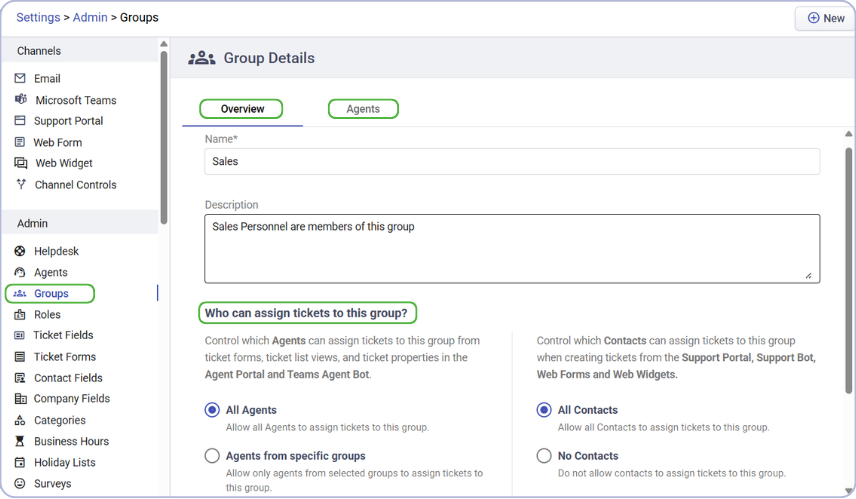
In July, we brought more control over group signatures so that admins can manage brand, group, and personal signatures from one place. We also redesigned Group Details and added more control over who can assign tickets to a group.
Ticket management also got some attention. You can now sort tickets using supported custom fields, while the new exact-match operators gave automation rules a little more precision.

Time-based triggers can now work around your configured business hours instead of simply counting every hour of the week.
And we also expanded our APIs with more powerful ticket search, dropdown filtering, and APIs for Asset Management.
That was our Q3 2026. If you’re already using Desk365, you’ll keep seeing these updates land throughout the year. If you’re just checking us out, this is a pretty good time to see what we’ve been building and book a demo.