

TL DR; Best SolarWinds Service Desk alternatives
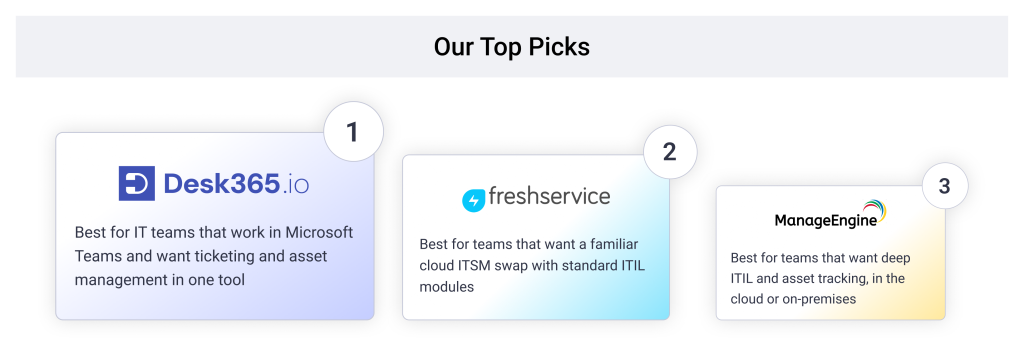
- Desk365: Best for IT teams that want a helpdesk inside Microsoft Teams with asset management in the same product
- Freshservice: Best for teams that want a familiar cloud ITSM tool and can budget for the Pro plan
- ManageEngine ServiceDesk Plus: Best for teams that want deep ITIL and asset tracking, in the cloud or on-premises
- SysAid: Best for teams that want AI included in the price
- HaloITSM: Best for teams that want one price with every module included
- InvGate Service Management: Best for teams that want ITSM and asset management from one vendor on simple yearly pricing
- TOPdesk: Best for teams that want ITIL-aligned service management with local support
In our conversations with IT teams that moved from SolarWinds to Desk365, two reasons came up most often. Cost was the biggest. Some teams called the bill too high. Others worried about future price increases and wanted written assurance that renewals would not jump by anything close to 50%. The second reason was an outdated product. Teams described it as old and slow to change, and one had run SolarWinds Web Help Desk for 15 years before looking for a cloud-based tool.
Public forums show the same pattern. In an r/sysadmin thread, a K-12 district with about 1,400 users and 85 agents started looking at alternatives to SolarWinds Web Help Desk because of rising costs. Their questions were practical. How well does a tool scale, how hard is migration, does it work with AD or LDAP, and what does it take to maintain over time?
This list covers seven ITSM tools that mid-size IT teams look at when they switch. We skipped the enterprise platforms and focused on mid-market tools, where setup takes days instead of months and most pricing is public.
Disclaimer
Full disclosure, Desk365 is on this list, and we ranked it first for teams that work in Microsoft Teams and need asset management. We still call out a real limitation for every tool here, including ours. Pricing pages and G2 reviews are linked throughout so you can check our work. Read more about our review methodology.
How I ranked the best SolarWinds Service Desk alternatives
We ranked each tool on what it costs once you turn on the features you need. That meant five checks: price with the key features on, whether IT asset management sits in the same product, how the tool works with Microsoft Teams, how long setup takes, and whether a mid-size team can run it without a full-time admin.
SolarWinds Service Desk is the baseline. Its Essentials plan starts at $39 per technician per month, but custom fields and forms start on Advanced at $99. AI incident summaries start on Premier at $124. The pricing page also says asset pricing is available on request. So we compared each alternative against a SolarWinds plan with similar features, not just the entry price.
Prices are per agent or technician per month unless noted. They come from each vendor’s pricing page as of October 2026. Pros and cons come from G2 reviews, linked in each entry.
7 best SolarWinds Service Desk alternatives for IT teams
| Tool | Best for | Starting price | Free trial or plan |
|---|---|---|---|
| Desk365 | Teams-native helpdesk with asset management | $12/agent/month | 21-day trial, free plan for 50 tickets a month |
| Freshservice | Like-for-like cloud ITSM swap | $19/agent/month | 14-day trial |
| ManageEngine ServiceDesk Plus | ITIL depth and asset tracking | Free for up to 5 technicians, paid cloud plans from $645/year (Professional, 2 technicians) | 30-day trial |
| SysAid | AI included in the price | $89/agent/month | Free trial, no credit card |
| HaloITSM | One price, every module | $99/agent/month | 30-day trial |
| InvGate Service Management | ITSM and asset management from one vendor | $500/agent/year | 30-day trial, no credit card |
| TOPdesk | ITIL-aligned service management | $64/agent/month | Product tour, quote on request |

4.9/5

4.9/5
Desk365 is the best SolarWinds Service Desk alternative for IT teams that work in Microsoft 365 and want asset management without a second tool. It is built for Microsoft Teams, so employees raise tickets in Teams and agents work them there too. Microsoft Teams ticketing is on every plan, including the $12 Standard plan.
Why I'd consider Desk365:
Desk365 prices the features IT teams ask about at a lower tier. Plus costs $22 per agent and includes AI ticket summaries, reply drafting, change and approval management, and load-based ticket assignment. Asset management is on Premium at $32 per agent. For comparison, SolarWinds Advanced costs $99 per technician.
Switching is also easier. SolarWinds bills annually at the start of the contract, so most teams move at renewal. Desk365’s switch-at-renewal offer gives you an extended trial and lets you pay only when your current contract ends. It also locks in your price and includes data migration at no extra cost, with a dedicated account manager.
Desk365 key features
- Microsoft Teams ticketing: Employees create tickets from Teams. Agents assign and resolve them there. Email, the support portal, and web forms feed the same queue.
- IT asset management (Premium): Sync devices from Microsoft Intune, track assets from procurement to retirement, manage software licenses and vendors, and link assets to tickets.
- Automation and SLAs: Workflow automation, SLA reminders, and escalations come with Standard. Plus adds round-robin and load-based assignment.
- Security: Desk365 is SOC 2 Type II certified and GDPR compliant, with data centers in the US and EU. Premium adds encrypted fields and data redaction.
- AI: Plus includes AI reply drafts, ticket summaries, and knowledge base article generation. The AI Agent add-on runs on credits at $50 per 1,000, with 100 free credits a month on Plus and 200 on Premium.
What a Reddit user says about moving from SolarWinds to Desk365
In the same r/sysadmin thread, one IT admin said their team moved from SolarWinds to Desk365 and saved part of its budget. They found the interface easy to navigate and said the team automated ticket routing by department for a queue of roughly 400 to 500 tickets. They also said response times improved. Read the thread

Cons
- There is no option to turn off reCAPTCHA for SSO tenants (review)
Desk365 pricing
- Free: up to 50 tickets a month, no end date
- Standard: $12/agent/month
- Plus: $22/agent/month
- Premium: $32/agent/month
- AI Agent credits: $50 per 1,000
START YOUR FREE TRIAL · REQUEST DEMO
4.6/5
4.6/5
Why I'd consider Freshservice:
Freshservice is the most familiar move for teams that want to stay in a cloud ITSM tool with standard ITIL modules. The catch is where those modules sit. Change management starts on Pro at $99 per agent, while SolarWinds lists change management on Essentials at $39. Asset management is included from Growth at $49, but with 100 asset units. AI Copilot costs $29 per agent on top of Pro. Our Freshservice pricing guide breaks down the full cost.
Freshservice key features
- Incident management, service catalog, and SLA management, with problem, change, and release management on Pro
- Workflow Automator and orchestration for repeat work
- ServiceBot on Microsoft Teams and Slack on every plan
Freshservice pricing
- Starter: $19/agent/month
- Growth: $49/agent/month
- Pro: $99/agent/month
- Enterprise: custom quote
- Freddy AI Copilot add-on: $29/agent/month
Prices are billed annually. The free trial lasts 14 days.
4.4/5
4.2/5
Why I'd consider ManageEngine ServiceDesk Plus:
ServiceDesk Plus covers the full ITSM stack and comes in cloud and on-premises versions. The Standard edition is free for up to five technicians, which makes it easy to test. Professional adds asset management, and Enterprise adds change, projects, and a CMDB. Lower editions treat several ITIL modules as paid add-ons. The company says AI features are included in every edition at no extra cost. Our ManageEngine ServiceDesk Plus pricing guide explains how technician and asset counts change the bill.
ManageEngine ServiceDesk Plus key features
- Three editions: Standard for the service desk, Professional with asset management, and Enterprise with change, projects, and CMDB
- Pricing based on technicians, plus the number of IT assets on Professional and Enterprise
- Support included in the subscription, with 24×5 coverage
ManageEngine ServiceDesk Plus pricing
- Standard: free for up to 5 technicians, paid plans from $1,545/year for 10 technicians
- Professional: from $645/year for 2 technicians and 250 assets
- Enterprise: from $1,595/year for 2 technicians and 250 assets
These are cloud starting prices for small bundles, so the cost per technician changes as you add agents. The free trial lasts 30 days.
4.5/5
4.5/5
Why I'd consider SysAid:
SysAid sells one main plan with AI built in. Professional costs $89 per agent per month and includes request, incident, change, and problem management, asset management for up to 250 assets, a Copilot assistant, and Microsoft Teams support. SolarWinds puts its AI incident summaries on Premier at $124. Two costs sit outside that price. Implementation plans are separate, and live chat support is only on Enterprise, which starts at 20 agents.
SysAid key features
- Request, incident, change, and problem management
- Asset management with a CMDB, inventory, and network discovery
- AI Copilot for agents and end users, plus prebuilt AI agents
SysAid pricing
- Professional: $89/agent/month
- Enterprise: custom quote, starting at 20 agents
SysAid offers a free trial with all features and no credit card.
4.7/5
4.8/5
Why I'd consider HaloITSM:
Halo prices by agent only. There are no tiers, so IT service, asset management, AI, and reporting come in the one price. It also offers named or concurrent licenses at the same price, which helps shift-based teams. The trade-off is setup. Halo requires an onboarding package with purchase, and the cost depends on scope. Reviewers also describe a steep learning curve once you start customizing.
SysAid key features
- Incident, problem, change, and knowledge management in one platform
- Asset and configuration management with a CMDB and asset discovery
- Halo AI, including AI triage and suggested replies
SysAid pricing
- All features included: $99/agent/month, billed annually
- Onboarding package required, priced by scope
The free trial lasts 30 days with all features included.
4.6/5
4.6/5
Why I'd consider InvGate Service Management:
InvGate uses simple yearly pricing. Starter is $1,499 per year for five agents, and Pro is $500 per agent per year for 5 to 50 agents. Microsoft Teams support starts on Pro, not Starter. InvGate sells asset management as a separate product. The service management plans include the integration with it, but you should price the asset side before you compare totals.
InvGate key features
- Ticketing, knowledge management, self-service portal, and SLA management on every plan
- Workflow builder, AI Service Agent, and Microsoft Teams on Pro
- Microsoft Entra ID sync and SSO on every plan
InvGate pricing
- Starter: $1,499/year for 5 agents
- Pro: $500/agent/year, 5 to 50 agents, starting at $2,500/year
- Enterprise: custom quote, starting at $12,000/year
The free trial lasts 30 days with no credit card. G2 lists the product as InvGate Service Management.
4.4/5
4.1/5
Why I'd consider TOPdesk:
TOPdesk includes asset management on every plan, with unlimited assets, tickets, and end users. That is a clear advantage over tools that cap assets. The upgrade path matters, though. SLA management, change, and problem management start on Engaged, and project management starts on Excellent. Local support runs 8 hours a day, 5 days a week on Essential and Engaged, and 24/5 on Excellent. TOPdesk also lists Microsoft Teams, Microsoft Entra ID, and Microsoft Copilot among its integrations.
TOPdesk key features
- Incident and asset management, a self-service portal, and a knowledge base on Essential
- Change, problem, and SLA management on Engaged
- AI assistants and project management on Excellent
TOPdesk pricing
- Essential: $64/agent/month
- Engaged: $91/agent/month
- Excellent: $128/agent/month
TOPdesk’s page says its average price falls as you add agents, and you request a quote for the exact figure.
How do you choose the right SolarWinds Service Desk alternative?
Start with the one thing you cannot give up. Most IT managers end up weighing four needs.
- If you work in Microsoft 365 and want Teams and assets together, look at Desk365 on Premium or SysAid Professional. Both put Microsoft Teams support and asset management in the same product.
- If your team follows ITIL closely, look at ManageEngine ServiceDesk Plus Enterprise, TOPdesk Engaged, or Freshservice Pro. Check which plan unlocks change and problem management, because it differs by vendor.
- If you want one price without module math, look at HaloITSM or InvGate. Halo bundles every module but requires an onboarding package. InvGate bills yearly, but asset management is a separate product.
- If AI matters, check whether it ships in the plan. SysAid includes it, Freshservice charges $29 per agent for Copilot, and Desk365 gives 100 to 200 free AI Agent credits a month on Plus and Premium.
Whichever way you lean, price the plan you will actually use. Add the AI you need, the asset tracking you need, and any onboarding fee. Then compare totals against what you pay SolarWinds today. Since SolarWinds bills annually, line up your trial with your renewal date.
Frequently asked questions
The best alternative depends on your stack. Desk365 is the strongest fit for IT teams that work in Microsoft Teams and want asset management in the same tool. Freshservice suits teams that want a familiar cloud ITSM swap, and ManageEngine ServiceDesk Plus suits teams that want ITIL depth.
SolarWinds lists three plans, all per technician per month and billed annually. Essentials is $39, Advanced is $99, and Premier is $124. All plans support unlimited requestors, and asset pricing is available on request. The free trial lasts 30 days.
ManageEngine ServiceDesk Plus Standard is free for up to five technicians. Among paid plans, Desk365 starts at $12 per agent per month and includes Microsoft Teams ticketing, automation, and SLAs on that entry plan. Desk365 also has a free plan for up to 50 tickets a month.
Yes. Desk365 supports ticketing in Teams on every plan. SysAid includes Teams support on Professional, Freshservice offers ServiceBot on Teams on every plan, and InvGate includes Teams on Pro.
SysAid Professional includes 250 assets. TOPdesk includes unlimited assets on every plan. Desk365 includes asset management on Premium, ManageEngine on Professional, and Freshservice from Growth with 100 asset units. InvGate sells asset management as a separate product.
SolarWinds sells Web Help Desk as a separate product from Service Desk. Any cloud tool above can replace either one. Ask each vendor what import options they offer for ticket history. Desk365 includes data migration at no extra cost with its switch-at-renewal offer.










