HubSpot Service Hub is HubSpot’s customer service platform, designed to help businesses manage customer support, ticketing, help desk operations, knowledge bases, customer feedback and customer success within the HubSpot CRM ecosystem.
At first glance, HubSpot Service Hub pricing can look straightforward. There is a free tier, followed by Starter, Professional and Enterprise plans. But the actual cost depends on factors such as the number of paid seats, billing terms, onboarding requirements, HubSpot credits and the additional capabilities your support team needs.
HubSpot Service Hub pricing in 2026 varies depending on the plan, number of seats, billing terms and additional usage.
How much does HubSpot Service Hub cost right now
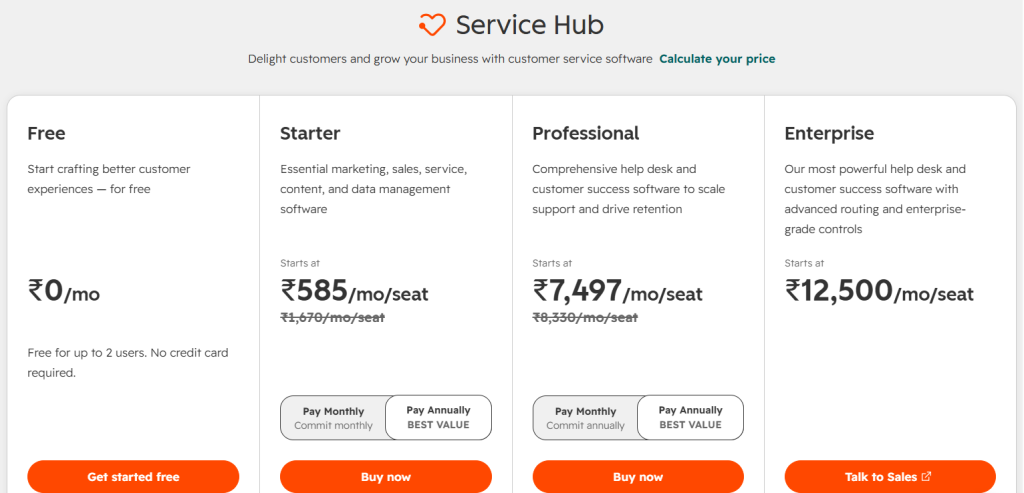
HubSpot offers four Service Hub pricing tiers: Free, Starter, Professional and Enterprise. The Free plan is available at $0 per month for up to two users, while paid plans are priced per seat. Starter starts at $7 per seat/month when billed annually, Professional starts at $90 per seat/month annually and Enterprise starts at $150 per seat/month.
For Starter, the monthly commitment price is $20 per seat/month. Professional is priced at $100 per seat/month when billed monthly and require a one-time $1,500 onboarding fee. Enterprise starts at $150 per seat/month and requires a one-time $3,500 onboarding fee.
In addition to the Service Hub subscription, HubSpot includes monthly HubSpot credits with paid plans. Starter includes 500 credits, Professional includes 3,000 and Enterprise includes 5,000. Additional credits can be purchased at $0.01 per credit when needed.
HubSpot also offers a 14-day unlimited trial of Customer Agent when purchasing at least one Professional or Enterprise Service seat.
What changed in HubSpot's pricing this year
One of the biggest things to understand about HubSpot’s current pricing is that it uses a seat-based pricing model. Instead of simply paying one flat amount for the entire Service Hub, businesses assign different seat types to users based on what those users need to access.
For new accounts using HubSpot’s current pricing model, users can have different seat types, including Core Seats and Service Seats. The seat assigned to a user determines which tools they can access. This makes the pricing more flexible than a model where every employee automatically requires the same full license. However, it also means that businesses need to understand exactly which users require paid Service access before calculating their total cost.
Another important change is the introduction of HubSpot credits.
Paid HubSpot subscriptions include a monthly allocation of HubSpot credits, which are used by certain usage-based features. Businesses that consume more credits than their included allowance can purchase additional credits. For support teams using AI features such as Customer Agent, this means the monthly subscription price may not tell the entire cost story.
HubSpot Service Hub plans breakdown, plan by plan
Here is what each HubSpot Service Hub tier includes as of September 2026. HubSpot currently offers four tiers: Free, Starter, Professional and Enterprise, with the three paid tiers using seat-based pricing.
| Plan | Price per month annually | Built for |
|---|---|---|
| Free | $0/month | Small teams getting started with basic customer service |
| Starter | From $7/seat | Small teams needing basic automation and additional service capabilities |
| Professional | From $90/seat | Growing support teams needing advanced help desk and customer service capabilities |
| Enterprise | From $150/seat | Larger organizations requiring advanced routing, SLAs, analytics and controls |
Free is HubSpot’s entry-level option for small teams. It is available at $0 per month for up to two users and includes contact management, ticketing, shared inbox, live chat, conversational bots with limited functionality and basic reporting.
Starter starts at $7 per seat/month when billed annually, or $20 per seat/month when billed monthly. It adds 500 HubSpot credits, removal of HubSpot branding, conversation routing rules, calling minutes, custom email templates and email open and click tracking.
Professional starts at $90 per seat/month when billed annually, or $100 per seat/month when billed monthly. It adds 3,000 HubSpot credits, Help Desk Workspace, Customer Agent, knowledge base, customer portal, customer success workspace and customer feedback capabilities. A one-time $1,500 onboarding fee also applies.
Enterprise starts at $150 per seat/month and is designed for more complex support operations. It adds 5,000 HubSpot credits, conditional SLAs, skill-based routing, customer journey analytics and advanced enterprise controls. A one-time $3,500 onboarding fee applies.
HubSpot credits: The additional pricing component
Unlike a purely seat-based helpdesk, HubSpot also uses HubSpot credits for certain usage-based features. Paid Service Hub plans include 500 credits with Starter, 3,000 with Professional and 5,000 with Enterprise.
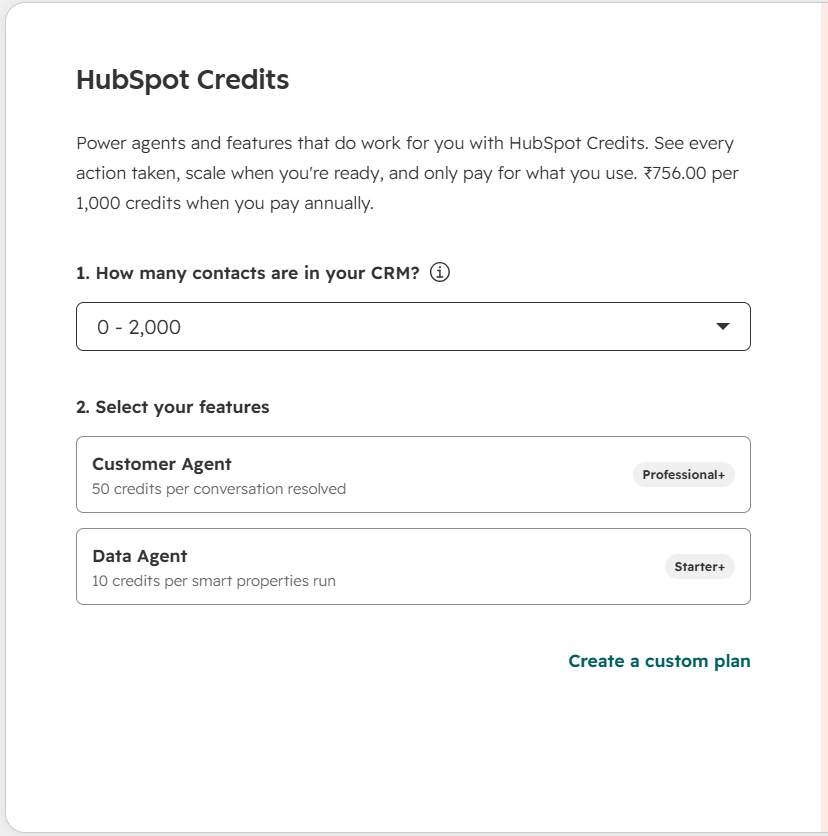
HubSpot currently charges $9 per 1,000 additional credits when paid annually.
| Plan | Included HubSpot credits | Example Usage |
|---|---|---|
| Starter | 500 per month | Usage-based AI and Breeze features |
| Professional | 3,000 per month | Customer Agent and other AI-powered features |
| Enterprise | 5,000 per month | Higher-volume AI and usage-based features |
For example, Customer Agent uses 50 HubSpot credits per conversation resolved. This means teams with higher volumes of AI-driven customer interactions may need to purchase additional credits beyond their included monthly allocation.
The additional costs that can push your HubSpot bill higher
The Service Hub seat price is only one part of the overall cost. Several other factors can increase what a business ultimately pays:
| Additional cost | What is means |
|---|---|
| Onboarding | Professional requires a one-time $1,500 onboarding fee, while Enterprise requires $3,500. |
| Additional seats | Adding users who need paid Service access increases the subscription cost. |
| HubSpot credits | Additional credits cost $9 per 1,000 credits when paid annually and may be needed for usage-based features. |
| Capacity increases | Additional usage or capacity for areas such as calling, reporting, API calls, workflows and segments can increase costs. |
| Other HubSpot products | Businesses that also need Marketing Hub, Sales Hub, Content Hub, or Data Hub may incur additional subscription costs. |
HubSpot’s pricing model therefore goes beyond the advertised per-seat price. Businesses comparing Service Hub with other helpdesk platforms should consider seats, onboarding, HubSpot credits, additional capacity and any other HubSpot products they plan to use.
What a real team ends up paying HubSpot
Looking only at the per-seat price can make it difficult to understand the actual cost of HubSpot Service Hub.
Consider a few simple examples.
| Team size | Plan | Base monthly subscription |
|---|---|---|
| 5 agents | Starter | $35/month annually |
| 10 agents | Professional | $900/month annually |
| 20 agents | Professional | $1,800/month annually |
| 50 agents | Professional | $4,500/month annually |
| 50 agents | Enterprise | $7,500/month |
These figures represent the base seat cost only.
They do not include:
- Professional or Enterprise onboarding fees
- Additional HubSpot credits
- Other HubSpot products
- Additional capacity
- Taxes
- Optional services or add-ons
For example, a 10-agent Professional team starts at $900 per month on annual billing. Adding the required $1,500 onboarding fee brings the first-year subscription and onboarding cost to $12,300 before taxes, additional credits, or other HubSpot products.
A 50-agent Enterprise team starts at $7,500 per month, which means the base annual seat cost alone is $90,000. Adding the required $3,500 onboarding fee takes the first-year base cost to $93,500 before other usage and services.
This is why looking at the advertised per-seat price alone can give an incomplete picture of the total cost.
HubSpot Service Hub pricing versus other alternatives
For teams comparing helpdesk platforms, the per-seat difference can add up quickly. Here is a simple comparison for a 10-agent team using comparable plans and annual billing:
| Provider | Plan | Monthly cost for 10 agents |
|---|---|---|
| Desk365 | Plus | $220 |
| HubSpot service hub | Professional | $900 |
| Zoho desk | Professional suite | $230 |
| Zendesk | Professional | $1,150 |
HubSpot Service Hub Professional starts at $90 per seat/month when billed annually, putting a 10-seat team at $900 per month, before the required $1,500 onboarding fee and any additional usage costs.
Desk365’s Plans start at $12 per agent/month for Standard, $22 for Plus and $32 for Premium, all billed annually. Desk365 also offers a lifetime free plan for 3 agents managing up to 50 tickets per month.
HubSpot’s pricing also includes HubSpot credits for certain usage-based features, while Desk365’s AI Agent uses a credit-based model with credits included in Plus and Premium plans. This makes it important to consider both the base subscription and usage-based costs when comparing the platforms.
How to pick the right HubSpot Service Hub plan for your team
Team size, support requirements, automation and the HubSpot tools you need matter most when choosing a Service Hub plan.
If you need basic ticketing, shared inbox, live chat and contact management, Free at $0/month is the starting point.
If you need basic routing, calling, email tracking and branding controls, Starter from $7/seat/month when billed annually provides additional capabilities.
If you need a dedicated help desk workspace, knowledge base, customer portal, automation and customer agent, professional at $90/seat/month is the more comprehensive option, with a $1,500 onboarding fee.
If you need conditional SLAs, skill-based routing, advanced governance and customer journey analytics, Enterprise at $150/seat/month adds these capabilities, with a $3,500 onboarding fee.
If you also use AI and other usage-based features, factor HubSpot credits into your budget. And if you primarily need a dedicated helpdesk rather than the wider HubSpot ecosystem, compare the total cost and support capabilities with alternatives such as Desk365 before committing.