Every IT Manager has dealt with this at least once: an employee leaves, and suddenly you’re chasing down what they were assigned. The laptop is in on one spreadsheet. The monitor might be in another. The software license was approved via email. The headset was never logged.
Now you’re spending two hours cross-referencing records, following up with HR, and hoping the information you eventually piece together is accurate.
That’s the problem Snipe-IT is built to solve. It gives IT teams a structured system for tracking hardware, software licenses, accessories, consumables, assignments, and asset history. Its pricing model is also different from most tools in this category: the software itself is free if your team is willing to host and maintain it.
But “free” and “right for your team” are two different questions. This breakdown helps you figure out which plan actually fits your environment.
Snipe-IT Pricing breakdown
The logic behind the pricing model
Snipe-IT’s model is built around a straightforward idea: the software is free, but convenience, support, and managed infrastructure cost money.
That’s actually a sensible structure for IT teams. A small team with a capable sysadmin can run Snipe-IT at zero license cost. A growing organization that doesn’t want to think about server maintenance pays for hosting. A security-conscious enterprise pays for isolation and private infrastructure.
The upgrade path is driven by three factors: how much server responsibility you want to carry, how deeply you need to integrate Snipe-IT with other systems, and how strict your security and compliance requirements are.
Source: Snipe IT
Plan 1: Self-hosted (Free)
Best for: Organizations with in-house technical staff who want maximum cost savings.
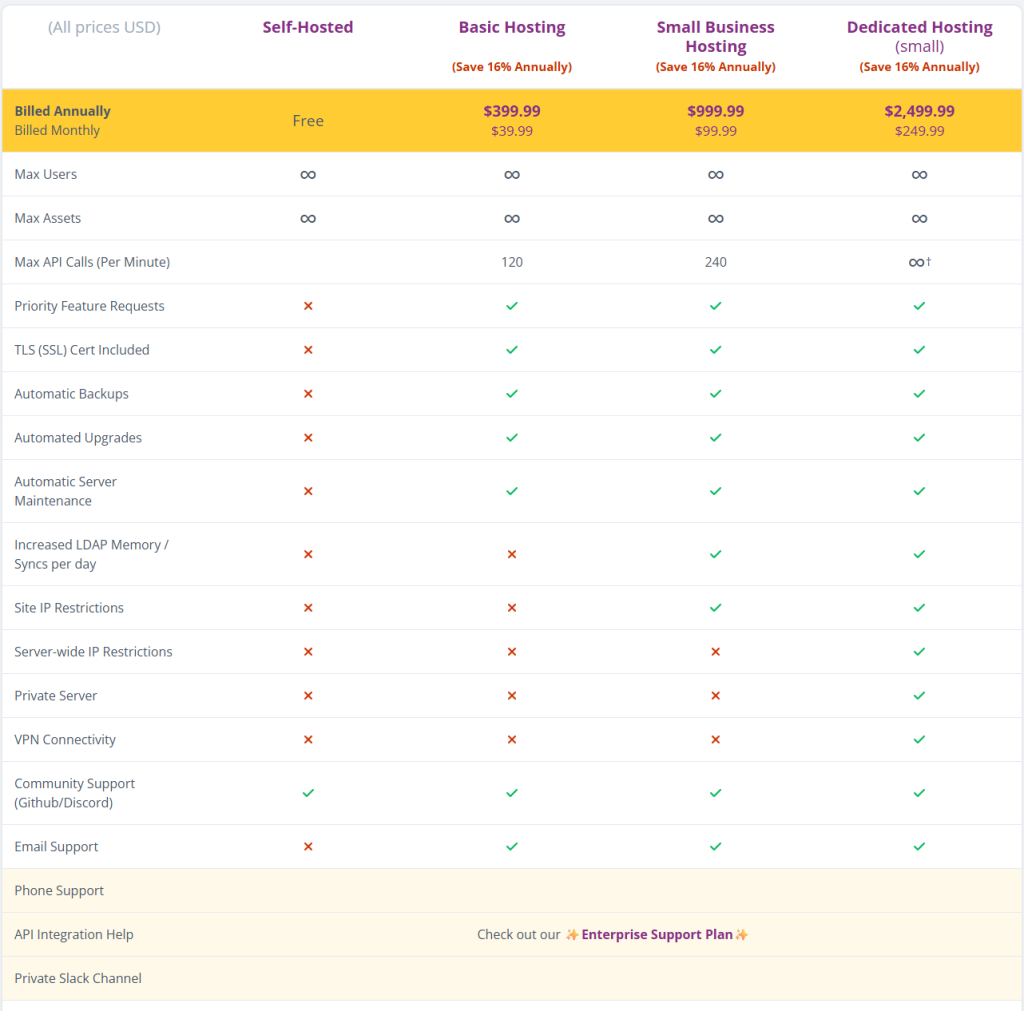
The self-hosted plan is the full Snipe-IT application at no licensing cost. You install it on your own infrastructure, configure the database, set up the web server, manage SSL, run backups, apply updates, and handle any issues that come up.
What that means in practice: this plan isn’t free in terms of labor. Someone on your team owns the system. If backups fail, if SSL expires, or if an update breaks something, that’s an internal problem to solve. Snipe-IT provides the software and community support through GitHub and Discord, but there’s no email support, no automatic upgrades, and no managed backups included.
Realistic use cases:
A college IT department that already manages internal servers can track laptops, projectors, tablets, and network equipment across campus without any recurring license cost. The technical overhead is manageable because the infrastructure skills are already there.
A startup with a DevOps engineer who handles cloud servers has the same situation. If the team is already running and maintaining applications, adding a self-hosted Snipe-IT instance is straightforward. The recurring cost is essentially zero.
Where it breaks down:
If nobody on your team is comfortable managing a Linux server or web application, this plan creates more problems than it solves. Downtime, failed backups, and version drift become your responsibility with no support path beyond community forums.
Choose self-hosted when your team has the technical skills, and keeping subscription costs to zero is a genuine priority.
Plan 2: Basic hosting ($39.99/month or $399.99/year)
Best for: Small organizations that want Snipe-IT running without managing the infrastructure themselves.
Basic hosting removes the server management burden. Snipe-IT handles SSL certification, automatic backups, automated upgrades, and server maintenance. You log in and use the system. The infrastructure side is handled.
The API limit is 120 calls per minute, which covers most small teams and simple integrations well. You also get email support and priority feature requests, which is a meaningful step up from community-only support on the free plan.
What it doesn’t include: increased LDAP memory, site IP restrictions, server-wide IP restrictions, a private server, or VPN connectivity. If those terms don’t mean much to you right now, Basic Hosting is probably the right level.
Realistic use cases:
A 30-person marketing agency tracking cameras, laptops, tablets, and software licenses needs a clean system for assignments and offboarding, not advanced security controls. Basic Hosting gives them a reliable hosted environment, backups, and support without requiring anyone to manage infrastructure.
A small law office or accounting firm that wants an asset inventory without staff managing databases or servers is a similar fit. The operational needs are straightforward. Basic Hosting handles the technical side so the team can focus on using the tool.
Where it breaks down:
If your organization connects Snipe-IT to other systems regularly, syncs users from a directory, or needs IP-based access restrictions, the basic plan’s limits will show up. It’s not built for those workflows.
Choose basic hosting when your priority is simple, reliable asset tracking without infrastructure overhead.
Plan 3: Small business hosting ($99.99/month or $999.99/year)
Best for: Growing organizations that need stronger integrations, active LDAP syncing, and access controls.
Small business hosting doubles the API limit to 240 calls per minute, adds increased LDAP memory and more syncs per day, and introduces site IP restrictions. Everything from basic hosting is included, plus these additional capabilities.
The API increase matters when Snipe-IT is connected to other systems. Pulling asset data into reporting dashboards, automatically updating records during onboarding, or running scripts that interact with Snipe-IT regularly can push against the 120-call limit on basic hosting. Small business hosting gives you more headroom.
LDAP support at this tier allows Snipe-IT to sync user data from a company directory more reliably. Rather than manually managing users in two places, the system stays current with your actual employee list. For organizations with active hiring and offboarding, this saves meaningful admin time.
Site IP restrictions let you limit Snipe-IT access to approved IP addresses. Employees can only reach the system from the office network, a company VPN, or other trusted addresses. It’s a practical security layer that Basic Hosting doesn’t offer.
Realistic use cases:
A company with 150 employees and a structured onboarding and offboarding process benefits from LDAP syncing and the higher API capacity. When a new hire starts, IT assigns a laptop, monitor, phone, and software licenses. When someone leaves, the team needs a quick view of everything assigned. If user records sync automatically from the directory, both processes run more smoothly.
A growing SaaS company automating asset record creation when new hardware is procured, pulling asset data into internal dashboards, and syncing from Active Directory regularly will hit the Basic plan’s limits. Small business hosting handles that workload without issues.
Where it breaks down:
Small business hosting still doesn’t include a private server, server-wide IP restrictions, or VPN connectivity. Organizations with stricter compliance requirements or the need for isolated infrastructure will need to move up.
Choose Small Business Hosting when your team is growing, integrations are becoming more frequent, and you need IP-level access control.
Plan 4: Dedicated Hosting ($249.99/month or $2,499.99/year)
Best for: Organizations where security, infrastructure isolation, and high-volume integrations are non-negotiable.
Dedicated Hosting is built for environments where the standard hosted setup isn’t enough. The key differentiators are a private server, server-wide IP restrictions, VPN connectivity, and effectively unlimited API calls per minute.
The private server means your Snipe-IT instance runs in a more isolated environment rather than sharing infrastructure. For organizations tracking sensitive assets, handling compliance audits, or operating under strict IT security policies, that isolation matters.
Server-wide IP restrictions go deeper than the site-level restrictions available on the Small Business plan. Access controls apply at the server level, not just the application. VPN connectivity allows Snipe-IT to integrate securely with internal systems or be reachable only through a private network path, which is a common requirement in healthcare, finance, and government-adjacent environments.
Unlimited API calls per minute support heavy automation. Large organizations connecting Snipe-IT to procurement systems, HR platforms, ticketing tools, identity management, reporting dashboards, and internal audit systems generate significant API traffic. Lower-tier limits would create bottlenecks.
Realistic use cases:
A large enterprise tracking thousands of assets across multiple offices with automated workflows for procurement, onboarding, security audits, and offboarding needs the infrastructure controls that only Dedicated Hosting provides. The cost is justified by the operational complexity and the security requirements.
A healthcare organization that needs internal tools to communicate through VPN rather than open internet access, and that has audit requirements around how asset data is protected and who can access it, will find the lower plans inadequate. Dedicated Hosting gives them the controls auditors expect to see.
A government contractor managing classified or restricted hardware has similar requirements. Demonstrating that access is restricted at the server level and that the environment is private is part of the compliance story.
Choose Dedicated Hosting when security, isolation, compliance, and high-volume automation outweigh cost considerations.
Quick decision
- Have technical staff and want zero subscription cost? Self-Hosted.
- Small team, simple tracking, no server management? Basic Hosting.
- Growing team with LDAP, automation, and access control needs? Small Business Hosting.
- Enterprise, compliance-driven, or need private infrastructure and VPN? Dedicated Hosting.
When Snipe-IT is the better choice

Source: Reddit
Snipe-IT is a good fit when your business wants a dedicated IT asset management system.
For example, imagine a company with 300 laptops, 80 monitors, 40 printers, and many software licenses. The IT team wants to know:
- Who has this laptop?
- When was it purchased?
- Is it still under warranty?
- Was it returned by the previous employee?
- Which assets are assigned to each department?
- Which licenses are expiring soon?
For this kind of use case, Snipe-IT makes a lot of sense. It gives structure to asset records and helps the business stop depending on spreadsheets.
It is also a strong option for companies that already have a separate helpdesk system. For example, if a company already uses Zendesk, Freshdesk, Jira Service Management, or another ticketing tool, then Snipe-IT can sit beside it as the asset database.
So, Snipe-IT is best for businesses that say:
- “We mainly need a serious asset tracking system.”
- “We already have a helpdesk.”
- “We have technical people who can manage self-hosting.”
- “We want unlimited users and assets without per-user pricing pressure.”
- “We care more about asset inventory than customer support workflows.”
When Snipe-IT may not be the best choice

Source: Reddit
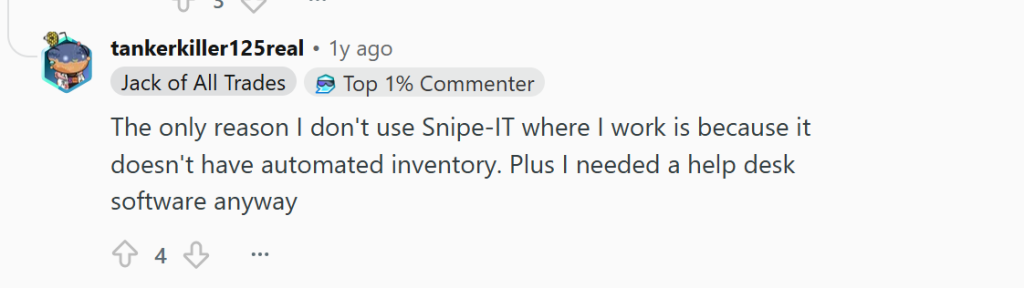
Snipe-IT may feel limited if the business problem is not just asset tracking but support management.
For example, think about an employee saying, “My laptop is not charging.” In a pure asset management system, you can see the laptop record, assignment, purchase date, and maybe warranty details. But the actual support conversation, troubleshooting steps, internal notes, SLA, automation, approval process, and resolution workflow may live somewhere else.
That means the IT team may have to jump between tools: one tool for the ticket, another tool for the asset, another spreadsheet for warranty or vendor details, and maybe Teams or email for communication.
This is where Snipe-IT is not always the complete answer. It is excellent for managing assets, but it is not primarily a modern helpdesk platform.
Source: Reddit
Where Desk365 becomes a strong alternative
Desk365 is worth considering when a business wants helpdesk and asset management together.
Desk365 positions its asset management as being built into the helpdesk, meaning assets can be connected directly to support tickets. Its asset management supports hardware, software, and consumables, and asset records can include vendors, locations, procurement details, depreciation, lifecycle status, QR codes, barcodes, and linked tickets.
That difference matters in real daily work.
For example, when an employee raises a ticket saying their laptop is slow, the support agent can see the asset linked to the ticket. They do not have to separately search another system to find the device owner, location, history, or related information. Desk365 specifically highlights this benefit: linking assets to tickets gives agents ownership and history context while resolving issues.
This makes Desk365 useful for teams where support and assets are closely connected.
Desk365’s Premium plan includes asset management and is listed at $32 per agent per month. Desk365 also offers a 21-day free trial or book a demo to evaluate whether it is a better fit than Snipe-IT for combining helpdesk and asset management in one platform.