TL;DR: Best ITSM tools at a glance
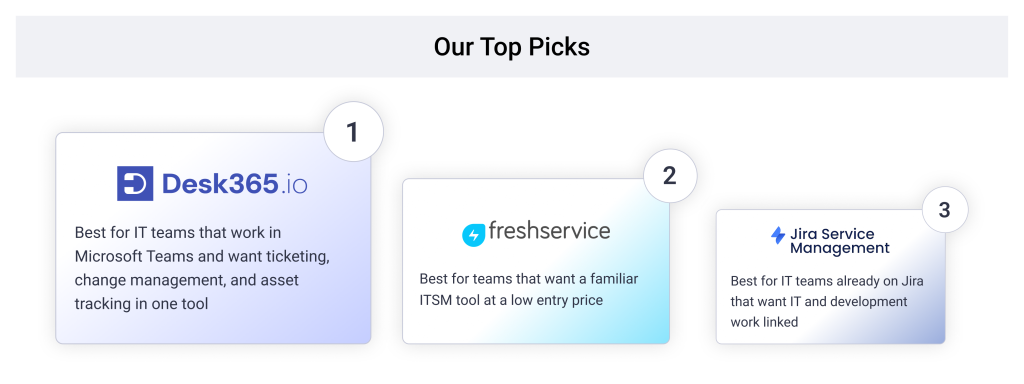
- Desk365: Best for ITSM inside Microsoft Teams, with change and asset management at published per-agent prices
- Freshservice: Best for a familiar ITSM tool at a low entry price
- Jira Service Management: Best for IT teams already on Jira
- ManageEngine ServiceDesk Plus: Best for on-premises or cloud with published pricing
- HaloITSM: Best for every module at one per-agent price
- TOPdesk: Best for unlimited assets and simple ITIL workflows
- InvGate Service Management: Best for published pricing with AI on every plan
- SysAid: Best for ITSM with AI included in the price
- TeamDynamix: Best for no-code ITSM that spans IT and project work
- Xurrent: Best for fast incident and change handling
- SolarWinds Service Desk: Best for ticketing and assets in one place
When you look for ITSM tools, you’ll come across plenty of options. But one name is hard to ignore: ServiceNow.
ServiceNow is one of the biggest names in IT service management, known for its extensive features, integrations, and partner network. But all of that comes with a higher price tag and a more complex setup. For many mid-sized businesses and smaller IT teams, it can be more than they actually need.
This is a common concern among IT teams. In a Reddit discussion on r/itsm, an IT professional managing a company of around 600 employees shared their experience of searching for the right ITSM tool. Their requirements were straightforward: incident management, service requests, change management, and basic asset tracking.
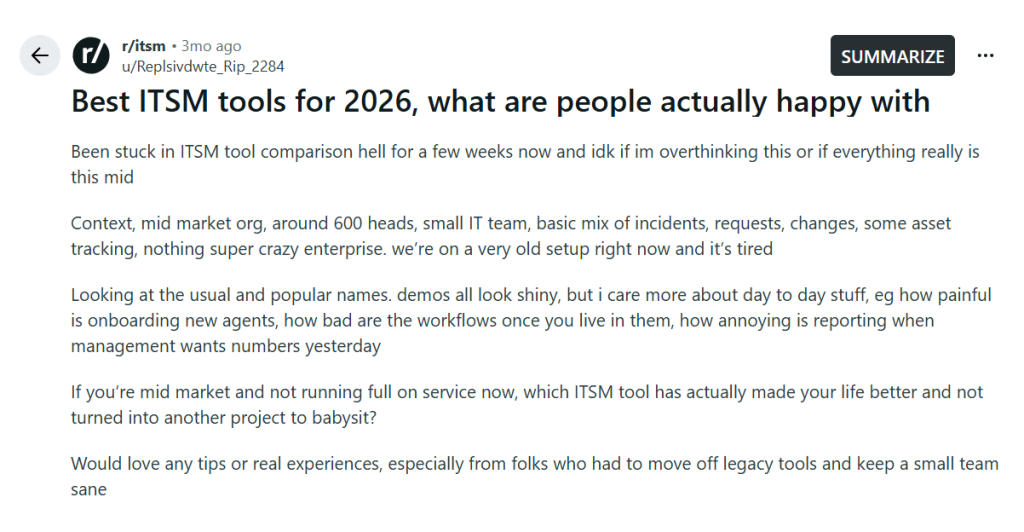
After spending weeks comparing different tools, they realized that impressive demos weren’t enough. What mattered was how easy the software would be to use every day. Could they onboard new agents quickly? Were workflows simple to manage? Could they generate reports without spending hours figuring things out?
Their biggest concern was finding an ITSM tool that would make their team’s work easier without adding unnecessary complexity.
With that in mind, I’ve put together a list of ITSM tools worth considering if ServiceNow feels too expensive or complex for your needs.
We’ve intentionally left ServiceNow out of this list. If you’re still curious about its costs, check out our ServiceNow pricing breakdown.
Instead, we’ll focus on ITSM tools that offer the features smaller and mid-sized IT teams need, without the cost and effort of a ServiceNow-scale implementation.
Disclaimer
I work for Desk365, and our product is on this list. It sits first because it runs ITSM inside Microsoft Teams at published prices, which fits this reader well. For every tool here, I list real limits from G2 reviews, Desk365 included. Pricing and reviews are linked as of October 2026, so you can check our work. Read more about our review methodology.
How I ranked the best ITSM tools
I ranked each tool on the everyday concerns from that Reddit thread, not on feature counts. That meant six checks, and each entry covers them where pricing pages or G2 reviews give real evidence:
- Time to go live and onboard new agents. A small team can’t spend a quarter on setup.
- Everyday workflow effort. How much work it takes to run incidents, requests, and changes once the tool is live.
- Asset tracking and Microsoft 365 fit. Whether assets link to tickets, and how well the tool works with Teams, Entra ID, and Intune.
- Reporting. Whether you can get numbers to management without exporting to Excel or writing SQL.
- Admin effort after launch. Whether the tool needs a dedicated admin to keep it running.
- Pricing gotchas. Add-ons, asset fees, and which plan tier unlocks change management and AI.
The last check matters more than most buyers expect. Most tools on this list put change management on a higher tier than their entry price. So the starting price on a vendor’s page is rarely what a team running changes will pay.
Comparison of the 11 best ITSM tools
| Tool | Best for | G2 rating | Change management starts on | Starting price | Free plan or trial |
|---|---|---|---|---|---|
| Desk365 | ITSM inside Microsoft Teams | 4.9 | Plus, $22/agent/month | $12/agent/month | Free plan for 50 tickets a month, 21-day trial |
| Freshservice | A familiar ITSM tool at a low entry price | 4.6 | Growth, $49/agent/month | $19/agent/month | 14-day trial |
| Jira Service Management | IT teams already on Jira | 4.3 | Premium | $25/agent/month for up to 15 agents, billed monthly | Free plan for 3 agents |
| ManageEngine ServiceDesk Plus | On-premises or cloud with published pricing | 4.2 | Enterprise, or a $3,195/year add-on | $13/technician/month (on-premises) | Free for 5 technicians, 30-day trial |
| HaloITSM | Every module at one per-agent price | 4.8 | Included | Custom quote | On request |
| TOPdesk | Unlimited assets and simple ITIL workflows | 4.1 | Engaged | Custom quote | 30-day trial |
| InvGate Service Management | Published pricing with AI on every plan | 4.6 | Pro | $24.98/agent/month (5-agent minimum) | 30-day trial |
| SysAid | ITSM with AI included in the price | 4.5 | Professional | $89/agent/month | Free trial |
| TeamDynamix | No-code ITSM that spans IT and project work | 4.5 | Not published | Custom quote | No free trial |
| Xurrent | Fast incident and change handling | 4.6 | Not published | Custom quote | Free trial |
| SolarWinds Service Desk | Ticketing and assets in one place | 4.3 | Not listed by plan | $39/technician/month | 30-day trial |

4.9/5

4.9/5
Desk365 suits mid-market IT teams that run on Microsoft 365 and want ITSM without a long rollout. Employees raise and track tickets in Microsoft Teams on every plan, starting at $12 per agent per month. Change management starts on Plus at $22, and IT asset management with Intune sync comes with Premium at $32.
The fit with Microsoft is the main reason it sits first. Agents work tickets from Teams, users sign in with Entra ID SSO on every plan, and Premium imports devices straight from Intune. If you’re already comparing Teams-based options, our guide to the best Microsoft Teams ticketing systems goes deeper.
Why I'd consider Desk365:
Pricing is published and the plan steps are small. A team running incidents, requests, and changes needs Plus at $22 per agent. Add Premium at $32 when you want asset tracking, audit logs, and data redaction. For the 600-person company in the r/itsm thread, those two plans cover the full list of needs.
Setup is light. Desk365 includes free setup and migration help, and there is a switch-at-renewal offer for teams still under contract with another vendor. You can onboard agents on an extended trial and start paying when your current contract ends.
One honest limit: Desk365 does not offer problem management or a formal service catalog. If root-cause tracking across many incidents is a must, look at HaloITSM, InvGate, or TOPdesk below.
Desk365 key features
- Microsoft Teams ticketing: Users create, track, and reply to tickets in Teams, and agents get Teams notifications. On every plan.
- Change and approval management: Structured change workflows with multi-stage approvals. Starts on Plus.
- IT asset management: Microsoft Intune sync, asset lifecycle tracking, software license management, vendors, depreciation, and ticket-to-asset links. On Premium.
- Automation and SLAs: Workflow rules, SLA reminders, and escalations on every plan. Round-robin and load-based assignment start on Plus.
- AI Copilot: Draft replies, summarize long tickets, and turn ticket conversations into knowledge base articles. On Plus and Premium.
- AI Agent add-on: Answers employee questions in chat and escalates to a ticket when needed. It costs $50 per 1,000 credits, with 100 free credits a month on Plus and 200 on Premium.
- Security: SOC 2 Type II, GDPR, and HIPAA compliance. Audit logs, encrypted PII and PHI fields, and data redaction come with Premium.
- Reporting: Productivity, ticket trend, agent performance, and custom reports on every plan. Multiple dashboards and scheduled exports start on Plus.

Why JDA TSG picked Desk365 over ServiceNow and SysAid
JDA TSG is a managed services provider that hires and manages a few thousand people each year. Before Desk365, employee requests were spread across Microsoft Forms, monday.com, shared mailboxes, and manual steps. Ownership was unclear, and requests got lost between teams. The team looked at ServiceNow and SysAid before choosing Desk365. ServiceNow had the features, but its enterprise pricing and complexity were more than they needed. SysAid's AI made it a strong contender. Desk365 won on its Teams integration, ease of use, and value for money. Today, more than 80 agents across HR, recruitment, finance, IT, and operations work in Desk365. Requests come in through Teams, email, Microsoft Forms, and the self-service portal. Automations route each ticket to the right department, and sensitive HR requests go to restricted groups.
"Most platforms have hundreds of features. People only end up using a fraction of them. Desk365 focuses on what teams actually use."
Josef Katz, Director of Technology, JDA TSG
Cons
- There is no option to turn off reCAPTCHA for SSO tenants (review)
- No problem management or formal service catalog
Desk365 pricing
- Free: up to 50 tickets a month, no end date
- Standard: $12/agent/month
- Plus: $22/agent/month
- Premium: $32/agent/month
- AI Agent credits: $50 per 1,000
START YOUR FREE TRIAL · REQUEST DEMO
4.6/5
4.6/5
Freshservice is often the first tool a mid-market team shortlists after ruling out ServiceNow. Its entry plan starts at $19 per agent per month, and reviewers like how organized day-to-day support feels. But the features this reader needs sit on higher tiers.
Why I'd consider Freshservice:
Starter covers incidents, a knowledge base, and a self-service portal. Problem, change, and release management start on Growth at $49 per agent. AI drafting is a separate cost. Freddy AI Copilot runs $29 per agent per month and is only sold as an add-on to Pro at $99 or Enterprise. With Copilot on Pro, AI drafting comes to about $128 per agent at list price. Our Freshservice pricing guide breaks down the full cost.
On G2, the no-code automation builder and the free Active Directory integration earn the most praise. Reporting and add-on costs draw the most complaints.
Freshservice key features
- Incident management, a knowledge base, and a self-service portal from Starter
- Problem, change, and release management from Growth
- No-code workflow automation
- Freddy AI Copilot as a paid add-on on Pro and Enterprise
- Day passes for occasional agents
Freshservice pricing
- Starter: $19/agent/month
- Growth: $49/agent/month
- Pro: $99/agent/month
- Enterprise: custom quote
- Freddy AI Copilot add-on: $29/agent/month
Prices are billed annually. The free trial lasts 14 days.
4.5/5
4.3/5
Jira Service Management makes the most sense when your developers already track work in Jira. Requests, incidents, and engineering tickets can link to each other without a connector. It is now sold inside Atlassian’s Service Collection, which also bundles Assets and Rovo AI.
Why I'd consider Jira Service Management:
The Free plan covers 3 agents, and Standard includes asset and configuration management. Change management is where the price jumps. Atlassian’s Service Collection pricing page lists incident, problem, and change management under Premium, which costs more than twice as much as Standard. For a small team, Atlassian’s pricing calculator shows Standard at $25 and Premium at $57.30 per agent per month on monthly billing for the first 15 agents. The lower $20 and $51.42 figures you may see apply at 75 agents. Our Jira Service Management pricing guide walks through the bands.
Having requests and workflows in one place is what G2 reviewers like most. The flip side is complexity. Several say it is hard to configure and keep running, which matters for a team without a Jira admin.
Jira Service Management key features
- Request queues, SLAs, approvals, and automation on Standard
- Asset and configuration management on Standard, Premium, and Enterprise
- Incident, problem, and change management on Premium
- 1,000 virtual agent conversations a month included on paid plans
- Native links to Jira Software and Confluence
Jira Service Management pricing
- Free: up to 3 agents
- Standard: $25/agent/month for up to 15 agents (monthly billing)
- Premium: $57.30/agent/month for up to 15 agents (monthly billing)
- Enterprise: custom quote
Per-agent prices drop as your agent count grows.
4.6/5
4.2/5
ManageEngine ServiceDesk Plus is one of the few ITSM tools with full published pricing for both cloud and on-premises. Teams that need to self-host often start here for that reason. Editions are split by scope, so you pay for asset management and change management only when you need them.
Why I'd consider ManageEngine ServiceDesk Plus
Standard covers the IT service desk, Professional adds asset management, and Enterprise adds change, projects, and a CMDB. On-premises starts at $13, $27, and $67 per technician per month for the three editions. Standard is free for up to five technicians. AI features are included on every edition at no extra cost.
Add-ons are where costs grow. On Standard or Professional, change and release management costs $3,195 a year, and problem management and a service catalog cost $1,595 a year each. Professional and Enterprise also price by the number of IT assets you manage. Our ManageEngine ServiceDesk Plus pricing guide shows how the totals stack up.
G2 reviewers like the ITIL-aligned workflows and ticket automation. They also call the initial setup overwhelming because of the sheer number of settings.
ManageEngine ServiceDesk Plus key features
- Cloud and on-premises deployment
- Incident, problem, and change workflows aligned with ITIL
- IT asset management from Professional, with a CMDB on Enterprise
- Predictive and generative AI on every edition, with Zia Agents on Enterprise
- Up to 15 service desk instances for HR, facilities, and other teams
ManageEngine ServiceDesk Plus pricing
- Standard: free for up to 5 technicians, then from $13/technician/month (on-premises)
- Professional: from $27/technician/month (on-premises)
- Enterprise: from $67/technician/month (on-premises)
Cloud: Standard from $1,545/year for 10 technicians. Professional from $645/year and Enterprise from $1,595/year, both for 2 technicians and 250 assets. The starting bundles differ in size, so compare them at your own team size.
A 30-day free trial is available for cloud and on-premises.
4.7/5
4.8/5
HaloITSM takes the opposite approach to tiered pricing. Incident, problem, and change management, a CMDB, a self-service portal, and AI tools all come at one per-agent rate. There are no plans to compare and no module add-ons.
Why I'd consider HaloITSM
If you need problem management and a CMDB from day one, HaloITSM covers them without a higher tier. The trade-off is price for small teams. HaloITSM doesn’t publish pricing, and one published review reports $95 per agent per month for 25 or fewer agents and $90 for 25 to 100 agents. For a 10-agent team, that is well above Desk365 Premium or Freshservice Growth.
G2 reviewers praise the modern interface and drag-and-drop workflow builder. The most common complaint is reporting, where advanced custom reports often need SQL.
HaloITSM key features
- Incident, problem, change, and release management in one price
- CMDB and asset management included
- Self-service portal and AI tools included
- Drag-and-drop workflow builder
- Cloud or on-premises deployment
HaloITSM pricing
- Custom quote, per named agent
- Reported pricing: about $95/agent/month for up to 25 agents and $90 for 25 to 100 agents
Ask the vendor for a current quote and trial.
4.4/5
4.1/5
TOPdesk is a long-standing ITSM tool with a strong base in Europe. Every plan includes unlimited end users, unlimited assets, an open API, and access to its marketplace. For a team with a large device fleet, costs are easier to predict as a result.
Why I'd consider TOPdesk
G2 reviewers say TOPdesk is easy for new users but still meets the needs of mature teams. Essential covers incidents, assets, a self-service portal, reporting, and a knowledge base. Change management and problem management start on Engaged.
TOPdesk only quotes prices directly. Third-party pricing data put Essential at about $76, Engaged at about $109, and Excellent at about $155 per agent per month, falling as agent count grows. Reporting and email alert setup draw the most complaints on G2
TOPdesk key features
- Incident management, asset management, and a self-service portal on Essential
- Change, problem, contract, and SLA management on Engaged
- Project management, live chat, and 24/5 support on Excellent
- Unlimited end users, assets, and mailboxes on every plan
- Cloud or on-premises deployment
TOPdesk pricing
Custom quote
4.6/5
4.6/5
InvGate Service Management is built to be configured by the IT team itself, without consultants. It publishes its prices, and its AI Hub comes with every plan at no extra fee. Reviewers say it is easy to roll out across IT, HR, and facilities.
Why I'd consider InvGate Service Management
Problem management and a service catalog come on every plan, including Starter. Change management starts on Pro. Starter costs $24.98 per agent per month billed annually, with a 5-agent minimum of $1,499 a year. Pro costs $500 per agent per year for 5 to 50 agents.
Asset management is a separate InvGate product that connects natively. G2 reviewers want more advanced reporting filters and more polished integrations.
InvGate Service Management key features
- Problem management and service catalog on every plan
- Change management on Pro and Enterprise
- AI Hub on every plan, cloud and on-premises
- SLA and OLA management on every plan
- Native link to InvGate Asset Management
InvGate Service Management pricing
- Starter: $24.98/agent/month, billed annually, 5-agent minimum ($1,499/year)
- Pro: $500/agent/year for 5 to 50 agents
- Enterprise: custom quote
A 30-day free trial is available.
4.5/5
4.5/5
SysAid has served small and mid-sized IT teams for years, and it pairs help desk work with IT asset tracking. Its AI is a real strength. JDA TSG, the Desk365 customer above, named SysAid’s AI as the reason it was a strong contender.
Why I'd consider SysAid
SysAid sells three plans: Help Desk, ITSM, and Enterprise. It doesn’t publish prices. One pricing tracker estimates about $79 per agent per month for Help Desk and about $108 for ITSM. Cost also grows with the number of assets you manage, and SysAid Copilot is a paid add-on.
G2 reviewers like its value and asset tracking. Reporting is the weak spot, with some teams moving to Power BI for advanced reports.
SysAid key features
- Help desk and IT asset tracking in one tool
- A fuller ITSM package on the ITSM and Enterprise plans
- AI ticket categorization, with SysAid Copilot as an add-on
- Cloud or on-premises deployment
SysAid pricing
- Professional: $89/agent/month, AI included
- Enterprise: custom quote, from 20 agents
- Add-ons: extra asset packs, remote support, patch management, and advanced discovery
A free trial is available with no credit card. The final price depends on your number of users and managed assets.
4.4/5
4.5/5
TeamDynamix combines ITSM, enterprise service management, and project portfolio management in one no-code platform. It is popular in higher education and with teams that want IT tickets and IT projects in the same place.
Why I'd consider TeamDynamix
G2 reviewers like the configurable intake forms, SLA targets, routing rules, and approval workflows out of the box. Support for multiple business units also gets praise.
Setup effort is the main cost. Reviewers call workflows, reports, permissions, and forms complex to configure. G2’s user-reported data puts average time to implement at about four months. TeamDynamix doesn’t publish pricing or offer a free trial, so you’ll need a demo and a quote to compare it.
TeamDynamix key features
- No-code ITSM and enterprise service management
- Project and portfolio management in the same platform
- Configurable intake forms, SLAs, routing rules, and approvals
- Conversational AI and automation
TeamDynamix pricing
- Custom quote only
- No free trial
4.6/5
4.6/5
Xurrent, formerly known as 4me, is a cloud ITSM platform that also covers enterprise service management and incident response. G2 reviewers say it makes incident and change management easier, and that its reporting helps teams keep track of SLAs.
Why I'd consider Xurrent
Reviewers describe the interface as intuitive and the setup as straightforward. Xurrent also offers a free trial, which helps a small team test daily workflows before committing.
Xurrent doesn’t publish prices, so plan for a quote before you can compare it. Its own G2 user-reported data also lists an average implementation time of about four months. Some reviewers mention limited integration options and slowdowns with large ticket volumes.
Xurrent key features
- Incident, request, and change management
- SLA tracking and reporting
- Enterprise service management beyond IT
- Cloud deployment with a free trial
Xurrent pricing
- Custom quote only
- Free trial available
4.6/5
4.3/5
SolarWinds Service Desk is a cloud ITSM tool that keeps tickets and IT assets together. G2 reviewers say an incident ties straight to the affected asset, and that teams can use it without much training.
Why I'd consider SolarWinds Service Desk
Even the entry plan includes a service portal, a service catalog, and SLA management. Advanced adds advanced automations and enterprise service management. Premier adds a virtual agent, SolarWinds AI, and data masking.
The entry price is higher than most tools here, at $39 per technician per month. Asset pricing is quoted separately on every plan. Reviewers also mention limited deep customization and patchy support. A 30-day trial gives full access to Premier, which is a good way to test it.
SolarWinds Service Desk key features
- Service portal, service catalog, and SLA management on Essentials
- Advanced automations and enterprise service management on Advanced
- Virtual agent, SolarWinds AI, and data masking on Premier
- IT asset management and CMDB, priced on request
SolarWinds Service Desk pricing
- Essentials: $39/technician/month
- Advanced: $99/technician/month
- Premier: $124/technician/month
- Asset pricing: on request
Contracts are typically annual. The free trial lasts 30 days.
What a former Gartner analyst says about choosing by vendor rankings
In a Humans of Support interview with my colleague Ranjani Raghupathi, Kenneth Gonzalez was asked how much buyers should rely on Gartner’s Magic Quadrant when they shortlist ITSM vendors. Kenneth spent years covering ITSM as a Gartner analyst, then led analyst relations at Freshworks, and now advises organizations on their support strategy. His answer was blunt.
Quite frankly, "this company's in the top right, so we should buy top right" is the stupidest thing I've ever heard.
His point is that the Magic Quadrant shows which vendors look viable for the long term. It doesn’t tell you whether a product fits your team. A top-right vendor can have a great product that is still too big, too costly, and too complex for a smaller organization. When he worked with customers at Gartner, he warned them against picking a tool on quadrant position alone. For feature fit, he points buyers to Gartner’s Critical Capabilities report instead.
That lines up with what the r/itsm poster was really asking. Use the Magic Quadrant to check that a vendor will be around for the long haul. Then judge fit on your own processes, your team size, and the plan tier you’ll actually pay for. Read the full interview with Kenneth Gonzalez.
Before you sign, test the three things the r/itsm poster cared about: how long it takes to onboard one new agent, how a change request flows from start to finish, and how fast you can build the report your manager asks for.
How do you choose the right ITSM tool?
Start with the processes your team runs every week, then price the plan that covers them. For most mid-market teams, that means incidents, requests, changes, and some asset tracking.
- If your company runs on Microsoft 365, look at Desk365 first. Tickets live in Teams, Entra ID handles sign-in, and Intune feeds the asset list. If you are comparing Microsoft Teams ticketing systems more broadly, check how much of the ticket lifecycle each one keeps inside Teams.
- If you need problem management and a CMDB from day one, look at HaloITSM, InvGate, or TOPdesk Engaged.
- If your engineers already live in Jira, Jira Service Management keeps IT and development work linked. Budget for Premium if you run changes.
- If you must self-host, ManageEngine ServiceDesk Plus, TOPdesk, SysAid, and HaloITSM all offer on-premises options.
- If you are a small business with a tiny IT team, start with a free plan or a low entry tier. Desk365’s free plan, Jira’s free plan for 3 agents, and ManageEngine’s free Standard edition for 5 technicians all work for testing.
Before you sign, test the three things the r/itsm poster cared about: how long it takes to onboard one new agent, how a change request flows from start to finish, and how fast you can build the report your manager asks for.
What a 10-agent team pays to run changes
The starting price on a pricing page rarely includes change management. Here is what 10 agents pay per month on the lowest plan that includes it, using the published prices above.
| Tool | Plan with change management | Monthly cost for 10 agents |
|---|---|---|
| Desk365 | Plus | $220 |
| InvGate Service Management | Pro | about $417 |
| Freshservice | Growth | $490 |
| ManageEngine ServiceDesk Plus | Enterprise, on-premises, 500 assets | about $500 |
| Jira Service Management | Premium, monthly billing | $573 |
Annual prices are divided by 12. Asset tracking changes the math. Desk365 needs Premium at $320 for 10 agents. ManageEngine’s figure uses its on-premises price of $5,995 a year for 10 technicians and 500 assets, so asset tracking is already included. SysAid’s price includes AI and 250 managed assets. HaloITSM, TOPdesk, TeamDynamix, Xurrent, and SolarWinds aren’t shown because their change management tier or price isn’t published.
If asset tracking is a big part of your shortlist, our review of IT asset management software compares the dedicated tools.
Frequently asked questions
It depends on your stack and which processes you run. For a Microsoft 365 company that needs incidents, changes, and asset tracking, Desk365 covers those at published prices. If you need problem management and a CMDB from the start, HaloITSM and InvGate are strong options. Teams already on Jira should look at Jira Service Management.
Desk365 runs ticketing inside Teams on every plan, so users create and track tickets without leaving the app. Several other tools on this list offer a Teams bot or notification integration. Ask each vendor how much of the ticket lifecycle actually happens in Teams, not just whether an integration exists.
A small business usually needs a low entry price and a quick setup. Desk365 has a free plan for 50 tickets a month and paid plans from $12 per agent. Jira Service Management is free for 3 agents, and ManageEngine ServiceDesk Plus Standard is free for 5 technicians.
Yes. Every tool on this list is built to run without a ServiceNow-sized rollout or a dedicated platform admin. Desk365, Freshservice, InvGate, and ManageEngine all publish their prices. Our list of ServiceNow alternatives compares more options.
Help desk software focuses on logging and resolving tickets. ITSM software adds structured processes such as change management, problem management, and asset management, usually based on ITIL. Our guide on the difference between a help desk and a service desk explains it in more detail.
Often, yes. Most tools here put change management on a higher plan than their entry price. Jira Service Management needs Premium, Freshservice needs Growth, and ManageEngine needs Enterprise or a paid add-on. Desk365 includes it on Plus at $22 per agent, and HaloITSM includes it in its single price.