
TL;DR
Freshdesk costs less and goes live faster, so I recommend it for small teams without a dedicated admin. Zendesk offers a more unified workspace, deeper reporting, and AI voice agents, so I recommend it for larger teams with complex support.
Freshdesk wins on price and speed. Zendesk wins on depth and scale. That short answer hides a lot of detail, so I read both vendors’ pricing pages, the top-ranking comparisons, and user reviews on G2 and Capterra.
Drowning in customer queries? You’re not alone.
67% of customers say that faster response times significantly improve their satisfaction with a company, and that timer is relentlessly ticking.
The pressure feels immense, heavier than a stack of unopened tickets. Customer service reps wear the weight of expectation on their shoulders and let’s face it, patience isn’t exactly a human superpower.
You’ve probably already started exploring solutions and navigating the helpdesk software. Big names like Freshdesk and Zendesk might have caught your eye. But with countless options and limited time, choosing the right one is a really hard task.
We hear you. That’s why I wrote this blog for support leads and IT managers at small and mid-size teams. I also work at Desk365, so I have a stake in this market.
How does Desk365 approach its comparisons?
At Desk365, we aim to publish well-researched, practical content that helps IT teams decide with confidence. We look at product features, pricing, customer reviews, and real user experiences. We also say where a competitor is stronger. Read our review methodology to know more.
Find Desk365 helpful? Set us as a preferred source on Google to see more of our content in search results.
What are the main differences between Freshdesk and Zendesk?
Both tools turn customer messages into tickets and add AI on top. The difference is how they package their features. Freshdesk offers email-first support and a separate omnichannel product. Zendesk offers core ticketing plans and a Suite that brings more support channels together.
| Area | Freshdesk | Zendesk |
|---|---|---|
| Entry price, billed annually | $19 per agent per month (Growth) | $19 per agent per month (Support Team) |
| Omnichannel entry price | $29 per agent per month (Freshdesk Omni Growth) | $55 per agent per month (Suite Team) |
| Workspace | Freshdesk Omni brings channels into a central workspace | Suite brings support channels into one agent workspace |
| AI agent pricing | First 500 sessions included; additional sessions cost $49 per 100 sessions | Includes a monthly resolution allowance; additional resolutions cost extra |
| Setup time | Some reviewers report a quick setup | Complex migrations can take longer, depending on the setup |
| Free trial | 14 days | 14 days |
| Best fit | Teams that want an email-first start and a lower entry price | Teams that need a unified, multichannel support setup |
Price is the first difference. The entry-level plans for both cost $19 per agent per month, but Freshdesk Omni Growth costs $29, while Zendesk Suite Team costs $55.
The workspace is another difference. Zapier’s Ryan Kane tested both tools and found that Zendesk brings chats, calls, and requests into one ticket view. Freshdesk Omni connects Freshdesk, Freshchat, and Freshcaller. Depending on the workflow, agents may need to move between different areas to find customer information.
The third difference is who manages the tool. Freshdesk suits teams that want to get started with email support and add features as needed. Zendesk offers more advanced options, but teams may need more time to configure and manage them.
Freshdesk vs Zendesk: Pricing comparisons
Pricing is one of the first things to consider when choosing a helpdesk. The starting price is useful, but you also need to look at which features are included and whether you’ll need additional products or paid add-ons.
Freshdesk
Freshdesk is part of the Freshworks ecosystem. It offers ticketing, automation, a customer portal, a knowledge base, reporting, and AI capabilities.
Freshdesk’s current email-focused plans are listed below. Prices are per agent/month with annual billing.
| Plan | Price | Key features |
|---|---|---|
| Growth | $19 | Ticketing, shared inbox, customer portal, knowledge base, reporting, roles and permissions |
| Pro | $55 | Multilingual support, custom dashboards and reporting, intelligent routing, and multiple SLA policies |
| Enterprise | $89 | Advanced capabilities such as skill-based routing, sandbox, audit logs, and additional security controls |
Freshdesk also offers AI add-ons. Freddy AI Copilot is listed at $29 per agent/month, and additional Freddy AI Agent sessions cost $49 per 100 sessions. The first 500 AI Agent sessions are included on eligible plans.
It’s important to distinguish Freshdesk from Freshdesk Omni. Freshdesk focuses on email-based support, while Freshdesk Omni brings multiple customer communication channels together.
Freshdesk Omni’s listed annual prices are:
| Plan | Price per agent/month |
|---|---|
| Growth | $29 |
| Pro | $79 |
| Enterprise | $119 |
Please check the official Freshdesk pricing page for current prices, product details, and trial terms.
Freshdesk vs Freshservice
Compare their features and find the right solution for your team.
Zendesk
Zendesk offers plans for teams that need core ticketing and for those that need a broader customer service suite. The Support Team plan focuses on ticketing, while the Suite plans provide additional communication channels and service capabilities.
Zendesk’s current published annual prices include:
| Plan | Price | Key features |
|---|---|---|
| Support Team | $19 | Email and ticketing, ticket routing, analytics dashboards, prewritten responses, customer context, automations and triggers |
| Suite Team | $55 | AI agents, knowledge base, omnichannel routing, messaging, live chat, and telephony |
| Suite Professional | $115 | Advanced capabilities such as skills-based routing, admin copilot, writing tools, and quick reports |
The Suite plan is worth considering if you need more than email-based ticketing. However, not every team needs all the additional channels or advanced capabilities.
Check the official Zendesk pricing page for the latest plan details and availability.
Read more: Zendesk Pricing: Does It Offer Value for Money in 2026?
Is Freshdesk easier to use than Zendesk for beginners?
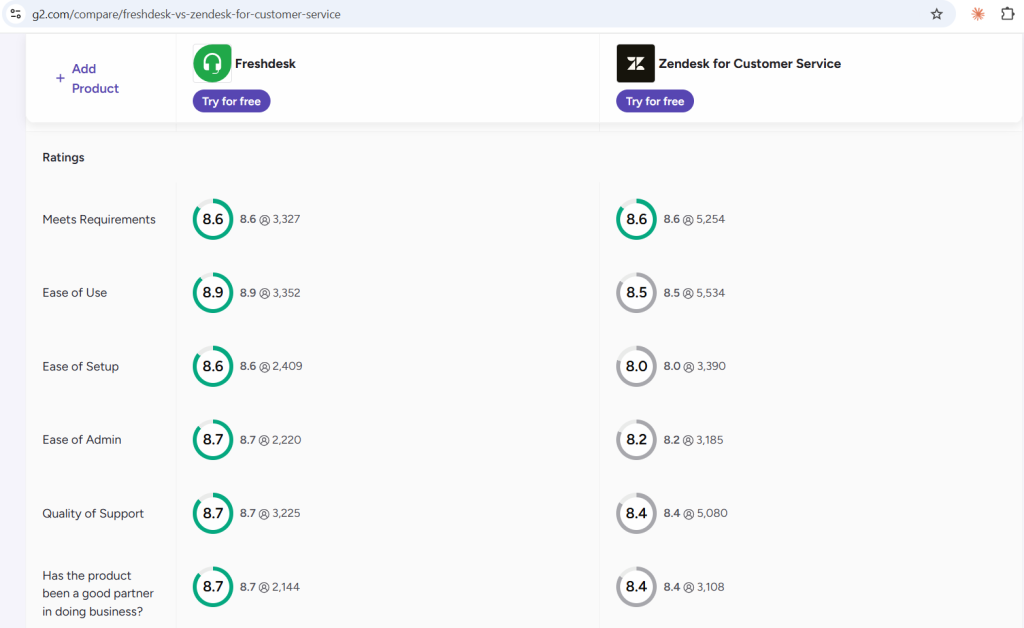
For setup and the first week, yes. G2 scores Freshdesk 8.6 out of 10 for ease of setup and Zendesk 8.0. G2 also scores Freshdesk higher for quality of support (8.7 versus 8.4) and reporting (8.7 versus 7.9). You can see the scores on G2’s comparison page.
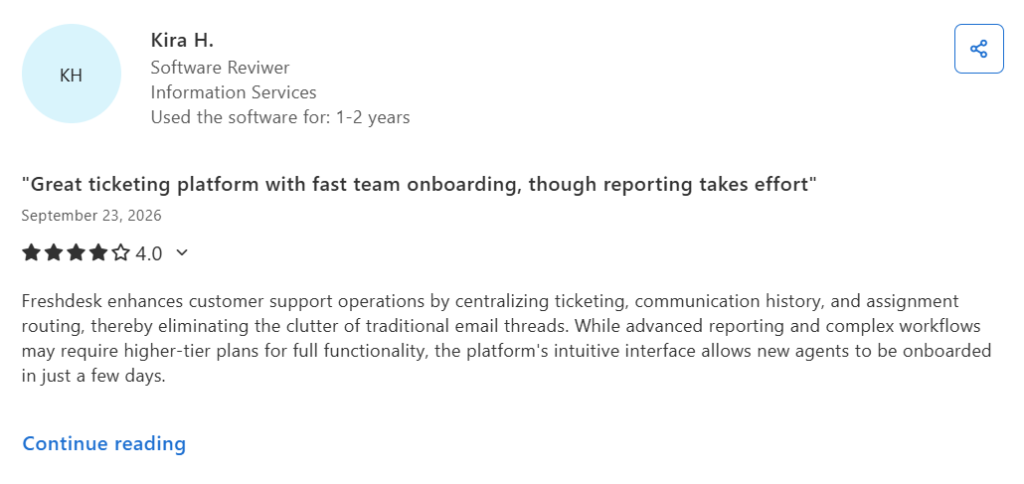
Capterra reviewers back this up. One Freshdesk reviewer says new agents became productive within a few days. Others say they reached full deployment in a couple of days.
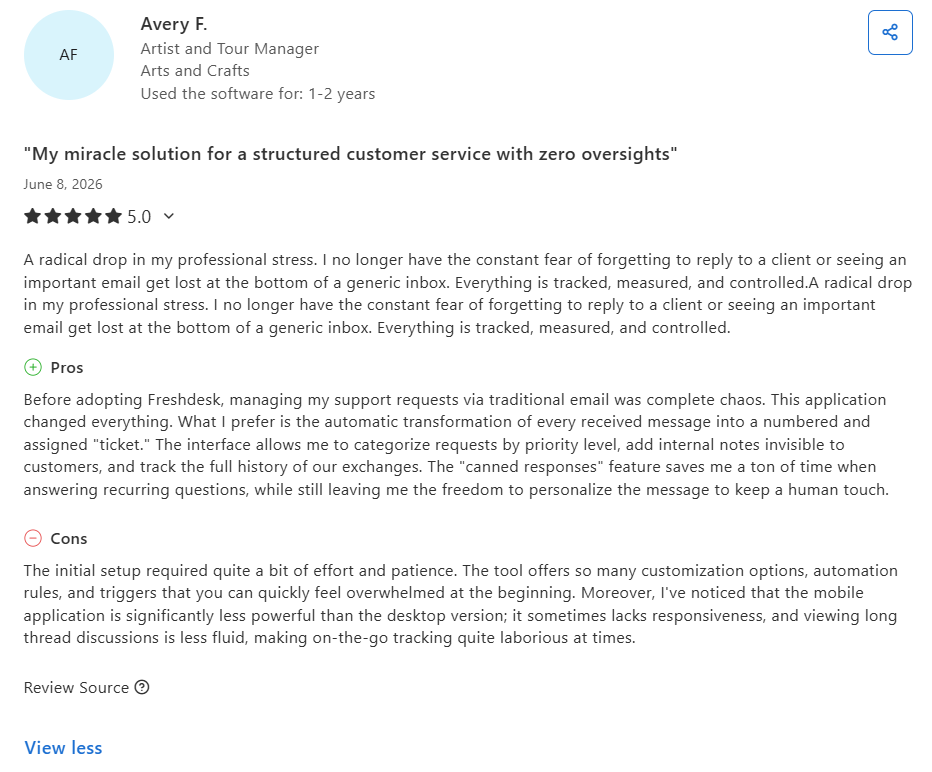
The catch shows up later. Zapier, in their blog, mentioned that Freshdesk Omni splits chats and tickets across separate screens, which confuses agents who search past conversations. Zendesk keeps every channel in one ticket view. Capterra’s summary of 237 Zendesk Suite reviews says basic ticketing is quick to learn, but admins need more time for automations, integrations, and analytics. A few Freshdesk reviewers say its admin pages hold too many options.
If your beginners start with email, pick Freshdesk. If they start with chat and phone together, Zendesk’s single screen may save more time than Freshdesk’s easier setup.
How long does it take to set up Freshdesk vs Zendesk?
Freshdesk often goes live in days. Two Capterra reviewers say their teams reached full deployment within a couple of days. Another reviewer says the first setup took patience because Freshdesk offers so many customization options.
Zendesk usually takes longer. HeliosX, a Zendesk customer, says it finished its migration in about three weeks. That included automations, triggers, macros, views, and help center content.
Both vendors give you a 14-day free trial. Freshdesk’s trial opens its Enterprise plan. Zendesk’s trial opens Suite Professional. Use those 14 days to build your three most common ticket types from start to finish. That test tells you more than any demo.
Your timeline depends on how much you move. Channels, automations, and help center articles add the most time. Desk365 offers a 21-day trial, free setup and installation, and Freshdesk data migration in a few clicks. See the details on the Desk365 pricing page.
Freshdesk omnichannel vs Zendesk Suite: How do the features compare?
Freshdesk Omni is Freshdesk’s omnichannel line. Zendesk Suite is the matching bundle. Here is how they compare on the features that decide most purchases.
| Feature | Freshdesk Omni | Zendesk Suite |
|---|---|---|
| Channels | Email, chat, phone, and social, delivered through Freshdesk, Freshchat, and Freshcaller | Email, messaging, live chat, voice, SMS, and social in one native platform |
| Agent workspace | Unified inbox, per Freshworks | Unified agent workspace, per Zendesk |
| Knowledge base | Available | Available |
| Automation | Rule-based automation across Freshdesk tools | Triggers, time-based automations, and macros |
| AI | Freddy AI Agent and Copilot; pricing depends on usage and plan | AI agents and paid Copilot options; pricing depends on plan and usage |
| Internal collaboration | Threads and tasks on every plan, plus external collaborators on Pro | Side conversations that start Slack or email threads from a ticket (Suite Professional) |
| Reporting | Advanced analytics on Omni Pro | Custom data exploration on Suite Professional |
| Marketplace | No app count on the Freshworks pages I checked | 1,800+ apps on its pricing page and 2,000+ integrations on its comparison page |
Sources: Freshdesk Omni pricing, Zendesk pricing, Freshworks’ comparison page, and Zendesk’s comparison page.
Each vendor attacks the other on this point. Freshworks says its unified inbox spares agents from juggling tabs and tools. Zendesk says Freshdesk agents move between separate apps, such as Freshchat and Freshcaller, and pay for the Omni upgrade to get basic connectivity. Both pages are marketing, so test the claim in a trial.
Capterra reviewers give a mixed picture. One Freshdesk Enterprise reviewer wrote on May 25, 2026 that the databases for email, phone, and chat were separate on his plan, and he expects newer versions to fix that. Another wrote on September 26, 2026 that omnichannel support is there but lacks depth for complex operations. You can read both on Capterra’s Freshdesk reviews page. Capterra’s summary of Zendesk Suite reviews lists unified chat and ticket workflows as a top strength, with 89% positive reviews out of 103.
My read is that Zendesk offers the cleaner single workspace today. Freshdesk is still workable if your agents mostly handle email and a little chat.
Freshdesk vs Zendesk on AI ticketing and automation features
Both tools include AI agents that resolve requests on their own, copilots that help agents write replies, and insights that spot trends. The differences sit in billing and in how each vendor says it built its AI.
Freshdesk’s Freddy AI Agent comes with 500 free sessions, then costs $49 per 100 sessions. Freshworks says you can train and deploy these agents with no coding. Freddy AI Copilot costs $29 per agent per month on Pro and Enterprise, and Freshworks says you can buy it for selected agents only. Freddy AI Insights comes with Enterprise.
Zendesk includes AI agents in every plan and bills per automated resolution. Team plans include five per agent per month, and Professional includes 10. Extra resolutions cost $1.50 (committed) or $2 (pay as you go). Copilot costs $50 per agent per month and works with Professional and higher. Zendesk says its AI resolves up to 80% of issues.
Treat vendor claims with care. Zendesk calls Freddy immature and bolted on. Freshworks says Zendesk’s AI is bolted on from acquisitions and calls its per-resolution billing unpredictable.
My advice is to build your knowledge base before you buy AI. An AI agent can only answer what your content covers.
Automation follows the same pattern. Freshdesk splits its rules across Dispatch’r, Supervisor, and Observer. Zendesk uses triggers for instant actions, automations for time-based ones, and macros for one-click replies. Zendesk says Freshdesk’s logic runs in three siloed modules with no shared context.
Desk365 takes a simpler route. The Plus plan includes an AI Copilot that drafts replies, summarizes long tickets, and turns ticket conversations into knowledge base articles. The AI Agent add-on costs $50 per 1,000 credits. Read more about Desk365’s AI Agent and ticket automation rules.
Common talk about Freshdesk and Zendesk on G2, Capterra, and Reddit?
What does G2 say?
G2’s AI summary lists the same top pros for both tools: ease of use, features, and ticket management. Freshdesk reviewers add automation and efficiency. Zendesk reviewers add customer support.
The cons differ. Freshdesk reviewers mention missing features, limited features, and ticketing issues. Zendesk reviewers mention a learning curve, limited customization, and complexity.
G2 shows Freshdesk at 4.4 out of 5 from 3,820 reviews. It shows Zendesk for Customer Service at 4.3 from 7,102 reviews.
What does Capterra say?
Capterra rates Freshdesk 4.5 from 3,494 reviews. Ease of use and customer service both score 4.5. Capterra rates Zendesk Suite 4.4 from 4,094 reviews. Features score 4.4, customer service 4.3, and value for money 4.2.
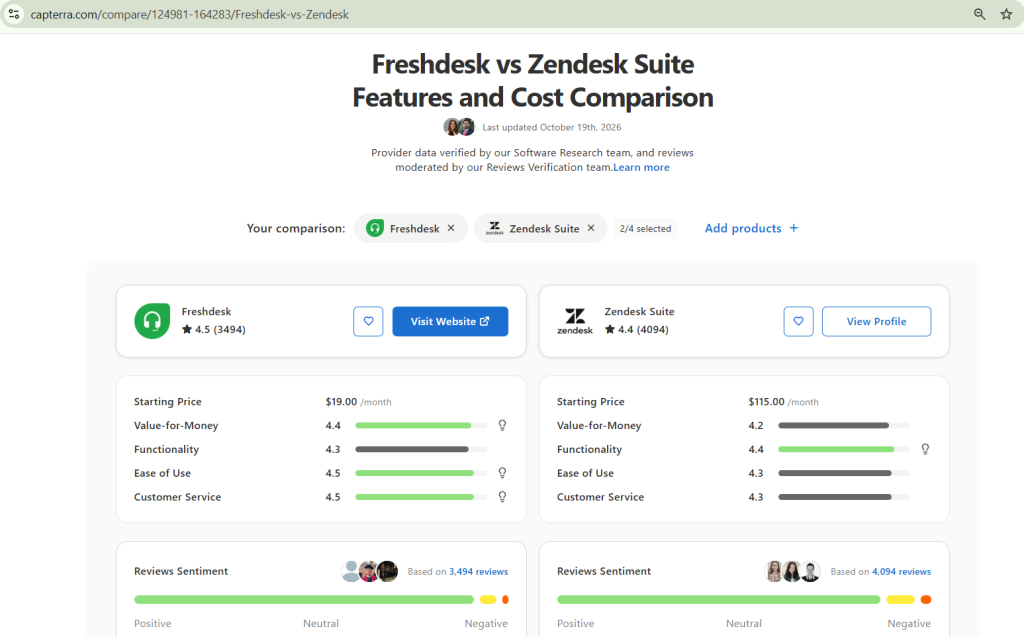
The written reviews show a pattern. Freshdesk reviewers praise quick onboarding, a clean interface, and lower cost. Several say customization and reporting feel limited. A few report a bug that creates duplicate tickets from one email, and some say advanced features sit behind higher tiers. Capterra’s AI summary lists unified chat and ticket workflows as a top Zendesk strength. It lists performance problems and complex pricing as the top complaints. Of the Zendesk reviews that mention pricing structure, 53% are negative.
What does Reddit say?
A founder asked the r/SaaS community which tool people picked after trying both. You can read the full r/SaaS thread.
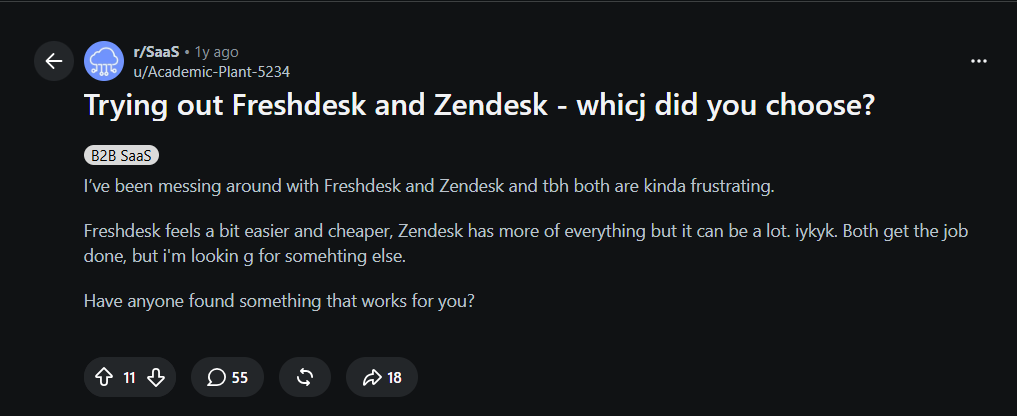
The responses highlight a common trade-off: Freshdesk can feel easier to start with, while Zendesk offers more features but can take more effort to manage.
Here are three perspectives from the discussion:
- “sometimes the boring solution that just works is better than the featurerich one that makes you want to pull your hair out :)) — u/forgetforgotforgo
- “Zendesk all the way. It is clunky at first, but once it’s dialed in, the workflows and reporting are fireee. Freshdesk felt great for a quick start, but we outgrew it.” — u/Growth_Natives
- “Freshdesk is lighter but starts to feel cramped once you try to do anything more advanced. Zendesk has all the knobs and levers, but the learning curve and clutter can be a real drag, especially if you don’t have a big team.” — u/blasian_jedi
These comments point to a key consideration when choosing a helpdesk: the right tool should match your team’s needs today without making everyday support harder as you grow. Feature depth matters, but so do ease of use, setup time, and the cost of managing the platform.
So, which is the best help desk software for small businesses - Freshdesk or Zendesk?
For most small businesses, I pick Freshdesk. It costs less once you add chat and AI. It also takes less time to set up, and it starts simple with email. Small teams use both tools, though. Small businesses make up 48.4% of Freshdesk’s G2 reviews. On Capterra, they make up 66% of Zendesk Suite reviewers. Size alone does not settle this.
Pick Freshdesk if your team handles mostly email, has no admin, and wants to go live this month. Pick Zendesk if you already take calls and chats, want one screen for all of them, and have someone to own the setup. Pick Desk365 if your team lives in Microsoft Teams and wants a reasonable bill. Desk365 manages tickets inside Microsoft Teams.
What are the top alternatives to Freshdesk and Zendesk?
Desk365 is my first alternative, and I am biased, so here are the facts. Plans cost $12 for Standard, $22 for Plus, and $32 for Premium per agent per month with annual billing. A lifetime free plan covers up to 50 tickets per month. Every paid plan includes a 21-day trial with no credit card. Desk365 holds SOC 2 Type 2 certification and supports GDPR and offers HIPAA-ready controls on Premium. If you want to leave a helpdesk, its switch at renewal guarantee lets you start now and pay when your current contract ends.
Other tools fit specific needs. Zoho Desk suits teams that already run on Zoho apps. HubSpot Service Hub suits teams that keep their customer data in HubSpot. Intercom leans toward chat-first support. Jira Service Management suits engineering-led IT teams. LiveAgent holds 4.7 on Capterra from 1,789 reviews and starts at $15.
For longer lists, read my guides to Freshdesk alternatives, Zendesk alternatives, and the full best helpdesk software roundup. You can also browse all Desk365 comparisons.

Zendesk offers a 14-day free trial for users to explore its interface and features before committing to a plan.
- Support Team ($19/agent/month): Email and social ticketing only, with basic automation — ideal for teams that don’t need live chat, phone, or a help center.
- Suite Team ($55/agent/month): Omnichannel ticketing (email, chat, social), basic macros and triggers, a reporting dashboard, and one customer help center.
- Suite Growth ($89/agent/month): Adds SLA management, CSAT surveys, multilingual support, light (view-only) agent seats, and a more complete automation workflow builder.
- Suite Professional ($115/agent/month): Adds custom reporting (Explore), skills-based routing, side conversations, HIPAA compliance option, and community forums.
- Suite Enterprise (custom pricing): Sandbox environment, advanced security controls, custom roles, and dedicated support.
Freshdesk vs. Zendesk: Features comparison
When it comes to customer support tools, Zendesk and Freshdesk are two of the big names out there. Let’s dive into what each offers and how they stack up against each other:
1. Ticketing system
Freshdesk
Freshdesk is a cloud-based customer support software that offers a comprehensive suite of tools to help businesses manage customer interactions and streamline service processes. Its ticketing system is designed to automatically convert emails, social media messages, and chats into tickets, making it easier to manage customer inquiries from multiple channels.
Key Features:
- Multi-channel support
- Automation and workflows
- Self-service portals
- SLA management
- Reporting and analytics
Recommended reading – Freshdesk alternatives in 2026
Zendesk
Zendesk is another popular customer service solution known for its strong emphasis on improving customer engagement and support across multiple channels. Zendesk’s ticketing system integrates seamlessly with various communication platforms, including email, social media, and live chat, to ensure that all customer interactions are centralized in one place. Also read – Best Zendesk Alternatives in 2026.
Key Features:
- Integrated customer views
- Advanced analytics
- AI-powered automation
- Customizable ticket management
- Omnichannel support
Read more – Zendesk features: Pros and cons breakdown
Comparison of Freshdesk and Zendesk ticketing systems
- User interface: Freshdesk generally has a more user-friendly interface compared to Zendesk, which might be more appealing to businesses with less technical staff.
- Customization: While both platforms offer significant customization options, Zendesk offers deeper customization capabilities, which might be necessary for larger organizations with complex workflows.
- Pricing: Freshdesk often comes out as more affordable, especially for small to medium-sized businesses, with free tiers and cheaper plans that still offer extensive features.
- Advanced features: Zendesk tends to have more advanced features and integrations, particularly in analytics and AI functionalities, which can be crucial for enterprises that need detailed data analysis.
- Customer support: Both platforms provide strong support, but Freshdesk’s focus on smaller companies might translate into more personalized customer service, which can be a deciding factor for smaller businesses.
2. Self-Service options
Freshdesk
Freshdesk’s knowledge base is crafted to be user-friendly, enabling businesses to create articles, guides, and FAQs that help customers resolve issues on their own.
The platform also features a smart search engine, making it easy for customers to quickly find the information they need within the knowledge base. Additionally, Freshdesk supports multiple languages, allowing businesses to serve a global audience and offer self-service options in various languages.
There’s also a feedback system in place where customers can rate and provide feedback on knowledge base articles, which helps businesses identify the most helpful content and areas needing improvement.
Zendesk
Zendesk offers a customizable Help Center that equips businesses with the tools to create a robust knowledge base, FAQs, and community forums.
This setup empowers customers to find answers to their questions without needing to contact support directly. To enhance user experience, Zendesk incorporates AI-powered search technology, improving the search functionality within the Help Center so customers can more easily find relevant articles and solutions.
Additionally, the platform provides user-friendly content management tools that include rich text editing and version control, making it simpler to create and maintain help-center content. Zendesk also fosters community engagement through its community forums, where customers can ask questions, share tips, and interact with one another, enhancing peer-to-peer support and building a sense of community.
Freshdesk vs Zendesk: Zendesk has advanced AI-Powered search
Both Zendesk and Freshdesk offer comprehensive self-service options, including knowledge bases and community forums. Zendesk’s AI-powered search and content management tools might be more advanced, making it easier for businesses to maintain and organize their help center content.
Freshdesk’s multilingual support and feedback system are valuable features for businesses with a diverse customer base and those looking to continuously improve their self-service resources
3. Customization
Freshdesk
Freshdesk, on the other hand, is known for its user-friendly interface and ease of use. While it may not offer the same depth of customization as Zendesk, it provides a good range of options for small to medium-sized businesses.
Freshdesk allows for the customization of ticket forms, support portal themes, and automation rules.
It’s easier to set up and manage, making it a great choice for businesses that want a straightforward and efficient support system without the need for extensive custom development.
Zendesk
Zendesk is known for its flexibility and extensive customization options. It allows businesses to customize the look and feel of their support portal, ticket forms, and even the workflow of their support team.
Zendesk’s customization is more developer-friendly, offering a wide range of APIs and SDKs for deeper integration and customization. This makes it a great choice for larger businesses or those with specific requirements that need custom solutions.
Freshdesk vs Zendesk: Freshdesk is more user-friendly
- Flexibility: Zendesk offers more flexibility and is better suited for businesses that require deep customization and integration.
- Ease of use: Freshdesk is more user-friendly and easier to set up, making it ideal for smaller businesses or those with simpler requirements.
- Developer tools: Zendesk provides more extensive developer tools, including APIs and SDKs, for custom integration and development.
- Cost: While both platforms offer various pricing tiers, Zendesk’s advanced customization options might come at a higher cost, especially for businesses that need extensive custom development.
4. Automation
Freshdesk
Freshdesk features a rule-based system called Dispatcher that automates the process of assigning, categorizing, and prioritizing tickets as they arrive.
This helps streamline ticket management and ensures that each ticket is handled appropriately and efficiently. Similarly, Freshdesk’s Supervisor function, akin to Zendesk’s Automation, performs time-based actions on tickets.
It can, for instance, send reminders or escalate tickets based on specific predefined conditions, ensuring timely responses and attention to critical issues.
Additionally, Freshdesk includes an Observer feature, which enables real-time actions on tickets through triggers. With Observer, you can set up a rule to notify a manager immediately when a high-priority ticket is created, facilitating prompt and effective handling of urgent matters.
Zendesk
Zendesk’s triggers offer a way to automate actions based on specific conditions.
For instance, tickets can be automatically assigned to a particular agent or group when they meet predefined criteria, streamlining the ticket handling process.
Additionally, Zendesk features automation, which consists of time-based actions scheduled to occur after a set period.
For example, an automation can be configured to escalate a ticket if it hasn’t been resolved within a designated timeframe, ensuring that no ticket is overlooked.
Macros are another powerful tool in Zendesk; they are predefined responses or actions that can be applied to tickets with a single click.
This functionality saves time for agents by automating repetitive tasks, allowing them to focus more on complex issues.
Freshdesk vs Zendesk: Zendesk's set up is more intuitive
- Ease of use: Both platforms have user-friendly interfaces for setting up automation rules. However, Zendesk’s automation setup might be more intuitive for users who prefer a straightforward, condition-action format.
- Flexibility: Zendesk offers a high degree of flexibility in setting up complex automation rules, especially with its combination of Triggers, automation, and Macros. Freshdesk’s Dispatch’r, Supervisor, and Observer also provide a comprehensive automation suite, but some users might find Zendesk’s approach more granular.
- Integration: Both platforms integrate well with other tools and systems, which is crucial for automation in a broader ecosystem. However, the specific integrations available might influence your choice depending on your existing tech stack.
Recommended reading – Zendesk Pricing – Does it offer value for money in 2026?
Freshdesk vs Zendesk: Is it worth the investment?
Certainly, while both Freshdesk and Zendesk offer impressive features, what if I told you that you can access most of these features without breaking the bank?
That’s where Desk365 steps in.
With Desk365, you can enjoy powerful features like those offered by Freshdesk and Zendesk, but at a fraction of the cost.
One of the users of Zendesk provided a review on G2, stating the following:
Even though Zendesk is a highly effective customer program, there are some aspects that can be increased. Firstly, the pricing structure of Zendesk may not be ideal for organization that have little budget or small –sized support teams. The price goes up as the number of agents or the requirement of improved features grows.
Whereas, listen to what a Desk365 user said about their reason for choosing Desk365,
We choose it because it was the best bang for your buck. You really do get a solid helpdesk platform compared to most in this price range. It was a no brainer.
Best-in-class customer support without breaking your bank
Number of agents:
Desk365
Freshdesk
Zendesk
Looking for more features at a better price? Try Desk365 over other helpdesk.
Overview of feature comparison of Freshdesk vs Zendesk
Here’s a simple feature comparison: everything you find in Freshdesk and Zendesk is also available in Desk365 at a fraction of the cost.
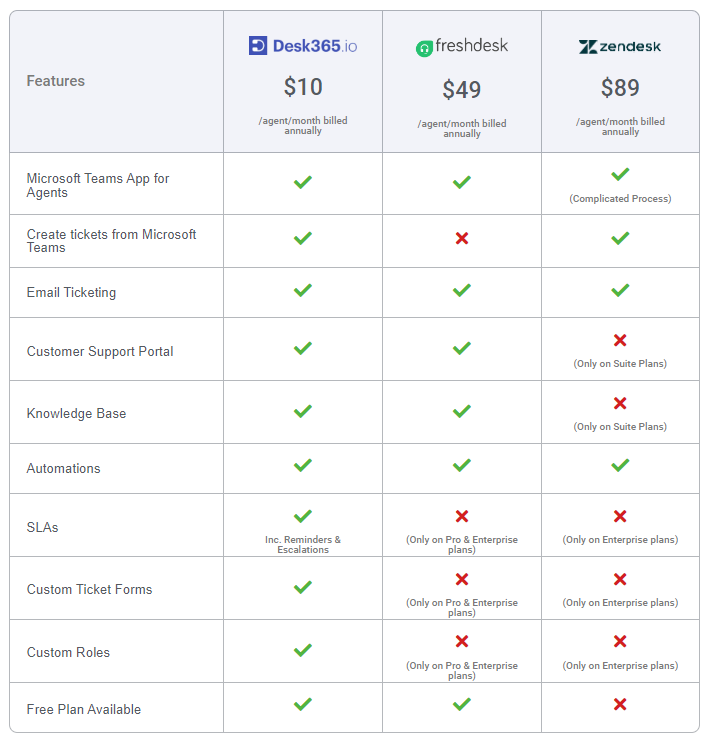
Features

$12
/agent/month billed annually

$49
/agent/month billed annually

$89
/agent/month billed annually
Microsoft Teams App for Agents
(Complicated Process)
Create tickets from Microsoft Teams
Email Ticketing
Customer Support Portal
(Only on Suite Plans)
Knowledge Base
(Only on Suite Plans)
Automations
SLAs
Inc. Reminders & Escalations
(Only on Pro & Enterprise plans)
(Only on Enterprise plans)
Custom Ticket Forms
(Only on Pro & Enterprise plans)
(Only on Enterprise plans)
Custom Roles
(Only on Pro & Enterprise plans)
(Only on Enterprise plans)
Free Plan Available
Switch to a better helpdesk solution now
Comparing Microsoft Teams ticketing solutions
When comparing Microsoft Teams ticketing systems, it’s important to note that Freshdesk and Zendesk lack seamless integration with Teams. On the other hand, Desk365 offers robust integration with Teams, allowing for seamless communication and collaboration between the ticketing system and the Teams platform
Freshdesk and Zendesk provide comprehensive features for managing Teams tickets, but their setup processes can be complex. Configuring support channels, ticket views, user roles, and customizing portals may require considerable time and technical expertise.
Additionally, Zendesk’s personalized support comes at a significant cost.
In contrast, Desk365 offers a seamless integration experience at an affordable price point. Desk365 offers Pro Plans with flexible features to meet your needs, all at an affordable price.
Comparing user experience and setup ease
Freshdesk boasts a superior user interface and simplified setup process compared to Zendesk. While Zendesk offers an extensive array of features, its onboarding and setup procedures can prove daunting for new users.
Configuring support email addresses, ticket views, user roles, support forms, and customizing the support portal within Zendesk can be time-consuming. Integrating Zendesk with existing software tools like websites and social media channels demands technical expertise.
Additionally, personalized training and issue resolution from Zendesk’s customer support team come with a hefty price tag ranging from $1500 to $1800.
In contrast, Freshdesk’s interface is more user-friendly, facilitating quicker configuration of support channels, ticket fields, and workflows. Pre-built integrations with popular software tools streamline the connection process to existing systems.
However, navigating Freshdesk’s admin section may pose challenges due to the multitude of options and settings, particularly for newcomers. Nevertheless, Freshdesk offers free assistance with platform implementation and onboarding.
In contrast to both Zendesk and Freshdesk, Desk365 offers a simpler setup process and a more intuitive interface. With Desk365, users can quickly configure support channels and customize ticket fields and workflows without the complexity seen in other platforms.
Freshdesk vs Zendesk: Ratings
Ratings are based on the Capterra platform.
Overall
4.9
- Ease of Use
- Customer Service
- Features
- Value for Money
- 4.8
- 4.9
- 4.6
- 4.8
Overall
4.5
- Ease of Use
- Customer Service
- Features
- Value for Money
- 4.5
- 4.5
- 4.4
- 4.4
Overall
4.4
- Ease of Use
- Customer Service
- Features
- Value for Money
- 4.3
- 4.3
- 4.4
- 4.2
What do customers say about Freshdesk and Zendesk's customer service?
Indeed, customer support is essential for ensuring customer satisfaction and fostering long-term loyalty. Regardless of how great a product may be, its value diminishes without effective customer support. Let’s take a look at what customers have to say about the customer experience provided by Freshdesk and Zendesk.
My experience with customer service has been terrible, and for me a platform that works for the Customer Experience sector must have as a principle that the experience of its customers is a central objective, they were only interested in solving incidents or answering questions when they saw that I was going to cancel, for 3 years they never contacted me to see my experience, only when I was about to change.
We have been a Zendesk for 10 years however extremely poor communication regarding chages to subscription and s offerings and pricing changes along with abismil Customer Service themselves has caused me to seriously reconsider this platform as a viable option for us going forward. I unfortunately cannot recommend this platform until their own Customer Service issues are addressed.
Read more – Zendesk reviews: The good, bad and the ugly
Let’s see what one of the Desk365’s users has to say about customer support,
Desk365 does what you expect from a much more expensive ticket system. The best thing however is the customer support. All questions about the software are answer quickly and completely and suggestions for improvement are treated seriously. They really make you feel they are part of your team.
Freshdesk vs Zendesk: Which is the best helpdesk?
In the ongoing debate of Zendesk vs Freshdesk, choosing the best customer service software or customer support software can be crucial for enhancing your team’s efficiency.
Both Freshdesk and Zendesk are prominent help desk platforms that offer live chat, bot functionalities, and comprehensive dashboards that streamline user interactions and workflow management.
When comparing Freshdesk to Zendesk, it’s essential to consider how each platform’s customer pricing plans stack up. While Freshdesk offers a free plan structure that is more appealing to small businesses or startups, Zendesk makes it better for larger enterprises looking for extensive integration capabilities and advanced features.
Zendesk excels in reporting, extensive API access, and e-commerce integrations, making it ideal for larger businesses with diverse needs. On the other hand, Freshdesk is a great option for small and mid-sized businesses due to its affordable pricing, user-friendly interface, and availability of free plans.
Choosing between Freshdesk and Zendesk depends on your budget and specific business requirements. When trying to choose Freshdesk or Zendesk, it’s important to understand the difference between Freshdesk and Zendesk, particularly in terms of scalability and the variety of features offered.
Overall, while both Freshdesk and Zendesk are established players in the market, Desk365 provides a compelling alternative with its simplicity, affordability, and feature-rich offering.
So make the right choice by choosing the right customer support software today by signing up for a free trial and improving your customer support with Desk365.
Frequently asked questions
Freshdesk is generally cheaper, especially when you compare higher-tier plans. However, the total cost depends on the plan, number of agents, and add-ons your team needs.
Both offer some Microsoft Teams integration, but their capabilities differ. Zendesk supports side conversations in Teams, while Freshdesk Threads lets users tag colleagues within Freshdesk or email outside vendors. Desk365 lets support agents create and manage tickets directly in Microsoft Teams.