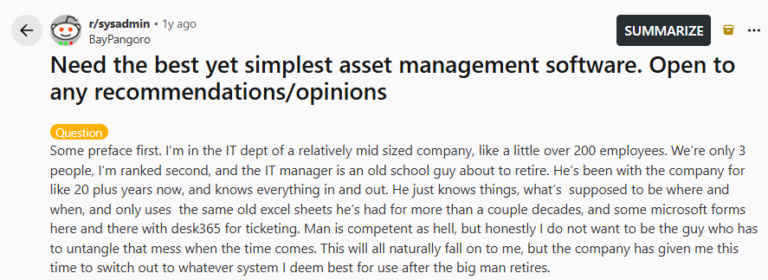
I recently came across a discussion thread on r/sysadmin where someone from a mid-sized company was asking a very relatable question. Their IT team manages around a thousand endpoints, and most of their asset tracking still lives in old Excel sheets that have been passed down for years. With the IT manager close to retirement, the responsibility of cleaning up that system is about to fall on the next person in line. The goal was simple but important: find an Asset Management solution that is easy to set up, scalable for the long term, and ideally tied into the helpdesk workflows so the team is not juggling multiple tools.
One interesting detail from the thread was that they were already using Desk365 for ticketing. That naturally opens the door to thinking about Asset Management in a way that connects with the helpdesk instead of living in a completely separate system.
When asset data, service requests, and device history sit in the same environment, it becomes much easier for small IT teams to keep track of equipment, troubleshoot issues faster, and maintain clear documentation for the future.
The conversation in the thread highlights a challenge many IT teams face today: moving from scattered spreadsheets to a structured Asset Management system that actually fits into their daily workflow.
What features should IT Asset Management tools include?
A good IT Asset Management tool should include several key features that help organizations track, manage, and optimize their IT assets effectively. Here are some of the most important ones:
Asset inventory management
The tool should allow you to maintain a centralized inventory of all your IT assets, including laptops, desktops, servers, mobile devices, and software licenses. This makes it easy for IT teams to know exactly what assets they own and where they are being used.
Automated asset discovery
Manually tracking assets can be time-consuming. Asset discovery features automatically detect devices connected to the network and add them to your asset inventory, ensuring your records are always up to date.
Asset lifecycle management
An IT asset goes through multiple stages, from procurement and deployment to maintenance and retirement. A good IT Asset Management tool helps you track every stage of this lifecycle, enabling you to plan upgrades, replacements, and budgeting more effectively.
Software license management
Managing software licenses is crucial for compliance. IT Asset Management tools help track software installations, monitor license usage, and ensure your organization stays compliant with licensing agreements.
Asset assignment and ownership tracking
The tool should allow you to assign assets to employees or departments. This makes it easier to track who is using a particular device and quickly retrieve information when support requests arise.
Maintenance and warranty tracking
Tracking warranty periods and maintenance schedules helps IT teams avoid unexpected costs and downtime. Many tools send reminders when warranties are about to expire or when maintenance is due.
Reporting and analytics
Detailed reports and dashboards provide insights into asset usage, costs, and performance. These insights help IT leaders make better decisions about procurement, budgeting, and asset optimization.
Integration with helpdesk systems
Many modern IT Asset Management tools integrate with IT helpdesk or ITSM platforms. This allows support agents to view asset details directly within support tickets, helping them resolve issues faster. Read more about the best ITSM tool in 2026.
Methodology
As I evaluate IT Asset Management tools, I look beyond the feature lists on product websites. What really matters is how these tools perform in real environments. That means going through customer reviews, reading Reddit discussions, and paying attention to what actual users say about what works well and what does not.
I also look closely at how easy each tool is to set up and start using, because most IT teams do not want software that takes weeks or months to implement. By combining real user feedback with practical considerations like setup and usability, I try to give a clear and honest view of which IT Asset Management tools are actually worth considering.
TL;DR of IT Asset Management software
| Platform | Best for | Pricing | Key features |
|---|---|---|---|
| Desk365 | Small to mid-sized IT teams that want helpdesk + asset management in one place, especially Microsoft Teams users | Starts at $12/agent/month; Asset management is included in the Premium plan at $32/agent/month | Asset tracking, asset-to-ticket linking, Microsoft Teams integration, approval management, AI agent, workflow automation |
| ServiceNow | Large enterprises with complex IT infrastructure and advanced ITIL needs | Custom pricing; often starts around $90–$100/user/month | Hardware and software asset lifecycle management, CMDB, asset discovery, compliance management, deep workflow automation |
| Freshservice | Mid-sized and growing companies that want strong ITSM + ITAM without heavy complexity | Starts at $19/agent/month; asset management from Growth plan ($49/agent/month) | Asset lifecycle tracking, automated discovery, CMDB, AI-powered workflows, service management |
| ManageEngine AssetExplorer | IT teams focused mainly on asset visibility, lifecycle tracking, and license management | Free for up to 25 assets; paid starts around $955/year for 250 assets | Automated asset discovery, hardware lifecycle management, software license tracking, CMDB, procurement tracking |
| Snipe-IT | Startups, schools, and budget-conscious teams needing a simple spreadsheet replacement | Free self-hosted; hosted plans start around $39/month | Hardware tracking, asset assignment, software license tracking, accessory management, audit history |
| Lansweeper | Organizations needing deep network discovery and infrastructure visibility | Custom / asset-based pricing | Automated network discovery, hardware/software inventory, license visibility, vulnerability insights, endpoint visibility |
| Asset Panda | Teams that need highly customizable asset tracking across multiple locations | Starts around $50/user/month | Custom workflows, mobile app, barcode/QR scanning, check-in/check-out, maintenance tracking |
| Ivanti Neurons for ITAM | Large enterprises focused on governance, compliance, and software optimization | Custom pricing | Centralized asset repository, lifecycle management, automated discovery, software license optimization, enterprise-grade reporting |
Full disclosure: I work at Desk365. To keep things unbiased, we’ve stuck to real reviews and customer pulse. Refer to the methodology above.

1. Desk365
Desk365 allows IT teams to track assets alongside support tickets. When a user raises an issue, the support team can instantly see the device history, ownership, and previous incidents linked to that asset.
Rating: 4.8/5
Here’s why Desk365 earned its spot on the list:
Desk365 is a helpdesk and IT service management platform designed primarily for teams that work within the Microsoft ecosystem. It combines ticketing, Asset Management, automation, and AI support into a single platform that integrates closely with tools like Microsoft Teams.
The platform is especially attractive for small and mid sized IT teams that want a modern helpdesk and basic asset tracking without the complexity of large enterprise ITSM platforms. Instead of maintaining spreadsheets or separate systems for assets and tickets, Desk365 allows teams to keep device information tied directly to support requests.
Many organizations adopt Desk365 because it is easier to implement compared to heavy ITSM tools while still offering automation, workflows, and integrations needed for daily IT operations.
Desk365 features:
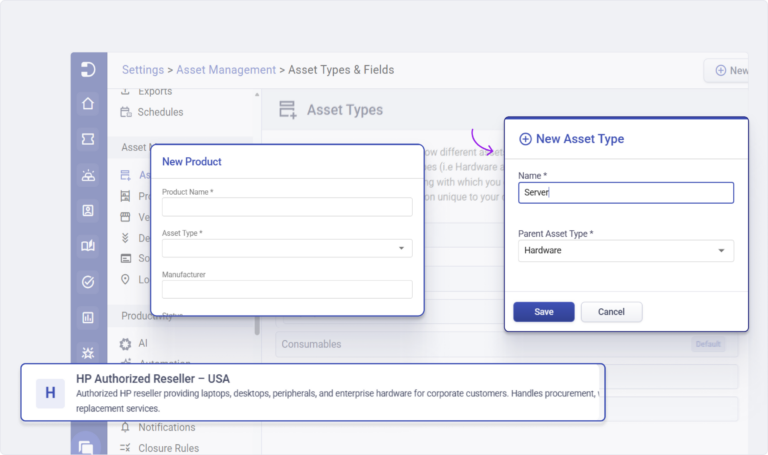
Asset Management and device tracking
Desk365 allows IT teams to maintain a centralized inventory of IT assets, including laptops, desktops, mobile devices, and other equipment.
Important capabilities include:
- Track device ownership and assignment
- Maintain asset lifecycle records
- Link assets to helpdesk tickets
- Maintain asset history and repair records
This becomes extremely useful when troubleshooting. When a user submits a ticket, the IT technician can immediately see which device is involved, its history, and previous incidents.
For organizations managing hundreds or thousands of endpoints, this creates a single source of truth instead of relying on spreadsheets.
Native Microsoft Teams helpdesk
One of the biggest differentiators of Desk365 is its deep Microsoft Teams integration.
IT teams can:
- Receive tickets directly in Teams
- Respond to support requests within Teams
- Collaborate internally on tickets
- Allow employees to submit requests via Teams
This makes adoption easier because employees can raise issues in the tools they already use daily.
Approval Management
One of the key strengths of Desk365 is its flexible Change & Approval Management workflows. Organizations can:
- Create automated approval workflows for service requests and changes
- Configure multi-level approval hierarchies for complex processes
- Use sequential or non-sequential approval flows based on business needs
- Send approval notifications and reminders to stakeholders
- Track approvals with complete visibility and audit trails
This helps teams eliminate back-and-forth emails and ensures requests move forward quickly while maintaining proper governance and accountability.
AI Agent
The Desk365 AI Agent is an AI-powered assistant built into Desk365 that helps support teams respond to tickets faster. It can generate replies, summarize conversations, and suggest responses using past ticket data and knowledge base content.
Agents can review and edit the AI-generated replies before sending them, so they stay in control of the final response. Overall, it helps teams save time, maintain consistent responses, and improve support efficiency.
Workflow automation
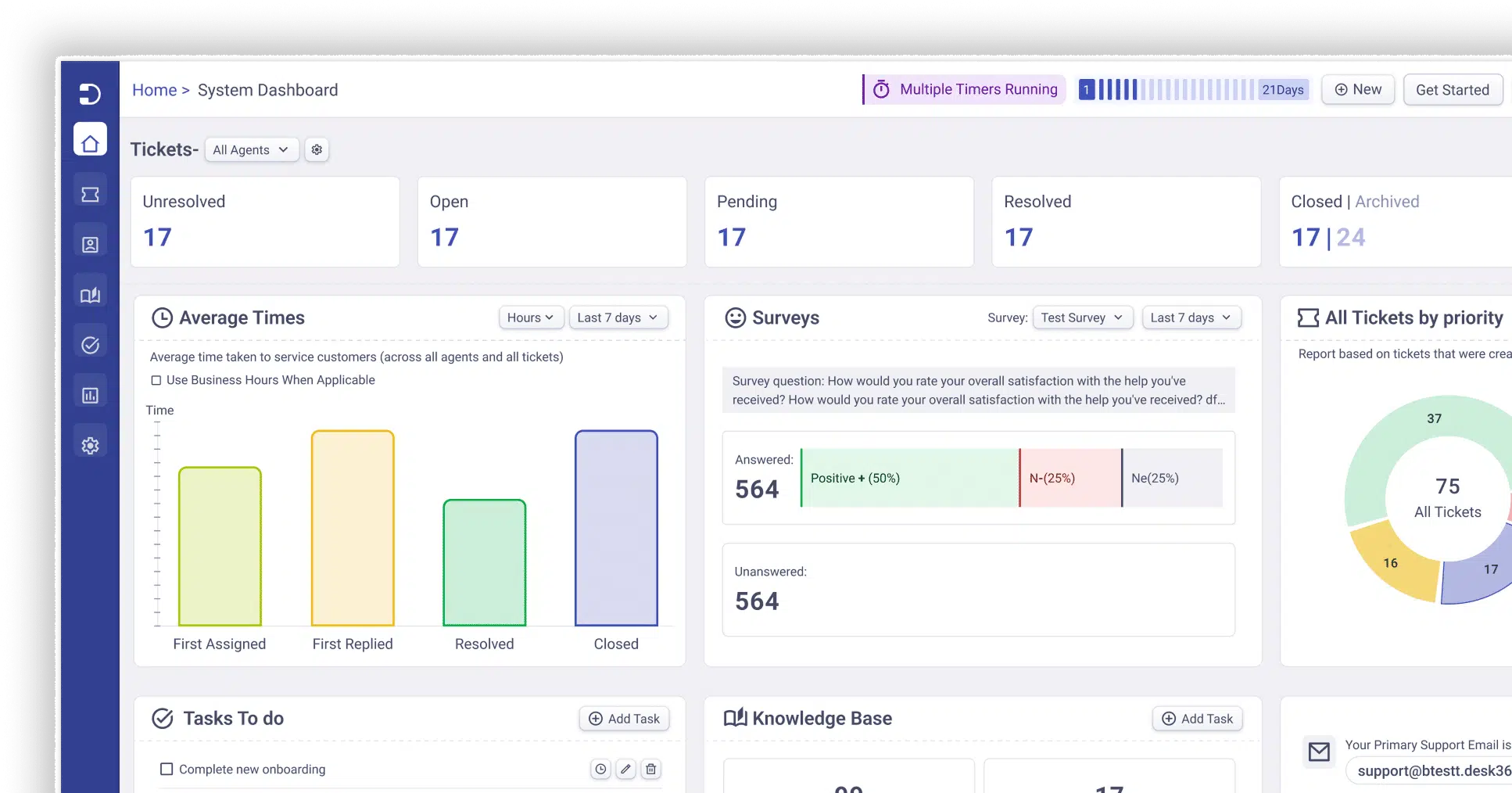
Desk365 includes automation rules and workflow triggers that reduce manual work for IT teams.
Examples include:
- Automatically assigning tickets based on category
- Escalating tickets that breach SLA
- Triggering approval workflows for requests
Automation is particularly useful for small teams managing large numbers of users.
What users like and dislike (Based on user reviews)
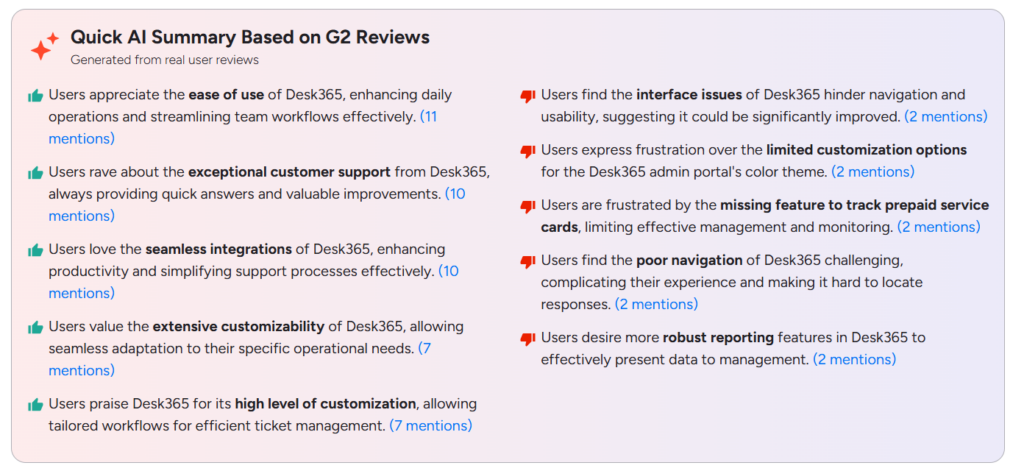
User feedback from G2 reviews and Reddit discussions shows that many teams appreciate Desk365 for its simplicity and ease of use. Users often mention that the platform is quick to set up and easy to navigate, which helps IT teams start managing tickets without a steep learning curve.
The Microsoft Teams integration is another frequently praised feature since it allows employees to raise and manage support requests directly within Teams. Many reviewers also highlight automation and SLA workflows as helpful for streamlining ticket routing and reducing manual work, as well as responsive customer support and flexible ticket field customization.
At the same time, some users mention a few areas for improvement. Reviews suggest that deeper customization options are somewhat limited compared to larger enterprise ITSM platforms. A few users also note that the admin interface and reporting capabilities could be more refined, especially for teams that need advanced reporting.
Additionally, features like contract management, prepaid service tracking, and search functionality are occasionally mentioned as areas that could be improved.

Source: Reddit
Source: G2
Who should consider Desk365
Desk365 is best suited for:
- Small to mid-sized IT teams
- Companies using Microsoft Teams and Microsoft 365
- Organizations moving away from spreadsheets for asset tracking
- Teams that want helpdesk and Asset Management together
Who should not use Desk365
Desk365 may not be ideal for:
- Large enterprises with complex ITIL workflows
- Organizations requiring heavy CMDB capabilities
- Teams needing deep configuration management systems
Desk365 pricing
Desk365 uses a per-agent pricing model
Plans start around $12 per agent per month, with higher tiers including additional automation, integrations, and enterprise features. Asset management is included in the Premium plan.
Typical plan structure includes:
- Standard plan starts at $12/agent/month
- Plus plan starts at $22/agent/month
- Premium plan starts at $32/agent/month
2. ServiceNow
ServiceNow helps organizations manage the full lifecycle of hardware and software assets while connecting them with IT service management processes like incident, change, and problem management.
Rating: 4.4/5
Here’s why ServiceNow earned its spot on the list:
ServiceNow is one of the most widely used enterprise IT Service Management (ITSM) and IT Asset Management platforms in the world. Large organizations use it to manage IT operations, infrastructure, workflows, and asset lifecycles from a single platform.
Unlike simpler tools that only track devices, ServiceNow provides a full digital workflow platform that connects IT service management, asset management, operations management, and business process automation.
In practice, organizations use ServiceNow to manage everything from hardware assets and software licenses to incident management and change management workflows. It acts as a central system where IT teams can track every asset from procurement to retirement while linking those assets to tickets, incidents, and system dependencies.
Because of its depth and scalability, ServiceNow is commonly used by large enterprises, government organizations, and Fortune 500 companies.
ServiceNow features:
Hardware asset lifecycle management
One of the core capabilities of ServiceNow is hardware asset lifecycle management.
IT teams can track assets through every stage including:
- Procurement
- Deployment
- Maintenance
- Upgrades
- Retirement
This lifecycle visibility helps organizations understand where assets are located, who is using them, and when they need replacement.
It also improves financial planning because companies can forecast hardware refresh cycles and depreciation.
Software Asset Management and license compliance
ServiceNow also provides powerful software Asset Management capabilities.
This includes:
- Tracking installed software across endpoints
- Managing license entitlements
- Identifying unused licenses
- Preventing compliance violations
Large organizations often face huge costs due to software over-licensing or under-licensing penalties. ServiceNow helps reduce those risks by providing real-time visibility into software usage.
Configuration management database (CMDB)
A major differentiator of ServiceNow is its CMDB.
The CMDB maps relationships between assets, systems, and services. For example:
- A server supports an application
- That application supports a business service
- That service supports a department
When an incident occurs, the CMDB helps IT teams understand what systems are affected and what business services might be impacted.
This makes root cause analysis and troubleshooting much faster.
Automated asset discovery
ServiceNow includes automated discovery tools that scan networks and identify devices automatically.
The platform can detect:
- Servers
- Network devices
- Virtual machines
- Cloud infrastructure
- Applications
Instead of manually entering assets into the system, IT teams can automatically populate inventory.
This reduces human error and keeps the asset database accurate.
What users like and dislike (Based on user reviews)
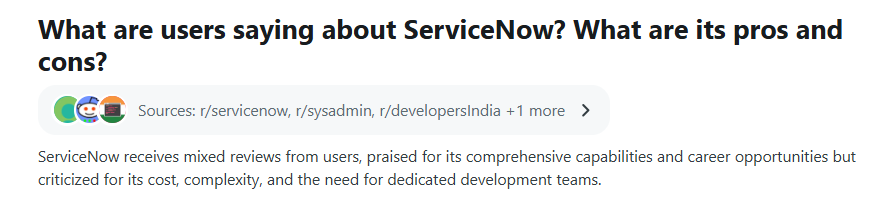
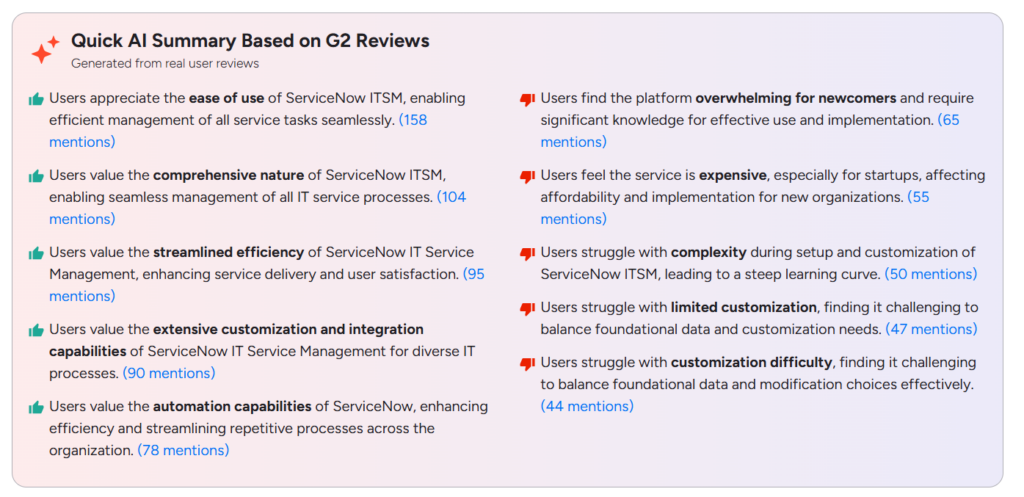
User feedback from G2 and Reddit suggests that ServiceNow is highly valued for its powerful capabilities and ability to handle complex IT service processes in one platform. Many users appreciate how it brings incident management, change management, asset tracking, and automation together, helping large organizations manage operations more efficiently. Its customization options and integrations are also often praised because they allow companies to tailor workflows to their needs.
At the same time, many users say the platform can feel overwhelming, especially for newcomers. The system is complex and usually requires experienced admins or developers to implement and maintain. Cost is another common concern, with several reviewers noting that ServiceNow can be expensive for smaller organizations.
Source: Reddit
Source: G2
Who should consider ServiceNow
ServiceNow is best suited for:
- Large enterprises
- Organizations with complex IT infrastructure
- Companies implementing ITIL frameworks
- Businesses managing thousands of assets
- Organizations requiring advanced compliance and governance
Who should not use ServiceNow
ServiceNow may not be a good fit for:
- Small IT teams
- Companies with limited budgets
- Organizations that only need basic asset tracking
- Teams that want quick implementation
In these cases, simpler tools like Freshservice or Desk365 may be easier to manage.
ServiceNow pricing
ServiceNow uses custom enterprise pricing, meaning costs vary depending on:
- Number of users
- Modules purchased
- Implementation complexity
- Support agreements
Typical starting estimates for ITSM licenses are roughly $90–$100 per user per month, though enterprise deployments often include additional modules and services.
Large deployments can cost tens or even hundreds of thousands of dollars annually depending on scale.

3. Freshservice
Freshservice automatically discovers devices across the network and links them to tickets, making it easier for IT teams to track assets and resolve issues faster.
Rating: 4.6/5
Here’s why Freshservice earned its spot on the list:
Freshservice is a cloud-based IT Service Management and Asset Management platform developed by Freshworks. It is designed to help IT teams manage service requests, incidents, assets, and workflows from one unified platform.
Freshservice sits in an interesting position in the ITSM market. It offers many enterprise capabilities like asset discovery, CMDB, and automation, but is still significantly easier to deploy and manage compared to heavy platforms like ServiceNow.
The platform combines IT Service Management (ITSM), IT Asset Management (ITAM), and IT operations management into a single system, helping organizations track hardware, software, and cloud assets while also managing tickets and service requests.
Because of this balance between functionality and usability, Freshservice is commonly used by mid sized companies and fast growing tech organizations that need strong IT management capabilities without enterprise complexity.
Freshservice features:
IT Asset Management and lifecycle tracking
Freshservice includes a built-in IT Asset Management module that allows IT teams to track both hardware and software assets.
Teams can manage assets across the entire lifecycle, including:
- Procurement
- Deployment
- Usage tracking
- Maintenance
- Retirement
The system keeps detailed records of each asset including ownership, warranty status, purchase details, and configuration information.
This helps organizations maintain clear asset visibility and reduce IT costs through better lifecycle planning.
Automated asset discovery
One of the most powerful capabilities of Freshservice is automated asset discovery.
The platform includes discovery agents and network scanning tools that automatically detect devices across the network such as:
- Laptops and desktops
- Servers
- Virtual machines
- Network devices
- Cloud infrastructure
Once discovered, these assets are automatically added to the inventory database.
This prevents the common problem where asset databases become outdated due to manual entry.
Configuration management database (CMDB)
Freshservice includes a CMDB that maps relationships between assets, services, and infrastructure components.
For example:
- A server supports a specific application
- That application supports a business service
- That service supports multiple departments
When an incident occurs, IT teams can quickly identify which systems and services are affected.
This greatly improves root cause analysis and incident response.
AI powered automation and workflows
Freshservice includes automation capabilities powered by Freddy AI, Freshworks’ AI assistant.
These automation features allow teams to:
- Automatically assign tickets
- Predict and categorize incidents
- Suggest solutions to agents
- Trigger automated workflows
AI can also power the self-service experience, allowing employees to resolve issues without contacting IT.
This helps reduce ticket volumes and improve support efficiency.
What users like and dislike (Based on user reviews)
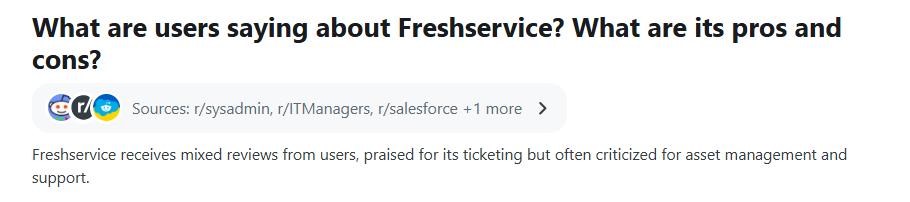
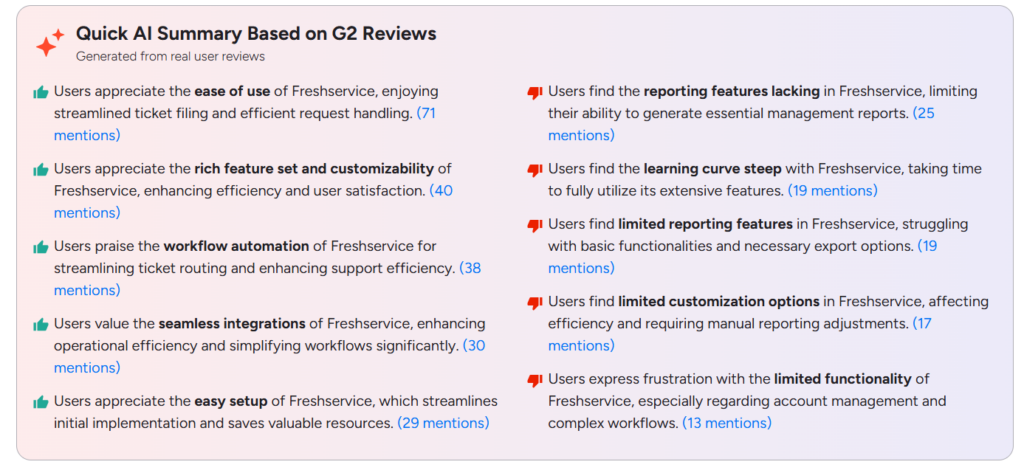
User feedback from G2 reviews and Reddit discussions shows that Freshservice is generally well-liked for its usability and modern interface. Many users say the platform is easy to set up and simple to use, which makes it easier for IT teams to manage tickets and service requests. Features like workflow automation, integrations with other tools, and the overall feature set are also frequently praised because they help streamline support operations and improve efficiency.
That said, some users mention a few limitations. Reporting is one area that comes up often, with reviewers saying the built in reporting tools could be more advanced. Some users also feel the platform has a bit of a learning curve when trying to use its more advanced features. Others note that certain customization options and complex workflow capabilities can feel somewhat limited depending on the organization’s needs.
Source: Reddit
Source: G2
Who should consider Freshservice
Freshservice works best for:
- Mid sized organizations
- Growing companies scaling IT operations
- IT teams adopting ITIL based workflows
- Companies wanting both ITSM and IT Asset Management in one platform
Who should not use Freshservice
Freshservice may not be ideal for:
- Very small teams with basic ticketing needs
- Organizations looking for extremely low-cost helpdesk tools
- Companies that need extremely deep enterprise customization
In those cases, tools like Desk365 or simpler helpdesk systems may be more suitable.
Freshservice pricing
Freshservice uses a per-agent pricing model, meaning organizations pay based on the number of support agents using the platform.
The Starter plan starts at $19 per agent per month and includes basic helpdesk features like ticket management, SLAs, and a knowledge base.
The Growth plan, at about $49 per agent per month, adds Asset Management, service catalogs, and workflow automation.
The Pro plan, priced around $99 per agent per month, includes advanced automation, analytics, and project management features.
For larger organizations, the Enterprise plan offers custom pricing with advanced orchestration and AI capabilities.

4. ManageEngine AssetExplorer
AssetExplorer helps IT teams track hardware, software licenses, purchase orders, and asset lifecycle from procurement to retirement.
Rating: 4.3/5
Here’s why ManageEngine AssetExplorer earned its spot on the list:
ManageEngine AssetExplorer is a dedicated IT Asset Management (ITAM) solution developed by ManageEngine. It is designed to help organizations track hardware, software licenses, and IT asset lifecycles from procurement to disposal.
Unlike broader ITSM platforms such as Freshservice or ServiceNow, AssetExplorer focuses primarily on asset discovery, inventory management, and license compliance. This makes it especially useful for IT teams that want strong asset visibility without implementing a full service management platform.
Many organizations use AssetExplorer to replace spreadsheets and manual inventory tracking, giving IT departments a centralized database of devices, licenses, and asset usage.
The platform is widely adopted by mid-sized companies, educational institutions, and IT teams managing large numbers of endpoints.
ManageEngine AssetExplorer features:
Automated asset discovery
One of the strongest capabilities of AssetExplorer is automated network discovery.
The system scans networks to detect devices and automatically populate the asset database. It can discover:
- Desktop computers
- Laptops
- Servers
- Network devices
- Printers
- Installed software
This automatic discovery helps ensure the asset inventory stays accurate and continuously updated, which is a common challenge for IT teams managing large environments.
Organizations with hundreds or thousands of devices often rely on this capability to avoid manual asset entry.
Hardware asset lifecycle management
AssetExplorer enables IT teams to track assets throughout their entire lifecycle.
Lifecycle stages include:
- Procurement
- Asset deployment
- Maintenance and upgrades
- Warranty tracking
- Asset retirement
The system records key information such as purchase date, vendor details, cost, warranty expiration, and ownership.
This lifecycle visibility allows IT teams to plan hardware refresh cycles, monitor depreciation, and avoid unexpected failures due to aging equipment.
Software license management
Another major feature is software license management, which helps organizations stay compliant with vendor licensing rules.
AssetExplorer allows teams to:
- Track installed software across devices
- Compare installations with purchased licenses
- Identify unused licenses
- Detect license violations
This capability can help organizations avoid costly compliance penalties during software audits.
For companies using large numbers of enterprise applications, this feature can result in significant cost savings.
Configuration management database (CMDB)
AssetExplorer includes a configuration management database (CMDB) that tracks relationships between IT assets.
For example:
- A server may host multiple applications
- Those applications support specific business services
- Those services are used by multiple departments
This relationship mapping helps IT teams understand how infrastructure components depend on each other.
When a system fails, the CMDB helps identify what other services may be impacted.
What users like and dislike (Based on user reviews)
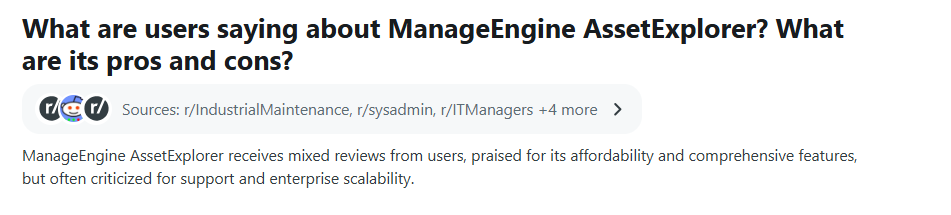
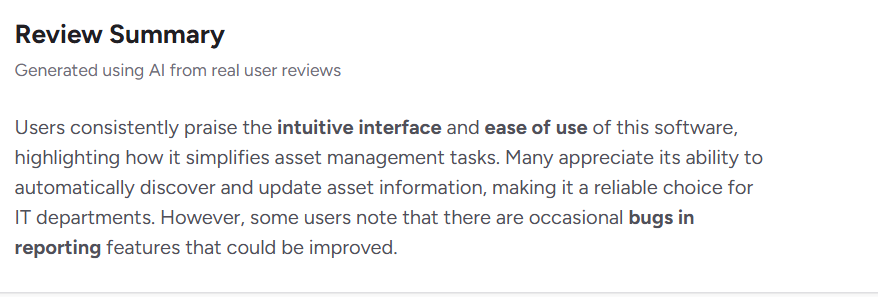
User feedback from G2 reviews and Reddit discussions suggests that ManageEngine AssetExplorer is generally appreciated for its ease of use and practical Asset Management capabilities.
Many users highlight the intuitive interface, which makes it easier for IT teams to track and manage hardware and software assets without a steep learning curve. Another feature users often mention is the automatic asset discovery, which helps update asset information and maintain a more accurate inventory for IT departments.
However, some users report a few limitations. A common concern is occasional bugs and performance issues, especially when working with reporting features. Others mention that reporting capabilities could be more advanced, and some organizations feel the platform may not scale as smoothly for very large enterprise environments.
Overall, users see AssetExplorer as a reliable and affordable option for asset management, though it may require improvements in reporting and scalability.
Source: Reddit
Source: G2
Who should consider AssetExplorer
AssetExplorer works best for:
- Mid-sized organizations with large numbers of devices
- IT teams focused on asset visibility and compliance
- Companies needing detailed software license tracking
- Organizations already using ManageEngine tools
Who should not use AssetExplorer
AssetExplorer may not be ideal for:
- Companies needing advanced helpdesk workflows
- Teams looking for modern SaaS interfaces
- Organizations requiring heavy automation and orchestration
In those cases, tools like Freshservice or ServiceNow may provide a more complete IT service management solution.
ManageEngine AssetExplorer pricing
ManageEngine AssetExplorer offers both on premise and cloud deployment options, which gives organizations flexibility depending on their infrastructure.
Pricing typically depends on the number of IT assets being tracked.
Typical pricing structure:
- Free edition for up to 25 assets
- Paid plans start around $955 per year for 250 assets (on premise license)
- Pricing increases based on asset count

5. Snipe-IT
Snipe-IT allows IT departments to track hardware assignments, accessories, and licenses with clear records of who is using what equipment.
Rating: 4.6/5
Here’s why Snipe-IT earned its spot on the list:
Snipe‑IT is an open source IT Asset Management (ITAM) platform designed to help organizations track hardware, software licenses, and accessories in a centralized system. It was created primarily for IT teams that wanted a simple but structured alternative to spreadsheets for managing equipment.
The platform can be self-hosted or used as a hosted SaaS service, giving organizations flexibility depending on their infrastructure and security requirements.
Snipe-IT is particularly popular among sysadmins, startups, schools, and IT teams with limited budgets. Because it is open source, companies can customize the system and control their own data.
On forums and Reddit communities, Snipe-IT is often recommended as one of the best lightweight asset management tools when organizations do not need a full IT service management platform.
Snipe-IT features:
Asset tracking and ownership management
The core feature of Snipe-IT is its hardware asset tracking system.
IT teams can track assets such as:
- Laptops
- Desktops
- Servers
- Monitors
- Mobile devices
- Network equipment
Each asset record can include detailed information like:
- Serial numbers
- Asset tags
- Purchase details
- Warranty information
- Assigned user
- Department location
This allows IT teams to maintain a clear record of who owns what device and where it is located.
The platform also supports asset check in and check out workflows, which helps organizations track when equipment is issued to employees or returned.
Software license tracking
Snipe-IT also supports software license management.
IT administrators can:
- Track purchased licenses
- Allocate licenses to users or devices
- Monitor license availability
- Track expiration dates
This helps organizations maintain better visibility over software usage and avoid unnecessary license purchases.
While it is not as advanced as enterprise license management systems, it provides basic compliance tracking for most organizations.
Accessory and component management
Another useful feature is the ability to track accessories and components.
Examples include:
- Chargers
- Docking stations
- Keyboards
- Mice
- RAM modules
- Hard drives
These items are often overlooked in asset tracking systems, but they can represent significant cost over time.
Snipe-IT allows teams to track quantities and assign these accessories to users or devices
Asset audit and history tracking
Every asset in Snipe-IT includes a complete history log.
The system records:
- Ownership changes
- Maintenance actions
- Status updates
- Asset movements between departments
This audit trail helps IT teams maintain accountability and track device usage over time.
For organizations undergoing compliance audits or internal reviews, this historical data can be extremely valuable.
What users like and dislike (Based on user reviews)
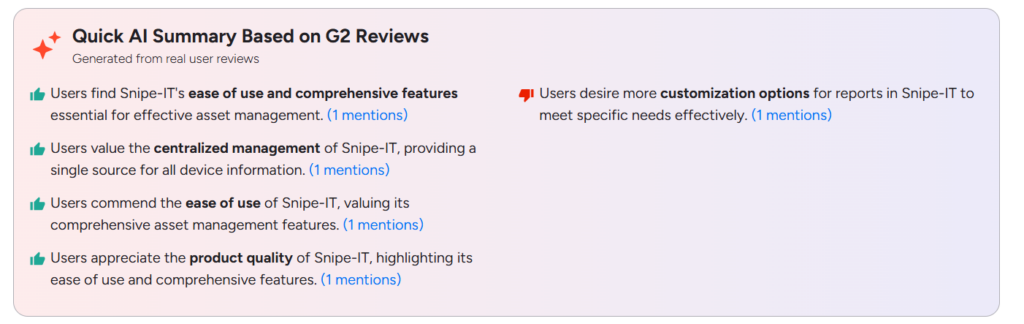
User feedback from G2 reviews and Reddit discussions suggests that Snipe-IT is generally appreciated for its simplicity and practical asset tracking features. Many users highlight how easy it is to use and how it provides a centralized place to manage device information.
IT teams often mention that it works well for tracking hardware, managing asset assignments, and maintaining a clear inventory without needing a complex enterprise system. Because it is open source, users also like the flexibility it offers for customization and self hosting.
At the same time, some users mention a few limitations. Reporting and customization options for reports can feel somewhat limited, especially for teams that need detailed analytics. Others note that integrations with other tools may require additional setup or development. Overall, users see Snipe-IT as a reliable and straightforward Asset Management tool, particularly for organizations looking for a simple and cost-effective solution.

Source: Reddit
Source: G2
Who should consider Snipe-IT
Snipe-IT is ideal for:
- Startups and small companies
- IT teams managing hardware inventory
- Organizations with limited budgets
- Companies comfortable with open source software
- Teams wanting a spreadsheet replacement for asset tracking
Who should not use Snipe-IT
Snipe-IT may not be suitable for:
- Large enterprises with complex infrastructure
- Organizations requiring deep ITSM workflows
- Companies needing advanced automation and asset discovery
- Teams that prefer fully managed SaaS tools
Snipe-IT pricing
Snipe-IT offers both a free open source version and a paid hosted option. The self-hosted version is completely free to use, but organizations need to host and maintain the servers themselves.
For teams that prefer not to manage infrastructure, Snipe-IT also provides a hosted cloud version. The basic hosted plan starts at around $39 per month and includes a managed environment with updates.
Higher tiers are available with custom pricing, offering additional support and scaling options for larger organizations. Because the core product is open source, many companies choose the self-hosted option to avoid licensing costs altogether.

6. Lansweeper
Lansweeper scans networks to identify devices, installed software, and potential vulnerabilities so IT teams always have an up-to-date inventory.
Rating: 4.4/5
Here’s why Lansweeper earned its spot on the list:
Lansweeper is an IT asset discovery and inventory management platform designed to give organizations complete visibility into their IT infrastructure. Unlike many traditional Asset Management tools that rely heavily on manual entry, Lansweeper focuses on automated network discovery and detailed device inventory.
The platform scans networks to detect and catalog all connected devices, including computers, servers, virtual machines, printers, and network equipment. Once discovered, these assets are automatically added to a centralized inventory database.
Because of its strong discovery capabilities, Lansweeper is often used by IT teams that need accurate infrastructure visibility across complex environments. Organizations managing thousands of endpoints often rely on it to maintain a continuously updated asset inventory.
Lansweeper is widely used by IT operations teams, cybersecurity teams, and infrastructure administrators who need detailed insights into hardware, software installations, and network devices.
Lansweeper features:
Automated network asset discovery
The most powerful capability of Lansweeper is its automated asset discovery engine.
The system continuously scans networks using multiple discovery methods such as:
- IP range scanning
- Active Directory scanning
- Agent based discovery
- Agentless scanning
Through these scans, Lansweeper can detect a wide range of devices, including:
- Desktops and laptops
- Servers
- Network switches and routers
- Printers
- IoT devices
- Virtual machines
This automated discovery ensures that new devices appearing on the network are detected quickly, which helps IT teams maintain an accurate asset inventory.
It also helps identify unauthorized or unknown devices that may pose security risks.
Detailed hardware and software inventory
Once devices are discovered, Lansweeper collects extensive hardware and software information.
This includes:
- Processor details
- RAM configuration
- Disk storage
- Operating system version
- Installed applications
- Network configuration
This level of detail allows IT teams to maintain a complete inventory of every system in their environment.
The system also helps identify outdated hardware, unsupported operating systems, and devices that may require upgrades.
Software license tracking
Lansweeper provides basic software Asset Management features that allow organizations to track installed applications and compare them with purchased licenses.
IT teams can use these insights to:
- Identify unused software
- Remove unauthorized installations
- Reduce unnecessary license spending
While it is not as deep as dedicated license management tools, it still provides valuable visibility into software usage across the organization.
Security and vulnerability insights
Another major advantage of Lansweeper is its security and vulnerability visibility.
The platform can identify:
- Outdated software versions
- Unpatched operating systems
- End-of-life systems
- Known vulnerabilities in installed applications
These insights allow security teams to prioritize patching and remediation efforts.
Because of this capability, many organizations use Lansweeper not only for Asset Management but also for security posture monitoring.
What users like and dislike (Based on user reviews)
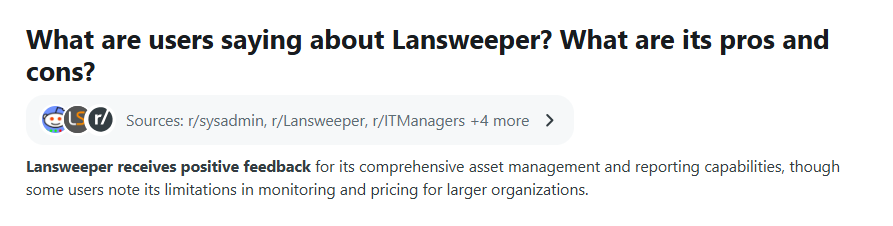
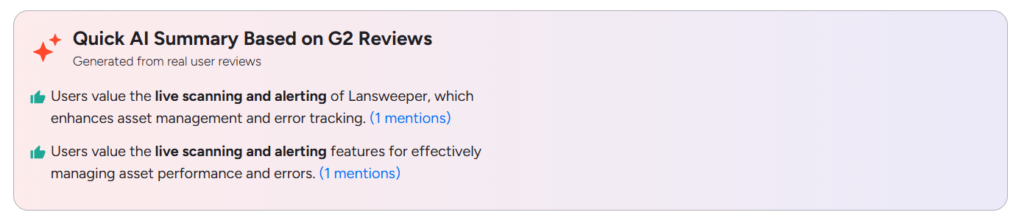
User feedback from G2 and other review platforms suggests that Lansweeper is generally appreciated for its strong asset discovery and inventory capabilities.
Reviewers highlight its ease of use and comprehensive asset management, which allows for efficient tracking and reporting of devices across networks, and many value that it’s agentless, which simplifies deployment across large networks.
At the same time, some users mention a few limitations. Several find the interface overwhelming for new users, and others feel reporting and software deployment features could be more developed. Overall, users see Lansweeper as a reliable, detail-rich network and asset discovery tool, especially valued for deep visibility without heavy agent-based setup
Source: Reddit
Source: G2
Who should consider Lansweeper
Lansweeper is best suited for:
- IT teams managing large infrastructure environments
- Organizations that need automated asset discovery
- Companies focused on infrastructure visibility
- Cybersecurity teams are monitoring network devices
- Enterprises with thousands of endpoints
Who should not use Lansweeper
Lansweeper may not be ideal for:
- Very small IT teams managing limited assets
- Organizations are primarily looking for helpdesk software
- Companies needing simple manual asset tracking
In those cases, tools like Snipe-IT or Desk365 may provide simpler solutions.
Lansweeper pricing
Lansweeper pricing is generally based on the number of assets being scanned and managed.
Typical pricing structure includes:
- Free trial version with limited asset scanning
- Paid plans starting around a few hundred dollars per year for smaller environments
- Enterprise pricing for organizations managing thousands of devices
Because pricing scales with asset count, Lansweeper becomes most valuable for organizations that need large-scale infrastructure discovery and inventory management.

7. Asset Panda
Asset Panda helps teams track equipment, manage check-in and check-out processes, and monitor asset usage with mobile and barcode scanning.
Rating: 4.2/5
Here’s why Asset Panda earned its spot on the list:
Asset Panda is a cloud-based Asset Management and tracking platform designed to help organizations monitor physical and digital assets across their entire lifecycle. It was founded in 2012 and built to replace traditional spreadsheets and manual inventory systems with a more flexible digital asset tracking system.
The platform allows organizations to track assets such as laptops, servers, tools, vehicles, and equipment while maintaining detailed records about ownership, location, condition, and maintenance history. Asset Panda is accessible through both a web dashboard and mobile apps, allowing teams to update asset data from anywhere.
One of the biggest strengths of Asset Panda is its high level of customization. Companies can create custom asset fields, workflows, reports, and automation rules without coding, which allows the platform to adapt to different industries such as IT, healthcare, education, and construction.
Because of its flexibility and mobile features, Asset Panda is commonly used by operations teams, IT departments, and organizations managing assets across multiple locations.
Asset Panda features:
Customizable asset tracking system
The core feature of Asset Panda is its highly configurable asset tracking system.
Organizations can create digital records for every asset and store information such as:
- Asset ID and serial number
- Location and department
- Assigned user
- Purchase and warranty details
- Maintenance history
Unlike many asset tools that use fixed templates, Asset Panda allows organizations to create custom fields and workflows tailored to their operational needs.
For example, an IT team may track laptops by serial number and OS version, while a construction company might track equipment usage hours and maintenance intervals.
Mobile Asset Management and barcode scanning
Asset Panda provides a mobile app for iOS and Android that allows teams to scan assets and update records in real time.
The mobile app includes built-in:
- Barcode scanning
- QR code scanning
- Asset lookup
- Maintenance logging
This eliminates the need for dedicated scanning hardware because smartphones can be used to track assets during audits or field operations.
Mobile access is particularly valuable for organizations managing assets across multiple locations or field teams.
Asset check in and check out workflows
Asset Panda supports asset assignment and check-in/check-out workflows, which help organizations track who is responsible for each asset.
For example:
- A laptop is assigned to an employee
- The system records the assignment date
- The asset is checked back in when returned
These workflows help maintain accountability and audit trails, ensuring organizations always know where their equipment is.
Maintenance and lifecycle management
Asset Panda also supports maintenance scheduling and asset lifecycle tracking.
Teams can:
- Schedule maintenance tasks
- Log repairs or upgrades
- Track depreciation
- Monitor asset condition
This helps organizations maximize asset utilization and extend equipment lifespan.
For companies managing expensive infrastructure or machinery, these maintenance logs provide valuable insights into asset performance and replacement planning.
What users like and dislike (Based on user reviews)
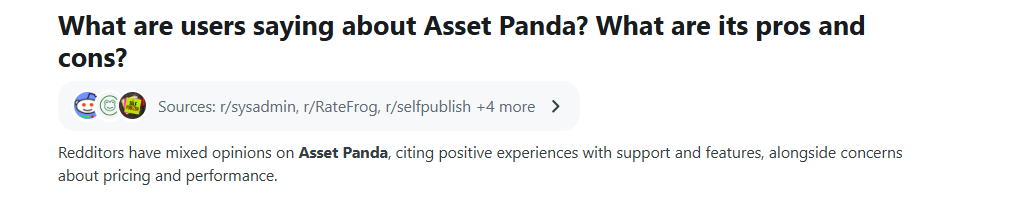
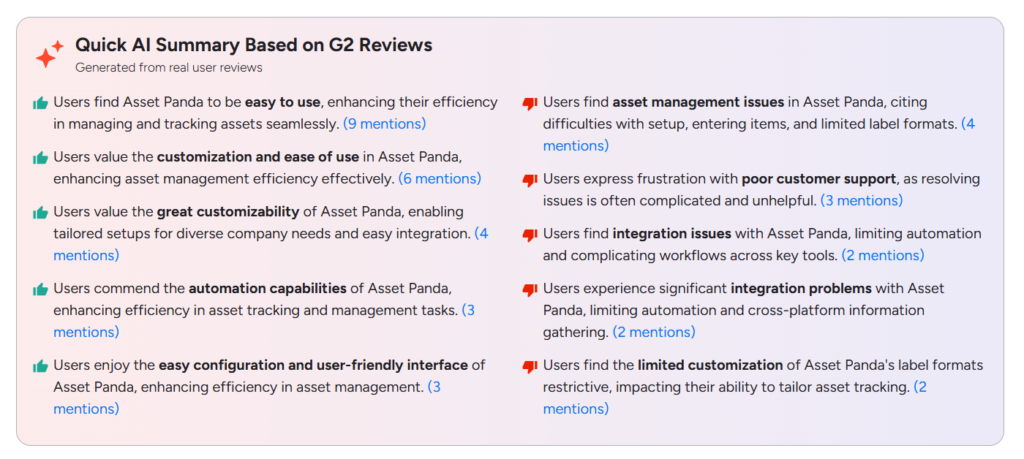
User feedback from G2 and Capterra reviews suggests that Asset Panda is generally appreciated for its flexibility and ease of use. Reviewers point to its intuitive interface and customizable features, along with strong customizability, such as the ability to add any columns needed to an asset, and a mobile app valued for barcode scanning and signature capture.
At the same time, some users mention a few limitations. Many describe a learning curve with advanced features and note that integration depth can fall short of what some users want, with occasional slowdowns when multiple people use the system at once. Overall, users see Asset Panda as a highly customizable, mobile-friendly Asset Management tool, though its flexibility can come with a steeper setup curve
Source: Reddit
Source: G2
Who should consider Asset Panda
Asset Panda works best for:
- Organizations managing assets across multiple locations
- IT teams tracking equipment and hardware
- Operations teams managing tools and inventory
- Companies that require customizable asset workflows
Who should not use Asset Panda
Asset Panda may not be ideal for:
- Very small teams with simple asset tracking needs
- Organizations requiring deep IT service management workflows
- Companies looking for very low-cost Asset Management tools
Asset Panda pricing
Asset Panda follows a subscription-based pricing model that is usually determined by the number of users and the number of assets being tracked.
The Starter plan costs about $50 per user per month and supports tracking up to 1,000 assets, making it suitable for smaller teams.
The Business+ plan, priced at around $60 per user per month, increases the limit to 5,000 assets and is designed for growing organizations.
For larger companies, the Enterprise plan offers custom pricing with unlimited asset tracking. Most plans also include features such as API access, integrations with other tools, and built-in reporting capabilities.
8. Ivanti Neurons for ITAM
Ivanti helps IT teams manage procurement, asset utilization, and software compliance while providing detailed reporting.
Rating: 4.3/5
Here’s why Ivanti Neurons for ITAM earned its spot on the list:
Ivanti Neurons for ITAM is an enterprise-grade IT Asset Management solution developed by Ivanti. The platform helps organizations track, manage, and optimize IT assets across their entire lifecycle, from procurement to retirement.
Ivanti Neurons for ITAM is part of the broader Ivanti Neurons platform, which includes tools for discovery, endpoint management, automation, and IT service management. The goal of the platform is to provide a single centralized repository for all IT assets, including hardware, software, virtual systems, and cloud resources.
The platform consolidates asset data from multiple sources and allows IT teams to track, configure, optimize, and strategically manage assets throughout their lifecycle.
Because of its depth and integration with enterprise infrastructure, Ivanti Neurons for ITAM is most commonly used by large enterprises that need strong asset governance, automation, and compliance management.
Ivanti Neurons for ITAM features:
Centralized asset repository
One of the core capabilities of Ivanti Neurons for ITAM is its centralized asset repository.
The platform gathers asset data from multiple systems and consolidates it into a single source of truth. This repository can include:
- Hardware assets (laptops, servers, network devices)
- Software assets and licenses
- Virtual machines
- Cloud infrastructure
- Mobile devices
By centralizing this data, organizations gain a complete and accurate view of their IT environment, which helps IT teams make better decisions about infrastructure investments and asset usage.
Full lifecycle Asset Management
Ivanti Neurons allows organizations to manage assets throughout their entire lifecycle.
Typical lifecycle stages include:
- Asset procurement
- Deployment and configuration
- Maintenance and upgrades
- License management
- Retirement or disposal
The platform helps organizations track every stage of an asset’s lifecycle, ensuring assets are used efficiently and replaced at the right time.
Lifecycle management also helps companies reduce unnecessary spending by identifying underutilized or redundant assets.
Automated asset discovery
The platform includes automated asset discovery capabilities, which allow it to identify devices and software across the network.
Discovery features can detect:
- Unmanaged devices
- Unknown endpoints
- Installed software across systems
- Network-connected hardware
These discovery tools provide real-time visibility into IT infrastructure, helping IT teams quickly identify new devices or potential security risks.
Some organizations use this feature to detect shadow IT or unauthorized devices appearing on the network.
Software Asset Management and license optimization
Another major strength of Ivanti Neurons for ITAM is software license management.
The platform helps organizations:
- Track software usage across endpoints
- Compare installed software against purchased licenses
- Identify unused licenses
- Reduce overspending on software subscriptions
This capability is particularly valuable for enterprises that manage large volumes of enterprise software licenses, where compliance and cost optimization are critical.
What users like and dislike (Based on user reviews)
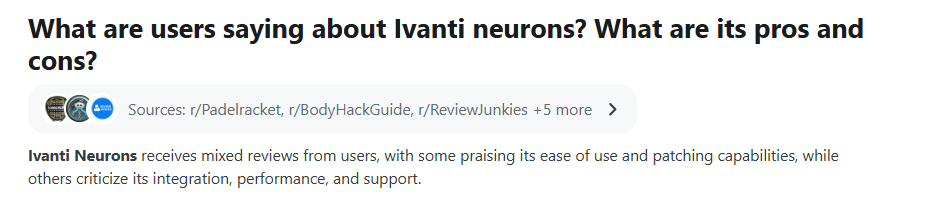
User feedback from G2 reviews and Reddit discussions suggests that Ivanti Neurons for ITAM is appreciated for its comprehensive Asset Management capabilities. Many users highlight that the platform can handle different types of assets effectively and provides strong visibility across IT environments. Some reviewers also mention that its patching and management capabilities help streamline Asset Management and system maintenance.
At the same time, users report a few challenges. Some mention occasional data synchronization issues, which can affect how asset information updates across systems. Others also note concerns around integration complexity, performance, and customer support in certain cases. Overall, while Ivanti Neurons is seen as a powerful enterprise asset management tool, some users feel it could improve in areas like integrations and system performance.
Source: Reddit

Source: G2
Who should consider Ivanti Neurons for ITAM
Ivanti Neurons for ITAM works best for:
- large enterprises
- organizations with complex infrastructure environments
- companies managing thousands of assets
- IT teams focused on software license optimization and compliance
Who should not use Ivanti Neurons for ITAM
Ivanti Neurons for ITAM does not publicly publish fixed pricing tiers.
Instead, pricing is typically customized based on several factors, including:
- Number of assets being managed
- Modules selected
- Deployment model (cloud, on-premises, or hybrid)
- Enterprise support requirements
Organizations usually need to request a custom quote from Ivanti sales to determine pricing.
Because of its enterprise positioning, the total cost of ownership can be significantly higher than simpler Asset Management tools.
Ivanti Neurons pricing
Ivanti Neurons pricing is quote-based, tailored to organization size, and typically structured as a per-user, per-year SaaS subscription, with no public price list on Ivanti’s website. The final quote depends on which modules you select (ITSM, ITAM, UEM/MDM, security, etc.) and whether it’s cloud, on-prem, or hybrid
Choose the best IT Asset Management software
Choosing the right IT Asset Management software ultimately depends on your organization’s size, infrastructure, and how your IT team manages daily operations. The right tool should help you move away from spreadsheets and give you a clear, centralized view of all hardware, software, and equipment across the company.
In this guide, we explored several popular IT Asset Management tools that serve different use cases. Platforms like Desk365 work well for teams that want asset tracking combined with helpdesk ticketing in a single system.
Tools such as Freshservice and ManageEngine AssetExplorer offer strong asset lifecycle management and automation features for growing IT teams.
For organizations with complex infrastructure, enterprise platforms like ServiceNow or Ivanti Neurons for ITAM provide deeper compliance, discovery, and governance capabilities.
At the same time, simpler solutions such as Snipe-IT, Lansweeper, and Asset Panda can be ideal for companies that mainly need asset tracking, device discovery, and inventory visibility without the complexity of large ITSM platforms.
The key is to choose a tool that fits naturally into your workflow. Look for platforms that offer strong asset visibility, lifecycle management, integrations with tools like Microsoft Teams or Slack, and enough scalability to support your organization as it grows.
Moving from scattered spreadsheets to a dedicated Asset Management system can dramatically improve how IT teams track equipment, manage device history, and resolve support issues faster. The right platform will not only organize your assets but also make day-to-day IT operations far more efficient.
Frequently asked questions
Organizations use specialized IT Asset Management (ITAM) tools to track and manage hardware, software, and cloud assets throughout their lifecycle. Popular tools include Desk365, ServiceNow IT Asset Management, ManageEngine AssetExplorer, Freshservice, and Lansweeper. These platforms help IT teams maintain a centralized inventory, track asset usage, and manage software licenses efficiently.
IT Asset Management tools give IT teams a centralized view of all devices and software used across the organization. This makes it easier to track ownership, monitor asset usage, ensure license compliance, and plan upgrades or replacements. They also help reduce costs by identifying unused or underutilized assets.
IT Asset Management tools can track a wide range of assets including laptops, desktops, servers, mobile devices, printers, networking equipment, and software licenses. These tools manage the entire lifecycle of assets—from procurement and deployment to maintenance and disposal.
Yes, some IT Asset Management tools offer free or open-source versions. For example, Snipe-IT is a popular open-source asset tracking system, while some commercial platforms provide free tiers or trials to help organizations get started with asset tracking