
Snipe-IT offers a free, open-source platform for managing IT assets, but running it without a software subscription doesn’t necessarily mean there are no costs involved. Businesses can host the application themselves or choose paid hosting plans that include server maintenance, automated upgrades, and backups.
The actual cost depends on how the organization deploys Snipe-IT, the level of infrastructure management it needs, and whether professional support is required. For IT teams, the decision goes beyond the advertised price: they also need to consider maintenance effort, hosting requirements, and whether asset tracking alone is enough to manage their support operations.
So, how much does Snipe-IT really cost, and which option makes sense for your team? Let’s break down its pricing plans, additional costs, and how it compares with Desk365.
How much does Snipe-IT cost right now
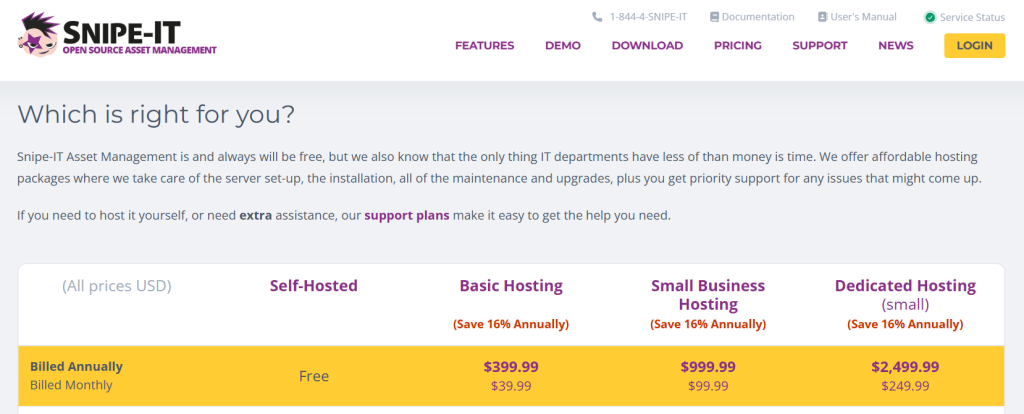
Snipe-IT currently offers a free self-hosted version and three main paid hosting plans: Basic Hosting, Small Business Hosting, and Dedicated Hosting. Basic Hosting starts at $39.99 per month, Small Business Hosting costs $99.99 per month, and Dedicated Hosting costs $249.99 per month. Annual billing is also available at a lower effective cost.
Source: Snipe IT
Snipe-IT’s pricing model differs from traditional help desk software. The official pricing page lists unlimited users and assets for its main hosting plans, so the subscription does not increase simply because more employees use the application. Instead, the cost depends on the hosting environment, API limits, and infrastructure capabilities required by the organization.
Snipe-IT also offers professional support separately. Basic Support costs $449.99 per year, while Enterprise Support costs $4,999.99 per year. These are optional support plans rather than mandatory charges for every hosting customer.
One important point when calculating the actual cost is that free self-hosting does not mean zero operating costs. Organizations running Snipe-IT on their own infrastructure must account for server resources, maintenance, backups, security updates, and internal IT administration. Paid hosting shifts more of that responsibility to Snipe-IT, making the hosting subscription only one part of the overall cost comparison.
Understanding Snipe-IT’s open-source pricing model
Snipe-IT follows an open-source pricing model, meaning organizations can use its core asset management software without paying a licensing fee. The software is available for self-hosting, while businesses that prefer a managed environment can choose from Snipe-IT’s paid hosting plans.
The main difference lies in who manages the infrastructure. With the self-hosted version, the organization’s IT team handles installation, server maintenance, security, backups, and software upgrades. With paid hosting, Snipe-IT manages the server environment and provides services such as automatic backups, maintenance, and upgrades, depending on the selected plan. The core software remains the same in both options.
Another important distinction is how Snipe-IT calculates its costs. Its pricing plans support unlimited users and assets, so the subscription does not increase as more agents use the platform or more assets are added. Instead, organizations pay for the hosting capabilities they need, with optional professional support available separately.
This means that choosing Snipe-IT involves more than comparing subscription prices. Organizations should also consider their existing infrastructure, the technical resources available to maintain the software, and whether managed hosting or professional support would reduce the workload on their IT team.
Snipe-IT plans breakdown, plan by plan
Snipe-IT is primarily an IT asset management platform, rather than a traditional help desk system. Its pricing plans focus on how the application is hosted, maintained, and supported. The core software remains the same across self-hosted and paid hosting options, while higher tiers add infrastructure capabilities and access controls.
| Plan | Price per month | Best suited for |
|---|---|---|
| Self-Hosted | Free | Teams that can manage their own infrastructure |
| Basic Hosting | $39.99 | Teams needing managed hosting and maintenance |
| Small Business Hosting | $99.99 | Teams requiring additional API capacity and access controls |
| Dedicated Hosting | $249.99 | Organizations needing a private server environment |
Self-Hosted is Snipe-IT’s free option for organizations that want to manage their IT assets on their own infrastructure. It supports hardware tracking, software license management, equipment assignments, and inventory management. However, the organization is responsible for server maintenance, backups, security updates, and application upgrades.
Basic Hosting is Snipe-IT’s entry-level paid plan for teams that want managed hosting without maintaining their own server. It includes automatic backups, application upgrades, server maintenance, email support, and up to 120 API calls per minute. It is suitable for organizations that want to manage their assets while reducing infrastructure administration.
Small Business Hosting is designed for organizations that need additional hosting capacity and access controls. It includes the features of Basic Hosting, along with up to 240 API calls per minute, increased LDAP memory and synchronization frequency, and site-level IP restrictions. These capabilities can benefit teams with greater directory synchronization and access management requirements.
Dedicated Hosting is intended for organizations that need a private server environment and additional network controls. It includes the capabilities of the lower hosting tiers, along with VPN connectivity, server-wide IP restrictions, and API calls without a fixed per-minute limit, subject to hardware limitations.
What are the additional costs of running Snipe-IT
Although Snipe-IT’s self-hosted software is free, organizations may incur additional expenses to keep it running reliably and securely. These costs depend on the existing infrastructure, the technical resources available, and the level of support required.
Server infrastructure and hosting: Organizations that self-host Snipe-IT need a server, database, and suitable hosting environment. If they use existing infrastructure, the additional expense may be limited. Otherwise, cloud hosting or server resources can add to the overall cost. Third-party infrastructure providers may charge separately for computing, storage, and related services.
Maintenance, backups, and security: Self-hosted installations require the organization to manage software upgrades, security updates, backups, and server maintenance. These tasks may not involve a separate software fee, but they require time and technical expertise. Snipe-IT’s paid hosting plans include managed maintenance, automated upgrades, and automatic backups, helping reduce this workload.
Internal IT administration: Installing and configuring Snipe-IT, troubleshooting issues, managing access, and maintaining the deployment can require ongoing staff time. The cost depends on the complexity of the environment and whether the organization already has the necessary technical expertise.
Professional support: Organizations that self-host Snipe-IT can purchase optional support if they need assistance beyond the free community resources. Basic Support costs $449.99 per year, while Enterprise Support costs $4,999.99 per year. Enterprise Support includes additional assistance, such as phone support and hands-on help with API integrations.
Ultimately, the total cost of running Snipe-IT depends on more than the software licence. Organizations should compare the expense of managing their own infrastructure with the subscription cost of managed hosting, while considering how much technical support and maintenance their team needs.
What does Snipe-IT cost for different organizations
Since Snipe-IT does not charge per user or asset, the cost depends on how an organization hosts the software and the level of infrastructure and support it requires. The following table illustrates how different organizations might approach their budgets using Snipe-IT’s pricing.
| Organization type | Recommended setup | Monthly cost | Annual cost |
|---|---|---|---|
| Small business with existing IT infrastructure | Self-Hosted | Free* | Free* |
| Growing team preferring managed hosting | Basic Hosting | $39.99 | $399.99 |
| Organization needing additional API capacity and access controls | Small Business Hosting | $99.99 | $999.99 |
| Business requiring a dedicated server environment | Dedicated Hosting | $249.99 | $2,499.99 |
Snipe-IT’s hosted plans support unlimited users and assets, so these prices are based on the selected plan rather than the size of the team. The actual total cost will depend on infrastructure requirements, maintenance responsibilities, and whether professional support is needed.
Snipe-IT pricing compared with other IT asset management tools
Snipe-IT is worth comparing with other tools that help organizations manage IT assets and support operations. However, the pricing models differ: Snipe-IT offers free self-hosting and fixed-price managed hosting, while other platforms may charge per agent or based on the number of assets managed.
| Tool | Pricing model | Starting price |
|---|---|---|
| Desk365 | Per-agent pricing; asset management included in Premium | $12/agent/month; Premium at $32/agent/month |
| Snipe-IT | Free self-hosted or fixed-price hosting | Free; hosted from $39.99/month |
| ManageEngine AssetExplorer | Based on the number of IT assets managed | $115/month for 250 assets |
| Freshdesk | Per-agent pricing | $19/agent/month for Growth, billed annually |
Desk365 combines helpdesk ticketing with IT asset management in its Premium plan, priced at $32 per agent per month when billed annually. It includes asset lifecycle management, software license management, product inventory, vendor records, depreciation tracking, and Microsoft Intune integration. This makes it worth considering for organizations that want to manage support tickets and IT assets within one platform.
Snipe-IT is a suitable option for organizations primarily focused on hardware inventory, asset assignments, and tracking. Its free self-hosted version avoids software licensing fees, while paid hosting reduces the burden of managing infrastructure.
ManageEngine AssetExplorer uses asset-based pricing, with its published cloud option starting at $115 per month for 250 IT assets. It may suit organizations that need dedicated asset discovery, inventory tracking, and lifecycle management capabilities.
Freshdesk provides helpdesk ticketing, a shared inbox, a customer portal, a knowledge base, and reporting. Its Growth plan starts at $19 per agent per month when billed annually. Freshdesk can complement Snipe-IT when an organization needs a separate platform to manage support requests alongside its IT asset inventory. However, teams should evaluate how asset information will be shared between the two systems, as they serve different purposes.
How to choose the right Snipe-IT setup for your organization
Your organization’s technical expertise, infrastructure requirements, security needs, and support expectations all matter when choosing a Snipe-IT setup.
If your team has the technical resources to manage its own servers, backups, upgrades, and security, self-hosting offers access to Snipe-IT without hosting fees.
If you prefer a managed solution without maintaining the infrastructure yourself, Basic Hosting provides essential hosting services, including automated backups, upgrades, SSL, and email support. Small Business Hosting is worth considering if you need higher API limits, more frequent LDAP synchronization, and additional access controls.
For organizations that require a private server, VPN connectivity, and greater infrastructure control, Dedicated Hosting offers a more suitable option. Teams that need assistance beyond the support included with their setup can also evaluate Snipe-IT’s paid support plans.
Ultimately, the right choice depends on the balance between hosting costs, internal IT resources, security requirements, and the level of support your organization needs. If your team also needs helpdesk ticketing alongside asset management, comparing Snipe-IT with platforms that combine both capabilities can help determine which approach offers the best fit.