
TL;DR
I’d say HR ticketing only becomes a priority once email stops scaling. At that point you need one queue to see what’s open, who owns it, and what’s close to breaching an SLA, plus a reliable way for employees to get help.
The 7 tools on my shortlist:
- Desk365: Microsoft 365 and Teams-focused organizations
- Zendesk: mature platform for mid-sized and large teams
- ServiceNow HR Service Delivery: large enterprises with complex workflows
- Hiver: small teams running HR from a shared inbox
- Zoho People: companies already on Zoho
- HappyFox: requests coming in across multiple channels
- InvGate: organizations combining HR and IT service management
I’ve noticed that HR ticketing is one of those things companies tend to think about only after their existing process stops working. At first, there doesn’t seem to be much of a reason to have a dedicated HR ticketing system. HR already has email, an HRIS, and plenty of other tools. An employee can send a message, someone from HR can pick it up, and the issue gets resolved.
But that process starts looking very different when HR is supporting hundreds or thousands of employees. Suddenly, the question isn’t just “Can my HR team answer employee questions?” It’s “Can my HR team handle those questions consistently, keep track of everything that needs attention, and give employees a reliable way to get help?”
That’s a much harder problem to solve. And it’s also where I think the definition of a best HR ticketing system gets interesting. I’m not just looking for a place where HR can turn emails into tickets. I’m looking for something that can bring structure to employee support without making the process unnecessarily complicated.
That could mean automatic ticket routing, i.e., automatically routing a payroll question to the right team, giving employees a place to find answers before they contact HR, setting up workflows for requests that need approvals, keeping a record of conversations, or even using AI to handle straightforward questions.
There are quite a few tools that can do some or all of this, but they aren’t all built for the same kind of organization. Some are primarily HR platforms, some are enterprise service management products, and others are dedicated help desks that can be adapted for employee support.
So, I spent some time looking at the options to figure out which HR ticketing systems are actually worth considering, what each one does well, and where I think each fits best.
Full Disclosure: I’m a content writer at Desk365, and Desk365 is included in this list. I’ve tried to keep this comparison useful by looking beyond vendor feature pages and considering product capabilities, pricing, customer reviews, Reddit discussions, usability, integrations, and the kind of teams each platform makes sense for. You can also see how we approach these comparisons in our review methodology
What is a HR ticketing system?
An HR ticketing system is software that helps an HR team receive, organize, assign, track, and resolve employee requests.
Instead of an employee sending an email to HR and hoping someone picks it up, they can submit a request through a portal, email, Microsoft Teams, or another supported channel. The request becomes a ticket that can be assigned to the right HR team member and tracked until it is resolved.
I think of it as moving HR support from an informal conversation model to a more structured service model.
That does not mean every employee question needs to become a formal ticket. In fact, I think that can make HR support unnecessarily rigid. The real value comes from having a reliable system for requests that need ownership, follow-up, documentation, or collaboration.
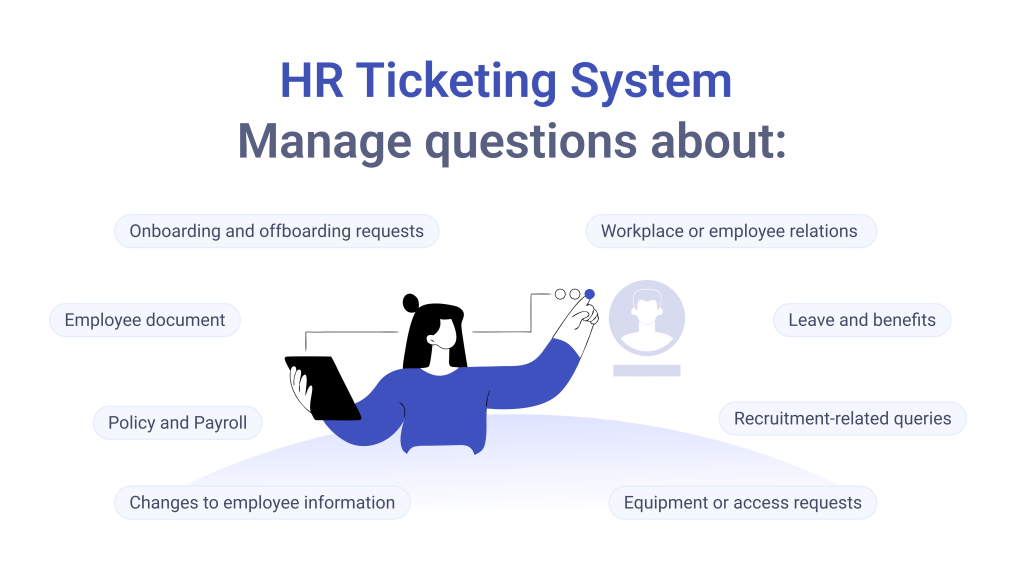
Modern HR help desks are also going beyond basic ticket tracking. Many now include knowledge bases, self-service portals, automation, AI assistants, reporting, workflows, and integrations with HR systems.
Why would I use a ticketing system for HR?
The first reason is simple: I would want one place to see what is happening
If employee requests are spread across email threads, Teams messages, Slack conversations, spreadsheets, and individual inboxes, it becomes difficult to know what is still waiting for a response.
A ticketing system gives me a central queue. I can see what is open, who owns it, how long it has been waiting, what priority it has, and whether someone else needs to take action.
But I think the bigger benefit is consistency
An employee asking about parental leave should not have to wait three days simply because their email landed in the wrong person’s inbox. A good HR ticketing system gives requests a process. It gives employees a clearer way to ask for help
A ticketing portal or support channel gives them a simple starting point. They can select a request type, provide the necessary information, attach documents if required, and track the request instead of wondering whether their email was seen.
It gives HR teams better visibility. HR personnel can quickly see which requests are waiting, which ones have been assigned, and which ones are approaching an SLA or internal deadline. That becomes particularly useful as the HR team grows.
A lot of HR requests are predictable
Employees ask the same questions about leave policies, benefits, payroll dates, expense policies, onboarding, and company procedures. Instead of answering the same question manually every time, you can use a knowledge base, automated responses, forms, or an AI assistant to handle some of that workload.
It makes handoffs easier
Some employee requests involve more than HR. For example, an onboarding request may involve HR, IT, facilities, and a hiring manager. A structured support ticket makes it easier to assign tasks, involve other teams, and keep the original request moving without losing the context.
What features to look for in an HR ticketing system?
I would not choose an HR ticketing system simply because it has the longest feature list. I would start with the workflow.
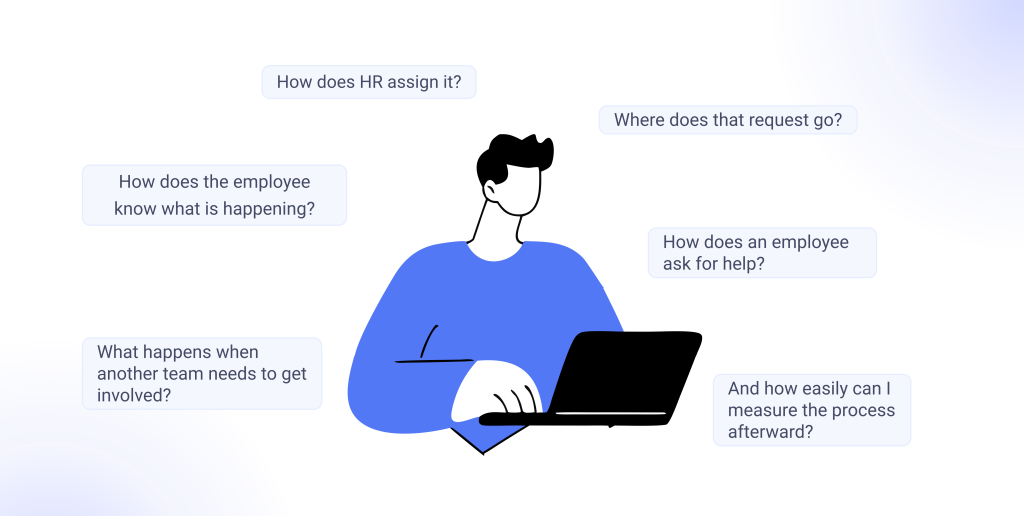
These are the features I would pay the most attention to.
1. Ticket management
This is the obvious one, but it is still the foundation. I would look for ticket creation, assignment, status tracking, priorities, categories, internal notes, attachments, conversation history, and clear ownership.
2. Multiple ways to submit requests
I would not force every employee into a completely separate portal if they already spend their day somewhere else.
Depending on the company, useful channels could include:
- Employee portal
- Microsoft Teams
- Web forms
- Chat or AI assistants
3. Automation and routing
I would want the system to automatically send requests to the right person or team. For example, a payroll question could go directly to payroll, while an onboarding request could go to the HR operations team.
Automation should also handle notifications, escalations, ticket categorization, assignments, and repetitive follow-ups.
4. Knowledge base and self-service
This is one of the features I would prioritize. Employees should not have to create a ticket every time they want to know how many days of annual leave they receive.
A searchable knowledge base can answer those questions before a ticket is created.
5. Employee-facing portal
A good employee portal should make it easy to:
- Search for answers
- Submit requests
- Check ticket status
- Add information
- Reply to HR
- Find relevant policies and documents
I would also pay attention to how simple the portal feels.
6. Approvals and workflows
HR processes often involve approvals. A system should be able to support workflows for things such as onboarding, employee changes, leave-related requests, equipment requests, or other processes that require multiple people to take action.
For more complex organizations, I would also look for conditional workflows and multiple approval levels.
7. Reporting and analytics
I would want to know more than the number of tickets closed. Useful reports could include response times, resolution times, ticket volume by category, SLA performance, employee satisfaction, and workload by team or agent.
8. Security and access controls
HR tickets can contain highly sensitive employee information. That makes permissions particularly important. I would look for role-based access, audit trails, secure authentication, data protection controls, and the ability to restrict sensitive information to the right people.
9. Integrations
The HR ticketing system should not become another isolated system. Depending on the organization, I would look for integrations with HRIS platforms, Microsoft 365, Teams, Slack, payroll systems, identity providers, automation tools, and other applications already used by the company.
10. AI and automation
AI is becoming a bigger part of employee support. So, i would look at practical use cases rather than simply checking whether a product has an “AI” label.
- Can it answer questions using the company’s own HR knowledge base?
- Can it summarize conversations?
- Can it suggest replies?
- Can it classify and route requests?
- Can it resolve straightforward questions without human involvement?
Those are the capabilities that can actually make a difference to an HR team.
What I learned from Reddit discussions about HR ticketing
I also wanted to look at what people actually say about HR ticketing systems outside vendor websites.
One Reddit discussion in r/sysadmin stood out because the problem was very familiar. A company with more than 2,000 employees was handling HR and payroll requests through Microsoft Forms and Power Automate, but the process had become chaotic. They were looking for a proper HR service management or ticketing system to handle things such as recruitment requests, work permits, employee changes, integrations, and reporting.
What I found interesting was that the responses did not simply say, “Here is the best HR ticketing tool.”
Some people argued that the company was actually looking for an HRIS rather than a ticketing system. Others suggested ServiceNow, Zoho People, ManageEngine, or Workday.
That distinction is important.
I would not automatically buy an HR ticketing system just because HR is receiving a lot of questions. If the underlying problem is employee records, payroll, benefits administration, recruiting, or workforce management, an HRIS may be the more appropriate investment.
I also found a more recent discussion in r/humanresources where an HR team was considering a ticketing system for a company of around 120 employees. The team was small, and the main requirements were routing, Slack integration, and keeping costs under control. The responses were mixed, with some people arguing that a team that size might not need a dedicated ticketing system at all and could instead improve self-service.
That is another point I would take seriously.
An HR ticketing system is not automatically the answer to every HR support problem. If most employee questions can be answered with a good knowledge base and a simple request process, I would start there.
Best HR ticketing systems for employee support
After looking at the options, I would put the following tools on my shortlist.
Desk365, Microsoft 365 and Teams-focused organizations, Teams support, ticketing, automation, AI, knowledge base, approvals
Zendesk, Larger teams that want a mature service platform, Ticketing, AI, automation, reporting, self-service
ServiceNow HR Service Delivery, Large enterprises with complex HR processes, Enterprise workflows, case management, integrations
Hiver, Teams that want to manage HR requests from email, Shared inbox, ticketing, automation
Zoho People, Organizations already using Zoho, HR workflows, employee records, request management
HappyFox, Teams managing requests across multiple channels, Omnichannel ticketing and workflow automation
InvGate Service Management, Organizations combining HR and IT service management, Workflow automation and enterprise service management
I would not treat this as a universal ranking. Each tool solves a slightly different problem.
Here is how I would look at them.
Yes. I’d make each review short, opinion-led, and consistent, so the reader can quickly understand why they should consider each tool without reading a mini product page for every one.
| HR Ticketing System | Best For | Key Features |
|---|---|---|
| Desk365 | Microsoft 365 and Teams-focused organizations | Teams support, ticketing, automation, AI, knowledge base, approvals |
| Zendesk | Larger teams that want a mature service platform | Ticketing, AI, automation, reporting, self-service |
| ServiceNow HR Service Delivery | Large enterprises with complex HR processes | Enterprise workflows, case management, integrations |
| Hiver | Teams that want to manage HR requests from email | Shared inbox, ticketing, automation |
| Zoho People | Organizations already using Zoho | HR workflows, employee records, request management |
| HappyFox | Teams managing requests across multiple channels | Omnichannel ticketing and workflow automation |
| InvGate Service Management | Organizations combining HR and IT service management | Workflow automation and enterprise service management |
I would not treat this as a universal ranking. Each tool solves a slightly different problem. Here is how I would look at them.
Yes. I’d make each review short, opinion-led, and consistent, so the reader can quickly understand why they should consider each tool without reading a mini product page for every one.
I’d put Desk365 high on my list if my company already relies heavily on Microsoft 365 and Teams. Employees can submit and track tickets directly in Teams, while HR teams get ticket management, automation, SLAs, approvals, a knowledge base, and AI-powered support.
What I particularly like is the Teams AI Agent that’s in their roadmap, which can help employees find answers without having to create a ticket for every question. That makes Desk365 useful when I want to combine self-service with human support.
I would say it is best for companies that use Microsoft Teams and want an easy-to-manage employee helpdesk.
I’d consider Zendesk when I need a mature ticketing platform with strong automation, reporting, AI, and self-service capabilities. It can handle HR support alongside other internal service teams, which makes it a good option for organizations looking for a broader service platform.
The main thing I’d watch is cost and complexity. For a smaller HR team with straightforward requirements, I think there are simpler options.
I feel it is best for mid-sized and large organizations that need a mature service platform.

I’d look at ServiceNow when HR support involves complex workflows, multiple departments, approvals, and enterprise-level processes. Its HR Service Delivery offering goes well beyond basic ticketing and is designed for organizations with more sophisticated employee service needs.
I would say it is best for large enterprises with complex HR service workflows. I wouldn’t choose ServiceNow for a small HR team unless there was a clear need for its broader capabilities.
If my HR team already works from a shared Gmail inbox, I’d consider Hiver. It adds helpdesk features such as ticket assignment, automation, SLAs, and reporting without forcing the team to completely change how it handles email.
I think it makes the most sense for teams that want to bring structure to an existing email-based process rather than move to a full service desk.
I’d say it is best for small and mid-sized HR teams managing requests through email.

I’d consider Zoho People if I wanted employee management and HR support in the same platform. Along with core HR features, it supports employee requests, workflows, and HR service processes.
The advantage is having more of the HR function in one place. The limitation is that I wouldn’t compare it directly with a dedicated helpdesk if ticket management is my primary requirement.
I feel it is best for companies already using Zoho or looking for an HR platform with employee support.
I’d look at HappyFox if employees contact HR through several channels and I want those requests brought into one ticketing system. It supports ticketing, automation, knowledge management, self-service, and multiple support channels.
I’d mainly compare its workflow capabilities and pricing against other dedicated helpdesk platforms before making a decision.
I’d consider HappyFox for HR teams handling employee requests across multiple channels.
I’d consider InvGate when I want HR and IT to work from a broader service management platform. It offers ticketing, workflows, automation, knowledge management, reporting, and asset management.
For me, its biggest advantage is the ability to support a wider employee service strategy. If I only need basic HR ticketing, though, I’d probably look at a simpler tool first.
I’d say it is best for organizations combining HR and IT service management.
How I would choose the best HR ticketing system
After comparing these tools, I would not start with the question, “Which one has the most features?”. I would start with these questions instead:
1. Where do employees already ask for help?
If everyone uses Microsoft Teams, I would prioritize a tool with strong Teams support. If most requests arrive through email, I would look more closely at shared-inbox and email-based tools. And, if employees work across Slack, Teams, email, and portals, I would look for a platform that can centralize those requests.
2. How large is the HR team?
A two-person HR team probably does not need the same platform as an HR organization supporting 50,000 employees. I would be careful about buying enterprise software simply because it has enterprise features.
3. How complicated are the workflows?
If most requests are simple questions, I would prioritize knowledge management, self-service, and easy ticketing. If I need multi-step approvals, onboarding workflows, employee changes, regional processes, and complex integrations, I would put more weight on workflow automation and service management capabilities.
4. Do I already have an HRIS?
This is one of the first things I would check. An HR ticketing system should complement the HRIS rather than duplicate everything it already does. If my HRIS already handles employee records, payroll, leave, and benefits, I may only need a better employee support layer on top.
5. How much self-service can I provide?
I would not want to create a ticket for every question. If an employee can find the answer in a good knowledge base, that is usually better for everyone. A strong HR support setup should combine self-service + automation + human support, rather than relying entirely on tickets.
6. How sensitive is the information?
HR requests can contain personal and confidential information. I would therefore look closely at permissions, authentication, audit logs, encryption, data handling, and access controls before making a decision.
7. How quickly can I get it running?
This is easy to overlook. I would ask the vendor to show me what implementation actually looks like. Can I get the basic employee support workflow running in days? Or am I looking at months of configuration before employees can submit their first request? The answer can make a huge difference, especially for smaller HR teams.
What is the best HR ticketing system?
I don’t think there is one answer that works for every HR team. If I were supporting a large enterprise with complex employee service workflows, I would look closely at ServiceNow HR Service Delivery. If I wanted a mature support platform that could serve HR alongside other service teams, I would consider Zendesk.
If my organization already used Zoho for HR, Zoho People would be a logical option. If most HR communication happened through email, Hiver would be worth considering. If I needed multi-channel HR ticketing, I would look at HappyFox. And if I wanted to combine HR and IT service management, I would consider InvGate.
For a Microsoft 365-focused organization that wants a straightforward helpdesk, I would put Desk365 high on my list.
The biggest reason is that I would not have to force employees to learn an entirely new communication environment. With its Microsoft Teams integration, employees can raise and track support requests where they already work, while the HR or support team can manage the underlying tickets, workflows, SLAs, automation, and knowledge resources.
And before I invest in one, I would make sure I actually need a ticketing system in the first place. If a better knowledge base and a simple request process can solve most of the problem, I would start there.
Frequently asked questions
An HR ticketing system helps HR teams receive, organize, assign, track, and resolve employee requests. Employees can submit questions or requests through channels such as email, portals, Microsoft Teams, or Slack, while HR teams manage them through a centralized ticketing system.
HRIS is the system that manages core candidate and employee information, and HR processes like resumes, background checks, offer letters – everything that happens before someone is hired. A HR ticketing system manages employee support requests like laptop issues, access permissions, onboarding, off-boarding, – everything that happens after someone is hired .
Some HR teams do. Consider implementing a HR ticketing system when employee requests have become difficult to manage through email, chat, spreadsheets, or a shared inbox.
Yes. Some helpdesk platforms allow employees to submit and track support requests directly through Microsoft Teams. This can be useful for organizations where Teams is already the primary workplace communication platform.
Look for ticket management, employee self-service, knowledge management, automation, routing, workflows, approvals, reporting, security, integrations, and AI capabilities.