TL;DR: Desk365 vs Spiceworks
Spiceworks is a good fit for IT teams that want a free help desk for basic ticketing, reporting, and asset tracking. Desk365 is built for teams that need more flexibility in how they manage support, especially if they already use Microsoft 365 and Teams.
Spiceworks offers a free Core plan and a Premium plan starting at $6 per user per month. Desk365 starts at $12 per agent per month, with Plus at $22 and Premium at $32. It also offers a 21-day free trial.
If your main goal is to keep costs low while handling everyday IT requests, Spiceworks makes sense. But if you want employees to raise tickets directly through Microsoft Teams, more options for automation and ticket assignments, AI capabilities, approval management, and asset management in the same platform, Desk365 is worth considering. It comes down to what your team needs today and how much you expect your support workflows to grow.
Spiceworks has been a go-to help desk for IT teams, giving teams ticketing, inventory, reporting, and other core help desk tools without a big price tag. For a small IT team, that can be enough. But the reason some teams start looking for a Spiceworks alternative isn’t that ticketing stops working. It is because the rest of their IT environment is starting to change.
Microsoft Teams becomes the place employees already go to ask for help. IT teams want tickets to follow more structured workflows. They need better automation, more control over assignments, or want their help desk and asset information connected in one place. At that point, the question becomes less about finding another ticketing system and more about finding one that fits the way the team already works.
That’s where a Desk365 vs Spiceworks comparison becomes useful. It helps IT teams look beyond basic ticketing and evaluate how each platform fits into their existing workflows and Microsoft 365 environment.
That came through in one Capterra review from a team that switched from Spiceworks to Desk365. The reviewer specifically pointed to Desk365’s Microsoft 365 and Teams integration as a reason for making the move.
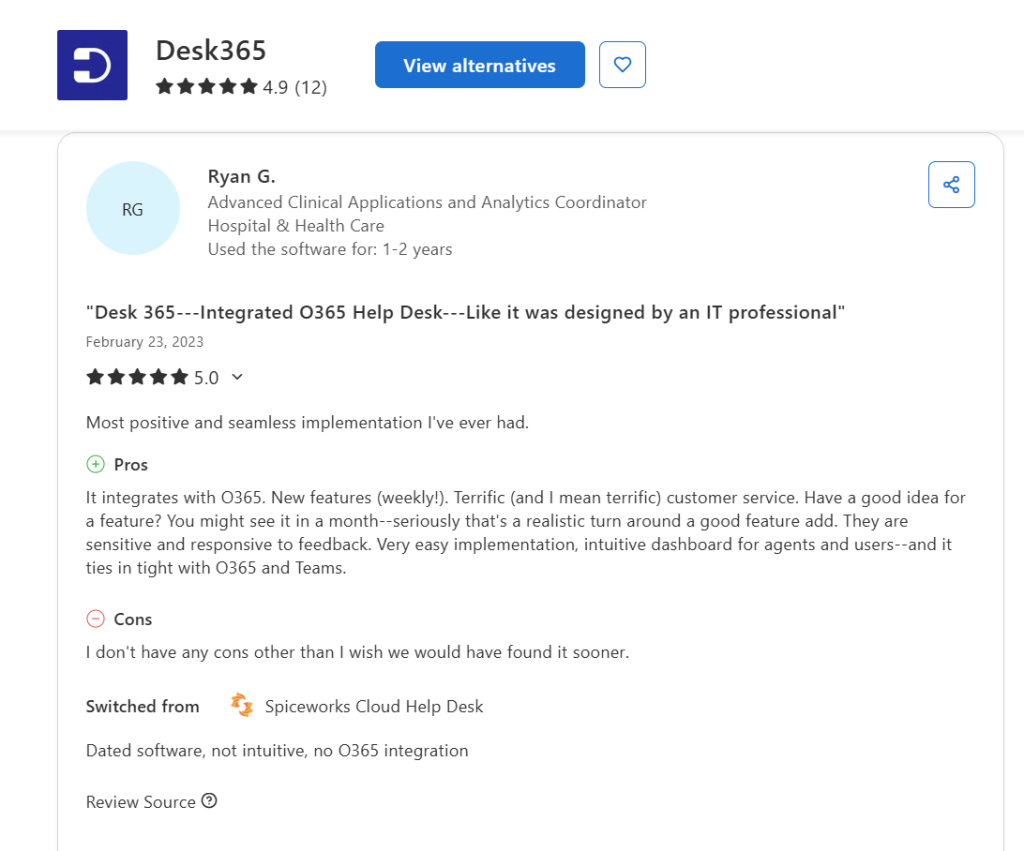
The team wasn’t simply looking for another place to manage tickets. They were looking for a help desk that fits more naturally into the tools they were already using.
That’s the comparison I want to focus on here. Rather than giving you another list of 10 or 15 Spiceworks alternatives, I’m putting Spiceworks and Desk365 side by side across the areas that can actually affect that decision: ticketing, Microsoft Teams, automation, asset management, reporting, AI, integrations, and pricing.
One quick disclaimer: this is a Desk365 comparison, so we naturally have a preference for our own product. I’ve tried to keep the comparison fair and call out where Spiceworks still makes sense, rather than simply presenting Desk365 as the winner across the board.
A note on how we approach our comparisons
At Desk365, we aim to publish well-researched, practical content that helps IT teams make informed decisions. We look at product features, pricing, customer reviews, and real user experiences to give you a clearer picture of what each tool offers. If you find our content helpful, you can set Desk365 as a preferred source in Google to make it easier to find our content in future searches.
Why are teams looking for a Spiceworks alternative?
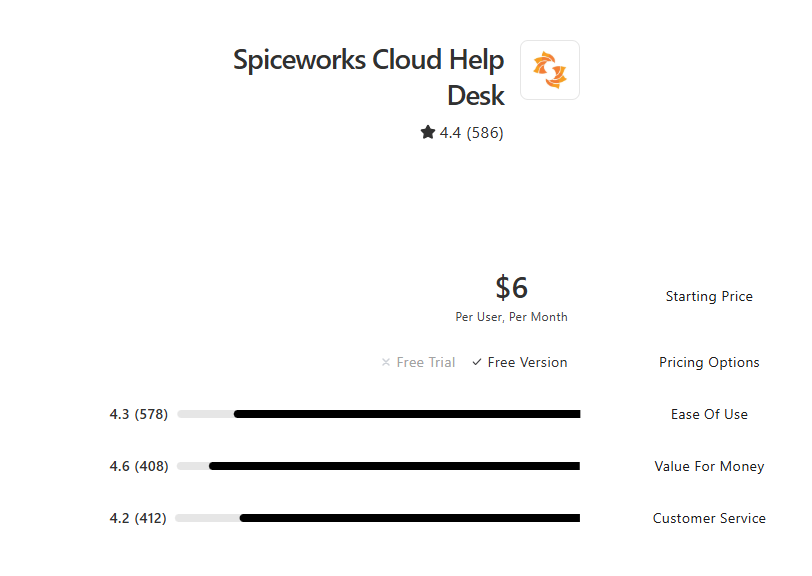
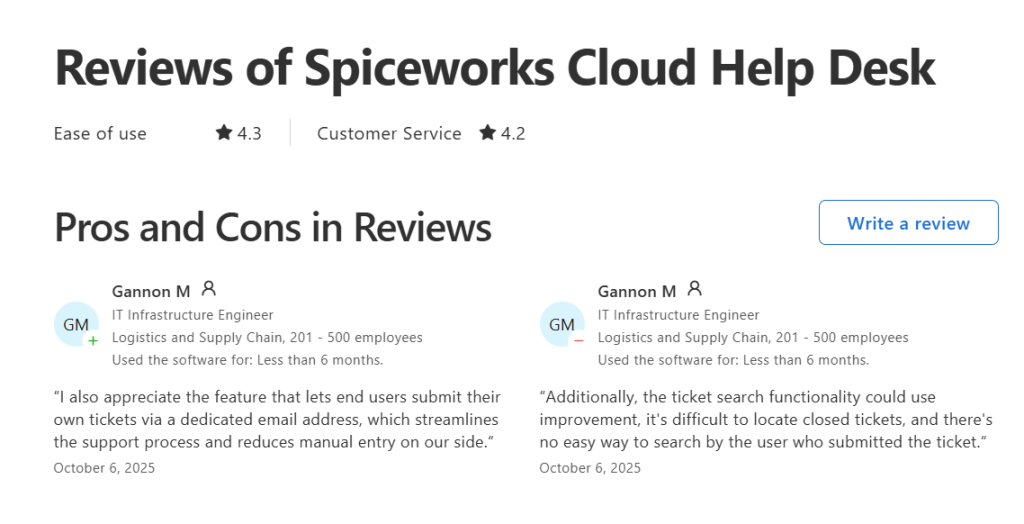
People still like Spiceworks for its simplicity, value, ticketing, and asset management, but different teams start looking elsewhere when their requirements become broader. For small IT teams, the price was a big part of the appeal. That still comes through in user reviews. As of September 2026, Capterra gives Spiceworks Cloud Help Desk a 4.4/5 rating, with ease of use rated 4.3/5. Recent reviewers describe it as easy to set up, useful for small businesses, and effective for basic ticket management.
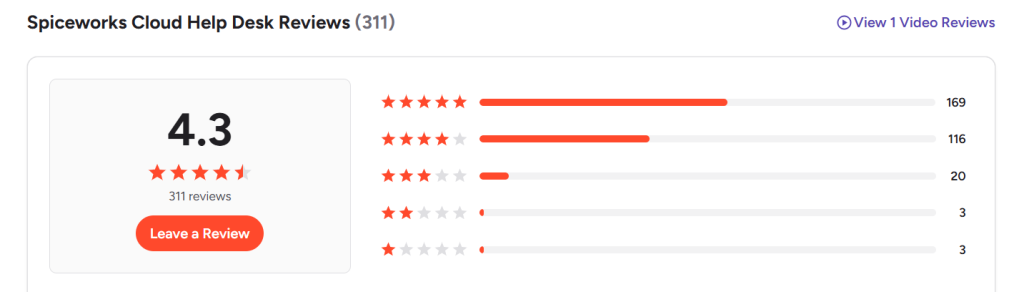
G2 shows a similar picture, with Spiceworks Cloud Help Desk at 4.3/5. Users highlight ticket submission and tracking, alerts, reporting, and team collaboration among the things they like about the product.
But why are people looking elsewhere? For many teams, the issue is less about basic ticketing and more about what comes around it.
Users mention:
- limited reporting
- fewer customization options
- integration challenges
- mobile app gaps, and
- delayed email notifications in their reviews.
One Capterra reviewer described Spiceworks as a strong starting point but said its ticket-flow capabilities eventually became limiting.
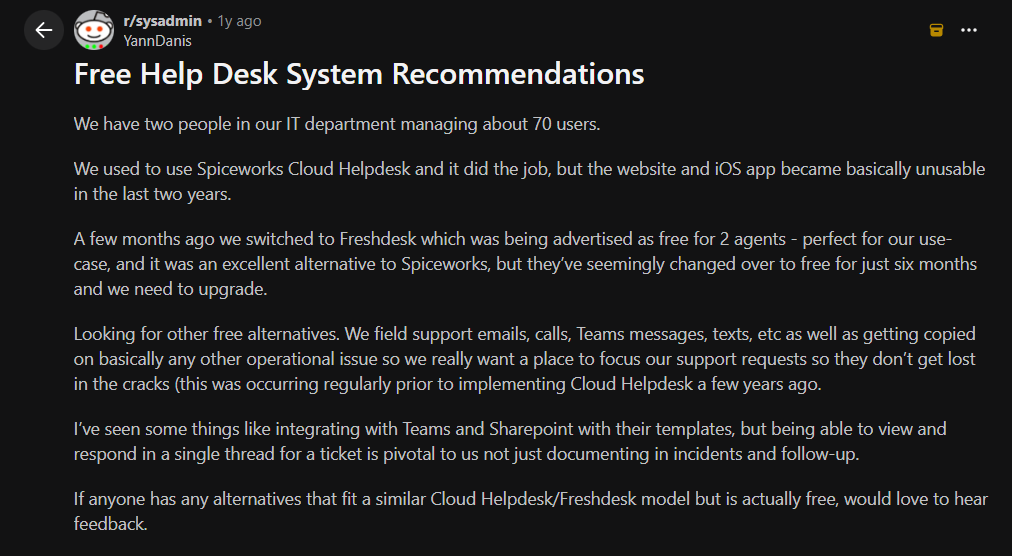
The same conversation shows up on Reddit. In one r/sysadmin thread, an IT team that had moved away from Spiceworks was looking for a system that could bring support requests from email, calls, Teams, and texts into one place. They also mentioned about moving away from Spiceworks because its website and iOS app had become difficult to use.
There is also a separate issue for teams that relied on the older on-premises version. In r/sysadmin, users looking for an alternative to Spiceworks on-premises pointed to the need for a replacement that could cover both ticketing and IT asset tracking. Suggestions included GLPI, osTicket, and combining separate ticketing and asset management tools.
That explains why “Spiceworks alternatives” means different things to different IT teams. Let’s put Spiceworks and Desk365 side by side and look at the areas that matter most to IT teams, from ticketing and asset management to Microsoft Teams, automation, and AI.
Desk365 vs. Spiceworks
I looked at product features, pricing, G2 reviews, Reddit discussions, ease of setup, automation, integrations, asset management, Microsoft Teams support, and what users actually seem to like and dislike about both products.
What’s actually different?
Spiceworks and Desk365 both cover the basics of an IT help desk:
- ticket management
- email-to-ticket,
- Reporting
- self-service, and
- Workflows
The bigger difference shows when you look at what sits around those core features.
Pricing
Spiceworks has a major advantage on price. Its Core plan is free, while its Premium plan starts at $6 per user per month. Capterra gives it a 4.6/5 rating for value for money, and reviewers often point to its free plan as one of its biggest strengths.
Desk365 takes a paid-plan approach, starting at $12 per agent per month, with Plus at $22 and Premium at $32. It also offers a 21-day free trial. Instead of competing with Spiceworks on being free, Desk365 puts more functionality into its paid plans, including Microsoft Teams ticketing in Standard, AI features and approval management in Plus, and IT asset management and advanced security features in Premium.
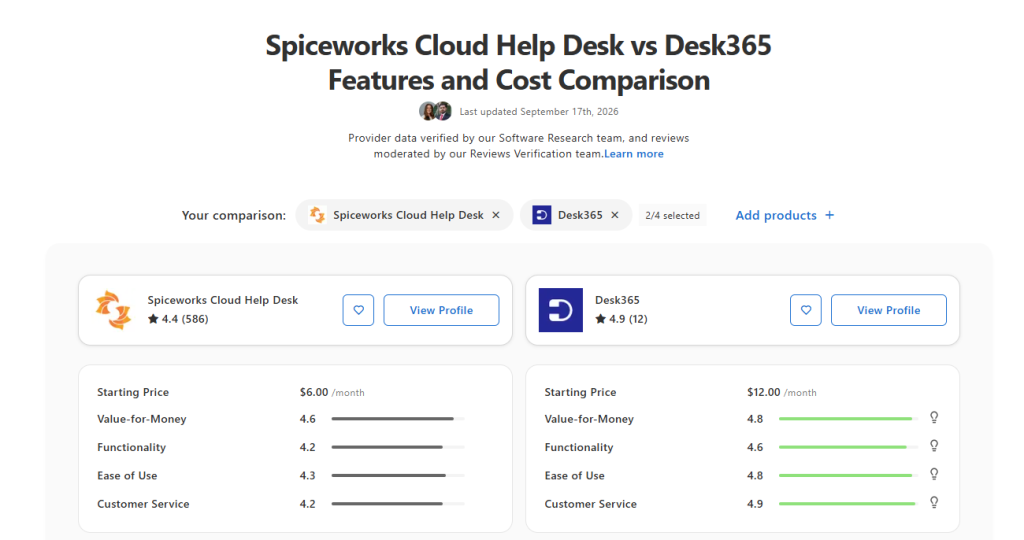
If your main goal is to get a basic IT help desk at the lowest possible cost, Spiceworks has a strong case. If your team is looking for a help desk that connects more closely with Microsoft 365 and gives you more room to build automated workflows, Desk365 brings a different set of capabilities to the table.
Ticketing and day-to-day help desk work
Both platforms handle the core ticketing workflow. Users can submit requests, agents can assign and respond to tickets, and teams can track issues through to resolution.
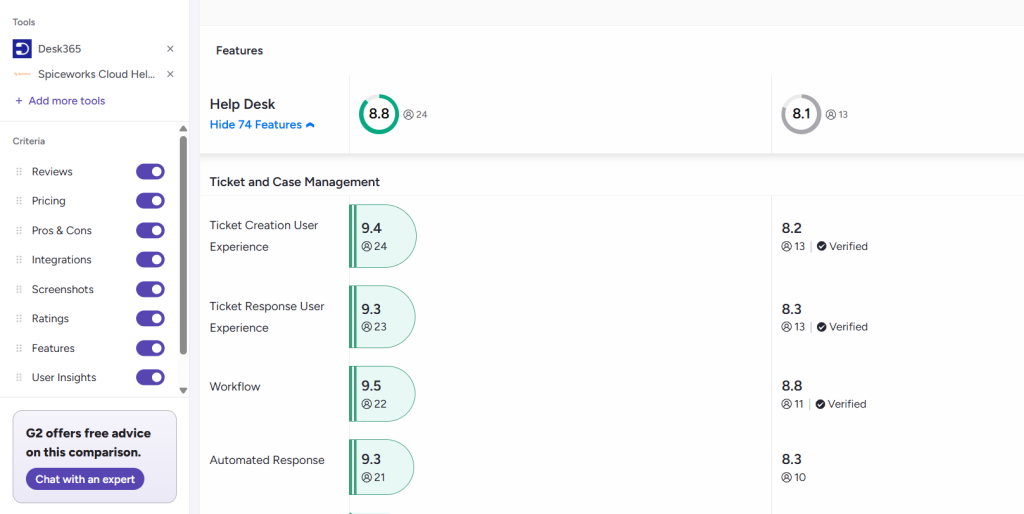
G2’s comparison data shows relatively strong scores for both products in core ticketing areas. Desk365 scores 9.4 for ticket creation user experience, 9.2 for ticket response, and 9.5 for workflow. Spiceworks scores 8.2, 8.3, and 8.8 in the same areas. Spiceworks, however, scores 9.0 for its customer/contact database compared with Desk365’s 8.9.
The Capterra reviews tell a similar story from a different angle. Spiceworks users frequently mention how easy it is to set up and use. One recent reviewer described it as a good basic SaaS help desk for day-to-day IT incident management. Another highlighted the dedicated email address that lets employees submit their own tickets.
Desk365 also gets strong feedback for ease of use and implementation. Capterra currently shows a 4.8/5 rating for ease of use and 4.9/5 for customer service. As mentioned in the introduction of this article, a reviewer who switched from Spiceworks specifically cited the integration with Microsoft 365 and Teams as a reason for making the move.
Microsoft Teams integration
This is one of the clearest differences between the two platforms. Desk365 is built around the Microsoft ecosystem. Teams ticketing is included in the Standard plan, while Microsoft Entra ID sync is available in Plus. Desk365 also integrates with Microsoft Intune, Azure, Power Automate, and Microsoft 365 Copilot. That matters for organizations that already use Teams as the main place where employees communicate. Instead of asking users to leave Teams to submit and follow up on a support request, Desk365 lets them interact with the help desk from within Teams.
Spiceworks also has integrations and a long-standing ecosystem of tools and plugins. Its users often value how well the help desk works alongside other Spiceworks products. So, this comes down to the environment your IT team already works in. Spiceworks makes sense for teams invested in its ecosystem. Desk365 becomes particularly relevant for teams that run heavily on Microsoft 365 and want Teams to be part of the help desk itself.
From Spiceworks to Desk365
See how CMC uses Desk365 and Microsoft Teams to simplify its IT support workflow

Automation and workflows
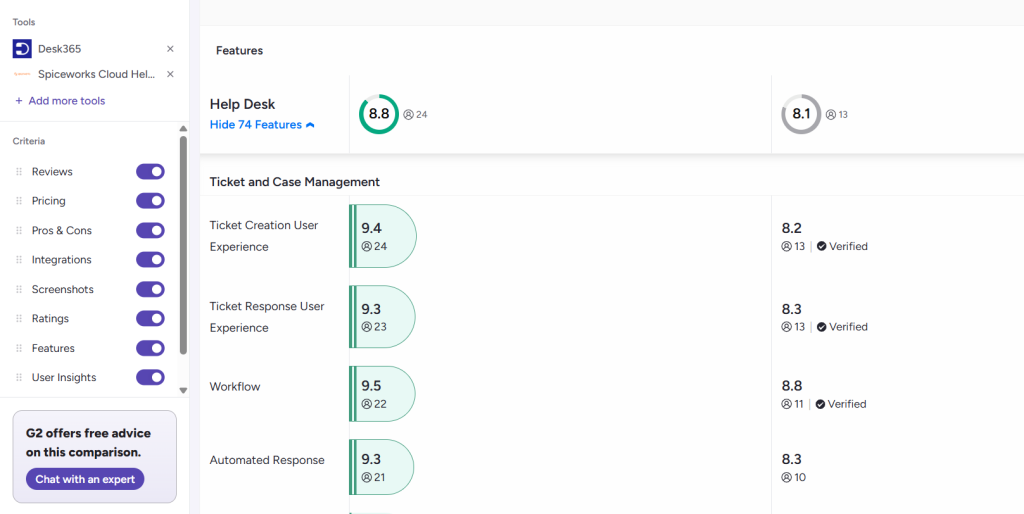
Both platforms offer automation, but Desk365 puts more emphasis on building structured workflows around the ticket lifecycle. G2’s comparison gives Desk365 a 9.5 rating for workflow and 9.3 for automated responses, compared with 8.8 and 8.3 for Spiceworks.
Desk365 also includes SLA reminders and escalations, automated ticket assignments, round-robin assignment, load-based assignment, time-based automation, and ticket closure rules across its plans. Spiceworks covers automated routing, alerts, reporting, and SLA management as well. Capterra lists automated routing, alerts and escalation, workflow management, and SLA management among its key features.
The difference becomes more noticeable when a team wants to build more detailed processes around its tickets. Desk365 gives teams more options for routing work, triggering actions, managing approvals, and handling different business hours or service rules as their processes become more complex.
Asset management
Asset management is an area where Spiceworks has a strong history. IT inventory has long been part of the Spiceworks experience, and Capterra reviews still mention inventory, software, and license management as reasons users get value from the platform. One reviewer described Spiceworks as having the IT asset management capabilities they needed, while another noted that the product covers the basics even though premium tools offer more features.
Desk365 also offers IT asset management, but it sits within the Premium plan. That includes asset lifecycle management, software management, product inventory, vendors, depreciation, and other asset-related capabilities.
For teams already comfortable with Spiceworks’ inventory tools, this is worth looking at closely rather than assuming that one platform automatically replaces the other. The important question is how you want assets connected to your help desk and what level of asset lifecycle management you need.
AI and newer help desk capabilities
This is another area where the products take different approaches. G2’s comparison currently lists Desk365 with ratings for AI text generation and AI text summarization, while Spiceworks does not have enough data in those categories for G2 to provide a comparable score.
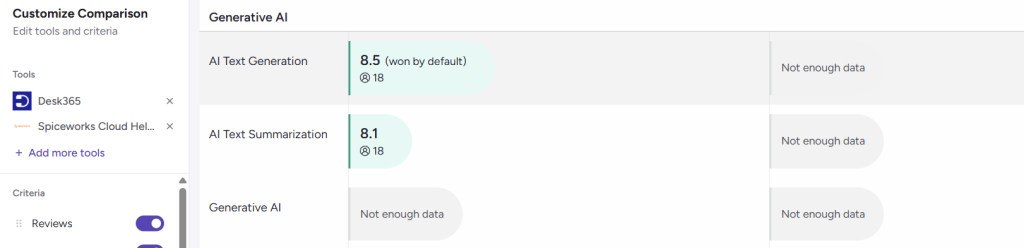
Desk365’s Plus plan includes AI ticket summaries, AI-generated knowledge base articles, and AI-assisted draft replies. Its AI Agent can also help automate parts of the support experience.
Spiceworks’ strength remains its straightforward IT help desk model. That can be an advantage for teams that want to keep their support process simple rather than add a large set of newer service management capabilities.
Reporting and visibility
Spiceworks includes reporting in its free Core plan, which adds significant value for smaller IT teams. Desk365 includes reporting across its plans, with custom reports in Standard and additional dashboards and scheduled reports in Plus. That gives teams more options when they want to build reporting around specific workflows, teams, or service targets.
Now that we’ve compared Spiceworks and Desk365, the real question is what you need your help desk to handle as your team and workflows grow. Spiceworks remains a practical option for teams that want straightforward ticketing, asset tracking, and a low-cost way to get an IT help desk running.
Desk365 matters when the requirements start moving beyond basic ticket management. Teams that already live in Microsoft 365, want employees to raise tickets through Teams, need more workflow and assignment options, or want to bring AI, approvals, and asset management into the same platform to have more capabilities to work with.