
The ticket was closed. The customer was happy. So why did the MSP still lose money on it?
A technician could have spent 15 minutes of troubleshooting, another 20 minutes on a customer call and another 25 minutes testing and documenting the fix. If those hours are not recorded accurately, the MSP may never get the full picture of how much effort went into resolving what looked like a simple issue.
This is where time entries at an MSP become more than a record of hours worked. They can show how much effort different customers, tickets and services actually require. Without that visibility, an MSP may struggle to identify unprofitable accounts, overloaded technicians, recurring work or services that consistently take more time than expected.
But effective time tracking is not simply about asking technicians to log every minute. The entries need to be timely, consistent and useful enough to support both day-to-day operations and bigger business decisions.
So, how can MSPs use time entries accurately to be effective for the business?
Here are five lessons to follow.
Lesson 1
Make time entries part of the ticket workflow
The longer a technician waits to record time, the harder it becomes to remember exactly what was done.
A ticket may involve troubleshooting, customer calls, remote sessions, research, follow-ups and documentation. Trying to reconstruct all of that at the end of the day can easily lead to missing or inaccurate entries.
Real-time or near-real-time tracking helps keep the work and the time entry connected. This becomes easier when technicians have a structured ticketing workflow where they can record their work as they move through each task. For MSPs evaluating their options, MSP ticketing systems can provide the workflow needed to keep ticket activity, time entries, and documentation connected.
A practical workflow is:
- Open the ticket before starting work.
- Start the timer or create the time entry.
- Record the key steps taken while working.
- Stop the timer when the task is complete.
- Add any final notes before moving to the next task.
The goal is not to make technicians spend more time documenting their work. It is to make documentation part of completing the work itself.
For MSPs, this can also reduce the amount of time spent trying to reconstruct a technician’s day later.
Lesson 2
Separate billable and non-billable time clearly
Not every minute spent by an MSP technician should be billed to a customer.
A technician may spend time resolving a client ticket, attending an internal meeting, completing training, researching an issue or working on internal documentation. Treating all activities the same can make time reports difficult to interpret.
MSPs should define clear rules for what counts as billable and non-billable work.
For example:
| Issue | Billable/non-billable |
|---|---|
| Customer-specific troubleshooting | Billable |
| On-site support covered by contract | Billable |
| Internal team meetings | Non-billable |
| Internal training | Non-billable |
| Internal documentation | Non-billable |
| Customer-requested project work | Billable, depending on the agreement |
The exact categories will depend on the MSP’s contracts and billing model. What matters is consistency.
This is particularly important for managed-service contracts. Even when a customer is not billed by the hour, time entries can show how much effort is being spent supporting that account. One MSP discussion noted that teams may use time entries for hourly clients to support billing and unlimited clients to demonstrate the value being delivered.
Clear categorization gives managers a better picture of where technician capacity is going and whether that time is aligned with the services being provided.
Lesson 3
Standardize how technicians record their time
Getting technicians to enter time is only half the challenge. The entry also needs to be detailed and meaningful.
An entry such as “worked on issue” may confirm that time was spent, but it tells very little about what actually happened.
A useful time entry should provide enough context for another technician, manager, or account team to understand the work without having to ask for clarification. For example, an entry such as “Worked on network issue” gives little context about what the technician actually did.
A more meaningful entry would briefly explain the problem, the steps taken to investigate it and the outcome:
“Investigated intermittent connectivity reported by the user and reviewed the switch logs to identify the cause. The logs pointed to a failing port, so the device was moved to an available port. Connectivity was then tested and confirmed with the user.”
This gives the next technician or manager a clear understanding of what happened without turning the time entry into a detailed report.
MSPs can standardize this by defining a few simple expectations:
- Record time against the correct ticket.
- Use consistent billable/non-billable categories.
- Briefly describe the work performed.
- Include the outcome or next step when relevant.
- Complete the entry before moving on whenever possible.
This also helps technicians who inherit tickets from someone else. Good time entries create a history of what was already tried, reducing duplicated troubleshooting.
In fact, MSP technicians discussing time-entry practices have highlighted that good notes and real-time entries can help another technician understand what was attempted if a ticket needs to be escalated or revisited later.
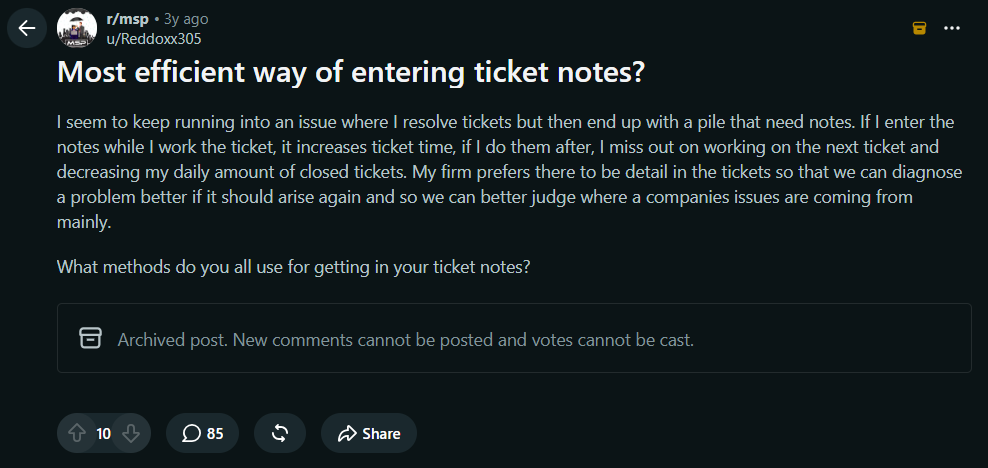
Source:Reddit
Lesson 4
Use time entries to find where MSP time actually goes
Time entries should not disappear into an invoice at the end of the month. They can reveal patterns that are difficult to see from ticket counts alone.
For example, an MSP may discover that:
- One customer consistently consumes more support hours than expected.
- Certain ticket categories take significantly longer to resolve.
- A recurring issue is generating unnecessary technician work.
- A particular application requires repeated troubleshooting.
- Senior technicians are spending too much time on routine tickets.
- A service included in a fixed-fee agreement is consuming more resources than expected.
This changes the role of time tracking. Instead of asking only, “How much time did we bill?” the MSP can start asking, “Why did this work take this much time?”
Time-tracking data can help MSPs understand customer profitability, resource allocation, recurring problems and when pricing or service agreements may need to be reviewed.
The same principle applies at the individual technician level. If one team consistently spends more time on a particular type of ticket, the issue may not be productivity. It could indicate a training gap, an inefficient process, missing documentation or a technical problem that needs to be addressed at its source.
Lesson 5
Turn time-entry data into better MSP decisions
Once an MSP consistently captures and categorizes time, the next step is to use that information to make better decisions.
Time data can support decisions around:
- Pricing: Are service agreements priced according to the effort required?
- Staffing: Does the team have enough capacity for the current workload?
- Workload planning: Which customers, services, or ticket types consume the most time?
- Process improvement: Which repetitive tasks could be automated or documented?
- Service reviews: Are customers receiving the level of service expected under their agreement?
- Resource allocation: Are highly skilled technicians spending too much time on routine work?
This is where time entries become more than a billing record.
For example, if an MSP notices that technicians repeatedly spend several hours each month resolving the same type of issue for one customer, that data could lead to a different conversation. The MSP might identify an underlying infrastructure problem, recommend a project, update the customer’s documentation or automate part of the process.
Time data can also help MSP owners understand where their own time is going. A recent discussion from MSP consultant Paul Green emphasizes that people often misremember how their working hours are distributed without tracking them.
For an MSP, the same principle applies across the organization; what gets measured consistently becomes much easier to understand and improve.
Make every logged minute count
Effective time tracking is not about forcing technicians to account for every minute simply because the system allows it.
It is about creating a reliable record of the work being performed and turning that record into something useful.
When time entries are captured as part of the ticket workflow, categorized consistently, documented clearly and reviewed regularly, they can support much more than billing. They can help MSPs understand customer profitability, technician capacity, recurring problems, service quality and where operational improvements are needed.
The real value of a time entry is not the number of minutes recorded. It is what those minutes can tell an MSP about the business.
Desk365 helps MSPs manage tickets, track time, automate workflows and gain better visibility into their support operations. Start a 21-day free trial to explore Desk365 or request a demo to see how it can fit into your MSP workflow.