Support requests pile up fast once you cross ten clients. One email lands in a technician’s inbox. Another comes through a call nobody logs. By the time a third client pings you on Teams, nobody remembers what got fixed and what’s still open.
This isn’t just annoying; it’s how MSPs lose clients. A request sits in one technician’s inbox. That tech calls in sick, and no one else even knows the request exists. Three days later, the client calls asking why nothing happened, and there’s no good answer, because nobody owns it and nobody can see it.
A regular help desk tool doesn’t fix this. MSPs need something built for a different problem: dozens of client accounts, each with its own SLA, each expecting its own branding, all funneling into one team. Every request needs to be tracked, assigned, and billed automatically, so nothing depends on one technician’s memory or a quiet Tuesday email inbox.
This post compares the 9 tools MSPs use most for ticketing in 2026, starting with Desk365, and works through pricing, RMM and PSA integration, and where each tool actually fits.
TL;DR - Best MSP Ticketing system shortlist
- Desk365 – Microsoft Teams-native helpdesk with SLA tracking and automation, built for lean MSPs already living in Microsoft 365.
- ConnectWise PSA – The deepest, most established PSA on the market, best for larger MSPs with complex processes.
- Autotask PSA – Tightly integrated with Datto RMM, a strong fit for MSPs already in the Kaseya ecosystem.
- HaloPSA – One price tier, every feature included, popular with MSPs leaving ConnectWise or Autotask.
- SuperOps – Modern unified PSA and RMM platform with AI-driven automation, built for smaller MSPs.
- Syncro – RMM, PSA, and ticketing in one system, priced per technician with unlimited endpoints.
- Freshservice – ITIL-aligned ITSM tool for MSPs whose clients expect formal service management.
- Zendesk – Strong at omnichannel client communication, weaker on MSP-specific billing and multi-tenancy.
- Zoho Desk – Budget-friendly helpdesk, a good fit for smaller MSPs already on Zoho CRM.
Why you can trust our reviews
When I review MSP ticketing systems, I look beyond the features listed on a website and consider what real users are saying – customer reviews, ratings, and firsthand discussions on places like Reddit. Full disclosure: I work at Desk365, so there may be some inherent bias here. To offset that, I based these rankings on public reviews, ratings, and real-world discussion rather than my opinion alone.
Pricing, ratings, and review details are accurate as of August 2026 and may change over time.
What makes an MSP ticketing system different from a help desk
An MSP ticketing system supports multiple client organizations from one platform, with each client’s data, SLA, and branding kept separate. A regular help desk supports one organization.
The difference shows up in three places. First, multi-tenancy: an MSP tool isolates data per client while still giving technicians one unified queue. Second, RMM integration: when a monitoring tool detects a failed backup or an offline device, the ticket should appear automatically, with device context attached. Third, billing: closing a ticket should feed logged time straight into an invoice, not into a separate spreadsheet someone reconciles by hand.
A tool missing any of these three still works as a ticketing system. It just is not built for MSP operations specifically, and the gap shows up the moment you cross ten or fifteen clients.
The 9 best MSP ticketing system, reviewed
Here are the ticketing tools that stood out after all my testing. For each one, I put together an easy-to-read overview that highlights what the tool does well, where it might fall short, the integrations it supports, and the situations where it works best. Some of these options include a fully free plan, while others only give you a limited trial, so I made sure to point out exactly what you can access at no cost. The goal is to help you quickly figure out which tool fits the way your team works.
| Tool | Best for | Multi-tenant | RMM/PSA Integration | Starting Price | Free Trial |
|---|---|---|---|---|---|
| Desk365 | Teams-native MSPs, SMB clients | Limited | No native RMM; helpdesk only | Free (3 agents), then $12/agent/mo | Yes |
| ConnectWise PSA | Large, complex MSPs | Yes | Deep, native ecosystem | Custom quote (~$25–65/user/mo) | Yes (14 days) |
| Autotask PSA | Datto RMM users | Yes | Native with Datto RMM | Custom quote (~$85–130/tech/mo) | Custom |
| HaloPSA | MSPs migrating off legacy PSAs | Yes | 250+ integrations | ~$90–115/agent/mo | Yes (30 days) |
| SuperOps | Smaller, modern MSPs | Yes | Native unified PSA + RMM | $79/tech/mo (PSA only) | Yes (14 days) |
| Syncro | Per-technician pricing, unlimited endpoints | Yes | Native unified RMM + PSA | $129/tech/mo | Yes |
| Freshservice | ITIL-focused clients | Limited | No native RMM | $19/agent/mo | Yes (14 days) |
| Zendesk | Client communication first | No | No native RMM/PSA | $19/agent/mo | Yes (14 days) |
| Zoho Desk | Budget-conscious, Zoho users | No | No native RMM/PSA | Free (3 agents), then $7/agent/mo | Yes |
1. Desk365
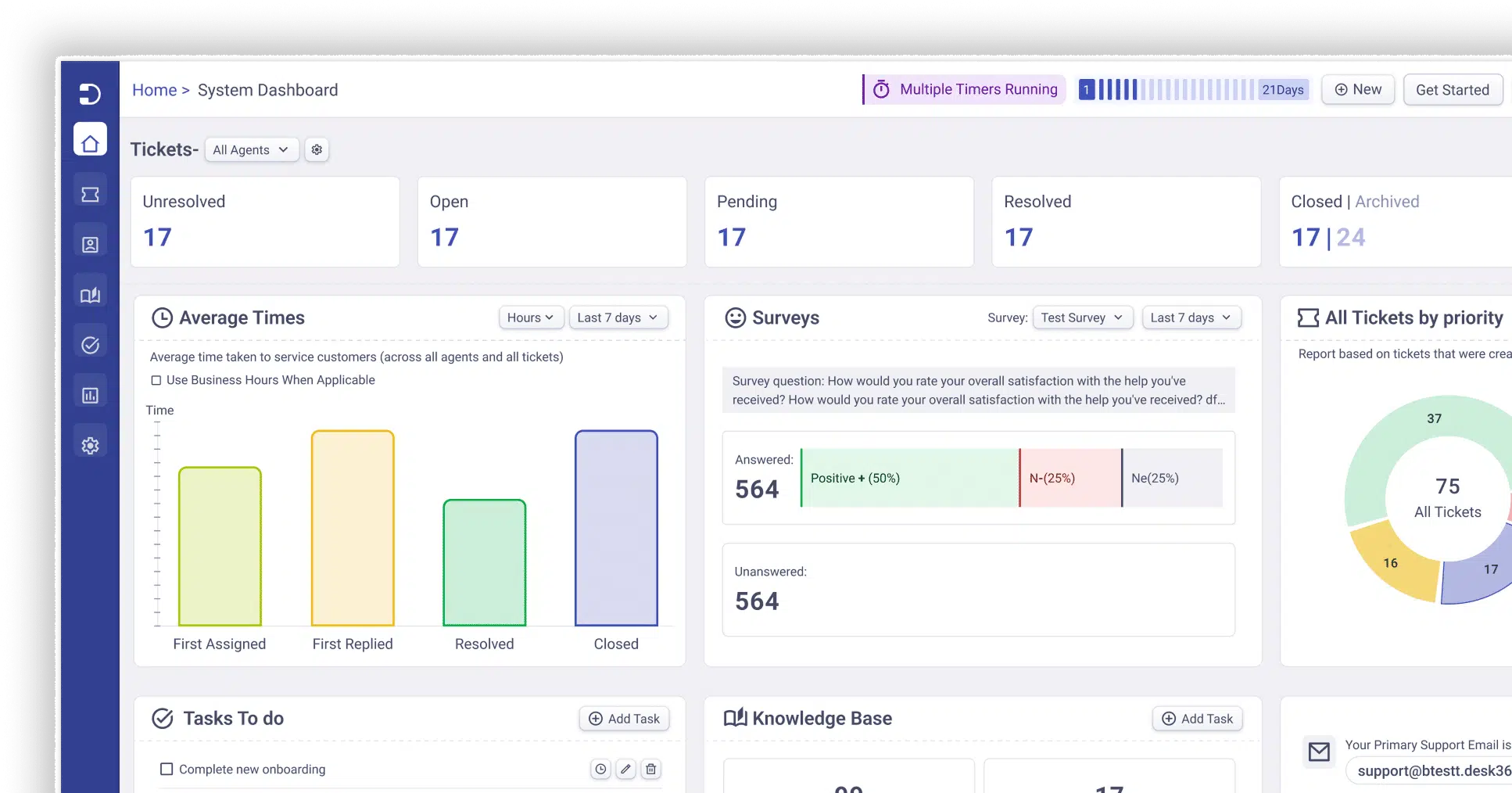
Desk365 is a Microsoft Teams-native helpdesk built for teams that already run their business inside Microsoft 365. It handles tickets across email, Teams, web forms, and a customer portal, all from one shared inbox.
Rating: 4.9/5
Why it earned its spot for MSPs
Most MSP tools force technicians to leave their communication platform to manage tickets. Desk365 flips that: agents triage, assign, and resolve tickets directly inside Teams, so there is no tab-switching between chat and ticketing. For MSPs serving SMB clients who want solid SLA tracking, workflow automation, and Microsoft Entra SSO without a full PSA’s price tag or setup time.
What customers are saying
G2 reviews put Desk365 at 4.9 out of 5, a score it also holds across Capterra, Software Advice, and GetApp. That said, with 30+ reviews on G2. Reviewers consistently point to the Teams integration and responsive support as the standout, with complaints mostly limited to customization options.
Desk365 features:
- Native Microsoft Teams ticketing, alongside email, web portal, and web widget channels
- SLA setup, tracking, and automated escalation reminders
- Workflow automation, round-robin and load-based ticket assignment
- Knowledge base with AI-assisted article generation (Plus and Premium plans)
- Change and approval management (Plus and Premium plans)
- Microsoft single sign-on and Microsoft 365 Copilot integration
- Built-in GDPR and HIPAA compliance on every plan, including Free
Pros
- Fastest setup among tools on this list if you are already on Microsoft 365
- Affordable entry point compared to full PSA platforms
- Frequent feature releases, closing the gap with larger ITSM tools
Cons
- No native RMM or billing automation, so MSPs needing ticket-to-invoice workflows will need a separate PSA or manual billing process
- Multi-tenancy is lighter-touch than a dedicated PSA, good enough for most SMB-focused MSPs, but operations juggling a large, complex client roster may want deeper per-client isolation than a helpdesk-first tool provides
Desk365 pricing:
Free plan for up to 3 agents and 50 tickets a month. Standard is $12 per agent per month, Plus is $20, and Premium is $32, all billed per agent per month.
What MSPs say about Desk365 as their ticketing system
CTS UK, a managed IT services provider based in the UK, replaced Freshdesk with Desk365 to manage ticketing across multiple client accounts from a single platform.
After switching, CTS UK used Desk365 to auto-convert client emails into tickets, track requests across separate clients, and centralize support operations that were previously spread across disconnected tools.
"We needed a platform that handled tickets, auto-created requests from emails, supported multiple clients, and simply worked."
Andrew Wilson, Service Delivery Manager, CTS UK
2. ConnectWise PSA
ConnectWise PSA is the ticketing and business-management platform most MSPs think of first. It combines service boards, time tracking, billing, and contract management into one system built around the technician workflow
Rating: 4/5
Why it earned its spot for MSPs
ConnectWise has the deepest feature set and the widest integration ecosystem of any tool on this list. For MSPs with 15 or more technicians and established, complex processes, that depth pays off. ConnectWise Sidekick, its AI layer, now handles ticket summarization and PowerShell script generation as part of a broader push toward automated triage.
What customers are saying
ConnectWise PSA carries a 4 out of 5 on G2 across 525 reviews and a 4.1 out of 5 on Capterra across 267 reviews. On TrustRadius, over half of reviewers commend its ticket management and time tracking proficiency, along with data visualization and KPI creation capabilities. The consistent theme across all three: deep functionality, but a steep learning curve and friction around cost/value, especially from the business side rather than day-to-day technicians
ConnectWise PSA features:
- Service boards with workflow automation for ticket routing
- Time tracking tied directly to billing and invoicing
- Deep integration with ConnectWise RMM, Automate, and hundreds of third-party tools
- Project management for larger, multi-phase client engagements
- ConnectWise Sidekick for AI-assisted ticket triage and scripting
Pros
- The most mature, feature-complete PSA on the market
- Strong ecosystem of integrations and partner support
- Handles complex, multi-location MSP operations well
Cons
- Pricing is not published; every quote requires a sales call and custom negotiation
- Steep learning curve, with setup and configuration often needing dedicated admin time
- Third-party estimates put combined PSA and RMM costs around $150 to $200 per technician per month once modules stack up
ConnectWise PSA pricing:
Not publicly listed.
3. Autotask PSA
Autotask PSA is Kaseya’s cloud-based professional services automation platform, built to centralize tickets, contracts, time entries, and billing for IT service providers.
Rating: 4.3/5
Why it earned its spot for MSPs
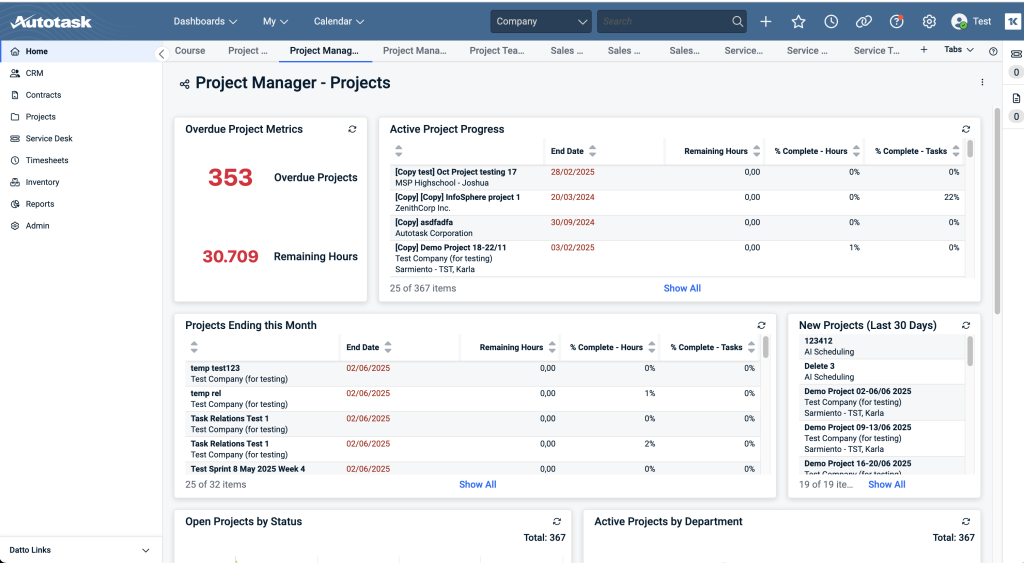
Autotask’s biggest advantage is how tightly it ties into Datto RMM. When a monitoring alert fires, the ticket arrives with device details, alert history, and client context already attached, so technicians skip the manual data-gathering step. MSPs already running the Datto stack get the most value here.
What customers are saying
Autotask PSA has 500+ reviews with an average rating of 4.3 out of 5.0 stars across review sites, and it holds 155 verified reviews on Capterra. Reviewers on both G2 and Capterra like how tightly it centralizes tickets, contracts, and billing (especially with Datto RMM), but many note the platform feels dated and overwhelming for new users, with workflows requiring multiple steps.
Autotask PSA features:
- Ticket-to-invoice workflows tied to contracts, expenses, and services
- Native integration with Datto RMM and IT Glue documentation
- Customizable dashboards and widgets for real-time alerts
- Multiple contract types, including recurring, time and material, and fixed price
- Built-in 256-bit encryption, two-factor authentication, and role-based access
Pros
- Best-in-class integration if you already use Datto RMM
- Strong audit trail depth, useful for HIPAA-regulated clients
- Proven uptime record and enterprise-grade security controls
Cons
- Pricing is not published and requires a custom quote
- Reviewers frequently describe the interface as dated and the learning curve as steep
- Per-user cost can run high for smaller teams before volume discounts kick in
Autotask PSA pricing:
Not publicly listed.
4. HaloPSA
HaloPSA is a UK-built, all-inclusive PSA that bundles ticketing, CRM, project management, billing, and reporting into a single pricing tier, with every feature included regardless of plan.
Rating: 4.6/5
Why it earned its spot for MSPs
HaloPSA’s single-tier model is the draw. There is no “Enterprise” upsell gate for features you need on day one. That transparency has made it a common landing spot for MSPs leaving Connectwise.
What customers are saying
HaloPSA rates 4.6 on G2, 4.9 on Software Advice, and 4.8 across nearly 1,200 reviews on Featured Customers. The near-universal praise is for its all-inclusive single price tier; the near-universal caution, especially strong on Reddit, is that onboarding without a dedicated “Halo admin” leads to a rough start.
HaloPSA features:
- Every feature included at every price point, including CRM, billing, and project tools
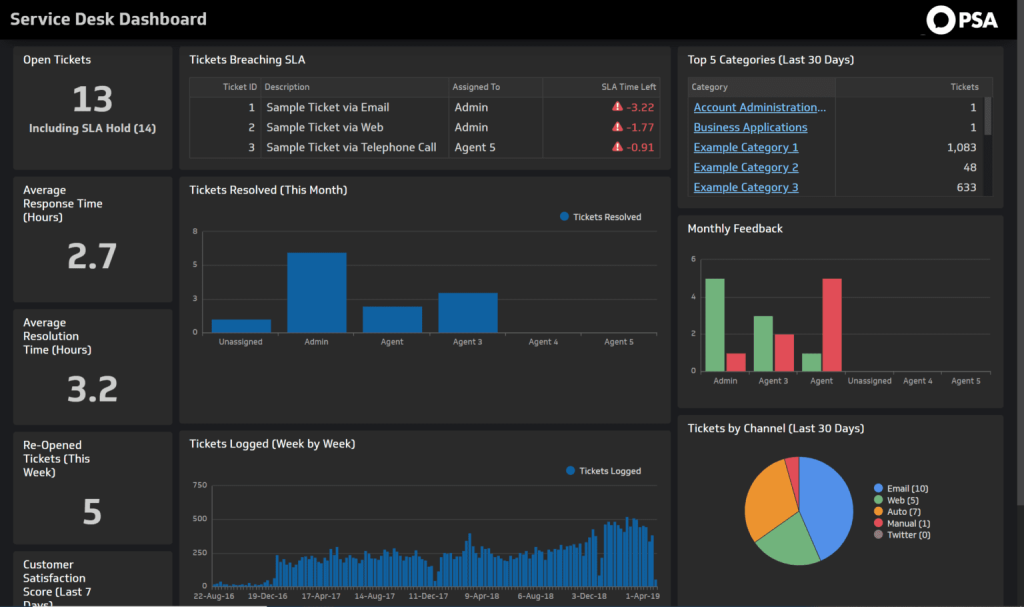
- Email and social ticketing, knowledge base, and SLA management with automated escalation
- 250-plus native integrations, including most major RMM platforms
- Named and concurrent licensing models
- Recognized as a Representative Vendor in Gartner’s 2025 Market Guide for ITSM Platforms
Pros
- Single price tier means no feature-gating surprises later
- Strong reputation among MSPs migrating off legacy PSAs
- 30-day free trial, self-service, full-featured
Cons
- Requires a 5-agent minimum; smaller teams join a waiting list
- Onboarding runs on the higher end, often $5,000 to $20,000 through an implementation partner
- Not an RMM itself, so it still needs to be paired with a separate monitoring tool
HaloPSA pricing:
Starts around $90 to $115 per agent per month when billed annually, with rates decreasing at higher agent counts. A mandatory onboarding fee applies for new customers.
5. SuperOps
SuperOps combines PSA and RMM in one modern platform, with its Monica AI assistant built into ticketing, patching, and workflow automation from the ground up.
Rating: 4.4/5
Why it earned its spot for MSPs
SuperOps targets MSPs who want unified PSA and RMM without the complexity or legacy interface baggage of ConnectWise or Autotask. Its published, per-technician pricing also removes the custom-quote guesswork that competitors rely on.

What customers are saying
SuperOps holds a 4.4 out of 5.0 G2 rating across 120+ reviews. Reviews across G2 and Capterra mostly revolve around the platform’s ease of use and customer support, though some criticize features that aren’t fully developed, such as QuickBooks integration only working one-and-a-half-way.
SuperOps features:
- Unified PSA and RMM in one interface, or either module standalone
- Monica AI for ticket classification, automation, and IT documentation
- Advanced patching, scripting, and policy management on higher tiers
- Splashtop remote access bundled into unified plans
- Transparent, published per-technician pricing
Pros
- Modern, clean interface with a shorter learning curve than legacy PSAs
- Published pricing, no sales call required to get a number
- Strong value for MSPs under 30 technicians
Cons
- PSA depth still trails ConnectWise and Autotask for complex billing and project work
- Best fit skews toward smaller MSPs; less proven at larger scale
- AI features are still maturing relative to marketing claims
SuperOps pricing:
PSA-only starts at $79 per technician per month; RMM-only at $99. Unified plans start at $129 (Pro) and run to $159 to $179 (Super), all billed annually per technician.
6. Syncro
Syncro is a unified RMM, PSA, and Microsoft 365 security management platform, priced per technician with unlimited endpoints included at every tier.
Rating: 4.5/5
Why it earned its spot for MSPs
Syncro’s pricing model is the reason MSPs choose it: adding a 300-endpoint client does not change your software bill, because you pay per technician, not per device. Its Smart Ticket Management feature uses AI to classify incoming tickets into more than 47 categories and guide technicians toward faster resolutions.

What customers are saying
Syncro holds a 4.5 out of 5.0 G2 rating across 500+ reviews and a 4.6 out of 5.0 Capterra rating across 970+ reviews. The recurring theme: reviewers like the unified RMM+PSA+billing setup and per-technician pricing, but flag an outdated, buggy interface and limited RMM automation/API flexibility as the main drawbacks.
Syncro features:
- Unlimited endpoint management with no per-device fees
- Smart Ticket Management, using AI to classify and route tickets automatically
- Native PSA with ticketing, billing, and time tracking sharing one database with RMM
- Automated ticket creation from RMM alerts, with device context attached
- Team plan adds Microsoft 365 security baselines and network discovery
Pros
- Predictable, per-technician pricing that scales with team size, not client count
- Ticketing and RMM share a single database, so no API-based reconciliation
- No long-term contract required
Cons
- Lighter PSA feature set than ConnectWise, Autotask, or HaloPSA for complex billing or project work
- Best suited to MSPs under roughly 50 technicians
- Some reviewers note the interface can feel unintuitive when navigating reports and automations
Syncro pricing:
Core plan starts at $129 per technician per month, Team plan at $179, both with unlimited endpoints included.
7. Freshservice
Freshservice is Freshworks‘ ITIL-aligned IT service management platform, built around incident, problem, and change management for structured internal or client-facing IT operations.
Rating: 4.6/5
Why it earned its spot for MSPs
Some MSP clients, particularly larger or regulated ones, expect formal ITIL processes rather than a simple ticket-and-bill workflow. Freshservice covers that need directly, with change advisory boards, asset management, and orchestration built in at higher tiers.

What customers are saying
Freshservice holds a 4.6 out of 5 rating on G2 across roughly 1,343 reviews, and a 4.5 out of 5 rating across 534 Capterra reviews. Both platforms praise its ease of use and ITIL alignment; both also flag project management as underdeveloped and AI/analytics features gated behind pricier tiers.
Freshservice features:
- Incident, problem, change, and release management aligned to ITIL practices
- Asset management and service catalog, added from the Growth plan up
- Workflow automation with orchestration transactions
- Freddy AI Copilot for ticket summarization and suggested resolutions (paid add-on)
- Change Advisory Board and change calendars for regulated environments
Pros
- Strong fit for MSPs whose clients require formal ITIL-aligned processes
- Clear, published per-agent pricing across four tiers
- Regularly cited as an easier transition than ServiceNow for mid-market IT teams
Cons
- No native multi-tenant billing built for MSP client structures
- AI features and asset packs are priced as separate add-ons, which can raise real cost 30 to 50 percent above the sticker price
- No permanent free plan, only a 14-day trial
Freshservice pricing:
Starter at $19 per agent per month, Growth at $49, Pro at $99, and Enterprise on a custom quote, all billed annually.
8. Zendesk
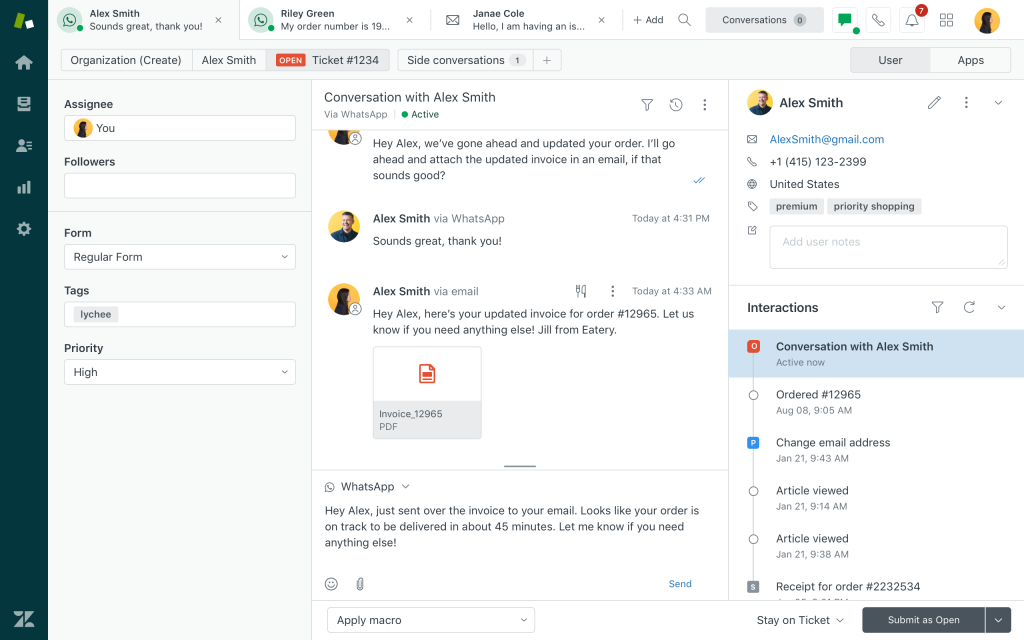
Zendesk is a customer service platform built around omnichannel communication: ticketing, live chat, voice, and a help center, all under one per-agent price.
Rating: 4.3/5
Why it earned its spot for MSPs
MSPs pick Zendesk when the client-facing communication experience matters more than back-office PSA automation. It excels at unifying email, chat, and social channels into one queue, but it was not built with MSP multi-tenancy or ticket-to-invoice billing in mind.
What customers are saying
G2 shows roughly 4.3/5 from about 7,000 reviews, Capterra shows about 4.4/5 from roughly 4,038 reviews, and TrustRadius shows 8.7/10 for the Support Suite. All three sources converge on the same story: best-in-class unified inbox and automation, but real cost creep once AI add-ons and per-resolution billing are factored in.
Zendesk features:
- Omnichannel ticketing across email, chat, voice, and messaging
- Prebuilt analytics dashboards and reporting
- AI-powered automated resolutions, included in every plan with a limited free allowance
- App marketplace with hundreds of third-party integrations
- Suite plans bundling a public help center and knowledge base
Pros
- Best-in-class client communication experience across channels
- Large app marketplace and integration ecosystem
- Clear, published pricing at the entry tiers
Cons
- No native multi-tenant architecture or per-client SLA policies built for MSPs
- No RMM integration or PSA-style billing automation
- AI features bill separately per resolution, on top of the per-agent Suite price, which can push real cost well above the sticker
Zendesk pricing:
Support Team at $19 per agent per month, Suite Team at $55, Suite Professional at $115, and Suite Enterprise (now sold as Enterprise plus Copilot) on a custom quote, all billed annually.
9. Zoho Desk
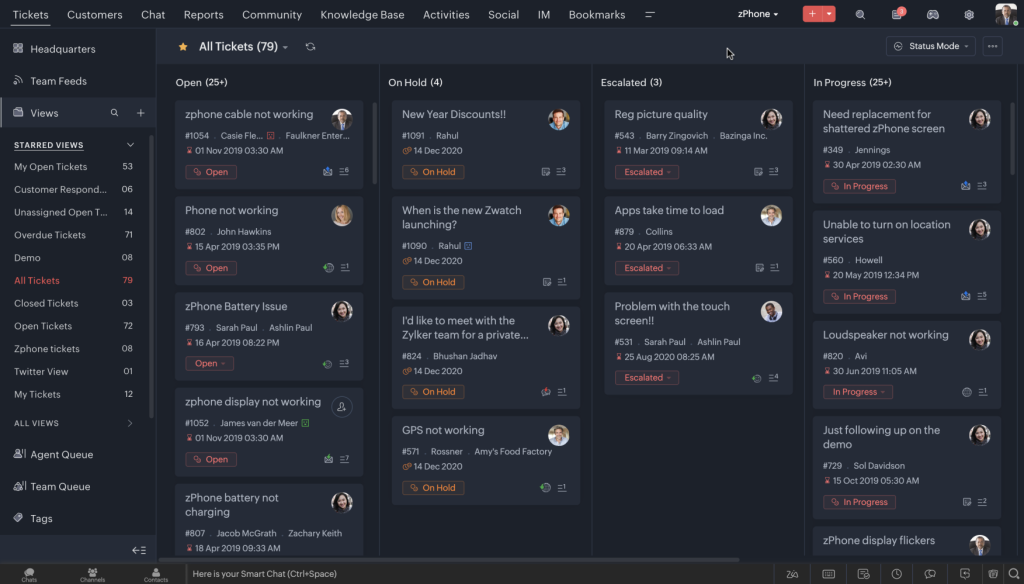
Zoho Desk is a cloud-based help desk that brings email, chat, and phone support into one ticketing workflow, with deep integration across other Zoho apps.
Rating: 4.4/5
Why it earned its spot for MSPs
Zoho Desk is the most affordable tool on this list with a genuine free tier, which makes it a common starting point for smaller MSPs or break-fix-first shops, especially those already running Zoho CRM. It is lighter than a full PSA, so it fits MSPs that do not yet need RMM integration or ticket-to-invoice billing.
What customers are saying
Zoho Desk holds roughly 4.4/5 on G2 across about 7,000+ reviews, and 4.5 out of 5 across 2,211 Capterra reviews. Consistent praise for ease of use, automation (Blueprints), and Zoho ecosystem ties; consistent criticism that the interface feels cluttered and Blueprint setup takes real trial and error
Zoho Desk features:
- Context-aware ticket views tied to Zoho CRM records
- Zia AI for ticket summaries, reply suggestions, and tone analysis (Enterprise plan)
- Predefined SLAs and basic workflow automation
- Multilingual help center support
- Light agent licenses for occasional collaborators, priced separately
Pros
- Genuine free plan for up to 3 agents, one of the more generous free tiers in the category
- Lowest-cost paid tiers among established help desk tools
- Strong fit for MSPs already using other Zoho products
Cons
- Limited automation and reporting on lower tiers
- No native RMM integration or MSP-specific multi-tenant billing
- Not built for MSPs managing complex, multi-client SLA structures at scale
Zoho Desk pricing:
Free for up to 3 agents. Express at $7 per agent per month, Standard at $14, Professional at $23, and Enterprise at $40, all billed annually.
How to choose the right MSP ticketing system
Choosing an MSP ticketing system can feel a little overwhelming, so it helps to focus on the essentials. Here are the key criteria to consider when you compare your options.
Multi-client architecture
Each client’s tickets, SLAs, and branding need to stay separate, even though your technicians work from one shared queue. Look for role-based access so a technician can’t accidentally see another client’s tickets, and a portal that looks and feels branded to each client rather than like a shared, generic help desk.
RMM integration
When monitoring detects a failed backup or an offline device, the ticket should generate automatically, with device context already attached. The tighter that integration, the less time technicians spend copying information between systems.
SLA management
Per-client, per-priority SLA rules should escalate automatically before a deadline is missed, not after. Manual tracking breaks down once you pass ten or fifteen clients with different contract tiers.
Billing integration
Closed tickets should feed logged time directly into an invoice. Manual time entry introduces errors that erode margin over hundreds of tickets.
Mobile access
Technicians in the field need to update, reassign, or close tickets from a phone, not wait until they’re back at a desk. Look for a real mobile app, not just a mobile-friendly browser view, one that supports time logging, notes, and status changes on the go, since a large share of MSP tickets get touched during an onsite visit or between appointments.
Frequently asked questions
An MSP ticketing system converts client IT requests into trackable tickets with priority levels, SLA deadlines, and assigned technicians, built for multi-tenant environments where one team supports many client organizations at once.
A regular help desk supports one organization. An MSP ticketing system isolates data across many client accounts, applies different SLA rules per client, and often ties directly into RMM monitoring and PSA billing.
Desk365 and Zoho Desk both offer free plans for up to 3 agents. Desk365 fits Microsoft Teams-native MSPs, while Zoho Desk fits teams already using Zoho CRM.
If you need ticket-to-invoice billing, RMM alert integration, and per-client contract management, you need a PSA like ConnectWise, Autotask, HaloPSA, SuperOps, or Syncro. If you mainly need organized ticketing and SLA tracking without complex billing, a tool like Desk365, Freshservice, or Zoho Desk may be enough.
Autotask PSA integrates most tightly with Datto RMM. Syncro and SuperOps both offer native, unified RMM and PSA in one platform, so there is no separate integration to maintain.
Yes, most platforms support CSV or API-based data migration for tickets, contracts, and client records. Budget extra time for data cleanup, since duplicate or outdated records rarely map cleanly between systems.