AI Agents can answer a customer in seconds. But can they actually solve the problem?
That is the question support teams need to ask as AI moves from experimentation into everyday customer service. It can resolve routine requests, summarize lengthy conversations, surface information for agents and automate repetitive work. But none of that guarantees a better support experience.
Getting value from AI takes more than simply adding an AI Agent to your help desk. It needs the right knowledge, the right use cases, clear boundaries and a support process that knows when human expertise is needed.
Customer issues can range from simple product questions to complex integrations and business-critical incidents, making it important to use AI where it can genuinely improve the support experience.
The investment is already significant. Gartner reports that customer service leaders increased their AI spending by 38%, while overall service and support budgets grew by just 2%.
So, how can support teams make sure that investment translates into better support?
Here are five lessons to keep in mind.
Lesson 1
Give AI agents a reliable knowledge foundation
AI Agents can find an answer quickly. The real question is whether it is finding the right one.
Imagine a customer raising a ticket because their SSO stopped working after a configuration change. Your AI Agent may recognize the error but requires product-specific knowledge to resolve it.
That is where a well-maintained knowledge base becomes valuable. It gives the AI Agent something specific and verified to work with and gives agents a source they can trust AI to use.
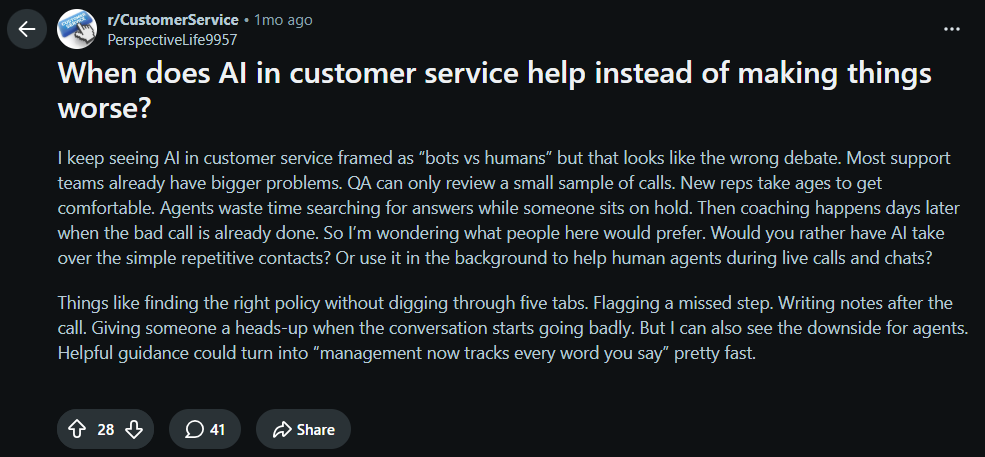
This can also remove one of the less visible costs of support: the time agents spend hunting for information while a customer is waiting. A recent discussion among customer service professionals highlights this use of AI helping agents quickly find the right policy, procedure or piece of documentation instead of searching across multiple sources during an interaction
Source: Reddit
Your tickets can also show where the knowledge base needs to work. Repeated agent explanations can point to missing documentation, while questions that AI Agents consistently fails to answer may indicate information that is unclear, incomplete or outdated.
For support teams, the goal isn’t to give AI Agents access to everything. It’s to make sure it can quickly access the information that matters. Training AI Agents on a limited, but trustable dataset changes the game.
Lesson 2
Choose the right problems for AI to solve
AI isn’t automatically the best answer to every repetitive support request.
Before automating a workflow, look at what actually makes the work difficult. If the process is predictable, a rule or workflow may be enough. AI becomes more useful when the request first needs to be interpreted before the right action can be taken.
Take a password-reset request. If a user can verify their identity and trigger the reset through an existing workflow, AI adds little value. But if a user says, “I suddenly can’t access our finance app,” the service desk may need to understand whether it is an authentication, permission or application issue before routing the ticket. That’s where AI can help interpret the request and guide it to the right workflow.
The difference is understanding versus execution. Traditional automation can execute a known process but AI is more useful when the request first needs to be understood.
Start by examining your ticket data. Look for requests that consume significant human time or need advanced intervention not solvable with automation flows.
Lesson 3
Use AI to help agents work smarter
Some of the most valuable ways AI supports humans happens right from the moment a ticket is escalated.
An agent handling a complicated ticket may spend the first few minutes reconstructing what happened: reading the conversation, checking previous interactions, searching for context, researching troubleshooting steps and deciding only then responding to the ticket.
AI assistants of AI Copilot as we call them here at Desk365, can shorten much of that process. It can summarize the issue, surface relevant documentation, suggest next steps and draft a response for the agent to review. Instead of spending minutes on each ticket gathering context, the human agent can be handed the context in seconds with AI Copilots.
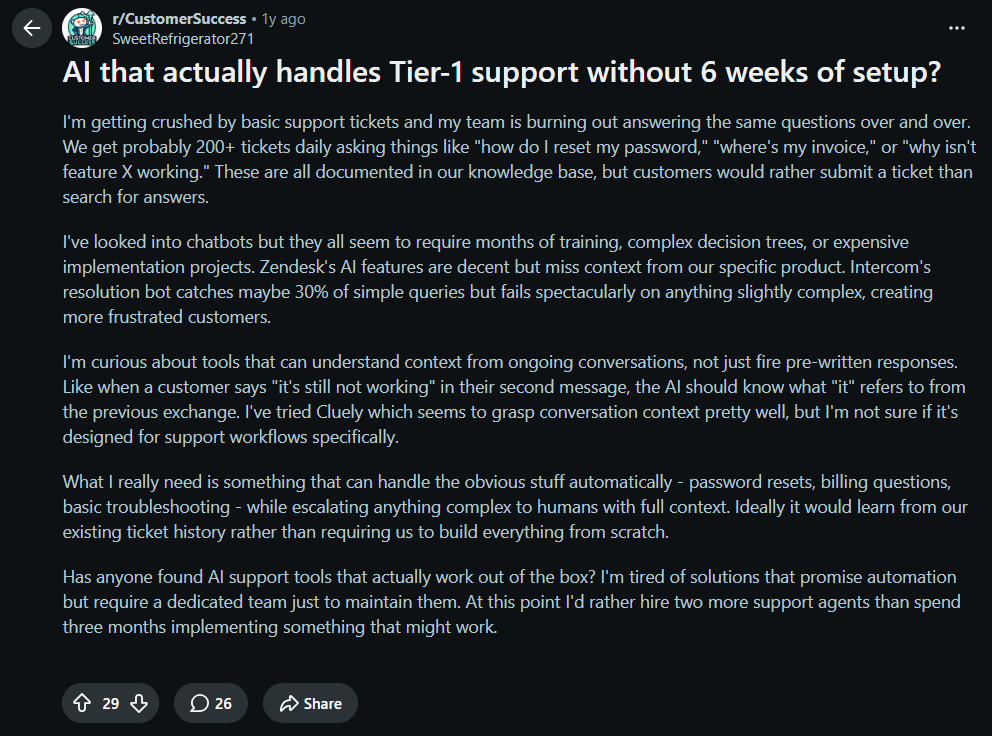
A Reddit discussion on AI handling Tier 1 support reflects this opportunity. With support professionals discussing how AI could take on repetitive first-level requests while allowing agents to focus on issues that need more human deliberation.
Source: Reddit
The value isn’t simply in reducing the number of tickets agents handle. It’s reducing the work around the ticket such as searching, summarizing, categorizing and drafting, so agents can concentrate on the problem itself.
Lesson 4
Make the AI-to-agent handoff smooth
The most important AI Agent decision isn’t always what to answer. Sometimes, it’s knowing when the issue needs a human.
A routine “How do I reset my password?” request may be easy to resolve automatically, but a security concern, failed integration affecting multiple users, or incident approaching an SLA breach needs human intervention.
That is why escalation should be designed before deploying AI Agents. Define the instances that require a human and make sure the ticket can move to the right agent without losing its context. The agent should be able to see what the customer reported, what AI has already responded and why the ticket was escalated.
This matters because poor AI interaction can quickly damage customer trust. Gartner found that only 27% of customers would be willing to try a chatbot again after a negative experience. It recommends prioritizing reliability over simply expanding the chatbot’s reach.
For support teams, this means AI should work within existing severity, escalation and SLA rules. If a ticket meets the criteria for immediate intervention, automation should accelerate the handoff rather than delay it.
Lesson 5
Keep improving your AI support strategy
AI doesn’t get better just because you switch it on. Your support process must improve with it.
Once AI starts handling real conversations, its performance will reveal what is working and what isn’t. If customers repeatedly reopen AI-resolved tickets, agents regularly rewrite suggested responses, then those patterns are telling you something.
Track the metrics such as resolution rate, reopen rate, escalation rate, customer satisfaction and handling time that show whether AI is actually helping. Don’t focus on how many tickets AI touches but focus on what happens to those tickets afterward.
The conversations can also reveal problems beyond support. If customers repeatedly ask how to use the same feature, your documentation may need to work. If a particular integration generates an unusual number of tickets, the issue may belong with the product team rather than support.
This makes AI more than a support tool. It can become a feedback loop for improving your support processes, documentation and product experience.
Review its performance regularly, identify recurring gaps, update the relevant workflows or knowledge and measure the impact again.
Where AI fits into better customer support
AI doesn’t need to take over your support operation to make it better. It needs to fit into it intelligently.
The real value comes from giving AI reliable knowledge, using it where it can make a measurable difference, helping agents with the work around tickets, setting clear escalation boundaries and continuously improving it based on real support data.
For support and ITSM teams, that could mean resolving a routine request automatically, helping an agent troubleshoot an integration faster, identifying an SLA risk early or uncovering a recurring issue through ticket trends.
The goal isn’t to maximize how much work AI handles.
It is to make the entire support operation more efficient, responsive and consistent.
When AI handles what it can, assists where human expertise adds value and steps aside when a situation requires judgment, it becomes more than another support feature. It becomes part of a better way of delivering support. These are the ethos we used to build AI capabilities within Desk365, both AI Agents and an AI Copilot.
The AI Agent can be deployed across any support channel you choose and is trained on the knowledge material you choose to respond to tickets 24/7. The AI Copilot helps human agents summarize tickets, generate K articles, and draft better responses. See more here or signup for a trial to see for yourself.