
TL;DR: Best Jira Service Management alternatives
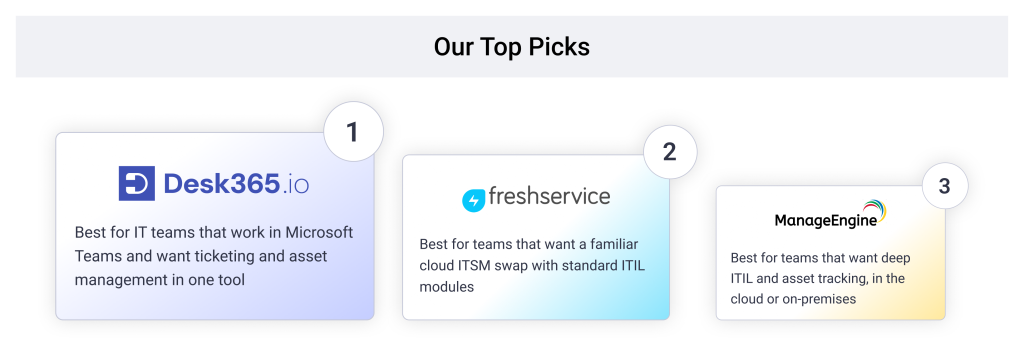
- Desk365: Best for IT teams on Microsoft 365 that want Teams-native ticketing and asset management in one tool
- Freshservice: Best for a familiar cloud ITSM swap with standard ITIL modules
- ManageEngine ServiceDesk Plus: Best for ITIL depth, in the cloud or on-premises
- SysAid: Best for teams that want AI and asset management in one plan
- HaloITSM: Best for one price with every module included
- InvGate Service Management: Best for simple yearly pricing
- Zendesk: Best for teams that also run external customer support
- monday service: Best for teams that want a no-code, board-style service desk
- TOPdesk: Best for ITIL-aligned service with unlimited assets on every plan
Jira Service Management works well for teams that already live in Jira. For a small IT team on Microsoft 365, it often feels like more tool than the job needs. For those teams, Desk365, Freshservice, and ManageEngine ServiceDesk Plus are the closest fits, depending on how much ITIL depth you need
Teams that leave it tend to name the same few problems. Setup can take days, because Jira’s workflows and permission schemes were built for software teams. Change management sits on the Premium plan, and Assets overages and the SSO add-on push the bill past the plan price.
Reporting is another sore point. In an r/sysadmin thread from a team trying to move off Jira, one commenter said Jira had some of the weakest out-of-the-box reporting they had used.
This list covers nine tools that small and mid-sized IT teams look at when they leave Jira Service Management.
Disclaimer
Full disclosure, Desk365 is on this list, and we ranked it first for IT teams that work in Microsoft Teams and need asset management. We still call out a real limitation for every tool, including ours. Pricing pages and reviews are linked so you can check our work. Read more about our review methodology.
Why IT teams look for Jira Service Management alternatives
Most teams leave Jira Service Management for three reasons. Setup takes more admin time than a small team can spare, key IT features sit on a higher plan, and the add-ons push the real bill well past the plan price.
It is built around Jira. Jira Service Desk was renamed Jira Service Management in 2020, but it still runs on Jira’s projects, workflows, and permission schemes. That is a strength for teams whose developers already use Jira. For an IT team that only needs a service desk, it means learning a system designed for a different job.
Change management starts on Premium. Standard is listed at $20 per agent per month, and Premium is listed at $51.42. Change management with approval workflows, plus advanced incident and problem management, only comes with Premium. A 10-agent team that needs change approvals pays about $514 a month in seats alone.
Usage and add-ons raise the bill. Assets now come with Standard, with 5,000 objects included. Past that allowance, each object costs $0.02 a month. Single sign-on needs Atlassian Guard, which adds about $4.20 per user per month on Free, Standard, and Premium.
Microsoft Teams is an integration, not the home base. Jira Service Management connects to Teams through Atlassian’s own integration and through Marketplace apps. A site admin has to link the Jira site to your Microsoft tenant first. Teams that want employees to raise and track tickets entirely inside Teams often look for a tool built that way from the start.
How we ranked the best Jira Service Management alternatives
We ranked each tool on what it costs once the features an IT team actually uses are turned on. That meant five checks: price at that feature level, whether IT asset management sits in the same product, how the tool works with Microsoft Teams, how long setup takes, and whether a small team can run it without a full-time admin.
We used Jira Service Management as the baseline for comparison. Atlassian’s pricing calculator defaults to 75 agents, showing Standard at $20 and Premium at $51.42 per agent per month. However, pricing varies by team size. For example, a 15-agent team would pay approximately $25 for Standard and $57.30 for Premium with monthly billing, based on a September 2026 price check. For a detailed look at additional costs, including Assets and virtual agents, see our guide to Jira Service Management pricing.
Prices below are per agent per month unless noted, taken from each vendor’s pricing page as of November 2026. Pros and cons come from G2 reviews and public Reddit threads, linked in each entry.
Jira Service Management alternatives at a glance
| Tool | Best for | Starting price | Free trial or plan |
|---|---|---|---|
| Desk365 | Teams-native helpdesk with asset management | $12/agent/month | 21-day trial, free plan for 50 tickets a month |
| Freshservice | Familiar cloud ITSM swap | $19/agent/month | 14-day trial |
| ManageEngine ServiceDesk Plus | ITIL depth, cloud or on-premises | Free for up to 5 technicians, paid cloud plans from $645/year | 30-day trial |
| SysAid | AI and asset management in one plan | $89/agent/month | Free trial, no credit card |
| HaloITSM | One price, every module | $99/agent/month | 30-day trial |
| InvGate Service Management | Simple yearly pricing | $500/agent/year | 30-day trial, no credit card |
| Zendesk | IT plus external customer support | $29/agent/month (Employee Service Suite Team) | 14-day trial |
| monday service | No-code, board-style service desk | $31/seat/month, 3-seat minimum | 14-day trial |
| TOPdesk | ITIL-aligned service management | $64/agent/month | Product tour, quote on request |
9 best Jira Service Management alternatives for IT teams

4.9/5

4.9/5
Desk365 is the best Jira Service Management alternative for IT teams that run on Microsoft 365 and want asset management in the same tool. It is built for Microsoft Teams, so employees raise tickets in Teams and agents work them there too. Teams ticketing comes with every plan, including the $12 Standard plan.
Why I'd consider Desk365:
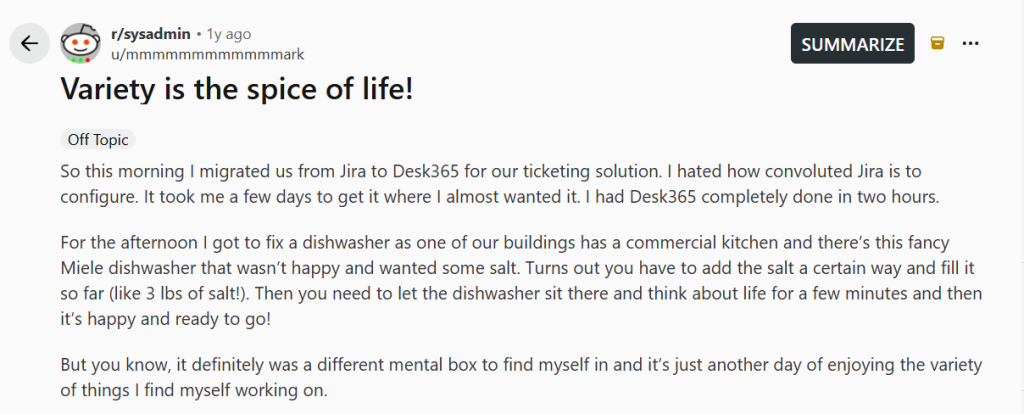
The difference shows up in setup time and in plan math. The Reddit stories below show the setup side.
On price, change and approval management sits on Plus at $22 per agent. Jira Service Management puts it on Premium at $51.42. Asset management is on Premium at $32 per agent. Microsoft Entra ID SSO is included on every plan, so there is no separate SSO add-on to budget for.
Desk365 does not try to match Jira’s AIOps tooling or its advanced incident and problem management. If your team runs a full ITIL program, that gap matters. Most internal IT desks pricing Jira are after ticketing, SLAs, approvals, and asset tracking.
Desk365 key features
- Microsoft Teams ticketing: Employees create tickets from Teams. Agents assign and resolve them there. Email, the support portal, and web forms feed the same queue.
- IT asset management (Premium): Sync devices from Microsoft Intune, track assets from procurement to retirement, manage software licenses and vendors, and link assets to tickets.
- Change and approval management (Plus): Approval workflows for changes and requests, without a jump to an enterprise tier.
- Automation and SLAs: Workflow automation, SLA reminders, and escalations come with Standard. Plus adds round-robin and load-based assignment.
- AI: Plus includes AI reply drafts, ticket summaries, and knowledge base article generation. The AI Agent add-on runs on credits at $50 per 1,000, with 100 free credits a month on Plus and 200 on Premium.
- Security: Desk365 is SOC 2 Type II certified and GDPR compliant, with data centers in the US and EU.
What Reddit users say about moving from Jira to Desk365
In an r/sysadmin post, one IT admin said he migrated his team from Jira to Desk365 for ticketing in a single morning. He found Jira convoluted to configure and spent a few days getting it close to what he wanted. He had Desk365 “completely done in two hours.”
In the same thread, a r/sysadmin user said their team had used Desk365 for about 2.5 years. When they asked how to submit a feature request, they were told to open a ticket. A few days before their post, that ticket was updated when the feature shipped.
Pros
- Clean, intuitive, and live within hours (Brian M)
- Brought a messy support inbox into full order (Michel K)
- Easy to use and keeps daily operations smooth (Stephanie C)
Desk365 pricing
- Free: up to 50 tickets a month
- Standard: $12/agent/month
- Plus: $22/agent/month
- Premium: $32/agent/month
- AI Agent credits: $50 per 1,000
4.6/5
4.6/5
Why I'd consider Freshservice:
Freshservice is a common move for teams that want standard ITIL modules with less configuration than Jira. The catch is where those modules sit. Change management starts on Pro at $99 per agent, nearly double Jira’s Premium rate. Asset management starts on Growth at $49, with 100 asset units included. AI Copilot costs $29 per agent on top of the plan. Our Freshservice pricing guide breaks down the full cost.
Freshservice key features
- Incident management, service catalog, and SLA management, with problem, change, and release management on Pro
- Workflow Automator and orchestration for repeat work
- ServiceBot on Microsoft Teams and Slack on every plan
Cons
- Reporting is weak (Verified User)
- The initial design and setup phase is demanding (Nolan R)
- Knowledge base and customization have limits, and some features are locked to the top tier (Verified User)
Freshservice pricing
- Starter: $19/agent/month
- Growth: $49/agent/month
- Pro: $99/agent/month
- Enterprise: custom quote
- Freddy AI Copilot add-on: $29/agent/month
Prices are billed annually. The free trial lasts 14 days.
4.4/5
4.2/5
Why I'd consider ManageEngine ServiceDesk Plus:
ServiceDesk Plus is the closest match to Jira’s ITIL coverage on this list, and it comes in both cloud and on-premises versions. The Standard edition is free for up to five technicians, which makes it easy to test. Professional adds asset management, and Enterprise adds change, projects, and a CMDB. The company says AI features are included in every edition at no extra cost. Our ManageEngine ServiceDesk Plus pricing guide explains how technician and asset counts change the bill.
ManageEngine ServiceDesk Plus key features
- Three editions: Standard for the service desk, Professional with asset management, and Enterprise with change, projects, and CMDB
- Pricing based on technicians, plus the number of IT assets on Professional and Enterprise
- Support included in the subscription, with 24×5 coverage
Pros
- Flexible custom automation workflows (Innocent K)
- ITIL processes and smart ticket automation (Antonio M)
- A wide range of IT management features (Pawan K)
Cons
- Some configuration is complex (Dixit V)
- The interface feels dated (Verified User)
- Running separate helpdesks means buying another instance (Verified User)
ManageEngine ServiceDesk Plus pricing
- Standard: free for up to 5 technicians, paid plans from $1,545/year for 10 technicians
- Professional: from $645/year for 2 technicians and 250 assets
- Enterprise: from $1,595/year for 2 technicians and 250 assets
These are cloud starting prices for small bundles, so the cost per technician changes as you add agents. The free trial lasts 30 days.
4.5/5
4.2/5
Why I'd consider SysAid:
SysAid sells one main plan with most of the ITSM stack built in. Professional costs $89 per agent per month and includes request, incident, change, and problem management, asset management for up to 250 assets, a Copilot assistant, and Microsoft Teams support. That is more per seat than Jira Premium, but there is less to add on top. Two costs sit outside the price. Implementation plans are separate, and live chat support is only on Enterprise, which starts at 20 agents.
SysAid key features
- Request, incident, change, and problem management
- Asset management with a CMDB, inventory, and network discovery
- AI Copilot for agents and end users, plus prebuilt AI agents
SysAid pricing
- Professional: $89/agent/month
- Enterprise: custom quote, starting at 20 agents
SysAid offers a free trial with all features and no credit card required.
4.7/5
4.8/5
Why I'd consider HaloITSM:
Halo prices by agent only. There are no tiers, so IT service, asset management, AI, and reporting all come in one price. That removes the plan math that comes with Jira’s tiers. It also offers named or concurrent licenses at the same price, which helps shift-based teams. The trade-off is setup. Halo requires an onboarding package with purchase, and reviewers describe a steep learning curve once you start customizing.
HaloITSM key features
- Incident, problem, change, and knowledge management in one platform
- Asset and configuration management with a CMDB and asset discovery
- Halo AI, including AI triage and suggested replies
HaloITSM pricing
- All features included: $99/agent/month, billed annually
- Onboarding package required, priced by scope
The free trial lasts 30 days and includes all features.
4.5/5
4.6/5
Why I'd consider InvGate Service Management:
InvGate keeps pricing simple with yearly billing. Starter costs $1,499 a year for five agents, which works out to about $25 per agent per month. Pro costs $500 per agent per year for five to 50 agents, or about $42 per agent per month. Microsoft Teams support and the workflow builder start on Pro. Asset management is sold as a separate product, so add its cost before you compare the total with Jira.
InvGate key features
- Ticketing, knowledge management, self-service portal, and SLA management on every plan
- Workflow builder, AI Service Agent, and Microsoft Teams on Pro
- Microsoft Entra ID sync and SSO on every plan
Pros
- Cost-effective and flexible (Dov H)
- An intuitive user experience (Esteban G)
- Easy to implement and configure (Patricio I)
Cons
- Customization is limited (Diana B)
- Updates can cause problems, and technical support is slow (Cristian P)
- No manufacturer certification or clear learning path (Hernan F)
InvGate pricing
- Starter: $1,499/year for 5 agents
- Pro: $500/agent/year, 5 to 50 agents, starting at $2,500/year
- Enterprise: custom quote, starting at $12,000/year
The free trial lasts 30 days with no credit card.
4.4/5
4.3/5
Why I'd consider Zendesk:
Zendesk makes sense when one team handles both internal IT requests and outside customer support. It sells two separate lines. The Employee Service Suite covers internal IT, HR, and facilities, and the Customer Service Suite covers external support. An agent who works in both needs a seat in each. Zendesk offers a native Microsoft Teams app, but it is not a full ITSM tool. Check how it handles change approvals and asset tracking before you compare it with Jira. Our Zendesk pricing guide breaks down both suites.
Zendesk key features
- Employee Service Suite with an employee portal, service catalog, and knowledge base
- AI agents included on every suite plan, with a monthly allowance of automated resolutions
- Microsoft Teams and Slack integrations
Zendesk pricing
- Suite Team: $29/agent/month
- Suite Growth: $59/agent/month
- Suite Professional: $99/agent/month
- Enterprise: custom quote
Prices are billed annually. Monthly billing costs more. The free trial lasts 14 days.
4.6/5
4.5/5
Why I'd consider monday service:
monday service suits teams that already run projects on monday.com and want service requests on the same boards. Setup is no-code, and AI agents can triage and route tickets. The limits show up when you need a traditional service desk. In the r/sysadmin thread above, the team that was leaving Jira found monday nice but ran into limits they could not get past. Another commenter warned that forcing monday into a service desk role means rebuilding features that dedicated tools already have. The Microsoft Teams integration is only on the Enterprise plan.
monday service key features
- No-code boards, automations, and a self-service portal
- Service AI agents that can respond to tickets from configured boards
- Microsoft Teams integration on Enterprise, where employees submit and track requests from Teams
Pros
- Strong AI and project automation (Mike M)
- An intuitive interface with flexible automations (Trevayne S)
- SLA tracking for IT ticketing (Verified User)
monday service pricing
- Standard: $31/seat/month
- Pro: $45/seat/month
- Enterprise: custom quote
Prices are billed annually. Paid plans have a 3-seat minimum, and seats are sold in blocks. There is no free plan, and the free trial lasts 14 days.
4.4/5
4.1/5
Why I'd consider TOPdesk:
TOPdesk includes asset management on every plan, with unlimited assets, tickets, and end users. That compares well with Jira’s Assets allowance and per-object charges. The upgrade path still matters. SLA, change, and problem management start on Engaged, and project management starts on Excellent. Local support runs 8 hours a day, 5 days a week on Essential and Engaged, and 24/5 on Excellent. TOPdesk lists Microsoft Teams, Microsoft Entra ID, and Microsoft Copilot among its integrations.
TOPdesk key features
- Incident and asset management, a self-service portal, and a knowledge base on Essential
- Change, problem, and SLA management on Engaged
- AI assistants and project management on Excellent
Pros
- Effortless reports and auto-population (Joshua C)
- Easy for new users to pick up and manage (Marloes v)
- Simple workflow automation and filtering (Ioan-Andrei T)
Cons
- Sending a message takes too many clicks (Verified User)
- Reporting and customization are hard to use (Aleta B)
- Workflow-based email alerts are difficult and time-consuming to build (Sophia W)
TOPdesk pricing
- Essential: $64/agent/month
- Engaged: $91/agent/month
- Excellent: $128/agent/month
TOPdesk says its average price falls as you add agents, and you request a quote for the exact figure.
How do you choose the right Jira Service Management alternative?
Start with the one thing you cannot give up. For most small and mid-sized IT teams, it comes down to four needs.
- If you run on Microsoft 365 and want Teams and assets together, look at Desk365 on Premium or SysAid Professional. Both put Microsoft Teams support and asset management in the same product. Desk365 runs inside Teams on every plan. SysAid costs more per seat but bundles more ITIL modules.
- If your team follows ITIL closely, look at ManageEngine ServiceDesk Plus Enterprise, TOPdesk Engaged, or Freshservice Pro. Check which plan unlocks change and problem management, because it differs by vendor.
- If you want one price without plan math, look at HaloITSM or InvGate. Halo bundles every module but requires an onboarding package. InvGate bills yearly, but asset management is a separate product. Teams that already use a separate IT asset management tool may not mind that split.
- If one team handles IT and customer support, look at Zendesk. Budget for a seat in each suite for agents who work both.
Whichever way you lean, price the plan you will actually use. Add the AI you need, the asset tracking you need, any SSO add-on, and any onboarding fee. Then compare that total with your Jira Service Management bill.
Ask each vendor how they import Jira tickets, users, and knowledge base articles before you sign. Our guide to helpdesk migration walks through the process.
Frequently asked questions
The best alternative depends on your stack. Desk365 is the strongest fit for IT teams that work in Microsoft Teams and want asset management in the same tool. ManageEngine ServiceDesk Plus and TOPdesk suit teams that need ITIL depth, and Freshservice suits teams that want a familiar cloud ITSM swap.
Yes. Atlassian renamed Jira Service Desk to Jira Service Management in 2020. People still search for the old name, but it refers to the same product.
Atlassian lists a Free plan for up to 3 agents, Standard at $20 per agent per month, and Premium at $51.42, based on its default 75-agent view. Smaller teams see higher per-agent rates. Enterprise is quote-only, and SSO needs Atlassian Guard at about $4.20 per user per month.
ManageEngine ServiceDesk Plus Standard is free for up to five technicians. Desk365 has a free plan for up to 50 tickets a month, and its paid plans start at $12 per agent per month with Teams ticketing, automation, and SLAs included.
Yes. Desk365 supports ticketing in Teams on every plan. SysAid includes Teams support on Professional, Freshservice offers ServiceBot on Teams on every plan, and InvGate includes Teams on Pro. monday service limits its Teams integration to Enterprise.
TOPdesk includes unlimited assets on every plan. SysAid Professional includes 250 assets, and HaloITSM includes asset management in its single price. Desk365 includes it on Premium, ManageEngine on Professional, and Freshservice from Growth with 100 asset units. InvGate sells asset management as a separate product.