You may have heard quite a bit about Console already, but is it really the right fit for your team? In this article, we’ll take a closer look at what Console offers, its pricing, user reviews, key features, and potential limitations. We’ll also explore whether it’s worth considering and what alternatives are available if you’re looking for a better fit.
Pricing, features, and reviews in this guide were checked in October, 2026.
TL;DR
- Pricing: Console does not publish its prices. It sells by quote, and its billing unit is not public, so get written numbers before a pilot.
- Reviews: All 20 G2 reviews we read rate Console four or five stars. Reviewers praise playbooks and fast setup. The complaints are support hours outside Pacific time, AI that needs manual tuning, and a few missing features.
- Ownership: Palo Alto Networks announced on September 1, 2026, that it had acquired Console.
- Alternatives: Desk365 is first on our list, with Microsoft Teams ticketing on every plan from $12 per agent per month. Freshservice, Atomicwork, Jira Service Management, Moveworks, ServiceNow, Serval, and Ravenna follow.
What is Console?
Console is an AI-native ITSM platform from Console, Inc. that lets employees ask for IT help inside Microsoft Teams or Slack. Console names customers such as Cursor, Webflow, Scale AI, and Synthesia, mostly software companies with small IT teams.
In practice, Console works as a single IT service desk that runs inside your chat tool. Employees ask for help in plain language, and Console Assistant, an AI agent built for Tier 2 IT work, handles the request or builds the automation for it. Console’s playbooks run repeat requests such as onboarding, offboarding, and password resets from start to finish. Its access governance module collects approvals, grants access, and removes it on schedule. It also includes its own ticketing system, called Console Inbox, an asset inventory, and more than 600 integrations. The next section covers each feature in detail.
Palo Alto Networks announced on September 1, 2026, that it had acquired Console. The press release says Console will deepen agentic capabilities in Cortex, Palo Alto Networks’ security operations platform.
What features does Console offer?
Console sells four modules, which are ticketing, playbooks, access governance, and asset management, with an AI assistant and background agents on top. A shared data layer that Console calls the Context Graph connects every user, system, policy, and ticket.
Does Console work in Microsoft Teams and Slack?
Yes. Console says it is built natively for both Microsoft Teams and Slack, and employees ask for help in plain language without opening a portal. Users can message the bot directly or add it to a shared channel, and one bot routes each request to the right workspace, such as IT, HR, RevOps, or Legal.
Replies sync both ways with the ticketing system behind the bot. If a request cannot be resolved automatically, the user taps a “Talk to IT” button and a human picks it up.
Console Assistant
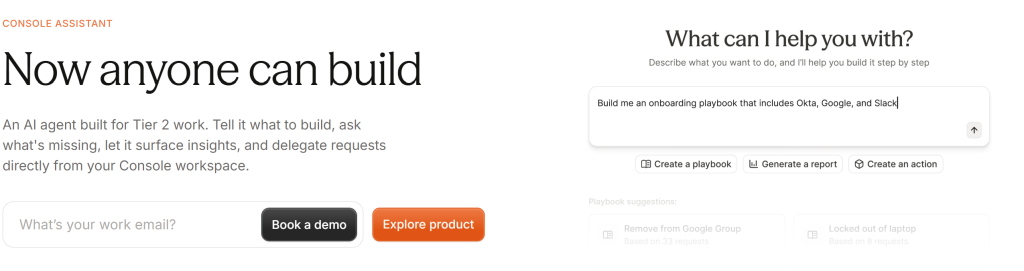
Console Assistant is an AI agent built for Tier 2 IT work. You describe what you want in plain language, and it builds playbooks, finds gaps in your setup, and takes delegated requests. Console also says Assistant can build a connector for any tool that has an application programming interface (API). This is the feature that separates Console from a standard help desk, so ask to watch it build something against your own tools.
Intelligent ticketing and the AI inbox
Console has its own ticketing system, called Console Inbox, so it does not need a separate help desk behind it. It can also sync with Jira, ServiceNow, or Linear if you want to keep one of those. Buyers who read older comparisons saying Console needs a second system should check the date on them.
Requests reach human agents with the user, device, app, and access context already attached, and routing rules are written in natural language. Reports track automation rate, response time, resolution time, service level agreement (SLA) performance, and team workload. Console says the inbox learns from each approval, which only matters if your team approves enough requests for patterns to form.
Playbooks for workflow automation
Playbooks are how Console automates a request from start to finish. They start from a user request, an event sent by an API webhook, or a schedule, and you write them in natural language instead of code. Console lists more than 130 example playbooks, including onboarding, offboarding, and password and multifactor authentication (MFA) resets.
Natural-language authoring lowers the skill barrier, but one G2 reviewer says the bot needs manual tuning and maintenance. Assign an owner before you launch.
Access governance
Employees request access in Teams or Slack. Console applies the right policy, collects approvals, grants access, schedules removal, and logs each step. You can import an existing access matrix from a CSV file, and Console also runs user access reviews. Access requests suit automation well, because the approval rules are fixed and the steps repeat.
Asset management
Console lists asset management as a module. It builds one inventory of devices, apps, and SaaS tools from your mobile device management (MDM) systems, procurement tools, identity providers, and HR systems, and it keeps the history of each asset. Because the inventory comes from your other systems, a device missing from those systems will be missing here too.
Integrations and setup
Console lists more than 600 integrations. Its site describes a three-phase rollout that starts with a dedicated engineer connecting your apps in about 30 minutes. Both numbers come from Console and not from independent testing.
Security and admin controls
Console lists step-up MFA before high-risk actions, approvals that follow fixed rules, role-based access control (RBAC), single sign-on (SSO), and audit logs. For an AI that acts on your systems, those approval controls matter more than any single feature.
How much does Console cost?
Console AI does not publicly disclose its pricing as of October 2026. It follows a custom, quote-based pricing model.
Console explicitly states that pricing is not based on help desk agent seats, meaning adding more support agents doesn’t necessarily increase licensing costs/
What should you ask Console on a pricing call?
Ask for these seven answers in writing:
- What is the billing unit, such as employee, agent, or resolved request
- What does AI usage cost, and is any of it metered
- Are the dedicated onboarding engineer and implementation help included
- Which integrations are included, and which cost extra
- What support hours do you get, given that G2 reviewers mention Pacific time coverage
- What price protection do you get after the Palo Alto Networks acquisition
- How much can the price rise at renewal
What do G2 reviewers say about Console?
Console reviews well on G2. All 20 reviews we read rate it four or five stars, and reviewers praise playbooks, fast setup, and high deflection. The complaints are small and cover support hours, AI tuning, and missing features. Twenty reviews is a small sample, so treat the pattern as a signal and not a verdict. You can read them all on Console’s G2 page.
What do users like about Console?
Playbooks come up most often. One reviewer says playbooks handle action requests from start to finish, and another praises access provisioning that runs without human involvement.
Speed to value is the second theme. A reviewer reports an almost immediate return on investment, and another found that getting started was straightforward.
Several reviewers mention deflection. One says Console drives a high deflection rate for general requests almost immediately, and another cites strong deflection percentages.
Reviewers also like that Console fits around what they already run. One says they were not forced into an ecosystem, and another says Console does not make you replace your existing tech stack. The Console team gets credit as well, with one reviewer calling it receptive to collaborative innovation.
What do users dislike about Console?
The most substantive criticism is about the AI. One reviewer says the bot does not learn from prior interactions, so everything needs manual tuning, and it can get confused in environments with overlapping tools and permissions. Another reports occasional routing issues where the tool cannot pick the right owning team.
Support hours come up twice. A UK customer says Console’s West Coast team leaves a large part of the working day without support, and an Eastern-time customer raises the same Pacific-time issue.
Reporting is split for teams that run Console next to another ITSM tool. One reviewer must reconcile two sources of metrics.
Smaller points include no bulk editing of policies across apps, no desktop app, and features other products already have. Two earlier complaints are now fixed, according to reviewers, which are the missing change log and the analytics gaps.
None of the praise or criticism we read mentions price. That is another reason to get written numbers before you start a trial.
What are the best Console alternatives?
How we picked these alternatives
We compared eight tools on five points. These were whether pricing is public, whether Microsoft Teams support is native, whether asset management is built in, how AI is priced, and what the tool leaves out. Each price comes from the vendor’s pricing page, checked in October, 2026. A tool that hides its price or sells AI as a separate line item ranks lower here, because that is the problem that sends most buyers looking for alternatives.
Disclaimer
Full disclosure, Desk365 is on this list, and we ranked it first for teams that work in Microsoft Teams and need IT asset management. We still call out a real limitation for every tool here, including ours. The reviews and pricing pages are linked throughout so you can check our work. Read more about our review methodology.
| Tool | Best for | Starting price | Pricing model |
|---|---|---|---|
| Desk365 | Microsoft Teams-based IT teams that need built-in asset management | $12 per agent per month | Per agent, public |
| Freshservice | Teams that want ITIL-style process modules at a published price | $19 per agent per month | Per agent, public, AI as add-on |
| Atomicwork | Teams that want AI coworkers, with or without replacing their help desk | From $25,000 a year | Platform fee plus credits or per outcome |
| Jira Service Management | Teams already on Atlassian | $20 per agent per month, free for three agents | Per agent, public |
| Moveworks | Large ServiceNow customers | Not published | Quote only |
| ServiceNow | Large enterprises | Not published | Quote only, per fulfiller |
| Serval | Teams that want a guided automation pilot | Not published | Platform fee, quote only |
| Ravenna | Slack-first teams | $22.50 per admin per month | Per admin, public |
1. Desk365: best for Microsoft Teams-based IT teams and built-in asset management
Why Desk365 leads this list
Desk365 is a Microsoft Teams ticketing system and IT help desk. It publishes the price of every plan, with no custom-quote tier.
Teams ticketing comes on every plan, starting with Standard at $12 per agent per month. Employees create and track tickets in Microsoft Teams, and agents can convert a Teams message into a ticket. That puts the help desk where Microsoft 365 teams already talk, with no new portal to teach.
IT asset management sits on the Premium plan at $32 per agent per month. It includes Microsoft Intune sync, asset lifecycle tracking, software license management, vendors, and depreciation. A Teams-based IT team can tie a laptop, its owner, and a ticket together without buying a second tool.
AI Copilot drafts replies, summarizes tickets, and turns resolved tickets into knowledge base articles on Plus and Premium. The AI Agent add-on costs $50 per 1,000 credits, with 100 free credits a month on Plus and 200 on Premium. The drafting tools come with the plan, and you pay for the AI Agent only as you use it.
Desk365 holds SOC 2 Type II certification and is GDPR compliant, and Premium adds HIPAA compliance controls, encrypted fields, and audit logs. Regulated teams find those answers on the pricing page and not behind a call.
Teams moving off an existing help desk can start on an extended trial and pay only when the current contract ends, and migration help is free. That removes the usual penalty for switching in the middle of a contract.
Desk365 features
- Microsoft Teams ticketing with a support bot for employees and an agent bot for your team
- Workflow automation with SLA reminders, escalations, and round robin or load-based assignment
- Change and approval management on Plus and Premium
- Knowledge base and self-service portal
- Microsoft Entra ID sync and single sign-on, a Power Automate connector, and a Microsoft 365 Copilot plugin
- Reports and multiple dashboards on Plus and Premium
- Custom ticket fields, forms, and a support portal on your own domain
How does Desk365 compare with Console feature by feature?
Desk365 offers a more comprehensive help desk and ITSM solution, combining AI-powered capabilities with essential features like ticket management, workflow automation, SLA management, change management, reporting, multilingual support, and built-in asset management. With AI Agents and AI Copilot, Desk365 helps teams automate repetitive tasks, improve response times, and boost agent productivity. Its deep Microsoft 365 integration makes it especially valuable for organizations using Microsoft Teams and other Microsoft tools.
While Console focuses primarily on AI-driven automation across applications, Desk365 brings AI, traditional help desk functionality, and ITSM together in one platform, making it a more complete solution for everyday IT support and service management.
| Feature | Desk365 | Console |
|---|---|---|
| Microsoft Teams | Customers create tickets, get notifications, and check status in Teams, and agents resolve tickets there. Teams ticketing is on every plan | Built natively for Teams and Slack, with two-way sync to the ticketing system |
| Ticket channels | Email, Microsoft Teams, support portal, web form, and web widget, all feeding one inbox, starting on Standard | Teams and Slack. Other channels not confirmed here |
| Built-in ticketing | Yes, on every plan | Yes, called Console Inbox |
| AI assistant | AI Copilot drafts, translates, and edits replies, summarizes tickets, and generates knowledge base articles, on Plus and Premium | Console Assistant, built for Tier 2 IT work, builds playbooks and connectors |
| AI that acts across systems | AI Agent chats with users and deflects Level 1 tickets from your knowledge base. Multi-system actions are not described on Desk365's pages | Playbooks carry out requests from start to finish, with more than 130 examples |
| Workflow automation | Triggers on ticket creation, updates, and time-based events, plus SLA reminders, escalations, round robin and load-based assignment, and ticket closure rules | Playbooks written in natural language, started by a request, webhook, or schedule |
| Change management | Multi-stage approvals, audit trail, risk assessment, and rollback planning, on Plus and Premium | Approvals inside access requests. Other change features not confirmed here |
| Asset management | Premium plan, with Intune sync, lifecycle tracking from procurement to retirement, software management, product inventory, vendors, and depreciation. Assets link to tickets, agents, and departments | Module that builds one inventory from MDM, procurement, identity, and HR systems |
| Access governance | Not described on Desk365's pages | Access requests, approvals, scheduled removal, and user access reviews |
| Knowledge base and portal | Knowledge base with an article editor and a self-service portal on your own domain | Answers from your existing docs, with Snippets and suggested knowledge base additions |
| Reporting | Productivity, ticket trend, agent performance, and custom reports on Standard. Multiple dashboards and scheduled exports on Plus. Power BI integration | Reports on automation rate, response time, resolution time, SLA performance, and team workload |
| Service quality tools | CSAT surveys, time tracking, and tasks on Plus. Multilingual helpdesks and multiple business hours on Plus | Not confirmed here |
| Integrations | Microsoft Entra ID sync and SSO, Intune sync, a Microsoft 365 Copilot plugin, and a Power Automate connector that reaches Jira, Asana, and Azure DevOps, plus APIs and webhooks | More than 600 integrations |
| Security and compliance | SOC 2 Type II and GDPR, with US and EU data centers. Premium adds HIPAA compliance, PII and PHI controls, data redaction, encrypted field logs, and audit logs | Step-up MFA, RBAC, SSO, and audit logs. Certifications not confirmed here |
| Pricing | Published: $12, $22, and $32 per agent per month, billed annually | Quote only |
| Free plan and trial | Free plan up to 50 tickets a month and a 21-day trial with no credit card | Demo, and no public trial found |
Pros
- Lowest paid starting price among the tools here that publish one
- Teams ticketing on every plan
- Asset management with Intune sync on Premium
Cons
- Fewer native integrations than category giants
Pricing
2. Freshservice: best for teams that want ITIL-style process modules
Freshservice is Freshworks’ IT service management product, with Starter at $19, Growth at $49, and Pro at $99 per agent per month on annual billing. Enterprise is custom. SLAs start at Growth, and problem and change management start at Pro, so the price most teams pay is the $49 or $99 tier.
Freshservice’s ServiceBot works in Microsoft Teams and Slack on every plan, so Teams support is not gated behind an upgrade. AI is a separate purchase. Freddy AI Copilot costs $29 per agent per month, and the Freddy AI Agent (Classic) appears only on Enterprise. AI is where the headline price stops being the real price.
Asset management arrives as a package. Every plan includes the ITAM Growth package with 100 asset units, and more units cost extra. Count your devices and licenses first, because 100 units is small. For a plan-by-plan breakdown, see our guide to Freshservice pricing.
- Pros: ServiceBot on Teams and Slack at every tier, and change, problem, and release management at Pro
- Cons: Copilot is a $29 add-on, and asset units beyond 100 cost extra
- Pricing: $19, $49, and $99 per agent per month billed annually, Enterprise custom, 14-day free trial. Check the Freshservice pricing page for current numbers
3. Atomicwork: best for teams that want AI coworkers, with or without replacing their help desk
Atomicwork sells an AI workforce platform for IT and enterprise service management, and its Professional plan starts at $25,000 per year. That plan includes two AI coworkers, up to 250 end users, up to 500 managed devices, and 25,000 credits. It is a platform commitment and not a per-agent price, so budget for it as a project.
Atomicwork also prices by outcome. A resolved knowledge query costs $1, an access request handled end to end costs $2, and a service resolution starts at $3. Each tier has an annual minimum, from 8,000 to 25,000 outcomes. Outcome pricing is easier to explain to finance than credits, but the minimums mean you need a volume estimate before you sign.
A bring-your-own-platform option lets Atomicwork’s AI coworkers run on top of ServiceNow or Jira Service Management with no platform fee, and you pay per outcome. That is the lowest-risk way to try an AI layer without replacing your help desk.
Atomicwork integrates with Microsoft Teams, Intune, and Microsoft Entra ID, and it is listed on the Microsoft Marketplace so buyers can use Azure credits. That helps Microsoft 365 teams that already buy through Azure.
- Pros: Teams and Intune integrations, a bring-your-own-platform option, and outcome-based pricing
- Cons: A $25,000 starting commitment, annual outcome minimums, and credit use that varies with steps, tool calls, and output length
- Pricing: See the Atomicwork pricing page, with Enterprise on a custom contract
4. Jira Service Management: best for teams already on Atlassian
Jira Service Management is free for up to three agents, then $20 per agent per month on Standard and $51.42 on Premium, with Enterprise priced through sales. The free tier makes it the easiest tool here to try with a small team.
Employees can submit requests through email, Microsoft Teams, Slack, a widget, or a portal. Standard includes asset and configuration management with 5,000 objects, and Premium adds a virtual service agent with 1,000 assisted conversations a month. Atlassian also says it is a Leader in the 2026 Gartner Magic Quadrant for IT Service Management Platforms, which is the company’s own statement.
Usage fees can raise the bill. Asset objects above your plan’s limit start at $0.02 per object per month, and virtual agent conversations above the monthly limit start at $0.30 each. Change management also sits on Premium, so a team that needs it pays more than $20 per agent.
- Pros: A free plan, requests through Teams and Slack, and asset management from Standard
- Cons: Usage-based extras, change management only on Premium, and a setup that favors teams already using Jira
- Pricing: See our guide to Jira Service Management pricing and Atlassian’s pricing page
5. Moveworks: best for large organizations already running ServiceNow
Moveworks is an AI employee support assistant that is now part of ServiceNow. News reports that the acquisition closed in December 2025 and that ServiceNow now sells the combined product as EmployeeWorks. Teams support is solid, but roadmap and pricing now follow ServiceNow’s priorities.
EmployeeWorks runs natively in Slack, Microsoft Teams, Google Chat, and Webex, and connects to more than 100 enterprise systems. Buyers with several chat tools get the widest channel coverage of any tool in this guide.
Moveworks does not publish pricing, and buyer guides describe a per-employee annual model. Per-employee pricing grows with headcount even if few people file tickets.
- Pros: Broad channel support and deep enterprise integrations
- Cons: Quote-only pricing, an enterprise focus, and a roadmap now tied to ServiceNow
- Pricing: Not published
6. ServiceNow: best for large enterprises with formal IT processes
ServiceNow pricing is custom and module-based, quoted per fulfiller with no public price list, according to Console’s comparison page. For a closer look at what it costs, see our guide to ServiceNow pricing.
Console also says ServiceNow’s Now Assist AI tier adds a further cost on top of the platform. Treat that as a competitor’s view and ask ServiceNow for the all-in number.
ServiceNow is built for large organizations with formal ITIL processes, and many smaller IT teams find it more platform than they need.
- Pros: depth for large, process-heavy IT organizations
- Cons: quote-only pricing, with AI priced as a further tier
- Pricing: custom
7. Serval: best for teams that want a guided automation pilot
Serval is an AI-native ITSM platform with a help desk agent, a workflow builder, access management, and a configuration database. It describes its pricing as one platform fee.
Serval does not publish that fee. It sells a guided pilot with a dedicated deployment engineering team and says it guarantees 50% of your tickets automated. A guarantee is a strong claim, so ask what counts as automated and what happens if the pilot misses.
Serval syncs both ways with ServiceNow, Jira, and Zendesk, and you can edit workflows in natural language or in code. Its pricing page does not say whether it supports Microsoft Teams, so ask during the demo.
- Pros: A guided pilot, code-level control over workflows, and sync with existing ticketing tools
- Cons: No public price, and Teams support is not stated on its pricing page
- Pricing: See the Serval pricing page
8. Ravenna: best for Slack-first teams
Ravenna is a Slack-native help desk. Starter costs $22.50 and Growth costs $45 per admin per month, and Enterprise is custom. Ravenna Intelligence, its AI layer, adds $5 per employee. Per-employee add-ons scale with company size and not with IT team size.
Ravenna’s own comparison page says organizations that do not use Slack as their main chat tool face adoption barriers. If you run Microsoft Teams, skip it.
- Pros: Low per-admin pricing and a tight Slack experience
- Cons: Slack only, and the AI add-on is priced per employee
- Pricing: See the Ravenna pricing page
What should you do next?
Console is a capable AI-first option, but the right choice depends on your team, your tools, and your budget.
Shortlist two or three tools from this guide, compare them against the same set of needs, and try them with your own requests before you commit.
If you want to see how a Microsoft Teams-based help desk with built-in asset management fits your team, you can start a free 21-day Desk365 trial with no credit card.
Frequently asked questions
Console AI does not publicly disclose its pricing as of October 2026. It follows a custom, quote-based pricing model.
Yes. Console has its own ticketing system, called Console Inbox. It can also sync both ways with Jira, ServiceNow, Linear, or another ticketing system if you want to keep one.
Desk365 is one of the best alternatives to Console AI for businesses looking for an AI-powered help desk and ITSM solution. Unlike Console’s AI-first approach, Desk365 combines AI Agents, AI Copilot, ticket management, workflow automation, SLA management, asset management, and reporting in one platform. It also offers deep Microsoft 365 integration, including Microsoft Teams ticketing and Intune integration. With transparent, affordable per-agent pricing, Desk365 is a strong choice for teams that want AI-powered automation alongside comprehensive IT support capabilities.
Yes. Console says it is built natively for Microsoft Teams and Slack, with direct messages, shared channels, escalation to a human, and two-way sync with the ticketing system. One G2 reviewer calls it a Slack-first helpdesk, so test the Teams experience in your own tenant.
Desk365 is one of the best Console AI alternatives for organizations seeking structured ticket management, audit trails, and stronger access controls. It offers comprehensive audit logs, role-based access control (RBAC), ticket history, reporting, and secure Microsoft 365 integrations. Desk365 is also SOC 2 Type II certified and provides features to support GDPR and HIPAA compliance requirements, including encrypted fields and activity tracking. With AI Agents and AI Copilot, Desk365 combines AI-powered support with traditional help desk functionality, making it a strong choice for businesses that prioritize security, accountability, and efficient IT service management.
Console AI is worth considering for organizations looking to automate repetitive IT tasks and multi-step workflows across different applications. Its AI-first approach can help reduce manual work and streamline employee support.
However, for businesses that need a complete help desk solution alongside AI capabilities, Desk365 is a strong Console AI alternative. Desk365 combines AI Agents, AI Copilot, ticket management, SLA tracking, workflow automation, asset management, reporting, and deep Microsoft 365 integration in one platform.
Desk365 offers Teams ticketing on every plan. Freshservice, Jira Service Management, Atomicwork, and Moveworks also support Teams. Ravenna works only in Slack.