When it comes to customer support, Zendesk has long been a dominant force, offering a comprehensive suite of tools designed to streamline service operations. However, its pricing structure has often been a point of contention. With plans starting at US$19 per agent per month, Zendesk’s costs can quickly escalate, especially for small businesses or startups with tight budgets.
But is the investment justified? Explore Desk365, a platform that promises robust features without the hefty price tag. In this post, we’ll delve into a detailed comparison between Zendesk and Desk365, examining their features, pricing, and overall value to help you determine which platform aligns best with your business needs.
Desk365 vs Zendesk: Pricing comparisons
Let’s delve into a detailed comparison of Desk365’s Standard and Plus plans to help you determine which best suits your business needs.
Desk365
Standard Plan – $12/agent/month (billed annually)
Ideal for small teams or startups seeking essential helpdesk functionalities at an affordable price. Key features include:
Ticket management: Email-to-ticket conversion, Microsoft Teams ticketing, support portal, web forms/widgets, and knowledge base.
Automation: Workflow automation, SLA reminders & escalations, canned responses, and AI-powered draft suggestions.
Customization: Custom ticket fields, status, forms, roles, and reports.
Integrations: Microsoft Entra ID sync and Power Automate connector.
Support: Free setup and installation, along with priority support
Plus Plan – $22/agent/month (billed annually)
Designed for growing teams requiring advanced features and enhanced customization. Includes all Standard Plan features, plus:
Advanced ticketing: Change/approval management, round robin and load-based ticket assignments, ticket watchers, and ‘Share To’ functionality.
Time management: Time tracking and ‘To Do’ tasks for agents.
Reporting & analytics: Scheduled reports and advanced ticket fields.
Business hours configuration: Multiple business hours and holiday lists for different teams or regions.
Customer feedback: CSAT surveys and ticket closure rules.
AI enhancements: AI Agent add-on for contextual ticket responses.
Premium Plan – $32/agent/month (billed annually)
Designed for growing IT teams that need complete visibility and control over their technology assets. Includes all Plus Plan features, plus:
- Asset management: Asset lifecycle management, software management, product inventory, vendor tracking, and depreciation tracking.
- Security & compliance: PII and PHI controls, data redaction, and HIPAA compliance support.
- Automation & governance: Scheduled ticket creation and custom password policies.
Zendesk
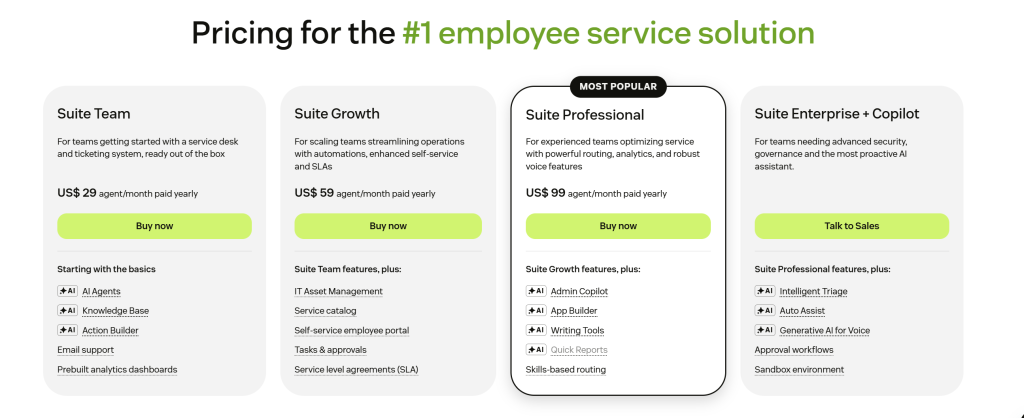
Zendesk offers a 14-day free trial for users to explore its interface and features before committing to a plan.
- Support Team ($19/agent/month): Email and social ticketing only, with basic automation — ideal for teams that don’t need live chat, phone, or a help center.
- Suite Team ($55/agent/month): Omnichannel ticketing (email, chat, social), basic macros and triggers, a reporting dashboard, and one customer help center.
- Suite Growth ($89/agent/month): Adds SLA management, CSAT surveys, multilingual support, light (view-only) agent seats, and a more complete automation workflow builder.
- Suite Professional ($115/agent/month): Adds custom reporting (Explore), skills-based routing, side conversations, HIPAA compliance option, and community forums.
- Suite Enterprise (custom pricing): Sandbox environment, advanced security controls, custom roles, and dedicated support.
Recommended Reading – Zendesk Pricing – Does it offer value for money in 2026?
Want to see how much you can save? Use our Zendesk Price Calculator to compare your current expenses with Desk365’s transparent and budget-friendly pricing.
Get Zendesk Suite Professional-level power for 72% less with Desk365 Premium
Number of agents:
Desk365
Zendesk
Hear directly from Desk365 customers
Here’s what Robin, one of the former Zendesk Clients, shared on G2:

"We love Desk365! Former Zendesk Client"
Desk365 can be customized to your absolute liking. You can pull granular reporting, view and sort your tickets with ease, and stay organized. There is so much automation, it’s very user friendly and easy to set up. We are so glad to have made the switch from Zendesk and we would not go back! Desk365 is also Soc 2 Type 2 compliant! This is a premium helpdesk at a great price. I couldn’t manage IT without it! I am also continuously impressed with their client dedication – if you suggest an improvement, they genuinely take it into consideration! They consistently roll out improvements. We are so grateful!
Robin B
Business Administration Management
Read more – Zendesk reviews: The good, bad and the ugly
Desk365 vs Zendesk comparisons
| Feature | Desk365 Premium ($32/agent/mo) | Zendesk Suite Professional ($115/agent/mo) |
|---|---|---|
| Microsoft Teams Ticketing | Native - convert Teams messages to tickets, manage/reply/reassign tickets without leaving Teams, Agent Bot + Support Bot built in | Not available - no native Teams ticketing integration; would need a third-party connector or workaround |
| SLA Management | Included (available from Standard, $12/mo) | Included |
| CSAT Surveys | Included (available from Plus, $22/mo) | Included |
| Approval Workflows | Included (available from Plus) | Not a core feature |
| Skills-Based Routing | Round robin / load-based assignment only - no true skills routing | Included - key differentiator at this tier |
| Advanced Security | HIPAA compliance, PII/PHI redaction, audit logs, encrypted field logs | Standard enterprise controls; not HIPAA-specific by default |
| Asset Management | Full IT asset lifecycle, Microsoft Intune sync, software management | Not included - not a native helpdesk feature |
| Live Chat / Messaging | No native human live-chat widget; real-time chat via AI Agent add-on only | Native live chat, messaging, and social channels (WhatsApp, Instagram) |
Desk365 Premium costs $32 per agent per month and includes SLA management, CSAT tracking, approval workflows, advanced security (HIPAA, PII/PHI redaction, audit logs), and full IT asset management with Microsoft Intune sync. Zendesk Suite Professional costs $115 per agent per month and adds skills-based routing and native live chat/messaging across channels like WhatsApp and Instagram, but has no native asset management.
At $32 versus $115 per agent per month, Desk365 Premium costs 72% less than Zendesk Suite Professional – offering comparable SLA, CSAT, security, and asset-management capabilities for teams that don’t need skills-based routing or omnichannel live chat.
Switch to Desk365 for better features, great support, and up to 72% savings!
No credit card required.
Desk365 vs Zendesk: Why Desk365 might be the better choice for your business
1. Pricing
Desk365: Offers an affordable pricing structure, starting at just $12 per agent/month for the Standard Plan, with essential features available right out of the gate. The Plus Plan at $22 per agent/month is also highly cost-effective for growing businesses. The Premium Plan at $32 per agent/month is designed for teams that need advanced asset management, security, and compliance capabilities as they scale.
Zendesk: While Zendesk has a lower entry plan, Support Team Plan ($19 per agent/month), the higher-tier plans (Suite Professional at $115/agent/month) can get quite expensive. Many essential features in Zendesk are locked behind these higher plans, which can be a dealbreaker for small businesses with limited budgets.
Why Desk365 is better: For smaller teams or startups, Desk365 is a much more budget-friendly choice, with no need for you to upgrade to an expensive plan for essential features.
2. Features at lower tiers
Desk365: Offers a wide range of features in its Standard Plan ($12/agent/month), including ticket management, automated workflows, multi-channel support, AI-powered routing, SLA management, and even time tracking. Everything you need to provide excellent customer service is available without upgrading.
Zendesk: Many advanced features like AI-powered chatbots, advanced reporting, custom branding, and multi-brand support are locked behind Zendesk’s Suite plans, which require you to pay more, even if you’re just starting out.
Why Desk365 is better: Desk365 gives you more core features for a lower cost without having to upgrade plans. Zendesk requires you to pay for more advanced features, even if you’re only looking for basic functionalities.
3. Customization and flexibility
Desk365: Provides a highly customizable support experience with options to create custom ticket fields, forms, and status, allowing businesses to tailor the platform to their needs. You also get AI-powered ticket routing without having to upgrade to higher-tier plans.
Zendesk: While Zendesk offers customization options, many of its most flexible and customizable features, such as custom branding, AI chatbots, and multi-brand support, are only available in higher-tier plans like Zendesk Suite.
Why Desk365 is better: Desk365 provides a more flexible solution at an affordable price, without restricting access to customization and AI features behind higher-tier plans. It allows businesses to scale easily without hitting the paywall for advanced features.
4. Simpler user interface and ease of use
Desk365: Known for its user-friendly interface that doesn’t require a steep learning curve. Whether you’re a small business or a startup, Desk365 provides a straightforward experience that allows teams to get up and running quickly.
Zendesk: While Zendesk is also user-friendly, its platform can sometimes feel more complex, especially when you need to unlock advanced features. Plus, as you scale up with Zendesk, the customization options can get overwhelming and harder to manage without a dedicated team.
Why Desk365 is better: Desk365’s intuitive design makes it easier for small teams and businesses to get started with minimal training, while Zendesk’s more complex setup may require a steeper learning curve and more time to configure.
5. All-in-one solution
Desk365: Offers an all-in-one customer support solution at a lower price point. It provides everything you need, from ticket management and AI-powered routing to SLAs and time tracking, all in one platform.
Zendesk: While it does provide a comprehensive solution, many of Zendesk’s most advanced features (like advanced reporting or AI chatbot integration) require you to upgrade to Suite plans.
Why Desk365 is better: Desk365 offers everything you need for a complete support system at a price that doesn’t require you to pay for additional upgrades, unlike Zendesk, where essential tools are locked behind premium plans.
6. Fewer hidden costs
Desk365: Offers a straightforward pricing structure with no hidden costs. Everything you need is included in the plan, and there’s no need for additional purchases or upgrades to access vital features.
Zendesk: While Zendesk does offer various plans, many essential features are locked behind their Suite plans, which can add up quickly, especially for growing businesses. Furthermore, advanced integrations and premium features often require additional paid add-ons.
7. Excellent customer support
Desk365: Known for offering priority support even for the Standard Plan users. Whether you need assistance with setup, troubleshooting, or anything else, Desk365 provides top-notch customer service.
Zendesk: While Zendesk also offers support, the premium support is typically available only in higher-tier plans, which could be an obstacle for businesses that need urgent assistance.

How to migrate from Zendesk to Desk365?
You can migrate from Zendesk to Desk365 by importing Contacts, Companies, and Tickets individually to ensure a smooth transition.
- For Contacts and Companies, follow this guide: [Import Contacts and Companies to Desk365 ]
- To import tickets, refer to this article: [Import tickets to Desk365 ]
- With Entra ID sync, there’s no need to manually import contacts; they can be synchronized automatically.
- Our support system is fully equipped and ready to assist at zero setup cost, ensuring a seamless experience without any upfront investment.
With the Desk365 API and webhooks, you can achieve a seamless transition from Zendesk to Desk365.
This process allows you to move essential data seamlessly while setting up Desk365 for your team. If you have any questions along the way, Desk365 Support is here to assist!
Read more – Switch from Zendesk and save up to 72% of your cost
Desk365 really stands out as a great alternative to Zendesk. One of its strongest points is its customer support—it’s fast, responsive, and easy to reach. You won’t be left waiting for ages like with Zendesk, where delays can be a bit of a headache for many users.
When it comes to pricing, Desk365 is super transparent and affordable. It offers everything you need without the need to buy extra add-ons, unlike Zendesk which often requires you to spend more for the full set of features. The setup and onboarding process are straightforward, with plenty of helpful guides to make sure you don’t get lost in the weeds.
Another area where Desk365 shines is in its customization and automation. It offers a lot of flexibility to tailor the platform to fit your business needs, which helps improve your overall efficiency.
The platform covers all the essential features you need to keep things running smoothly. From CRM tools that keep customer data secure, to powerful tools that help you manage customer interactions, Desk365 really has it all.
And the best part? You can test it out for 21 days for free! You’ll get a feel for how Desk365 can make things easier, without the hidden fees or complicated setup that often come with Zendesk.
In short, if you’re tired of the headaches and extra costs of Zendesk, Desk365 offers a more user-friendly, affordable, and efficient solution.