
TL;DR
- IT solutions combine hardware, software, networks, and IT services to solve business and technical problems.
- Common types include IT infrastructure, cloud computing, business applications, cybersecurity, IT support, communication tools, and data analytics and automation.
- They help businesses improve productivity, protect information, reduce repetitive work, manage costs, and keep operations running smoothly.
- IT solutions can also simplify employee onboarding, manage support requests, secure business data, and support remote teams.
- When choosing an IT solution, consider your business needs, ease of use, security, integration, cost, and scalability.
- Help desk platforms like Desk365 help businesses centralise support requests, automate ticket management, and track issues through resolution.
Ordering a product online happens in a few clicks – add to cart, pay, done.
But a lot is running behind the scenes. The app displays the products, the payment gateway processes the transaction, and the inventory system updates the stock.
Suppose the payment goes through, but the order isn’t placed, or the app suddenly stops working – a small technical glitch can make a smooth shopping experience frustrating.
And that’s where IT solutions come in.
Businesses rely on technology to run operations, manage information, and stay connected. IT solutions help them address everyday challenges through the right tools and systems.
So, what goes into an IT solution, and why do businesses need one? Let’s take a closer look.
What are IT solutions?
IT solutions combine hardware, software, networks, and IT services to solve specific business or technical problems. An IT solution doesn’t always mean buying several different tools. It can also be a single platform or service configured to address a specific business need.
For example, a company can use an IT help desk solution to manage employee technical issues. Instead of handling requests through multiple emails or calls, employees can report problems through one platform, where the IT team can track and resolve them.
The platform may include ticketing software, automated notifications, and a knowledge base, all working together to provide better IT support.
IT product vs. IT service vs. IT solution
These three terms are often used together, but they don’t mean exactly the same thing.
| Category | What it means | Example |
|---|---|---|
| IT Product | A technology or tool used to perform a specific task. | Antivirus software that scans company computers and detects malware. |
| IT Service | Support or assistance provided to keep technology running smoothly. | An IT team monitors company systems for suspicious activity, investigates security alerts, and responds to potential threats. |
| IT Solution | A combination of products, services, and processes used to solve a specific business problem. | A company combines antivirus software, firewall protection, regular security monitoring, and data backups to protect its business information. |
IT products provide the tools, IT services keep them running, and IT solutions bring everything together to solve a business problem.
What are the different types of IT solutions?
Businesses use different types of technology depending on the work they do. Some need better ways to manage data, while others need to protect company information or simplify everyday tasks.
Businesses are continuing to invest heavily in technology. Gartner forecasts that worldwide IT spending will reach $6.39 trillion in 2026, a 14.5% increase from 2025. This investment spans areas such as software, IT services, cloud infrastructure, and devices, showing how much businesses rely on technology to run their operations.
Here are seven common types of IT solutions and how businesses use them.
IT infrastructure and networking solutions
Think of IT infrastructure as the foundation of a company’s technology. It includes computers, servers, internet connections, and other equipment employees need to complete their work.
Networking solutions help these devices connect and share information as well.
Example: In an office, employees need access to the internet, shared files, printers, and business applications. A reliable office network makes it possible for everyone to access these resources without constantly facing connection problems.
Cloud computing solutions
Not every business wants to store all its files and run its applications on computers or servers at the office. Cloud computing allows businesses to store information and access applications over the internet.
Some common examples include:
- Google Drive and OneDrive for storing and sharing files.
- Microsoft 365 and Google Workspace for everyday office work.
- Cloud-based backup services for protecting important files.
Example: An employee working from home can open a document saved in Google Drive, make changes, and share it with colleagues without visiting the office. This makes it easier for teams to work together from different locations.
Business software and application solutions
Businesses handle different activities, from managing customers and processing payments to tracking employee records and monitoring sales. Business software helps bring these activities into an organised system.
Some commonly used applications include:
- CRM software
- ERP software
- HR software
- Accounting software
- Inventory software
Example: A retail store can use inventory software to check how many products are available. Whenever an item is sold, the stock information gets updated, making it easier to know when products need to be reordered.
Cybersecurity and data protection solutions
Businesses store a lot of sensitive information, including customer details, financial records, and employee data. Keeping this information safe is highly essential.
These Cybersecurity solutions help protect business systems from various threats and security attacks.
They include:
- Endpoint detection and response (EDR)
- Email security and hacking protection
- Data loss prevention (DLP)
Example: An employee receives a phishing email containing a suspicious link and accidentally downloads a malicious file. The company’s endpoint detection and response (EDR) solution identifies unusual activity on the device, alerts the security team, and helps isolate the affected computer before the threat spreads to other systems.
IT support and service management solutions
When technology stops working, employees need a quick way to get help. This is where IT support and service management solutions come in.
These solutions help IT teams manage employee requests, resolve technical issues, and keep track of company assets and softwares.
Common examples include:
- IT help desk software.
- Ticket management systems.
- IT asset management.
- Employee self-service portals.
- Knowledge bases.
- Incident management
- Service request management
- SLA management
- Change and approval management
Example: A new employee joins a company and needs a laptop, software access, and login credentials to get started. The HR team raises a request through the help desk, and the IT team takes care of setting up the device and providing the necessary access before the employee’s first day.
This makes it easier for employees to get help and for IT teams to manage their workload.
Communication and collaboration solutions
When employees work from different locations, staying connected and sharing information can become challenging. Communication and collaboration tools help teams work together without always being in the same place.
Some familiar examples include:
- Microsoft Teams and Slack for workplace communication.
- Zoom and Google Meet for online meetings.
- Google Docs and Microsoft 365 for sharing and editing documents.
- Project management tools for tracking tasks and deadlines.
Example: A team working on a project can use Microsoft Teams to discuss updates, share documents, and attend meetings. Everyone stays informed without having to rely on long email conversations.
Data analytics and automation solutions
Businesses collect information every day, but going through large amounts of data manually can take time. This is where data analytics tools help turn this information into reports that businesses can understand and use.
Automation tools, on the other hand, help complete repetitive tasks with less manual effort.
Some examples include:
- Sales and performance reports.
- Business dashboards.
- Automated email notifications.
- Workflow automation tools.
- AI-powered business applications.
Example: An IT team receives dozens of support tickets every day. Instead of manually assigning each request, a ticketing system can use round-robin assignment to distribute tickets among available agents. It can also send status updates and reminders about pending requests.
What are some common IT solutions use cases?
IT solutions are used across different departments, depending on what a business needs to manage or improve. Here are a few common examples.
1. Employee onboarding
When a new employee joins, the HR and IT teams need to coordinate several tasks. These may include preparing a laptop, creating user accounts, setting up email, and providing access to the applications required for the job.
Employee management software, identity management tools, and IT help desk platforms can help coordinate these tasks and make the onboarding process easier to manage.
2. Managing business data
A business may have customer information, sales records, financial documents, and employee details stored across different systems.
Cloud storage, database management, and business applications help organise this information so employees can access the data they need. Access controls and backups also help protect important records.
3. Securing company systems
A company receives an email containing a suspicious attachment. Email security tools can flag the message, while endpoint protection can detect unusual activity if a file is downloaded and executed.
The security team can then investigate the alert, isolate the affected device if necessary, and take steps to prevent the threat from spreading.
4. Managing IT support requests
Employees regularly need help with device problems, software access, and network issues. Instead of handling every request through individual emails or calls, a company can use an IT help desk to collect and manage them.
The IT team can assign requests to technicians, set priorities, monitor progress, and keep employees updated until their issues are resolved.
5. Supporting remote and hybrid teams
Employees working from different locations need secure access to company files, applications, and communication tools.
Cloud platforms, virtual private networks, identity management, and collaboration applications help employees work together while maintaining appropriate access to business resources.
What are the benefits of IT solutions?
For businesses, the value of an IT solution goes beyond simply getting work done faster. The right tools can help teams handle growing workloads, keep customers happy, and avoid problems that affect everyday operations.
Here are some ways IT solutions that make a big difference in regular workspace.
Reduces repetitive work
IT teams often spend a surprising amount of time handling the same requests, such as password resets, software access, and routine troubleshooting.
With ticketing systems and workflow automation, businesses can automatically assign requests, send status updates, and remind technicians about pending tickets.
This leaves IT staff with more time to focus on issues that actually need their attention.
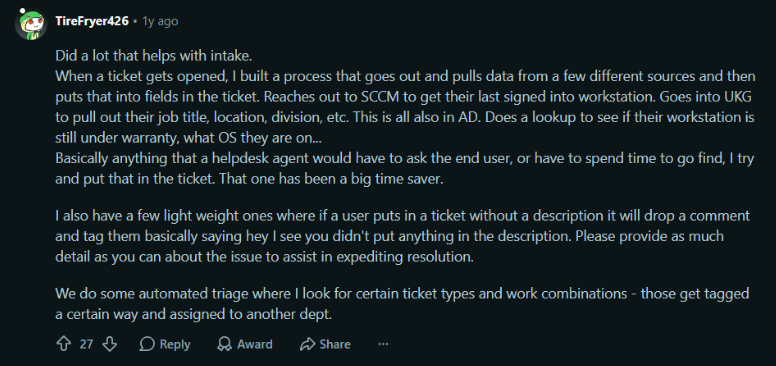
One IT professional on Reddit described how their team automatically pulls employee and device information into new tickets. This saves technicians from having to search multiple systems or ask employees for details that the company already has
Helps teams manage more support requests
As a business grows, the number of customer queries and technical support requests usually grows with it.
Managing these requests through separate emails, spreadsheets, and chat conversations can quickly become difficult.
A help desk or ticketing system brings all requests into one place where support teams can categorise tickets, assign them to the right agents, set priorities, and monitor their progress.
This gives managers a clearer picture of the team’s workload and helps prevent customer requests from being overlooked.
Improves customer experience and retention
For many companies, customer support doesn’t end after a customer purchases a subscription. Customers may need help with product setup, integrations, account access, or technical issues throughout their subscription.
When these problems take too long to resolve, customers may start questioning whether the product is worth continuing with.
A good support system helps teams respond to customers, keep them informed, and track issues until they are resolved.
In Verint’s 2026 research survey of 5,000 U.S. consumers, 79% said they would switch to a competitor after a single negative customer experience. The same survey found that 78% prioritise the fastest resolution over their preferred support channel.
This is why businesses need a reliable help desk or ticketing system to manage customer queries, reduce response delays, and ensure issues are followed up until they are resolved.
Helps businesses track support performance
How long does it take to respond to a customer? Which types of issues take the longest to resolve? Are tickets being handled within the promised service levels?
Without proper records, answering these questions can be difficult.
ITSM and ticketing platforms provide reports on ticket volumes, response times, resolution times, and SLA performance. Managers can use this information to identify delays, understand recurring issues, and see where their teams need additional support.
In a 2024 Deloitte’s research of 160 B2B technology support leaders, 61% named mean time to resolve as a key measure of support success, while 53% named mean time to respond. These metrics show how important it is to measure support performance rather than simply count resolved tickets.
Makes it easier to scale business operations
A small company might initially manage customer queries with a shared email inbox. But as its customer base expands, the same approach may no longer work.
More customers mean more questions, more technical issues, and more requests to handle.
IT solutions such as cloud platforms, help desk software, and automated workflows help businesses manage this growth without having to depend entirely on manual processes.
For example, a company can add more support agents, create separate ticket queues, and introduce automated ticket routing as its support requirements increase.
Keeps business operations running smoothly
A technical issue doesn’t always affect just one person. If a company’s application becomes unavailable, several employees or customers may be affected at the same time.
If a company’s internal application stops working, employees may be unable to access customer records, process orders, or complete their daily tasks. IT monitoring and incident management tools help teams identify the issue, notify the right people, and coordinate the recovery.
Helps businesses make better decisions
Support tickets contain useful information about what employees and customers struggle with most.
For example, if a company receives repeated tickets about the same product feature, it could indicate that the feature needs improvement or that customers need better guidance.
Ticket reports and analytics help businesses identify these patterns instead of treating every request as an isolated problem.
Product teams can use this feedback to improve features, while support managers can update knowledge base articles or provide additional training to their agents.
Ultimately, IT solutions help businesses understand not just how much work their teams are doing, but also where things are going wrong and what can be improved.
How do you choose the right IT solution for your business?
With so many IT products and services available, choosing one can feel overwhelming. Every vendor promises better performance, faster workflows, and improved efficiency. But does your business need all those features?
The best place to start is with a simple question:
“What problem are you trying to solve? “
For instance, if your IT team struggles to keep track of employee requests, investing in an advanced infrastructure management tool may not help. What you need is a help desk or ticketing system that brings all support requests into one place.
Once you understand the problem, look at how the solution fits into your business.
- Will it work with your existing tools? Check whether it integrates with the applications your employees already use. Having to switch between multiple platforms can create more work.
- Can your team use it easily? A solution may offer plenty of features, but if employees find it difficult to navigate, they may not use it effectively.
- Is your business information protected? Look at its security features, user permissions, data protection, and backup options.
- What will it cost in the long run? Don’t just compare subscription prices. Consider implementation, training, maintenance, and additional user charges.
- Can it grow with your business? The solution should be able to support more users, increased workloads, and changing requirements as your business expands.
- What happens when something goes wrong? Check the availability of technical support, product updates, and documentation.
If you’re still unsure, try the solution before committing it. A free trial or small pilot project can help you understand whether it actually fits your team’s workflow.
Where does Desk365 fit in?
For businesses looking to improve their IT support and customer service operations, a help desk solution like Desk365 can be a practical option.
Desk365 brings support requests from email, Microsoft Teams, web forms, and other channels into one central ticketing platform. IT and customer support teams can assign tickets, automate repetitive tasks, set SLA reminders, and track requests until they are resolved.
It also offers features such as a self-service knowledge base, ticket reporting, asset management, and workflow automation. Its Microsoft 365 integration allows teams to manage support requests directly within Microsoft Teams, making it easier to work with tools they already use.
Technology is only useful when it makes work easier. The right IT solutions help businesses solve everyday problems, support their teams, protect important data, and serve customers better.
Whether it’s automating routine tasks or managing IT requests, choose solutions that fit the way your business works today and can grow with it tomorrow.
Frequently asked questions
IT solutions are combinations of technology, software, and services used to solve specific business problems. They help businesses manage daily tasks, protect information, connect employees, and improve operations.
The seven common types are IT infrastructure and networking, cloud computing, business software and applications, cybersecurity and data protection, IT support and service management, communication and collaboration, and data analytics and automation.
An IT product is a technology tool used for a specific task, such as antivirus software. An IT service involves technical support or assistance, such as security monitoring. An IT solution brings products, services, and processes together to address a business problem.
Businesses use IT solutions to improve productivity, reduce manual work, protect important data, manage operating costs, support collaboration, and keep essential systems running.
Examples include cloud storage platforms, business management software, cybersecurity tools, office networks, IT help desk software, ticket management systems, and workflow automation tools.