TL;DR - Managing an efficient IT helpdesk
Helpdesk management means running the people, process, and tools that resolve IT requests fast.
To run an efficient helpdesk:
1. Start with better ticket intake, clear Service Level Agreements (SLAs), and a shared knowledge base.
2. Add automation next. Prioritize tickets by urgency and impact, assign clear ownership, train agents, and track metrics such as first response time, resolution time, and customer satisfaction.
3. Bring in AI only with human oversight.
4. Pick a tool your team finds easy to use, because ease of use drives adoption.
Why I'm writing this guide:
I spend my days around IT experts. I’ve worked in the helpdesk industry since 2018 across a few different companies, and today I measure results for the IT teams that use Desk365. That means I read their numbers, write their case studies, and ask what changed after they switched.
I also talk to IT leaders for Humans of Support, our interview series. After more than 10 episodes, one pattern keeps showing up: The best helpdesks do not win on features, they win on habits.
This guide pulls those habits together.
What is helpdesk management
Helpdesk management is the process of organizing and improving how an IT team receives, tracks, prioritizes, and resolves support requests. It covers the people, processes, and tools that keep IT support running.
For an IT manager, this means more than closing tickets. They need to manage workloads, train agents, monitor service levels, reduce recurring problems, and make sure employees get the help they need.
Biggest challenges in helpdesk management
Helpdesk management is a balancing act. IT managers must keep employees productive, maintain service quality, and make the best use of limited resources, often while handling requests from across the business. The difficulty lies in making support reliable and predictable, even when demand fluctuates and new issues arise without warning.
Another challenge is moving from a reactive approach to a proactive one. Teams can spend their entire day resolving incoming tickets without having time to identify recurring problems, improve processes, or prevent future incidents. Without a broader view of helpdesk operations, managers may struggle to distinguish temporary spikes in demand from persistent problems that need attention.
There is also the challenge of demonstrating the value of IT support. Closing tickets is easy to count, but it does not necessarily show whether employees can get back to work quickly or whether the underlying issue has been resolved. Managers need to look beyond activity and understand how support affects employee experience and business continuity.
These pressures are particularly significant for small and midsize businesses, where IT teams often have to support a growing workforce without a corresponding increase in headcount. Understanding the most common operational challenges is the first step toward building a helpdesk that scales without compromising service quality.
| Challenge | How IT managers and overcome the issue |
| Missing information causes workflow delays | Better intake forms and ticket details can reduce back-and-forth |
| Agents use three to five additional tools alongside their helpdesk, leaving context split across | Support information may be spread across several systems but they should all feed into a unified helpdesk |
| Agent productivity is low | Automate repetitive tasks with AI so human agents have bandwidth to focus on high-priority issues |
| AI is not trustable yet | Deploy AI Agents that have defined training material that is accurate. Give human agents an AI Copilot that assits with daily activities like ticket summaries and generating knowledge base articles. |
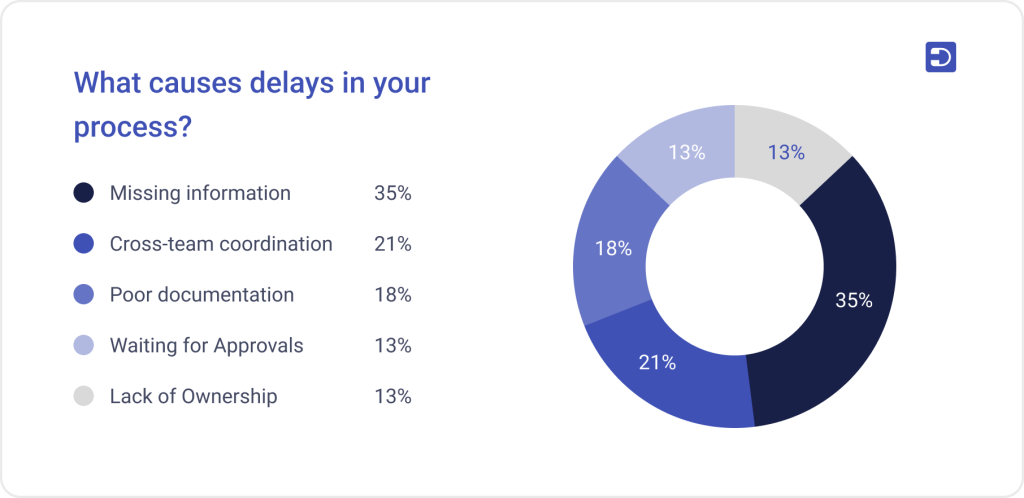
Desk365 surveyed 92 helpdesk users from small and midsize businesses for its State of IT Helpdesks report. The findings show where teams struggle. Missing information alone causes workflow delays for 2/3 IT managers. A helpdesk should be flexible enough to collect the right information based on the type of request.
A hardware issue may need an asset number, device name, location, and affected user. An access request may need a department, manager, business justification, and approval. A software issue may require the application name, error message, and steps already attempted.
What does Reddit say about being a helpdesk manager?
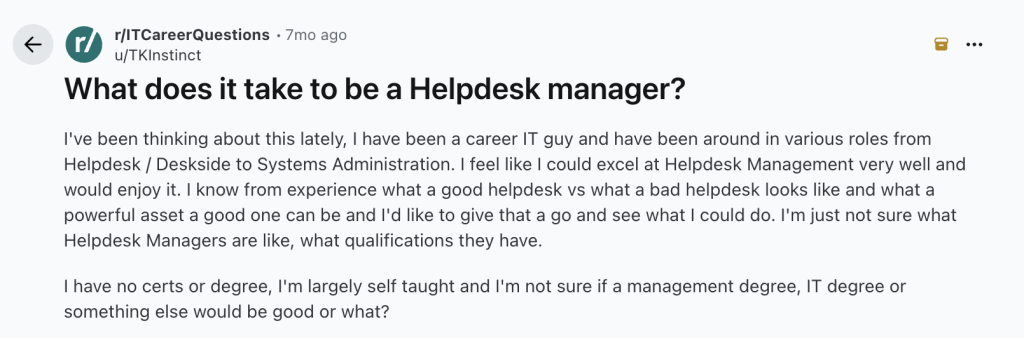
In a discussion on r/ITCareerQuestions, an IT professional asked what it takes to move into helpdesk management after working in helpdesk, deskside support, and systems administration.
One response from a manager overseeing Tier 1 and Tier 2 teams described the role as making sure technicians do their jobs, maintaining ticket hygiene, and driving continuous improvement.
That answer gets to the heart of helpdesk management. Technical knowledge helps, but a manager also needs to build consistent habits across the team.
The same discussion raises a useful point for people moving into management. Experience troubleshooting issues does not automatically prepare someone to manage a support team. Managers must also understand ticket trends, aging requests, escalations, workloads, and team performance.
For small businesses, that distinction matters. An IT manager may still handle complex technical issues while managing the helpdesk. The challenge is to protect time for both responsibilities.
Running an efficient helpdesk
Efficient helpdesks share seven habits. Each one may seem small, but together, they cut delays, imprive agent productivity, and elevate service delivery.
Capture the right information when a ticket arrives
When an agent gets a vague ticket, asks follow-up questions, and waits, it adds hours before resolution can happen.
Use ticket forms that change by request type. A hardware ticket should ask for the device name, asset number, and location. An access request should ask for the manager, department, and business reason. A software ticket should ask for the app name, the error message, and the steps already tried.
Desk365’s customizable ticket forms let you build each of these once and reuse them.
Let employees use channels they prefer
Meet people where they already work. Ryan Geiler, IT Director at Community Medical Center (CMC), said his team saw much higher ticket use once employees could file a ticket from Microsoft Teams, email, or the portal. Staff stopped relying on office visits and phone calls. A ticket on record is a ticket you can measure, assign, and learn from. A hallway request is gone the moment it ends.
Employees may contact IT through email, Microsoft Teams, a self-service portal, or other channels. Wherever a request starts, the team should be able to track it in one place.

Desk365 integrates very seamlessly with Microsoft Teams—it was a clear choice for us as an Office 365 shop. With Desk365’s API, we were able to route public-facing website requests to specific departments—seamlessly.
Ryan Geiler, Advanced Clinical Applications and Analytics Coordinator
Assign tickets to the right agent and define priorities
Assign by skill and workload, not by who happens to be online. Round robin ticket assignment spreads work evenly. Skill-based routing sends complex tickets to the right person the first time.
Set priority from two questions. How many people does this affect? How badly does it block their work? A broken printer for one person is not the same as a down VPN for 50.
Concurrent, a wealth management firm, routes tickets across 39 departments with automated rules. It started with 65 agents and now runs more than 100 on its helpdesk, see how they do it in this case study.
Define ticket categories, ownership rules, escalation paths, and service targets. Use automation to assign common requests when the rules are clear. Our guide on how to choose a helpdesk explains which capabilities to evaluate when selecting a system.
Set SLAs that align with business goals
Define a first response target and a resolution target for each priority level. Then track them with SLA management so breaches trigger alerts before they happen.
Set targets that reflect your business needs and available resources. A small team supporting 200 employees will not have the same capacity as a large service desk operating around the clock.
Do not stop at the timer, though. John Noctor, Chief Customer Success Officer at the Service Desk Institute (SDI), put the risk plainly in our interview: “A ticket can be SLA-green while the customer is still seeing red.”
Noctor also described the “watermelon SLA.” It is a report that looks green on the outside and turns red when you cut into it. Your SLAs should allow for agents to truly resolve issues so that a closed ticket is always indicative of a problem solved.
Build a knowledge base that is updated and accurate
When your team solves the same problem twice, write the article. Give each article an owner. Review the set every quarter.
This matters more than most managers expect. A shared knowledge base helps new agents ramp up faster. It gives agents a reliable source of information for troubleshooting, following standard procedures, and resolving unfamiliar issues. Without one, employees may receive different answers to the same question depending on who handles their request. Outdated instructions can be equally problematic, especially when software interfaces, security policies, or internal processes change.
For users, a well-maintained knowledge base supports self-service. Employees can find answers to common questions, follow step-by-step instructions, and solve simple problems without waiting for an agent. This gives support teams more capacity to focus on issues that require investigation or specialist expertise.
However, creating articles is only part of the job. IT managers need a process for reviewing content, assigning owners, validating technical accuracy, and removing obsolete instructions. Feedback from agents and users can reveal gaps in existing documentation. Reviewing search terms and unanswered queries can also help teams identify what information to add next. A knowledge base should evolve alongside the systems and processes it documents.
Answer repetitive questions using AI
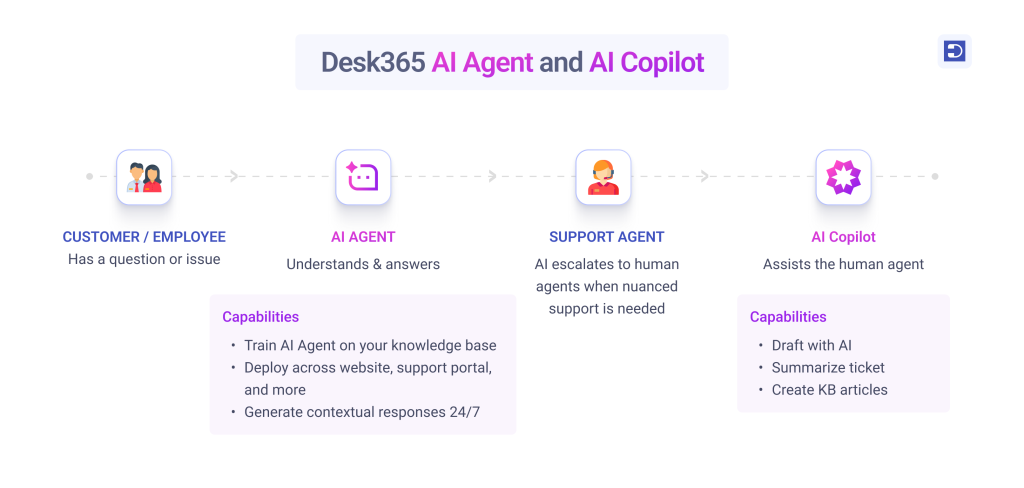
When it comes to AI Agents, IT managers still have a lack of trust in how AI handles tickets. In our survey, 74% of respondents said they do not trust AI to answer tickets. When asked what would help, 35% wanted visibility into how the AI learns.
That’s why we built the Desk365 AI Agent. The Desk365 AI Agent is available 24/7 and is custom-trained on the data you feed it. This could include your knowledge base, web pages, and Q&As, so it answers only from pre-approved material. When it cannot find an answer in its training material or receives a complex question it cannot answer, it can escalate to a human and help the user create a ticket. The AI Agent can be deployed on your website, support portal, Microsoft Teams, or any channels you choose. It looks at the user’s question and answers it immediately, helping them even before they speak to an agent. The AI Agent also comes with additional capabilities that let you tailor its persona to suit your brand and business. It helps deflect L1 tickets, while our AI Copilot helps agents summarize tickets, generate knowledge base articles, and draft responses in 30+ languages. This kind of AI Agent gives agents back their bandwidth, allowing humans to focus on complex issues that require higher-order thinking.
Monitor helpdesk performance
While each organization may require specific metrics tailored to their services, here are 12 commonly used helpdesk metrics that every enterprise should consider tracking to initiate benchmarking and enhance their helpdesk experience.
2. Resolution time
3. Ticket volume
4. Customer Satisfaction Score (CSAT)
5. Net promoter score (NPS)
6. First Contact Resolution Rate (FCR)
7. Ticket Backlog
8. Customer Effort Score (CES)
9. Average Handle Time (AHT)
10. Escalation Rate
11. Service Level Agreement Compliance
12. Time to Resolution (TTR)
Tracking the right metrics helps IT managers understand how well their helpdesk performs and where improvements are needed. First response time measures how quickly agents acknowledge requests, while resolution time tracks how long it takes to resolve them. First contact resolution (FCR) shows how often issues are solved in the first interaction. SLA compliance measures whether tickets meet agreed response and resolution targets. Customer satisfaction (CSAT) reveals how users rate their support experience. Managers should also monitor ticket backlog, ticket aging, and reopen rates to identify bottlenecks and recurring issues. Review these metrics together rather than in isolation to make informed decisions.
Read more on the 12 metrics to measure here.
What are the most popular helpdesk management tools?
The best tool depends on your support model, company size, existing systems, and budget. These platforms are worth evaluating for different needs.
- Desk365 – Best for Small and mid-sized IT teams on Microsoft 365 that want fast setup and ticketing inside Microsoft Teams
- Zendesk – Good for support teams that need many customer service channels
- Freshservice – Used by mid-sized IT teams that want service management workflows
- ManageEngine ServiceDesk Plus – Best for IT teams that want deep service management and asset features
- Jira Service Management – Ideal for teams that already work in Atlassian tools
- ServiceNow – Used by large enterprises with complex, multi-team workflows
How do you choose the right helpdesk for your team?
A search on G2 for ‘helpdesk” will throw 450+ results. What’s right for your team depends on your goals, agent size, employee size, budget, and complexity requirements. Here are a few factors to condiser when choosing a helpdesk.
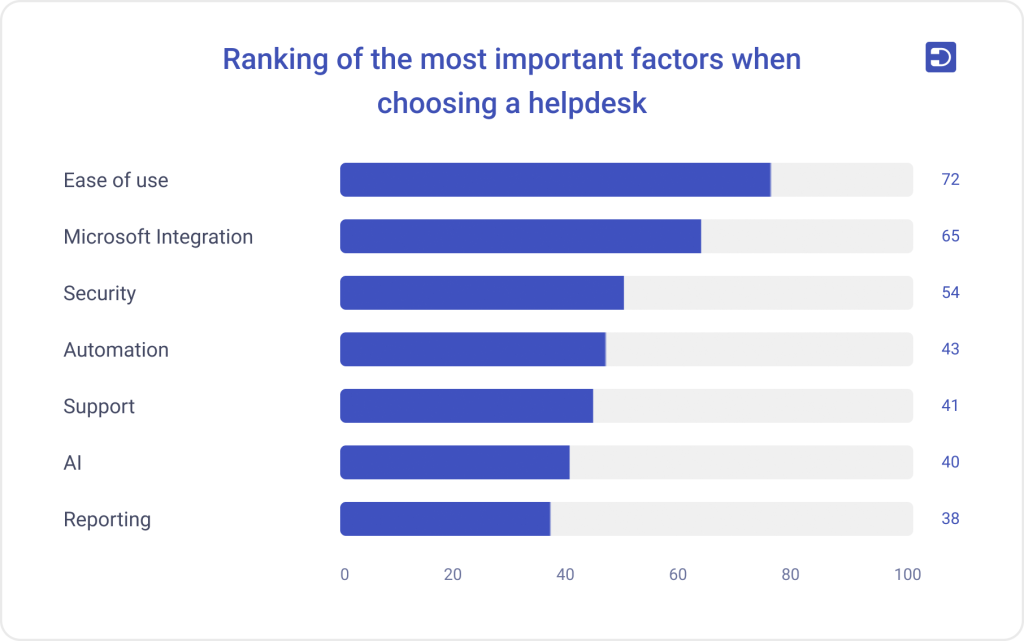
In our survey, 44 of 92 respondents switched vendors to get something easier to use. Ease of use also ranked first among the factors they weigh when choosing a helpdesk, ahead of integrations, security, automation, and AI. And small frictions add up. We found that there is a cost to this clicking around – 12 hours a week to be exact. That’s the equivalent of 1.5 workdays agents spend just finding their way around the systems they use. Over months and years, this wasted time affects both productivity and customer satisfaction.
Before making a decision, map your current support processes and identify where your team loses the most time. Check whether the helpdesk can adapt to your existing workflows, handle the types of requests your team receives, and scale as your business grows. Look at how easily you can configure ticket forms, customize workflows, and manage permissions without relying on technical support for every change. Ask vendors for a hands-on trial and involve the agents who will use the platform daily. Their feedback can reveal practical limitations that a feature checklist might miss. The right helpdesk should fit how your team works today while giving you room to improve without adding unnecessary complexity.
AI-powered helpdesk management with Desk365
Desk365 helps IT teams bring ticketing, automation, reporting, and self-service into one helpdesk. Teams can manage requests, assign tickets, set service targets, and track performance without relying on scattered conversations and manual follow-ups.
For organizations using Microsoft 365, Desk365 also supports ticketing within Microsoft Teams, Microsoft Entra ID sync and single sign-on, Power Automate workflows, and Intune asset synchronization. Its AI features can help agents work with tickets and knowledge content, while the AI Agent can answer employee questions using configured knowledge sources.
These capabilities help small and midsize IT teams reduce repetitive work and maintain a clearer view of support activity. Explore Desk365’s helpdesk features to see how they fit your team’s needs.
Frequently asked questions
The main goal is to resolve support requests efficiently while giving employees a reliable support experience. This requires clear processes, trained agents, useful performance metrics, and the right tools.
Use a centralized ticketing system, clear priority rules, standard responses, a maintained knowledge base, and automation for repetitive tasks. Review ticket trends regularly to identify recurring problems and workload gaps.
The best choice depends on your needs and existing tools. Compare ticket management, automation, reporting, knowledge management, integrations, security, pricing, and ease of use before selecting a platform. Desk365 works great for businesses within the Microsoft ecosystem.
Helpdesk management focuses on handling and resolving support requests. IT service management (ITSM) covers a broader set of practices, which can include incident, problem, change, and service request management.
Start by reducing manual ticket routing, improving request forms, documenting recurring solutions, and reviewing ticket trends. Automation and self-service can free up time, but you should measure their impact before assuming they will reduce workload.