
TL;DR: Best SaaS help desk tools at a glance
- Desk365: Best for B2B SaaS companies whose customers work in Microsoft Teams
- Zendesk: Best for large support teams that need every channel, including voice
- Freshdesk: Best for growing teams that want a full help desk at a mid-range price
- Intercom: Best for product-led SaaS that supports users inside the app
- Help Scout: Best for small teams that mostly do email support
- Zoho Desk: Best for teams that want the lowest per-agent price or already use Zoho
- HubSpot Service Hub: Best for SaaS companies already running sales and marketing on HubSpot
A founder in r/SaaS recently asked a question many growing SaaS teams run into: how are you handling customer support as your SaaS grows? They wanted to know how many requests others get, which channel they rely on, how many questions are repeats, who answers them, whether AI has helped, and what hurts most.
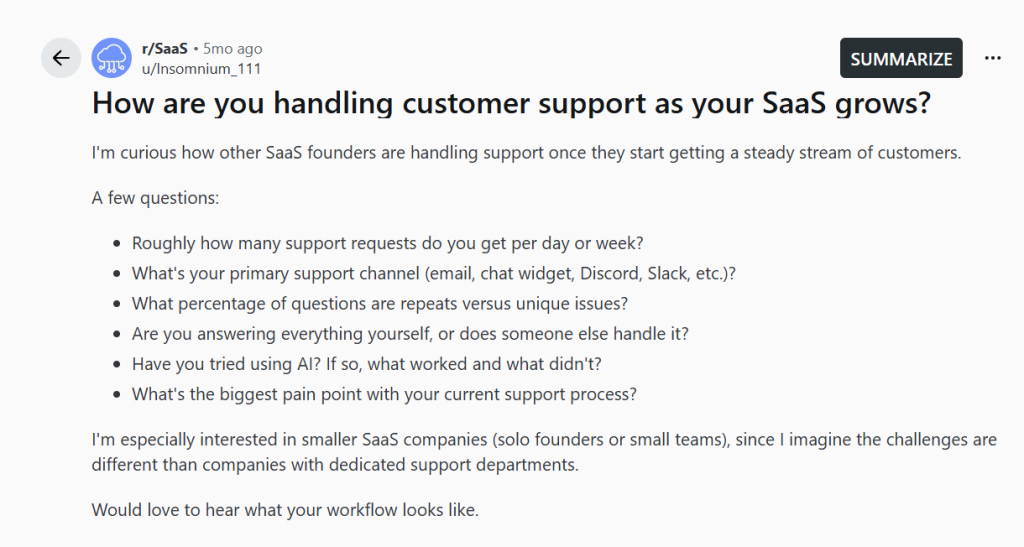
Those questions get harder once a steady stream of customers arrives. Requests come in through email, chat widgets, and community channels, the same questions keep showing up, and the founder who used to answer everything no longer has the time.
The usual answer is a help desk, and Zendesk is often the first name people mention. It is a strong product, but it is priced for large support teams, and the bill grows quickly once you add AI resolutions and Suite features. Most SaaS teams need something simpler: a shared queue, SLAs that match their plans, a portal and knowledge base, and AI that cuts repeat questions without a surprise invoice.
This guide explains what SaaS customer support involves and compares seven help desks that SaaS teams use in 2026, with current pricing for each.
Disclaimer
I work for Desk365, and our product is on this list. It sits first because it lets B2B SaaS customers raise and track support tickets inside Microsoft Teams at published prices, which fits SaaS teams whose customers work there. For every tool here, I list real limits from G2 reviews, Desk365 included. Pricing and reviews are linked as of November 2026, so you can check our work. Read more about our review methodology.
What is SaaS customer support?
SaaS customer support is the help a software-as-a-service company gives its subscribers so they can set up, use, and keep paying for the product. It starts at the free trial and continues for as long as the customer stays.
A typical queue mixes setup and onboarding questions, how-to requests, bug reports, feature requests, billing changes, and login or permission issues. Many tickets come from admins setting the product up for a whole team, so agents need to understand integrations and user roles, not just account basics.
The big difference from traditional support is that the sale is never finished. Customers can leave at the end of any billing cycle, so every reply affects renewal and expansion. Repeated tickets are also some of the best customer feedback a product team can get.
Most SaaS teams take tickets from email, an in-app widget or chat, a self-service portal, and a knowledge base, all routed into one queue. B2B teams increasingly add Microsoft Teams, since that is where many business customers already work. Our guide to multi-channel customer support covers how to run several channels without losing context.
The rest of this post focuses on choosing the right tool.
How I ranked the best SaaS help desk tools
I scored each tool on six things that decide whether a help desk works for a SaaS support team, in this order of weight.
- Channels SaaS customers use. Email, an in-app or website widget, a self-service portal, and support inside the tools B2B customers already use, such as Microsoft Teams.
- SLAs by plan or customer. SaaS companies often promise faster replies to higher tiers. I checked which plan each tool’s SLA policies start on. If you track satisfaction too, see CSAT vs SLA for how the two differ.
- Self-service. A customer portal and a knowledge base that customers can actually find.
- AI that cuts repeat work. Reply drafts and summaries for agents, plus an AI agent that answers common questions. I also checked how each vendor charges for it.
- Integrations. Bug tracking, CRM, and the productivity suite your customers and team use.
- Total cost for a small team. Price per agent on the plan where SaaS essentials (portal plus SLAs) are included, not just the entry plan.
A note on pricing gotchas: The headline price is rarely what you pay. Watch for features locked to higher tiers, AI billed per resolution or per credit, one-time onboarding fees, and monthly rates that run higher than annual ones. Our help desk software pricing comparison explains these models in more detail.
Comparison of the 7 best SaaS help desk tools
Desk365 includes SLA policies, a customer portal, and a knowledge base on its $12 entry plan, while most tools here put at least one of those on a higher tier. Prices are per agent (or seat) per month, billed annually, from each vendor’s pricing page in November 2026.
| Tool | Best for | G2 rating | Capterra rating | SLA policies start on | Starting price | Free plan or trial |
|---|---|---|---|---|---|---|
| Desk365 | B2B SaaS whose customers use Microsoft Teams | 4.9 | 4.9 | Standard | $12 | Free plan (50 tickets/month), 21-day trial |
| Zendesk | Large teams needing every channel | 4.3 | 4.4 | Suite Professional | $19 (Support Team) | 14-day trial |
| Freshdesk | Growing teams at a mid-range price | 4.4 | 4.5 | Pro (multiple policies) | $19 | 14-day trial |
| Intercom | Product-led SaaS with in-app support | 4.5 (listed as Fin) | Not listed | Expert | $29 ($19 for new customers) | Free trial |
| Help Scout | Small, email-first teams | 4.4 | 4.6 | Standard (one basic policy) | $25 | Free plan (5 users), 15-day trial |
| Zoho Desk | Lowest per-agent cost, Zoho users | 4.4 | 4.5 | Standard (4 policies) | $7 | Free plan (3 users), 15-day trial |
| HubSpot Service Hub | Teams on HubSpot CRM | 4.4 | 4.4 | Professional | $20 (Starter) | Free tools (2 users) |
1. Desk365, best for B2B SaaS whose customers work in Microsoft Teams

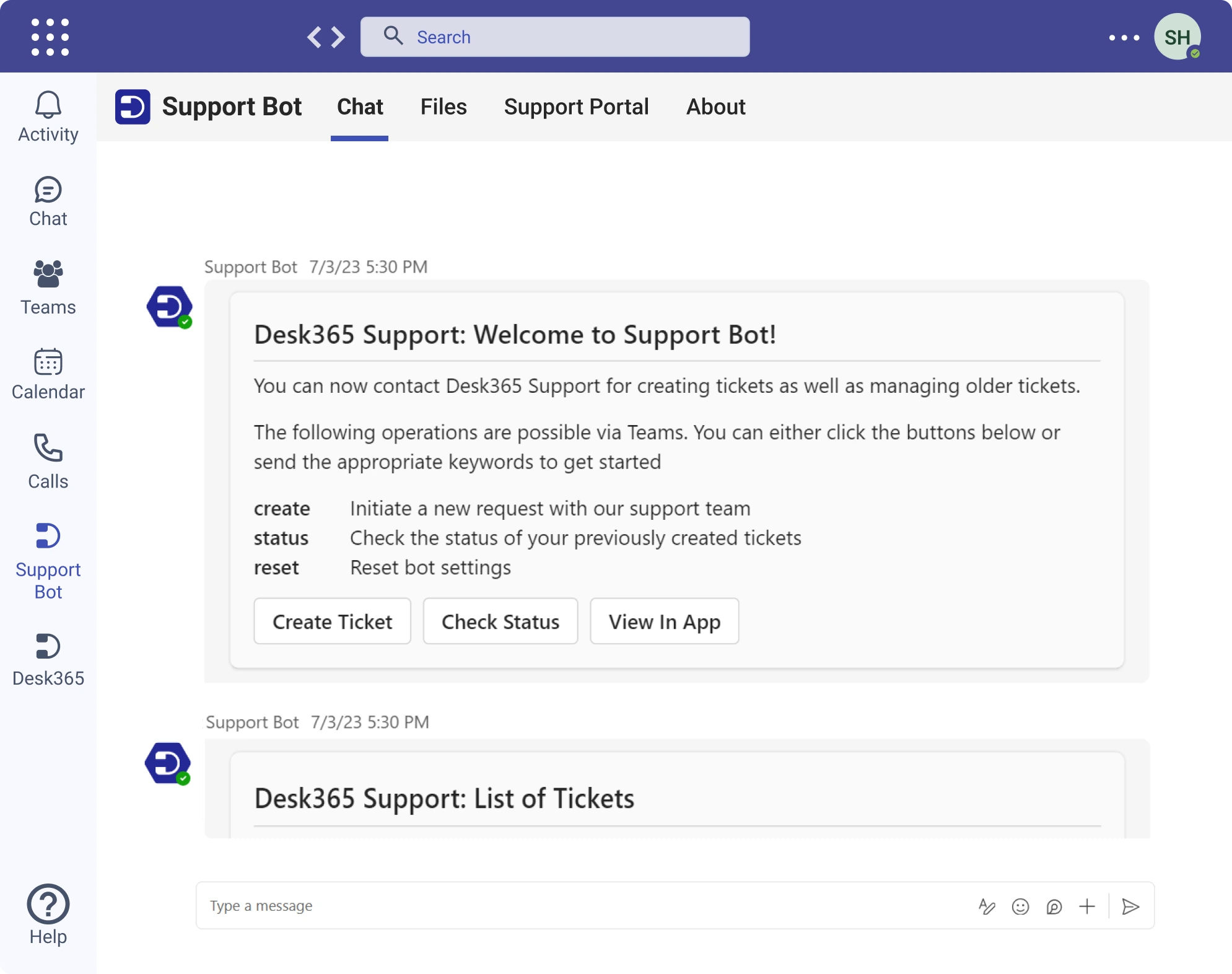
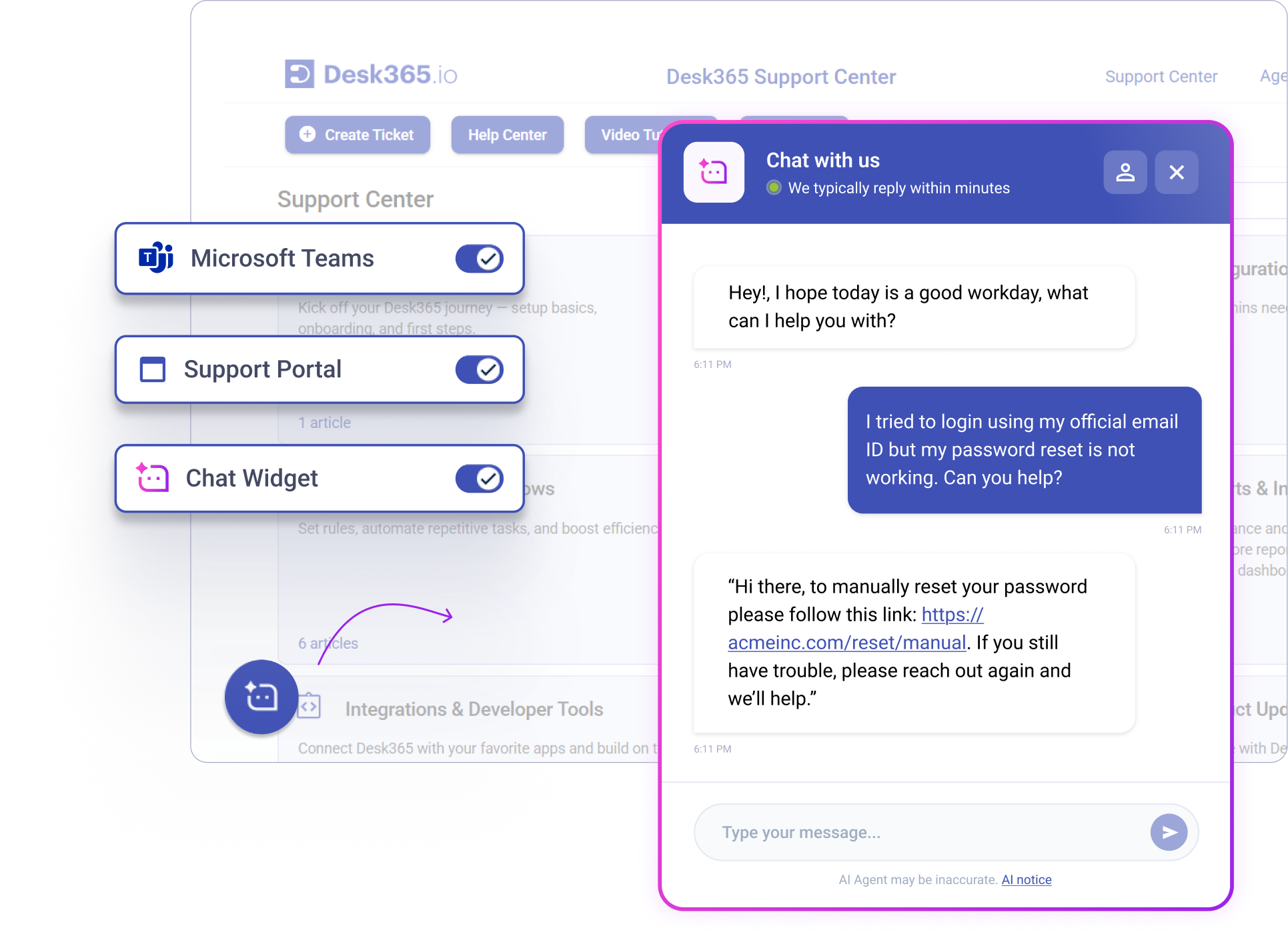
Desk365 is a help desk built natively for Microsoft Teams. Customers can raise, track, and reply to tickets in Teams, and the same queue takes email, a web widget, a web form, and a self-service portal.
Why I'd consider Desk365:
If you sell to businesses that run on Microsoft 365, your customers’ admins and power users already spend their day in Teams. Letting them open a ticket there removes a step for them and gets your team better details up front. That is different from a help desk that only posts Teams notifications, which we explain in Teams-native vs Teams-integrated help desks.
The pricing is also simple for a SaaS team. SLA reminders and escalations, the customer portal, unlimited knowledge base articles, and AI Copilot are all on the $12 Standard plan. You don’t need to jump two tiers to get the basics.
Desk365 key features
- Omnichannel ticketing: Microsoft Teams, email, web widget, web form, and support portal in one unified inbox
- SLAs by ticket type, priority, or customer segment: Give enterprise customers faster targets, with alerts before a breach
- AI Agent (add-on): Build and train AI agents that answer customers on your website, support portal, and in Teams to deflect Tier 1 tickets
- AI Copilot: Draft, translate, and edit replies, summarize tickets, and turn resolved tickets into knowledge base articles
- Knowledge base: Unlimited internal and public articles on every plan
- Automation and assignment: Workflow automations on every plan, plus round robin, load-based assignment, and time-based automations on Plus
- CSAT surveys and time tracking: Included from the Plus plan
- Microsoft integrations: Power Automate, Entra ID sync and SSO, a Microsoft 365 Copilot plugin, and Power BI reporting, with Jira through the API
- Security: SOC 2 Type 2, GDPR, and HIPAA-ready controls, with PII and PHI redaction on Premium
Desk365 pricing
- Free: Up to 50 tickets per month
- Standard: $12 per agent per month, billed annually
- Plus: $22 per agent per month, billed annually
- Premium: $32 per agent per month, billed annually
- AI Agent add-on: $50 per 1,000 credits, with 100 free monthly credits on Plus and 200 on Premium
- Free trial: 21 days with every feature, no credit card required
2. Zendesk, best for large support teams that need every channel
Zendesk is the best-known help desk on this list. Its Suite plans combine email, messaging, live chat, voice, a help center, and AI agents in one workspace.
Why I'd consider Zendesk
Zendesk makes sense when your support team is large, handles several channels, and needs deep routing and reporting. Its app marketplace also means you can connect almost any tool your team uses.
The trade-off is cost. The $19 Support Team plan covers email ticketing only. Messaging, live chat, and AI agents start on Suite Team at $55, and extra AI resolutions and the Copilot add-on cost more on top of that.
Zendesk key features
- Ticketing with routing, triggers, and automations on every plan
- Messaging, live chat, omnichannel routing, and AI agents on Suite Team and above
- Skills-based routing, AI writing tools, and IVR phone trees on Suite Professional
- Large marketplace of apps and integrations
Zendesk pricing
- Support Team: $19 per agent per month, billed annually ($25 monthly)
- Suite Team: $55 per agent per month, billed annually ($69 monthly)
- Suite Professional: $115 per agent per month, billed annually ($149 monthly)
- Suite Enterprise: Custom quote
- Free trial: 14 days
3. Freshdesk, best for growing teams that want a full help desk at a mid-range price
Freshdesk gives growing SaaS teams ticketing, a customer portal, a knowledge base, and an AI agent from its entry plan.
Why I'd consider Freshdesk
Freshdesk is a common next step for teams that have outgrown a shared inbox. The Growth plan already includes the portal, knowledge base, and 500 Freddy AI Agent sessions, which covers a lot for $19.
The catch for SaaS teams is SLAs. Multiple SLA policies start on Pro at $55, which matters if you promise different response times by plan. If you are weighing other options, see our list of Freshdesk alternatives.
Freshdesk key features
- Ticketing, shared inbox, customer portal, and knowledge base on Growth
- Freddy AI Agent, with the first 500 sessions included on every plan
- Multiple SLA policies, custom dashboards, and intelligent routing on Pro
- Skill-based routing, audit logs, and a sandbox on Enterprise
Freshdesk pricing
- Growth: $19 per agent per month, billed annually
- Pro: $55 per agent per month, billed annually
- Enterprise: $89 per agent per month, billed annually
- Free trial: 14 days on the Enterprise plan
4. Intercom, best for product-led SaaS that supports users inside the app
Intercom is built around in-app messaging, with its Fin AI Agent handling front-line questions on every plan.
Why I'd consider Intercom
If most of your users ask for help while they are inside your product, Intercom’s Messenger puts support right where the question comes up. Fin can also run on top of another help desk if you only want the AI agent.
The pricing needs care. Seats are only part of the bill, since Fin charges per outcome. SLAs also wait until the $132 Expert plan. Our roundup of Intercom alternatives covers other options.
Intercom key features
- Messenger for in-app and website conversations
- Fin AI Agent on every plan, or standalone with another help desk
- Shared inbox, ticketing, and a public help center on Essential
- Workflow automation, round robin assignment, and multilingual help center on Advanced
- SLAs, SSO, and HIPAA support on Expert
Intercom pricing
- Essential: $29 per seat per month ($19 for new customers)
- Advanced: $85 per seat per month
- Expert: $132 per seat per month
- Fin AI Agent: From $0.99 per outcome
- Free trial: Available on every plan
5. Help Scout, best for small teams that mostly do email support
Help Scout feels more like a shared inbox than a traditional help desk, which keeps email support personal for small SaaS teams.
Why I'd consider Help Scout
Help Scout works well when your support is mostly email and your team values a clean, simple interface. The free plan is a low-risk way to start, and paid plans add live chat and messaging channels.
The gap for SaaS teams is the customer portal. It starts on Plus at $45, along with advanced SLA policies. We compare it side by side in Freshdesk vs Help Scout.
Help Scout key features
- Shared inboxes, saved replies, and a knowledge base
- Live chat, SMS, WhatsApp, Instagram, and Messenger on Standard
- Secure customer portal, round robin routing, and advanced SLA policies on Plus
- AI Assist and AI Summarize on all paid plans, with AI Drafts on Plus and Pro
Help Scout pricing
- Free: Up to 5 users and 25 contacts per month
- Standard: $25 per user per month, billed annually ($30 monthly)
- Plus: $45 per user per month, billed annually ($54 monthly)
- Pro: $75 per user per month, billed annually ($90 monthly)
- Envoy AI add-on: $0.75 per resolution
- Free trial: 15 days on Standard and Plus
6. Zoho Desk, best for teams that want the lowest per-agent price
Zoho Desk is one of the most affordable full help desks and fits best with teams that already use other Zoho apps.
Why I'd consider Zoho Desk
If budget is the main concern, Zoho Desk is hard to beat on the sticker price. It also handles multi-department support well, which helps if one account serves several products.
The features SaaS teams tend to want, such as Zia AI and round robin assignment, start on Professional at $23. For a full breakdown, see our guide to Zoho Desk pricing.
Zoho Desk key features
- Email, social, and web form ticketing on every paid plan
- Live chat, knowledge base, community forum, and Answer bot on Standard
- Zia AI, Blueprints, round robin assignment, and a multilingual help center on Professional
- Skill-based assignment and a multi-brand help center on Enterprise
Zoho Desk pricing
- Free: Up to 3 users
- Express: $7 per agent per month, billed annually
- Standard: $14 per agent per month, billed annually
- Professional: $23 per agent per month, billed annually
- Enterprise: $40 per agent per month, billed annually
- Free trial: 15 days, no credit card required
7. HubSpot Service Hub, best for SaaS companies already on HubSpot
HubSpot Service Hub connects your help desk to HubSpot CRM, so support, sales, and marketing share one view of each customer.
Why I'd consider HubSpot Service Hub
If your sales and marketing teams already live in HubSpot, adding Service Hub keeps every customer conversation in the same CRM record. That makes renewals and upsells easier to spot.
Most service features, including the knowledge base, sit on Professional, which also carries a one-time onboarding fee. See HubSpot Service Hub alternatives for other options.
HubSpot Service Hub key features
- Help desk and live chat tied to HubSpot CRM records
- Breeze Customer Agent for AI answers across chat, email, forms, and calling
- Knowledge base, customer surveys, health scores, and playbooks on Professional
- Calling, WhatsApp, and conversation intelligence on higher plans
HubSpot Service Hub pricing
- Free tools: Up to 2 users
- Starter: $20 per seat per month
- Professional: $90 to $100 per seat per month, plus a $1,500 one-time onboarding fee
- Enterprise: $150 per seat per month, plus a $3,500 one-time onboarding fee
How do you choose the right help desk for SaaS customer support?
Start with where your customers work, then check which plan gives you SLAs, a portal, and AI at a price your team can grow into. Feature lists overlap a lot across these tools, so those two questions usually settle it.
- Your customers are businesses on Microsoft 365. Shortlist Desk365, so customers can raise tickets in Teams.
- You need voice, messaging, and chat at scale. Shortlist Zendesk and budget for a Suite plan.
- You have outgrown a shared inbox but want a mid-range price. Shortlist Freshdesk.
- Most questions come from users inside your app. Shortlist Intercom, and model Fin’s per-outcome cost first.
- You are a small team doing mostly email. Shortlist Help Scout.
- Price per agent matters most, or you already use Zoho. Shortlist Zoho Desk.
- Sales and marketing already run on HubSpot. Shortlist HubSpot Service Hub, and include the onboarding fee in your budget.
Once you have two finalists, test them with real work before you commit:
- Route a week of live tickets through both tools.
- Set up one SLA per customer plan and check that breach alerts fire.
- Build two or three automation rules for your most common tickets. Our guide to automating repetitive help desk tickets shows where to start.
- Test your escalation path from agent to engineering and back to the customer. See our guide to escalation management.
- Turn on the AI agent with your knowledge base and review what it answers.
- Price a full year, including AI usage, add-ons, and onboarding fees.
What a 10-agent SaaS support team pays for portal and SLAs
A 10-agent team pays $120 a month on Desk365 for a customer portal plus multiple SLA policies, compared with $140 to $1,320 on the other tools in this list. The table uses annual billing and the lowest plan that includes both features.
| Tool | Plan with portal and SLA policies | Monthly cost for 10 agents |
|---|---|---|
| Desk365 | Standard ($12) | $120 |
| Zoho Desk | Standard ($14), for 4 SLA policies | $140 |
| Help Scout | Plus ($45) | $450 |
| Freshdesk | Pro ($55), for multiple SLA policies | $550 |
| HubSpot Service Hub | Professional ($90), plus a $1,500 one-time onboarding fee | $900 |
| Zendesk | Suite Professional ($115) | $1,150 |
| Intercom | Expert ($132), plus Fin per-outcome charges | $1,320 |
AI agent usage and one-time onboarding fees aren’t included in the monthly cost.
Frequently asked questions
Customer support responds to problems customers bring to you, such as bugs, how-to questions, and billing issues. Customer success works ahead of problems to drive adoption and renewals. Small SaaS teams often do both.
Start with first response time, resolution time, CSAT, ticket backlog, and SLA compliance. Once those are steady, look at ticket volume before renewals and top ticket categories after each release.
Look for a free plan or low entry price that still covers ticketing, a knowledge base, and basic automation. Desk365, Help Scout, and Zoho Desk all offer free plans, and Desk365 is the stronger fit if your customers use Microsoft Teams. For more options, see our list of free customer service software.
Not always. Many SaaS companies offer business-hours support on lower plans and 24/7 coverage only for enterprise customers or outages. A knowledge base and an AI agent can answer common questions after hours.
Most start with email, a knowledge base, and an in-app widget or chat, then add a self-service portal. B2B SaaS companies whose customers use Microsoft Teams should consider Teams as a channel too.
Yes. Desk365 supports multiple departments with separate queues and permissions, so a SaaS company can run customer support and internal IT requests from one account.