An HR ticketing system sounds simple on paper: employees submit a question, HR answers it, and everything moves a little faster. But when you read through real conversations from HR professionals, you see a much more honest picture. There’s curiosity, hesitation, relief, frustration, and a healthy amount of “this better not slow us down.”
Across the responses, a pattern emerges. Before implementation, people dread it. After implementation, most end up wondering how they survived without it. HR teams talk about less chaos, fewer messy shared inboxes, better accountability, faster delegation, and real data to prove the workload they’re carrying. Employees appreciate consistency and transparency. And leaders finally get a system that scales across large, scattered teams.
Of course, there are challenges. Change management is hard. Some employees still want to “just ask one quick question.” HRBPs worry about feeling less connected to their people. And a bad tool (or a slow one) can ruin the entire experience.
But the takeaway is clear: when done right, an HR ticketing system doesn’t make HR less human. It creates the space for HR to be more human by removing all the noise. It frees teams from inbox chaos, gives real insights, and a reliable way to get help, no matter where they sit.
This blog post explores exactly what HR ticketing systems really look like in practice, what teams love about them, what they struggle with, and how companies can implement them without losing the human touch that makes HR valuable.
TL;DR
HR teams are drowning in employee questions, from payroll fixes to policy clarifications, and an HR ticketing system is the simplest way to bring order to the chaos. The right tool centralizes every request, adds AI and automation to handle the repetitive stuff, and gives employees instant clarity on where to go for help. When done well, it doesn’t make HR less personal — it frees up time for the human part of HR. And if you want something fast, simple, affordable, and actually built for HR teams, Desk365 hits the sweet spot.
What is an HR ticketing system?
An HR help desk is a ticketing system that helps HR teams handle employee questions in an organized, stress-free way. Instead of emails getting lost or messages coming from five different places, employees can submit all their questions about benefits, payroll, policies, leave, anything through one central ticketing system.
Most modern HR help desks also come with AI features that automate repetitive tasks, suggest answers, create knowledge base articles, and even offer round-the-clock support. HR teams can respond across multiple channels like email, Microsoft Teams, or a Support Portal, making it easier for employees to reach out the way they prefer.
Everything is tracked through a unique ticket number, so the process, from request to resolution — stays organized and transparent.
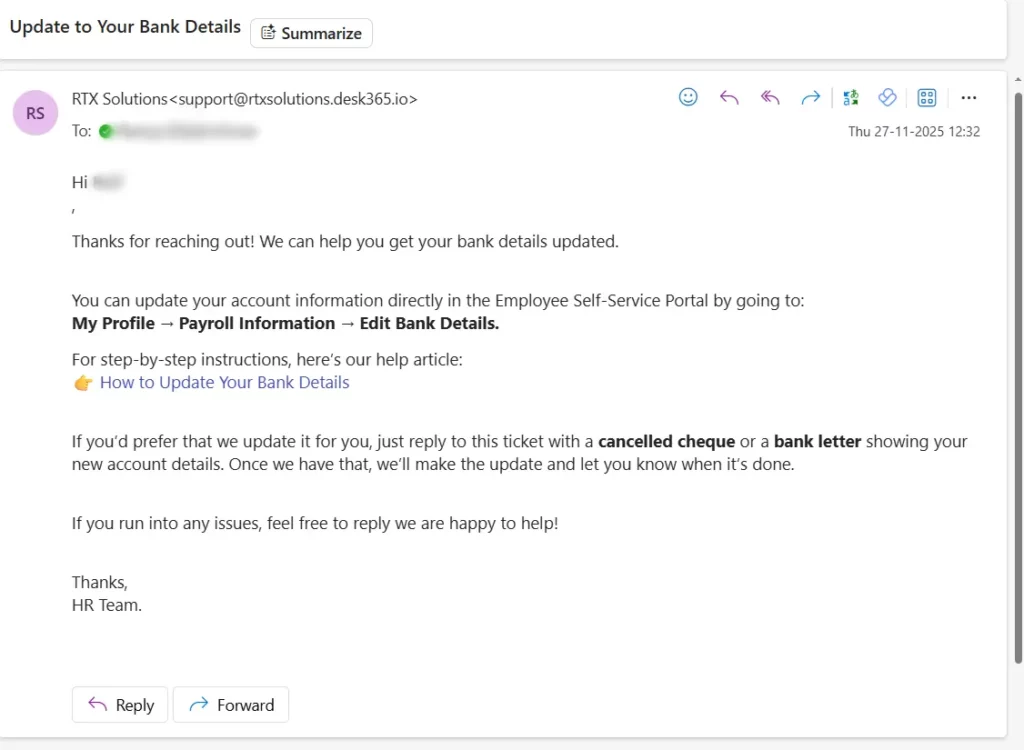
Let’s say, for example, if an employee wants to know “How do I update my bank details?”, they can submit a ticket, get an instant KB article suggestion, and an HR rep can easily follow up if needed, all without anything slipping through the cracks.
Why do you need an HR help desk software?
Let’s be honest, if your company deals with a steady stream of employee questions, juggling everything through email, chat, and random DMs gets messy fast. An HR help desk keeps all of that organized, makes the process smoother for everyone, and gives employees a better overall experience.
But here’s the catch: most help desks come loaded with features… and a matching price tag. The real question is, do you actually need all of that, or just the essentials that fit your team?
No matter if you’re supporting 50 people or 5,000, here are the six core features that truly matter.
- Omnichannel support
- Self-service
- AI
- Automation
- Reporting and Analytics
- Security
1. Omnichannel support
Employees shouldn’t have to wonder where to reach HR. A good HR help desk lets them raise requests from anywhere, email, chat, Microsoft Teams, or the portal, and everything lands in one unified inbox. No scattered messages, no follow-ups lost in the shuffle.
2. Self-service
Not every question needs a ticket. With a built-in knowledge base, employees can quickly look up things like leave policies or payroll FAQs without waiting on HR. It cuts down repetitive queries and gives employees instant answers.
3. AI
Suggesting relevant articles, automating ticket responses, categorizing requests, or helping employees find what they need right away. It’s like having a smart assistant that speeds things up for both HR and employees.
4. Automation
Routine HR workflows – approvals, onboarding steps, reminders, document requests can be automated so nothing is missed. HR teams save time, and employees get faster, more consistent responses.
5. Reporting & Analytics
Want to know what employees ask about the most? Or which teams get the most requests? Reporting gives you clarity. You spot trends, improve processes, and make decisions backed by actual data, not guesses.
6. Security
Employee data is sensitive– bank details, contracts, benefits, personal info. A solid HR help desk ensures everything stays secure with role-based access, encrypted ticket fields, and compliance features so you can support employees without worrying about data risks.
How to choose the right HR helpdesk ticketing system
Choosing an HR helpdesk can feel overwhelming, so we’ve broken it down into simple criteria to help you evaluate tools quickly and confidently.
1. Functionality
Start with the basics: does the platform actually do what you need? Look for core features like ticket management, a built-in knowledge base, automation, SLAs, analytics, and integrations with your existing HR systems. This should carry the most weight in your evaluation.
2. Standout features
Next, look at what makes the tool special. Does it offer AI and machine learning? Can you customize workflows? Is there a mobile app for on-the-go HR teams? These unique capabilities help you differentiate between vendors.
3. User experience
A great tool should feel easy from day one. Check for an intuitive UI, drag-and-drop elements, and a responsive design that works smoothly across devices.
4. Onboarding and enablement
Good documentation and onboarding go a long way. Look for how-to guides, demos, product tours, and an overall smooth setup experience.
5. Customer support
Test the quality of their support: Do they offer 24/7 help? Multiple support channels? A dedicated account manager? Regular product updates? Do they actively gather user feedback? These things matter once you go live.
6. Pricing
Transparent pricing is non-negotiable. Evaluate their plans, free trials, and any discounts. Make sure you’re paying for what you need, not a bloated feature set.
7. Customer reviews
Finally, see what real users are saying. Reviews give you honest insight into reliability, ease of use, and overall customer satisfaction.
Benefits of an HR ticketing system
An HR ticketing system isn’t just a place to submit requests, it seriously improves how your team works day-to-day.
1. Gets things done faster
Instead of juggling emails, chats, and random DMs, HR can finally focus on actually solving problems. The system handles the repetitive stuff, and employees get quicker, cleaner responses.
2. A smoother experience for employees
People always know where to go and can see what’s happening with their request. That transparency makes the whole process feel fair, clear, and genuinely helpful.
3. Support that doesn’t slip through the cracks
Nothing gets lost. Nothing gets “missed.” Every request is tracked properly, assigned to the right person, and followed through so HR can stay consistent no matter how busy things get.
4. Insights you can actually use
Reporting shows you what employees ask for most, what slows things down, and where policies or workflows need improvement. It’s like getting a roadmap for fixing the root causes.
5. Stronger self-service
When your helpdesk connects to a knowledge base, employees can find quick answers on their own. Fewer tickets for HR, faster resolutions for everyone.
Try the best HR helpdesk for free
With so many HR helpdesk tools out there, what actually makes Desk365 stand out? Simple: it’s built to be fast, intuitive, and genuinely helpful for both employees and HR teams, without piling on unnecessary complexity or costs.
Here’s why Desk365 works so well as an HR helpdesk:
1. AI that’s actually useful
Desk365’s AI isn’t just a chatbot on the side. It reads past HR tickets, learns from your knowledge base, and helps craft accurate, contextual responses in seconds. That means fewer repetitive answers for HR, faster resolutions for employees.
2. A unified space for all HR requests
Whether employees reach out via Microsoft Teams, email, your HR portal, or web forms, everything lands in one clean inbox. No switching tabs, no lost messages, no chasing people for updates.
3. Automations that save hours every week
Desk365 automates routing tickets, sending reminders, triggering onboarding checklists, or escalating payroll issues that are time-sensitive. The result: your HR team stays organized and employees get answers sooner.
4. Designed for cross-department collaboration
HR often needs help from payroll, IT, finance, or security. Desk365 makes it easy to loop in anyone using Share To, Watchers, or internal notes without losing ticket context.
5. Self-service that actually reduces tickets
With an easy-to-manage knowledge base, employees can find answers to FAQs like leave policies, benefits, reimbursement rules, or onboarding processes, without waiting on HR.
6. Real-time alerts and SLAs that keep things on track
Desk365 keeps HR on top of urgent issues with instant alerts, SLA timers, and escalation rules. Nothing slips through the cracks, and employees feel cared for.
7. Built for flexibility, not force-fit processes
Desk365 lets you customize ticket fields, forms, workflows, and the support portal, so it adapts to your HR processes instead of forcing you to work around the tool.
8. Affordable without compromising on capabilities
Unlike many HR helpdesks that bundle in features you don’t need and charge heavily for them), Desk365 keeps pricing transparent and flexible. You get enterprise-grade support without the enterprise-grade price tag.
9. Reports that help HR get better every month
From employee satisfaction scores to time-to-resolution and issue trends, Desk365 gives HR clear data to improve processes, policies, and employee experience.
When you know what to look for, the decision becomes a whole lot easier. Pick wisely, test thoroughly, and your team will thank you for it.
Read more – 9 Free Ticketing Systems You can Trust in 2026
Experience a cleaner, faster HR helpdesk
Frequently asked questions
It’s a centralized tool HR teams use to track, manage, and resolve employee requests quickly and efficiently.
Yes, if you want fewer back-and-forth emails, faster turnaround times, and a smoother employee experience, an HR help desk is a must.
It depends on your needs; Desk365 is a strong choice with an easy setup, automation, AI features, and affordable pricing.