Customers these days don’t just “reach out”; they expect you to be everywhere. Whether it’s email, live chat, social media, or messaging apps, support is no longer tied to a single channel. It’s continuous, fragmented, and fast-moving. And while being available across channels is great for customers, it often turns into chaos for support teams, missed messages, delayed replies, and zero context when conversations are scattered.
That’s exactly why multi-channel customer support has become essential. Instead of juggling tools and tabs, it brings everything into one place, so your team can respond faster, stay organized, and see the full customer journey.
Interestingly, this isn’t just a theory, it’s something support teams actively struggle with. A quick look at discussions on Reddit shows how common and messy this problem really is.
One user summed it up perfectly:
“I need to manage customer service across email, chat, and social. Looking for a tool that keeps everything in one place and works well for a small remote team.”
That one question alone sparked dozens of responses, and a clear pattern emerged. Teams aren’t just looking for “more channels”, they’re looking for less complexity.
One reply highlights how overwhelming disconnected tools can get:
“If you’re a small remote team, the key is finding something lightweight that keeps email, chat, and social in one clean inbox without feeling enterprise-y.”
Another user pointed out the real operational pain:
“The mistake is managing each channel separately, that gets messy fast.”
And that’s the core issue. Multichannel support isn’t hard because of the channels themselves, it’s hard because they’re often managed in silos.
Some teams try to solve this with multiple tools, while others move toward unified platforms. As one user shared:
“Managing multiple channels was a mess until we found crisp. It keeps everything like email, chat, socials organized and actually manageable for a small team like ours.”
Across all these conversations, one thing becomes clear, the goal isn’t just to be present on every channel, it’s to manage them in a way that doesn’t overwhelm your team.
That’s where getting started with multi-channel support the right way makes all the difference.
What is multi-channel customer support?
Alright, let’s keep this super simple.
Multi-channel customer support is just helping your customers on different platforms like, email, chat, phone, social media, wherever they decide to reach out.
As you grow, this can turn into something called omnichannel support. That’s basically the upgraded version, where all those channels are connected, so conversations don’t feel scattered.
Think of it like this:
Multi-channel = you’re everywhere
Omnichannel = everything works together nicely
Multi-channel vs omnichannel customer support, what’s the difference?
You must have got an idea by now, but it can still get confusing, so let’s keep it simple.
Multi-channel support
In a multi-channel setup, your business is present across multiple platforms like email, chat, social media, and phone.
Each channel works independently. Let’s say a customer emails you, that conversation stays in email.
If the same customer messages on chat, it’s treated as a separate interaction. You’re available everywhere, but the conversations are not connected.
This is usually the first step for growing teams because it improves accessibility without needing a complex setup.
Omnichannel support
Omnichannel support takes things a step further by connecting all those channels together.
Here, the focus is on creating a single, continuous customer experience, no matter where the conversation happens.
A customer starts on chat – Follows up via email – Reaches out again on social
Your team sees it all as one unified conversation, with full context.
This means:
- No repeated explanations from customers
- Better personalization
- Smoother handoffs between agents
Why is multi-channel customer support important?
Multi-channel support isn’t just a “nice to have” anymore; it’s what customers expect. People switch between email, chat, social media, and even phone calls depending on what’s convenient at the moment. If you’re only available on one or two channels, you’re already creating friction. But when you’re present across multiple channels and manage them well, you make it easier for customers to reach you, trust you, and stick with you.
Here’s why it actually makes a difference:
1. Meet customers where they are
Not everyone wants to send an email and wait. Some prefer quick chats, others DM you on social. Multi-channel support lets customers choose what works best for them, which instantly improves their experience.
2. Faster, more consistent responses
When all conversations are managed in one place, your team doesn’t waste time switching tabs or missing messages. This means quicker replies and fewer “sorry for the delay” moments.
3. Better customer experience
Customers don’t care about your internal setup, they just want help. When you’re available across channels and respond reliably, the experience feels smooth and effortless.
4. No more missed or lost conversations
Without a proper system, messages can easily slip through, especially on social or chat. Multi-channel tools keep everything tracked, so nothing gets ignored.
5. Improves team productivity
Your agents aren’t juggling multiple tools or duplicating work. Everything is centralized, which makes handling conversations faster and less stressful.
6. Scales with your business
As you grow, your support volume and channels will grow too. A multi-channel setup makes it easier to add new channels without completely reworking your process.
7. Builds trust and reliability
When customers know they can reach you anytime, on any channel, and actually get a response, it builds confidence in your brand.
Benefits of multi-channel customer support
From what I’ve seen and read, customers today don’t just reach out, they expect quick, consistent support no matter where they message you. And on the flip side, I’ve also seen how messy things can get for support teams trying to manage all of this across different tools.
In fact, while going through discussions on Reddit, this line really stuck with me:
“The mistake is managing each channel separately, that gets messy fast.”
And honestly, that sums it up. Here’s how I see multi-channel support helping teams in a real, practical way:
1. Get a single, clear view of everything
Instead of bouncing between tools, everything comes into one place. It’s easier to track conversations and stay on top of things.
2. Respond faster without feeling rushed
When I’m not switching tabs all the time, I can focus on actually helping customers instead of just managing tools.
3. Don’t have to worry about missing messages
Every query, whether it’s email, chat, or social, it is captured and tracked, which removes a lot of stress
4. Team collaboration becomes smoother
There’s no more guessing who replied or forwarding messages around. Everyone has the same context.
5. Customers get a more consistent experience
No matter where they reach out, the support feels reliable and connected. It feels scalable, not overwhelming. As things grow, it doesn’t feel like things are breaking, it feels like the system is holding up.
How does multi-channel support help with your business growth?
As your business grows, support doesn’t just get busier; it gets more complex. More customers, more channels, more conversations happening at the same time. Without the right setup, things can quickly turn into delays, missed tickets, and unhappy customers.
That’s where multi-channel support really starts to drive growth, not just by being available everywhere, but by helping you manage and scale support efficiently behind the scenes.
Here’s how it actually helps:
1. SLA management keeps responses on track
With SLAs (Service Level Agreements), you can set clear response and resolution time goals. Tickets are automatically prioritized based on urgency, so high-impact issues get handled first, helping you stay consistent as volume increases.
2. Automations reduce manual work
Instead of agents manually sorting, assigning, or replying to repetitive queries, automations can handle it for you. Things like ticket routing, status updates, and canned responses free up your team to focus on more important conversations.
3. Round-robin assignment balances workload
As tickets come in from different channels, round-robin assignment ensures they’re distributed evenly across your team. This prevents burnout, avoids bottlenecks, and keeps response times steady
4. Centralized inbox gives better control
When all channels feed into one place, your team gets full visibility. No more switching between tools or missing messages, everything is tracked, organized, and easy to manage.
5. Scales without increasing chaos or cost
You don’t need to keep hiring aggressively just to keep up. With the right systems in place, your existing team can handle more volume efficiently.
6. Better insights for smarter decisions
With all conversations in one system, you can track trends; common issues, response times, team performance and use that data to improve both support and your product.
In short, multi-channel support isn’t just about handling more conversations, it’s about handling them smarter as you grow.
How to implement multi-channel customer support in Desk365
Getting started with multi-channel support in Desk365 isn’t just about adding more channels, it’s about bringing everything together and setting up the right workflows from day one. Here’s a practical, step-by-step way to implement it properly
1. Start with a unified inbox
The first step is simple, centralize all your channels.
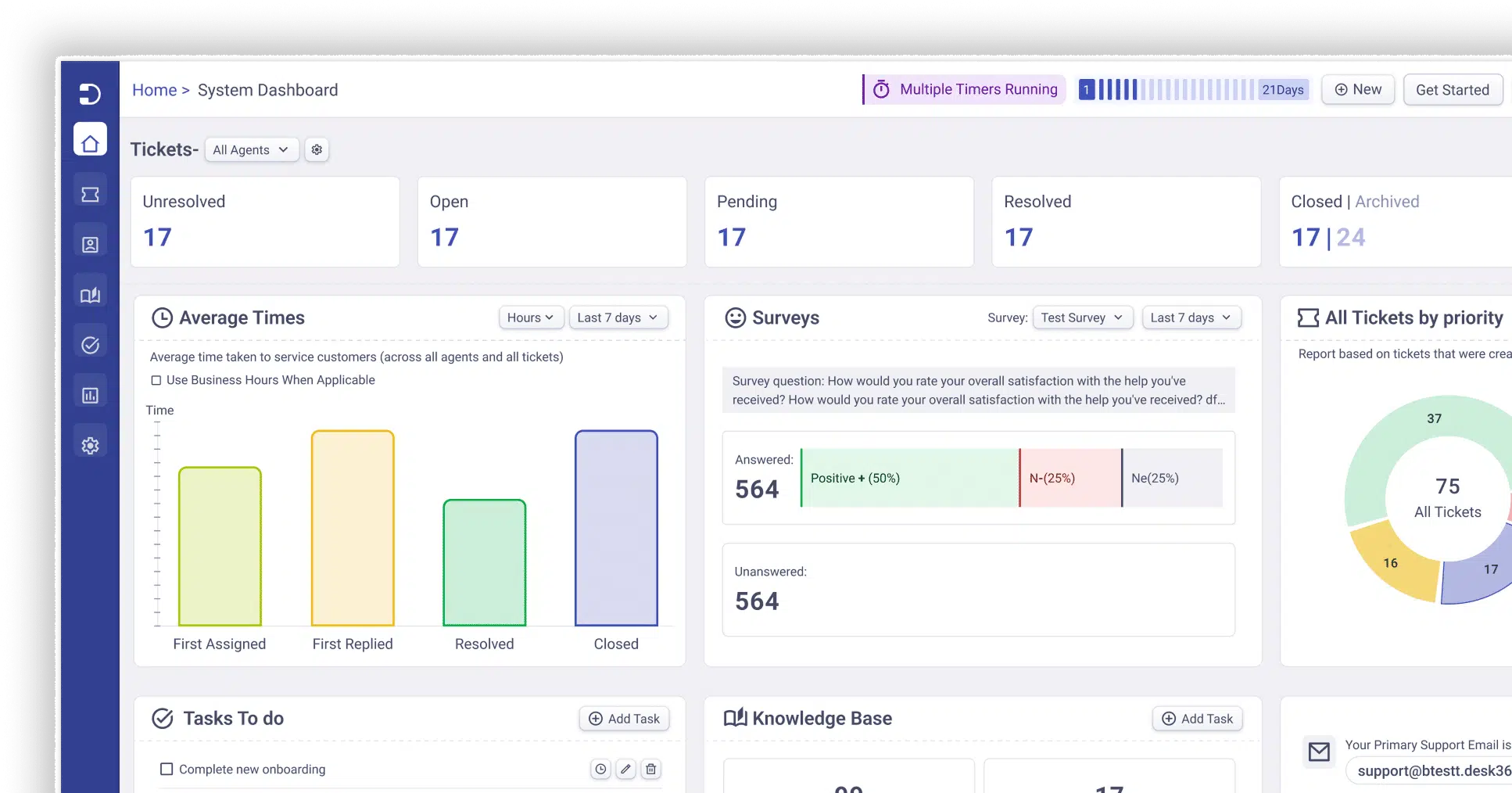
Desk365 gives you a unified inbox where emails, portal tickets, Microsoft Teams chat, and other requests come into one place. This is what turns “multi-channel chaos” into something manageable.
Instead of checking multiple tools:
- Your team works from one dashboard
- Conversations are tracked as tickets
- Collaboration happens inside the ticket itself
Set up your support email, portal, Teams and any integrations first, this becomes your single source of truth.
2. Set up SLAs to keep response times consistent
Once tickets start flowing in, the next step is control, and that’s where SLAs (Service Level Agreements) come in.
With Desk365, you can:
- Define response and resolution time targets
- Get reminders before SLAs are breached
- Track performance across teams
For example:
High priority tickets – respond in 1 hour
Medium priority – respond in 4 hours
You can configure this directly in️ Settings > Productivity > SLA Policies (see help guide: SLA configuration)
SLAs ensure that as volume grows, nothing slips through, and your team stays accountable.
3. Automate ticket routing and repetitive work
his is where things start scaling. Desk365’s automation rules let you automatically:
- Assign tickets based on keywords, channel, or priority
- Update ticket status or fields
- Trigger responses or internal notes
A simple but powerful setup:
- If subject contains “password”, assign to L1 team
- If priority is high > mark urgent > notify team
This removes manual triaging completely and ensures tickets go to the right team instantly.
As shared in community workflows:
“Tickets go to the right agent immediately… reduces first response time significantly”
4. Use round-robin assignment to balance workload
Once tickets are routed, the next challenge is who handles them. Desk365’s Round Robin assignment automatically distributes tickets across agents:
- Classic Round Robin – assigns tickets in a fixed rotation
- Load-aware Round Robin – assigns based on current workload
Why these matter:
- Prevents agent overload
- Keeps response times consistent
- Ensures fair distribution across the team
You can set it up here Settings > Round Robin. It even considers:
- Agent availability
- Out-of-office schedules
- Current ticket load
Example workflow:
- Ticket comes in via email/chat
- Automation routes it to “Support Team”
- Round Robin assigns it to the next available agent
- Trigger sends notification + adds internal note
All of this happens automatically.
5. Enable self-service with a knowledge base
Not every question needs an agent. Desk365 lets you create:
- Public knowledge base articles
- Support portal for customers
- Internal articles for agents
This helps:
- Reduce ticket volume
- Speed up resolutions
- Improve consistency in answers
6. Organize teams with groups and departments
As you scale, structure becomes important. Desk365 allows you to:
- Create groups (IT, Sales, Support, etc.)
- Assign tickets to the right team
- Control access and visibility
You can also combine this with automation:
Email > Sales queries > Sales group
Technical issues > IT support group
This ensures tickets are always handled by the right people.
7. Monitor, optimize, and improve
Once everything is set up, your job isn’t done, you optimize. Track things like:
- SLA compliance
- Response and resolution times
- Ticket trends
Desk365 also helps surface insights so you can:
- Identify common issues
- Improve workflows
- Reduce ticket volume over time
Frequently asked questions
It just means supporting your customers across different platforms like email, chat, social media, and phone, wherever they choose to reach out.
It just means supporting your customers across different platforms like email, chat, social media, and phone, wherever they choose to reach out.
- Multichannel means you’re available on multiple platforms, but each works separately.
- Omnichannel connects everything, so conversations stay continuous across channels.
Yes, because it lets customers choose how they want to reach you and ensures they get consistent, timely responses across channels.
Desk365 brings email, chat, Microsoft Teams, and other channels into one unified inbox, with automation, SLAs, and smart routing to help teams manage conversations efficiently.