

The updates within this release are designed to help you manage assets with fewer clicks, keep your inventory organized, and make everyday support tasks more efficient.
From smarter asset management to support for 24-hour time format to two new ticket import API endpoints, here’s everything new.
Let’s get into the details.
Smarter asset and software management
Add a new product and vendor while creating assets
Until now, when creating a new asset, you could only associate an existing product or vendor with that asset. If the product or vendor didn’t already exist in your helpdesk, you had to go create it from the settings first, then come back.
That changes with this update. You can now create a new product and a new vendor and associate it right from the asset creation form itself, using the new options next to the Product and Vendor fields. The creation process stays exactly the same as before, you’re just doing it without leaving the page.
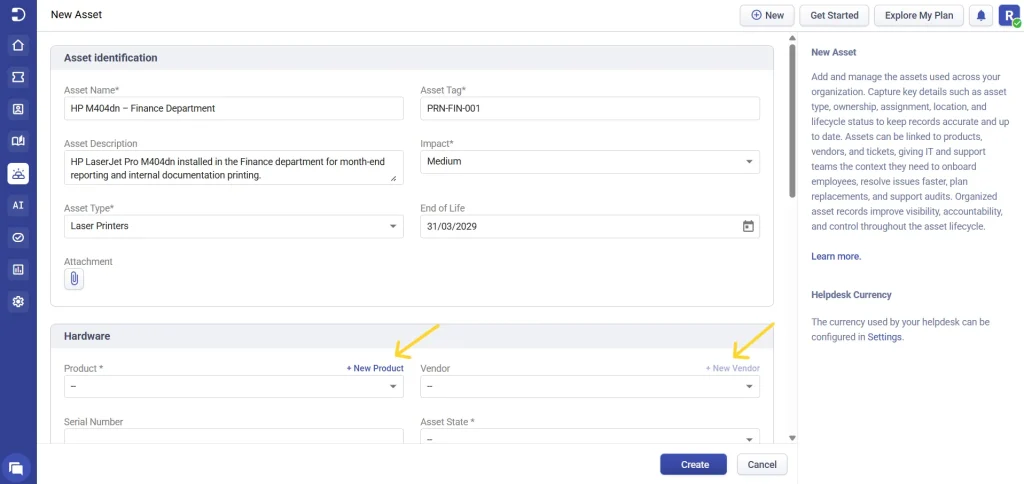
You’ll also find the create new vendor option when creating a new software, so the same convenience carries over there too.
A new option: Non-Associated Vendor
Alongside this, we’ve introduced a new option called Non-Associated Vendor in the vendor dropdown.

Here’s why this is useful. Vendors in Desk365 are usually linked to specific products, so when you pick a product, the vendor list naturally points you toward the vendors tied to it. But real-world purchasing doesn’t always work that neatly. You might buy an HP printer through a general reseller or an office-supply vendor that isn’t formally associated with that product. The Non-Associated Vendor group lets you select exactly that kind of supplier, a vendor that exists in your helpdesk but isn’t linked to the chosen product, so your asset records reflect where the item actually came from. No more forcing a mismatched association just to save the record.
No more duplicate names in asset modules
To help keep your asset inventory cleaner and more consistent, we’ve made an enhancement, where asset-related names are kept unique across the platform.
Previously, records with the same names could exist across asset modules. Though it offers flexibility, it could also create confusion when managing assets, running reports, or searching records.
With this update:
- Names must be unique across Assets, Products, Vendors, Asset Types, Asset Fields, Depreciation, Locations, and Software records.
- Asset field names must be unique within their respective asset type.
If your existing setup already contains duplicate names, don’t worry. Desk365 automatically handled them during the update by appending a bracketed number to the original name. So, no data is lost, and every record remains identifiable.
This change helps maintain cleaner asset data, improves reporting accuracy, and eliminates the confusion that can come from having multiple records with the same name.

A small UI upgrade: collapsible view panel
We’ve also added a collapsible view panel within both the asset list and the software list, giving you a cleaner, more flexible way to manage your view and focus on the records that matter.

Learn more in detail about asset management in Desk365.
Ticket activities, now multilingual
The ticket activities section within the Agent Portal now supports multiple languages, so your team can follow what’s happening on a ticket in the language they’re most comfortable working in.
This is currently reflected for activity data from the past two weeks, starting 8th June 2026.
You’ll notice this change in two places:
- The ticket activities section on the home tab dashboard
- The ticket activities within an individual ticket conversation


It’s a small change that goes a long way for multilingual teams, keeping activity logs consistent with the rest of the localized Agent Portal experience.
24-hour time format in helpdesk settings
In the date format setting within the helpdesk settings menu, we’ve introduced the 24-hour time format.

You can now choose between the standard 12-hour format and the 24-hour format depending on your team’s preference. Once you make the change here and save it, the format is applied consistently across the Agent Portal, the Support Portal, and email, so the way time is displayed stays uniform everywhere your team and customers interact with the helpdesk.
New ticket import API endpoints
Migrating historical support data often requires more than just importing tickets. Teams also need to preserve customer conversations and ticket context to maintain a complete support history.
To simplify this process, we’ve introduced two new Ticket Import API endpoints.
With the Import Tickets with Conversations endpoint, you can create new tickets and import their associated conversation history in a single API request.
We’ve also added the Import Conversations for Existing Tickets endpoint, which allows you to import historical conversations and associate them with tickets that already exist.
Together, these endpoints help maintain complete ticket history, customer interactions, and conversation context during migration.

Coming Soon: AI Agent within Microsoft Teams
Until now, Desk365 offered two separate experiences within Microsoft Teams: the Teams Support Bot for ticket management and the AI Agent for automated support. Soon, we’re bringing the best of both together with the new Teams AI Agent.
The Teams AI Agent combines the capabilities of our Support Bot and AI Agent into a single, seamless experience, allowing your contacts to get help, manage requests, and stay updated without ever leaving Microsoft Teams.
What your contacts can experience:
- Get instant answers
- Create tickets seamlessly
- Stay informed in real time
- Access the Support Portal within Teams

Available on the Plus and Premium plans, the Teams AI Agent extends the reach of your existing AI Agent to Microsoft Teams alongside the Chat Widget and Support Portal, all powered by the same knowledge base, workflows, and configuration.
We’re putting the final touches on this feature and look forward to sharing more details soon.
And that’s everything for this update! Whether you’re working through ticket activities in your own language, creating products and vendors on the fly while adding assets, using the ticket Import API endpoints for easier migrations or switching to a 24-hour clock across your helpdesk, these enhancements are designed to help your team work faster and with less friction.
If you are already using Desk365, log in and start exploring the new features today.
If you are new, start your free 21-day trial and see how helpdesk and ITSM can work together on a single platform.




 AI Agent
 Asset Management
 Knowledge Base
 Automations
 SLAs
SLAs
 Customization
 Ticket Assignment
 Reports & Analytics
 Approval Management
 Helpdesk Security
 Explore All Features
 Banking and Finance
 Healthcare
 MSP
MSP Government
  Non Profit
 IT Services
 Customer Support
 Human Resources
 Facilities







