Finding customer service software sounds simple until you actually start looking.
You search for a few options, and suddenly you’re comparing Zendesk, Freshdesk, Zoho Desk, Help Scout, and a dozen others. Then come the pricing pages, feature lists, integrations, AI add-ons, and different plans. Before long, you’re spending more time comparing helpdesks than thinking about the support problems you actually need to solve.
I came across a Reddit discussion where someone was asking for recommendations for customer service software. They weren’t running a massive support operation. They were handling support themselves, had a manageable number of tickets, and wanted something simple that they could eventually hand over to a virtual assistant.
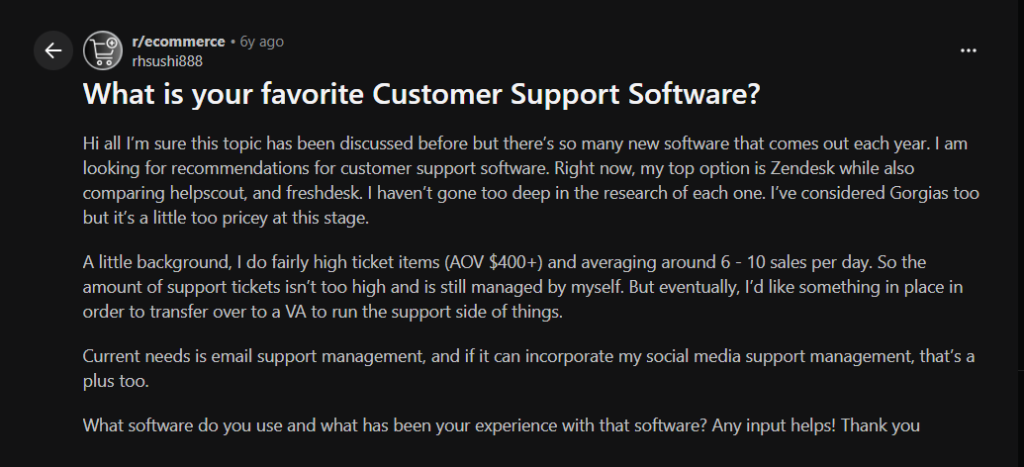
The responses were all over the place: some people loved Zendesk, others preferred Gorgias or Freshdesk, while others pointed out that simplicity and ease of use mattered more than having every possible feature.
That got me thinking: what actually makes one customer service software a better choice than another?
So rather than putting together another list of 20 customer service software, I decided to narrow it down to nine.
For this comparison, I looked at the things that matter when you’re actually choosing a platform: how easy it is to manage tickets, what channels it supports, how much you can automate, whether it can handle self-service and AI, how well it integrates with the tools you already use, and of course, how much it costs.
Here are the top nine customer service software platforms I’d consider, and who each one makes the most sense for.
Our top picks for customer service software
After comparing the options, I narrowed the list down to the nine best customer service software platforms worth considering.
I didn’t rank them simply by how popular they are. I looked at what you actually get for the price, how easy the software is to use, the support channels it covers, automation and AI capabilities, self-service features, integrations, and how well it can grow with a support team.
Here are my top ones:
- Desk365 – Best overall value for Microsoft 365-focused teams
- Zendesk – Best for large and complex support operations
- Freshdesk – Best for growing support teams
- Zoho Desk – Best for businesses already using Zoho
- HappyFox – Best for teams with complex support workflows
- HubSpot Service Hub – Best for businesses that want customer service and CRM together
- Help Scout – Best for simple and personal customer support
- Intercom – Best for conversational and AI-powered support
- Salesforce Service Cloud – Best for enterprise customer service
A quick disclaimer: This ranking is based on our own research, product comparisons, publicly available information, and editorial opinion. There isn’t a single “best” customer service software for every business, so your ideal choice may be different depending on your team’s size, budget, support channels, and existing tech stack.
Customer service software comparison
| Software | Best for | Starting price | Standout |
|---|---|---|---|
| Desk365 | Teams that want a complete helpdesk with Microsoft Teams at the center | $12/agent/month | Helpdesk + ITSM + AI + Microsoft Teams in one platform |
| Zendesk | Large support operations | $19/agent/month | Extensive customization and scalability |
| Freshdesk | Growing support teams | $19/agent/month | Easy adoption and broad helpdesk features |
| Zoho Desk | Businesses using Zoho | $7/user/month | Strong Zoho ecosystem integration |
| HappyFox | Complex support workflows | Contact sales | Flexible workflows and automation |
| HubSpot Service Hub | Businesses using HubSpot | $20/seat/month | Customer service + CRM in one platform |
| Help Scout | Simple customer support | $25/user/month | Simple, conversation-focused support |
| Intercom | Conversational and AI-powered support | $29/seat/month | AI + live chat + customer engagement |
| Salesforce Service Cloud | Enterprise customer service | $175/user/month | Deep CRM and service customization |
Starting prices are based on publicly listed annual pricing where available and can vary by plan, region, billing cycle, and add-ons. If you’re looking to try customer support software for free, you can also read our guide to the best free options here.
Here’s a closer look at what each platform does well, where it may fall short, and who it makes the most sense for.
1. Desk365 - Best for Microsoft Teams - focused teams
If your team already works heavily in Microsoft Teams, Desk365 is one of the first customer service platforms I’d look at.
Desk365 is an AI-powered helpdesk that brings ticketing, automation, knowledge management, reporting, and service management into one platform. You can manage requests from email, Microsoft Teams, web forms, widgets, and the support portal from a centralized workspace.
What stands out to me is the balance between functionality and price. You don’t have to move to an expensive enterprise plan just to get the features a growing support team needs.
Desk365 also goes beyond traditional customer service software. Plus and Premium plans add capabilities such as change and approval management, while Premium includes asset and software management. AI Copilot and AI Agents add another layer of automation for teams that want to reduce repetitive support work.
Why I considered Desk365
My biggest reason for putting Desk365 first is value.
It covers the fundamentals you’d expect from a modern helpdesk: ticket management, SLAs, automation, knowledge base, reporting, and omnichannel support, while also giving Microsoft Teams users a particularly strong set of integrations.
Pricing is another factor, and there’s also a 21-day free trial.
Best for: Microsoft Teams-focused businesses that want customer service and ITSM capabilities without enterprise-level complexity or pricing.
What makes it stand out is the combination of customer support, automation, AI, and ITSM in one platform. Teams can manage SLAs, workflows, knowledge bases, reporting, AI Copilot, and AI Agents, while Premium adds asset and software management.
Key features: Email-to-ticket, Microsoft Teams ticketing, SLA management, workflow automation, knowledge base, AI Copilot, AI Agents, reporting, Entra ID Sync, Power Automate, asset management, and change management.
Pricing: Starts at $12/agent/month when billed annually. Plus is $22, and Premium is $32. A 21-day free trial is available.
Pros: Strong Microsoft Teams integration, broad helpdesk and ITSM capabilities, competitive pricing, built-in AI, and asset management on Premium.
Cons: Teams looking for highly specialized software may need a more focused platform. Some advanced features are limited to higher plans.
2. Zendesk - Best for large and complex support operations
If you’re running a large support operation with multiple teams, channels, and complex workflows, Zendesk is one of the first platforms I’d look at.
Zendesk is probably one of the first names you’ll come across when you start researching customer service software.
And there’s a reason for that.
It’s a mature platform with a huge range of customer service capabilities, from ticketing and messaging to AI, reporting, automation, knowledge management, and integrations.
Where Zendesk really makes sense is in larger organizations where support operations are complex and there are multiple teams, channels, and workflows to manage.
Why I considered Zendesk
Zendesk has an impressive feature set and can handle sophisticated support operations. But that breadth can also be its downside.
For a large organization with a dedicated support operations team, the flexibility can be a major advantage. For a smaller team looking for a straightforward helpdesk, it can feel like more software than you actually need.
That’s why I placed it second. It’s an excellent platform, but the amount of functionality you need to manage should be part of the buying decision.
Best for: Large organizations with high-ticket volumes and complex customer service operations.
Key features: Ticketing, email, messaging, live chat, voice, AI Agents, knowledge base, automation, ticket routing, reporting, and extensive integrations.
Pricing: Support plans start at $19/agent/month when billed annually, with higher tiers adding more advanced capabilities.
Pros: Extensive functionality, strong customization, reporting, integrations, and scalability.
Cons: Can become expensive, and the platform may be more complex than smaller teams need.
3. Freshdesk - Best for growing support teams
If you’re looking for a helpdesk that’s easy to get started with but still gives you room to grow, Freshdesk is one of the platforms I’d consider.
Freshdesk is another platform I’d put on the shortlist for most businesses researching customer service software.
It’s built around core helpdesk functionality such as ticket management, automation, knowledge bases, reporting, and customer portals, with AI capabilities available through Freddy AI.
One of its biggest advantages is that it doesn’t require you to be a customer service operations expert just to get started.
Why I considered Freshdesk
Freshdesk gets a lot right. It’s approachable, has a broad feature set, and can scale as your support operation grows.
I put it behind Desk365 and Zendesk mainly because of the balance between pricing, features, and the specific needs of the teams we’re considering in this list.
For a growing business that wants a recognizable helpdesk with room to expand, Freshdesk is still a strong choice.
Considering Freshdesk?
See how it compares. Check out this quick look at five of the best helpdesk platforms for customer support.
Best for: Growing support teams that want an approachable platform with room to scale.
Key features: Ticket management, shared inbox, customer portal, knowledge base, workflow automation, SLA management, ticket routing, Freddy AI, reporting, and integrations.
Pricing: Starts at $19/agent/month when billed annually. Higher plans add more advanced features and AI capabilities.
Pros: Easy to get started, strong ticketing, good self-service options, extensive integrations, and a strong AI focus.
Cons: Advanced features are restricted to higher plans, and costs can increase as you add agents and capabilities.
4. Zoho Desk - Best for businesses already using Zoho
If your business already runs on Zoho, Zoho Desk is one of the first customer service platforms I’d look at because it fits naturally into the ecosystem you already use.
If your business already uses Zoho CRM or other Zoho products, Zoho Desk is worth considering. It combines ticket management, automation, self-service, reporting, AI, and multichannel support, with the added advantage of fitting neatly into the wider Zoho ecosystem.
Why I considered Zoho Desk
Zoho Desk offers a solid feature set at a competitive price. Its Express plan starts at $7 per user/month when billed annually, and there’s also a free edition for up to three users. Higher plans add capabilities such as advanced workflows, custom dashboards, AI, messaging, telephony, and more.
I ranked it fourth not because it lacks features, but because its biggest advantage is its connection to the Zoho ecosystem. If you’re already using Zoho CRM or other Zoho applications, that integration can make Desk a natural choice.
If you’re not using Zoho products already, however, you may want to compare it with platforms that offer stronger integrations with the tools your team already relies on.
Best for: Businesses already using Zoho that want their customer service platform to fit into the same ecosystem.
Key features: Email ticketing, web forms, messaging, AI Agents, workflow automation, knowledge base, self-service, customer satisfaction ratings, reports, dashboards, and Zoho CRM integration.
Pros: Strong Zoho integration, competitive pricing, free plan, automation, and a broad feature set.
Cons: Its biggest advantage is tied to the Zoho ecosystem, and advanced functionality requires higher plans.
5. HappyFox - Best for complex support workflows
If your support operation involves complex workflows, multiple teams, and a lot of automation, HappyFox is a platform I’d consider.
HappyFox is a good option for teams that need more control over how support requests move through their organization.
It combines ticket management with automation, SLAs, knowledge management, reporting, and other service management capabilities.
Why I considered HappyFox
HappyFox is capable of handling complex workflows, which is useful for larger or more process-heavy support teams.
But that flexibility isn’t necessarily what every business needs.
If you’re a small team with straightforward support requests, a simpler platform may be easier to manage. HappyFox becomes more interesting when you have multiple workflows, teams, and service processes that need to work together.
Best for: Organizations with complex support workflows that need extensive customization and automation.
Key features: Ticket management, omnichannel support, workflow automation, SLA management, knowledge base, reporting, task management, asset management, custom workflows, and integrations.
Pros: Flexible workflows, strong automation, detailed reporting, and support for complex IT and customer service operations.
Cons: Can require more configuration, pricing is less straightforward, and smaller teams may not need its full feature set.
6. HubSpot Service Hub - Best for businesses that want customer service and CRM together
If your sales, marketing, and support teams already work in HubSpot, Service Hub is one of the first customer service platforms I’d look at.
If you’re already using HubSpot for sales or marketing, Service Hub is a natural option to consider. It brings customer service into the same platform, so your support team can work with the same customer data used by your sales and marketing teams.
Service Hub includes ticketing, shared inboxes, live chat, knowledge bases, automation, reporting, customer feedback, and AI-powered tools.
Why I considered HubSpot Service Hub
The biggest reason to consider HubSpot Service Hub is the connection between customer service and CRM.
Your support team can see customer interactions, deals, activities, and other CRM information alongside support tickets. That can be particularly useful when sales, marketing, and service teams need a shared view of the customer.
The trade-off is that some of the more advanced service features are reserved for higher-priced plans, so the cost can increase as your requirements grow.
Best for: Businesses already using HubSpot that want customer service, CRM, sales, and marketing data in one platform.
Key features: Ticketing, shared inbox, live chat, knowledge base, help desk workspace, automation, customer portal, reporting, customer feedback, AI tools, and CRM integration.
Pricing: HubSpot Service Hub pricing starts with a free plan, while paid plans start at $20/seat/month when billed annually. Professional and Enterprise plans add more advanced automation, reporting, AI, and service capabilities.
Pros: Strong CRM integration, easy access to customer data, good automation, self-service tools, and a broad business ecosystem.
Cons: Advanced customer service capabilities can become expensive, and businesses that don’t use HubSpot’s CRM may not get the full benefit of the platform.
7. Help Scout - Best for simple and personal customer support
If you want a straightforward helpdesk that keeps customer conversations at the center, Help Scout is one of the first platforms I’d consider.
Help Scout takes a simpler approach to customer service. Instead of trying to cover every possible service workflow, it focuses on making customer conversations easy for agents to manage.
It combines shared inboxes, ticket management, knowledge bases, workflows, reporting, and customer-facing tools such as Beacon.
Why I considered Help Scout
I considered Help Scout because simplicity is one of its biggest strengths.
The interface is straightforward, and teams can get started without spending weeks configuring a complicated helpdesk. It works particularly well for businesses where support is centered around email and direct customer conversations.
It doesn’t have the breadth of ITSM or enterprise capabilities you’ll find in platforms such as Salesforce or Desk365, but that’s not necessarily a drawback for smaller teams.
Are you considering Help Scout?
Before you make a decision, take a closer look at Help Scout’s pricing and how it compares with other ticketing platforms like Zendesk and Freshdesk.
Best for: Small and mid-sized businesses that want an easy-to-use helpdesk focused on customer conversations.
Key features: Shared inbox, ticket management, workflows, saved replies, knowledge base, Beacon, live chat, reporting, customer profiles, and AI assistance.
Pricing: Help Scout’s paid plans start at $25/user/month when billed annually, with higher plans adding more advanced features and reporting.
Pros: Simple interface, easy adoption, strong shared inbox experience, useful knowledge base, and good customer-facing tools.
Cons: May not be suitable for teams that need advanced ITSM, asset management, or highly complex workflows.
8. Intercom - Best for conversational and AI-powered support
If you want live chat, conversational support, and AI to play a bigger role in your customer service, Intercom is one of the platforms I’d look at.
Intercom approaches customer service from a conversational perspective. Alongside traditional ticketing, it brings live chat, email, a shared inbox, help center, automation, and AI into one platform.
It’s particularly useful for businesses that want customers to get help directly through their website or product rather than relying mainly on email.
Why I considered Intercom
The biggest reason I considered Intercom is its focus on AI and conversational support.
Its Fin AI Agent can answer customer questions, resolve common issues, and work alongside human agents. The platform also gives teams tools for live chat, email, help center content, automation, and customer engagement.
One thing to watch is the pricing model. Intercom combines seat-based pricing with usage-based charges for AI, so your overall cost can depend on how much you use its AI capabilities.
Best for: Businesses that want live chat, conversational support, and AI to play a central role in customer service.
Key features: Shared inbox, ticketing, live chat, email, help center, Fin AI Agent, automation, reporting, knowledge management, and integrations.
Pricing: Plans start at $29/seat/month when billed annually, with Fin AI Agent priced separately at $0.99 per outcome.
Pros: Strong conversational support, powerful AI, live chat, automation, and a polished customer-facing experience.
Cons: Usage-based AI pricing can make costs harder to predict, and teams looking mainly for traditional ticket management may find it more feature-rich than necessary.
Want to consider Intercom further?
If you’re evaluating Intercom, this related read can help you look at how it compares with other popular helpdesk tools
9. Salesforce Service Cloud - Best for enterprise customer service
If you’re running an enterprise support operation and need customer service tightly connected to your CRM and wider business processes, Salesforce Service Cloud is worth considering.
Salesforce Service Cloud is designed for organizations that need customer service to work closely with their CRM and wider business operations.
It’s much more than a traditional helpdesk. Along with case management, it offers knowledge management, omnichannel routing, workflow automation, self-service, reporting, AI, asset management, and a large ecosystem of integrations.
Why I considered Salesforce Service Cloud
I considered Salesforce because its depth and flexibility are difficult to match at the enterprise level.
Service Cloud connects customer service data with sales, customer, and business information in Salesforce. That gives large organizations a broader view of their customers and lets them build highly customized service processes.
The downside is that this level of functionality comes with greater cost and complexity. For a small or mid-sized support team looking for a straightforward helpdesk, Salesforce may be more platform than you need.
Best for: Large organizations that need customer service deeply integrated with CRM, customer data, and complex business processes.
Key features: Case management, omnichannel routing, knowledge management, workflow automation, self-service, reporting, AI, asset management, service contracts, APIs, and extensive integrations.
Pricing: Service Cloud starts at $175/user/month for Enterprise when billed annually. Higher tiers offer additional capabilities and AI features.
Pros: Extremely powerful, highly customizable, strong CRM integration, advanced automation, AI, reporting, and scalability.
Cons: Significantly more expensive than most helpdesk platforms, requires more configuration, and can be excessive for smaller support teams.
How to choose the right customer service software
The best customer service software isn’t necessarily the one with the longest feature list.
Start by identifying what your support team actually needs.
1. Consider your support channels
If most requests arrive by email, a simple ticketing system may be enough. If your customers use email, chat, web forms, portals, and messaging platforms, look for a platform that brings everything together.
2. Think about your team's size
A small support team may not need the complexity of an enterprise platform. Look for software that gives you the features you need today while allowing you to scale later.
3. Look beyond ticketing
Ticket management is only one part of customer service. Automation, knowledge management, reporting, AI, and integrations can have a much bigger impact on your team’s productivity over time.
4. Check how AI is priced
Many customer service platforms now include AI, but the way they charge for it differs. Some include AI capabilities in specific plans, while others charge separately based on usage.
Make sure you understand what’s included before comparing prices.
5. Consider your existing technology stack
Your support platform should work with the tools your team already uses.
For example, Microsoft 365 organizations may benefit from a helpdesk with native Microsoft Teams and Entra ID integrations, while businesses already invested in Zoho may get more value from Zoho Desk.
6. Don't overlook usability
A feature-rich helpdesk isn’t useful if your agents don’t want to use it.
Before committing, test the interface yourself. Create a few tickets, configure an automation, search the knowledge base, and see how easy it is to complete everyday tasks.
Customer service software has moved well beyond basic ticket management.
Today’s platforms combine ticketing with automation, self-service, analytics, AI, and integrations to help support teams handle more requests without adding unnecessary complexity.
Desk365, Zendesk, Zoho Desk, Freshdesk, HappyFox, etc, are all strong options, but each is suited to a different type of organization.
If you’re running a large and complex support operation, Zendesk may be worth considering. Zoho Desk makes sense for businesses already invested in the Zoho ecosystem. Freshdesk is a strong option for growing teams looking for an approachable platform, while HappyFox is worth considering if your workflows are more complex.
For businesses using Microsoft 365 and looking for a combination of customer support, ITSM, AI, automation, and asset management, Desk365 offers a particularly strong balance of functionality and price.
Desk365 starts at $12 per agent/month when billed annually, with a 21-day free trial and no credit card required.
Frequently asked questions
There isn’t one customer service platform that’s right for every business. Desk365, Zendesk, Zoho Desk, Freshdesk, HappyFox, etc., are all strong options, but the right choice depends on your team size, support channels, workflows, integrations, and budget.
The terms are often used interchangeably. Helpdesk software traditionally focuses on managing support tickets and requests, while customer service software can include a broader set of capabilities such as live chat, self-service, AI, customer engagement, analytics, and automation.
At a minimum, look for ticket management, automation, reporting, knowledge base, SLA management, integrations, and multiple support channels. Depending on your needs, AI, asset management, change management, and advanced security may also be important.
Yes. Even small support teams can benefit from centralized ticket management and automation. The key is choosing a platform that provides the features you need without forcing you into an unnecessarily complex or expensive plan.
Yes. Several customer service platforms offer Microsoft Teams integrations. Desk365 is particularly focused on the Microsoft ecosystem, allowing teams to manage tickets through Microsoft Teams while also integrating with Microsoft Entra ID and other Microsoft tools.