“Conversational AI vs. Chatbots” is a comparison that comes up often these days, but the two aren’t quite the same. Both can sit on your website. Both can answer customer questions. Both can help reduce the number of repetitive requests landing in your support queue. But they aren’t quite the same thing.
The easiest way I’ve found to think about it is: a chatbot is an interface, while conversational AI is the intelligence behind a conversation.
That difference becomes much more important when you’re looking at customer support. Because answering “What are your business hours?” is one thing. Understanding “I can’t log in after changing my password, and I need this fixed before my meeting” is another.
The first is a pretty straightforward question. The second requires the system to understand what I’ve already tried, what I’m actually asking for, and what I need to do next.
So, what exactly is the difference between conversational AI vs. chatbots? And where do AI-powered helpdesk tools fit into the picture?
Let’s get into it.
The difference between conversational AI vs. chatbots
The simplest way to look at it is that a chatbot is a way of having a conversation with a system. Conversational AI is what makes that conversation smarter.
How is conversational AI different from a traditional chatbot?
A traditional chatbot generally follows predefined rules or matches questions to predefined answers. Conversational AI can understand natural language, use context from the conversation, and generate a response based on the information available to it.
A traditional chatbot usually works with a set of rules. You ask something. It looks for a matching question or keyword, and then it gives you a predefined answer. This works well for simple things like “How do I reset my password?” If the questions are predictable, a simple chatbot can do the job without much trouble. The problem starts when people stop asking questions exactly the way the bot expects. And customers are very good at doing that.
Instead of “How do I reset my password?” they might say, “I changed my password, but now I can’t get into my account.” It is the same basic problem, but completely different wording. A rule-based bot may struggle to connect the two.
Conversational AI is designed to deal with that kind of natural language more effectively. It can use technologies such as natural language processing (NLP), machine learning, and increasingly large language models to understand what someone means rather than just looking for a matching phrase. To make it simple, it makes the conversation feel a lot less robotic.
Where does conversational AI fit into a helpdesk?
This difference becomes pretty practical when you bring a helpdesk into the picture.
A support team isn’t just answering the same five questions all day. Customers and employees come in with different problems, explain them in different ways, add more details as the conversation goes on, and sometimes need a ticket or an agent to step in.
That’s where having AI that can understand the conversation individually without needing pre-defined rules becomes useful.
What can conversational AI do in a helpdesk?
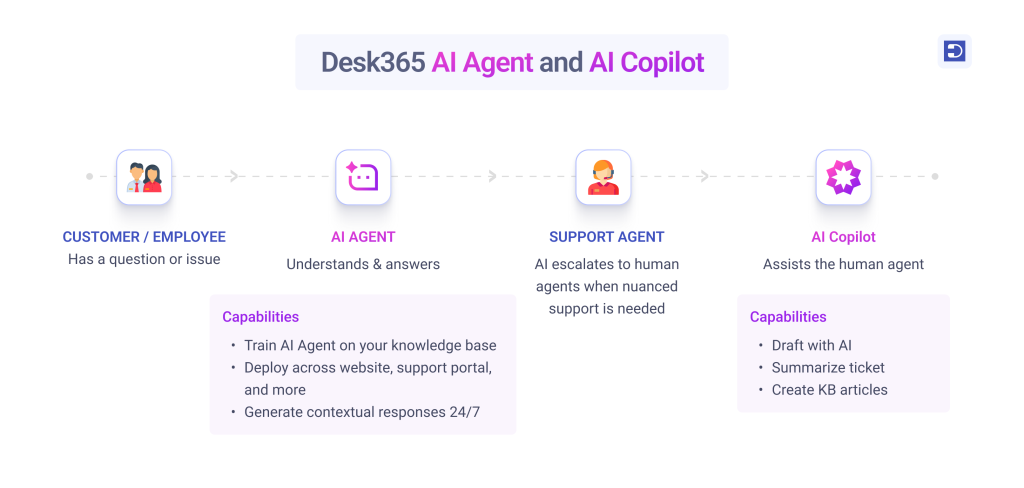
A conversational AI Agent can understand a customer’s request, use information from your knowledge base, help troubleshoot an issue, answer follow-up questions, and hand the conversation over to a human agent when nuanced help is needed.
For example, someone might tell a support bot, “I changed my password this morning, but I still can’t log in from my laptop.”
They aren’t really asking for a password reset guide. They’re telling you that they’ve already tried something and it didn’t work.
A more capable AI can understand that context and use the information available to figure out what might help next. And if the issue needs a human, the conversation can move into the regular support process instead of leaving the customer stuck in a loop of suggested articles.
This is where conversational AI Agents start to make more sense as part of a helpdesk rather than just another chatbot sitting on a website.
What do support leaders think about AI?
There’s a lot being said about what AI can do for support. But it’s also worth hearing from the people who are actually working in the industry and watching these changes happen firsthand.
In our Humans of Support series, we speak with support leaders, IT professionals, and industry experts about AI, the changing support landscape, and where they think technology fits into the future of the industry.
Arsen Misakyan, Founder and CEO of LAXcar, described AI in support as a way to take care of the boring work while leaving decision-making to live agents.
That distinction is important. The goal of conversational AI isn’t necessarily to remove people from the support process. It’s to handle the parts of a conversation that don’t need human intervention, while giving agents more room to focus on the situations that do.
And Arsen is just one perspective. We publish a new Humans of Support conversation every week, bringing a different voice and perspective from the people shaping support today.
Hear from the people experiencing the change firsthand.

How Desk365 brings AI into the helpdesk
Desk365 takes this approach with its conversational AI Agents. Let’s say I am a support agent. Instead of expecting me to manually write a response for every possible query, I can train the AI Agent on the information my support team already relies on. That can include my knowledge base, website content, files, and Q&A.
I can then make the AI Agent available through the website chat widget, Support Portal, or Microsoft Teams (coming soon), depending on where customers or employees usually come looking for help.
So, if an employee asks a question in Teams, for example, they don’t necessarily have to leave Teams, find the support portal, and create a ticket just to get a simple answer. And when the AI Agent can’t resolve something, I can set up escalation rules so the conversation can move to a human agent.
That balance is important. The point isn’t to make AI handle every single support request. It’s to let it take care of the questions it can handle while making it easier for an agent to step in when needed.
Take a quick look at the Desk365 AI Agent
AI doesn't stop at the customer conversation
This is the part I find interesting about using AI in a helpdesk. The customer-facing conversation is only one part of the support process. Once a ticket reaches an agent, there’s still a lot of work that happens behind the scenes. An agent might have to read through a long conversation to understand what happened, figure out what the customer has already tried, and then write a response.
Can conversational AI create or escalate support tickets?
It can, depending on how the helpdesk is set up. For more complex requests, conversational AI can collect the relevant information and hand the issue over to a support agent instead of forcing the customer to start the conversation again.
Desk365’s AI Copilot helps with some of that work. For example, if a ticket has a long conversation behind it, the agent can use AI to summarize it instead of going through every message again. They can also use Draft with AI when writing a response. It can help rephrase text, fix grammar, or translate a response into another language, while the agent still reviews and decides what to send.
So, the AI isn’t just talking to customers. It’s also helping the people who are actually resolving their problems. And then there’s everything you learn from your tickets. There’s one more part of this that I think is easy to overlook. Support teams solve a lot of problems every day, but the solution often ends up buried inside a closed ticket.
Someone asks a question. An agent figures it out. The ticket gets resolved. Then, a few weeks later, someone asks the same thing again. With Desk365, an agent can use a resolved ticket to generate a knowledge base article. They can review it, make any changes they need, and publish it to the knowledge base.
The answer doesn’t stay inside just one ticket. Over time, those solved conversations can help build a better knowledge base, which gives the AI more useful information to work with the next time someone asks a similar question.
The AI Agent can handle repetitive questions, agents can use AI Copilot to work through tickets faster, and the solutions from those tickets can become useful knowledge for future conversations.
It’s less about adding a chatbot to a helpdesk and more about making AI part of the way the helpdesk works.
Is conversational AI better than chatbots?
A traditional chatbot can be useful when the questions are simple, predictable, and easy to answer with predefined information.
But if you’re running an advanced helpdesk while tackling high-ticket volume, and complex requests, conversational AI Agents add more value.
And with a platform like Desk365, the AI doesn’t have to sit separately from the helpdesk. The AI Agent can handle conversations, while AI Copilot helps agents work through the tickets that still need humans.
Frequently asked questions
Yes. Conversational AI can be used to answer customer or employee questions, provide information from a knowledge base, troubleshoot common issues, and escalate requests to support agents when needed. In a helpdesk, it can also work alongside agents to speed up ticket resolution.
An AI Agent is a customer or employee-facing AI that can handle support conversations and provide answers based on information you’ve given it.
Yes. AI can help agents summarize long ticket conversations, draft responses, rephrase text, fix grammar, and translate responses. Desk365’s AI Copilot provides these types of capabilities while leaving the final response and decision with the support agent.
Yes. Resolved support tickets can contain useful solutions that other customers or employees may need later. In Desk365, agents can use a resolved ticket to generate a knowledge base article, review or edit it, and publish it for future use.