
TL;DR
IT change management helps teams assess, approve, and track changes before they affect business services. A good process reduces avoidable disruptions without slowing routine work. Small and midsize businesses need clear approval rules, documented decisions, and visibility into every change. The right software automates these steps without adding unnecessary complexity.
What is IT change management?
IT change management is the process of evaluating, approving, implementing, and reviewing changes to IT systems and services. These changes might include updating a server, modifying network settings, deploying a software patch, changing user permissions, or introducing a new business application.
The goal is to reduce risk while allowing IT teams to make necessary changes. A change should have a clear purpose, an understanding of its potential impact, and the right approvals before implementation.
ITIL 4 uses the term change enablement for this practice. Its purpose is to maximize successful changes by assessing risks, authorizing changes, and managing the change schedule. The focus is not on preventing change. It is on helping teams make changes safely and efficiently.
For a small IT team, this could be as simple as documenting a planned change, getting approval from the right person, scheduling the work, and recording the outcome.
How does the IT change management process work?
A practical change management process follows a few key steps.
1. Submit a change request
The requester documents what needs to change, why it is necessary, which systems it affects, and when the work should happen. The request should include enough information for reviewers to assess its impact.
2. Assess the risk and impact
The IT team evaluates potential downtime, security implications, dependencies, and business disruption. It should also identify a rollback plan in case the change fails.
3. Get the right approvals
The request goes to the people responsible for evaluating its risk. A routine, low-risk change may need one approval or qualify as pre-approved. A major infrastructure change may require input from security, IT leadership, or other affected teams.
4. Schedule and implement the change
The team chooses an appropriate time, informs affected users, and carries out the work according to the plan.
5. Review and document the outcome
After implementation, the team confirms whether the change worked as expected. It records any incidents, unexpected effects, and lessons for future changes.
Not every change needs the same level of scrutiny. Applying a proportionate process helps teams maintain control without creating unnecessary delays.
Why does IT change management break down?
The process often fails when teams focus on getting approvals rather than making informed decisions.
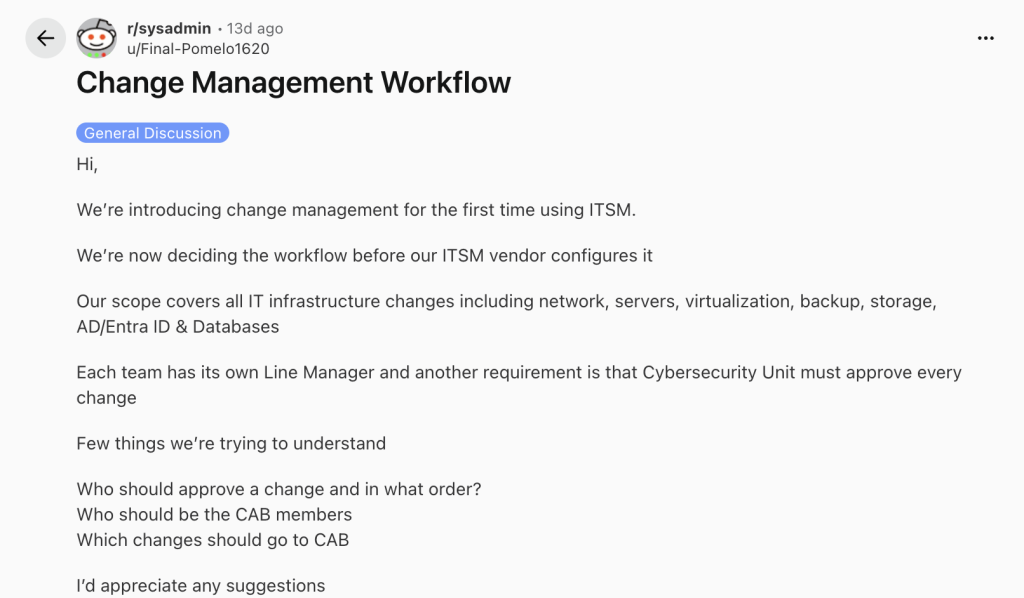
A recent discussion in r/sysadmin about introducing a change management workflow highlights questions IT teams face when defining approval responsibilities, choosing change advisory board (CAB) members, and deciding which changes need review.
Three problems commonly emerge.
First, approval chains become too long. When every change requires several people to approve it in sequence, routine work can sit idle while managers wait for responses.
Second, teams treat every change equally. A minor configuration update should not necessarily follow the same process as a production infrastructure change. Without risk-based rules, the process becomes either too restrictive or too loose.
Third, teams lack a reliable record of decisions. When requests, approvals, and implementation notes live in separate emails and spreadsheets, it becomes difficult to establish who approved a change or what happened afterward.
The solution is to define clear responsibilities, match approval requirements to risk, and keep the process visible from submission to completion.
What should IT change management software actually do?
Change management software should help teams apply their process consistently. It should not force small businesses to build an elaborate approval structure they do not need.
Look for these capabilities:
| Capability | What it helps your team do |
| Change request tracking | Record the request, reason, affected systems, and status |
| Configurable approval workflows | Route requests to the right people in the right order |
| Automated notifications | Notify approvers when action is needed and when decisions change |
| Approval tracking | See pending, approved, and rejected requests in one place |
| Audit history | Maintain a record of approval decisions and related activity |
| Closure controls | Prevent requests from being closed while required approvals remain pending |
The most useful software also makes everyday tasks easy. IT admins should be able to configure workflows without extensive technical work. Approvers should be able to understand a request and act on it without navigating several systems.
More advanced ITSM platforms may also connect changes to configuration management databases (CMDBs), infrastructure dependencies, risk assessments, and incident records. These capabilities can be valuable for organizations with complex environments. Smaller teams should assess whether they need them before paying for additional complexity.
Does every change need a change advisory board?
No. A change advisory board should review changes that genuinely benefit from broader input.
For example, a planned network upgrade affecting several departments may need input from infrastructure, security, and business stakeholders. A routine, pre-approved software update may not require a meeting.
ITIL practices support adapting change controls to the organization’s needs and the risk involved. Small teams can apply this principle without creating a formal board for every request.
Define which changes need individual approval, which require multiple stakeholders, and which qualify as standard changes. Review these rules periodically as systems and business requirements evolve.
How does Desk365 simplify change and approval management?
Small and midsize businesses need control over IT changes without the overhead of a complex enterprise platform. Desk365 brings change and approval workflows into its helpdesk, giving teams a practical way to manage requests and decisions.
With Desk365 change and approval management, teams can configure sequential workflows, where approvers act in a set order, or non-sequential workflows, where everyone must approve or any one designated approver can approve.
Teams can also trigger approval workflows through automation rules, send notifications and reminders, manage approver permissions, and track requests through a centralized approvals view. Closure rules can prevent tickets from being closed or resolved while approvals remain pending.
For example, issuing a laptop to a new employee might require a department head to approve the budget before IT confirms availability. Desk365 can route the request through these steps and keep the decisions tied to the ticket.
See the Desk365 change approval management guide for setup instructions, or watch the change approval management walkthrough.
Desk365 offers these capabilities for teams that need structured approvals without the overhead of a large enterprise implementation. Sign up here to get started.
Frequently asked questions
A common ITIL-based classification includes standard changes, normal changes, and emergency changes. Standard changes are pre-authorized and repeatable. Normal changes require assessment and approval. Emergency changes follow an expedited process to address urgent needs.
Yes. An IT manager or administrator can own the process. Define who submits, reviews, approves, and implements changes, then use software to document decisions and automate notifications.
Start with configurable approval workflows and clear tracking. These capabilities help teams establish accountability and maintain a record of decisions. Add advanced risk and dependency management when your environment requires it.