TL;DR: Is outsourced IT support right for your business?
Outsourced IT support makes sense when your business needs more IT expertise, coverage, or security than your internal team can provide at a reasonable cost. Small businesses often benefit from a managed service provider (MSP), while growing companies may prefer a mix of in-house IT staff and external experts.
The right choice depends on your employee count, the strength of your IT team, your budget, and how much control you need over your systems. Before outsourcing, identify the gaps you need to fill. Then compare the cost, service scope, security practices, and response times of potential providers. Read on for a decision making matrix.
What is outsourced IT support, and how does it work?
Outsourced IT support means hiring an external company or team to manage some or all of your business’s IT needs. Instead of hiring employees to handle every technical issue, you pay a specialist to provide support, maintain systems, and help your business use technology effectively.
The scope can range from basic help desk support to full IT management. It depends on what your business needs and what you agree to with the provider.
For example, a small business might outsource password resets, laptop issues, software updates, and network maintenance. A larger company might keep an internal IT team but hire outside experts for cybersecurity, cloud infrastructure, or round-the-clock monitoring.
An outsourced IT provider typically works in one of three ways:
Break-fix support: You contact the provider when something breaks and pay for the work performed
Managed IT services: You pay a recurring fee for ongoing support, maintenance, monitoring, and other agreed services
Co-managed IT: Your internal IT team shares responsibilities with an external provider
Many businesses use a mix of these models. They might manage daily IT operations internally while outsourcing specialist work or after-hours support.
If you’re evaluating the managed services model, our guide to managed IT support explains how it works and what businesses should consider.
When does outsourced IT support make sense?
There isn’t a single employee count at which outsourcing becomes the right choice. A company with 100 employees and a complex technology setup might need more support than a company with 500 employees and simple IT needs.
Start by looking at four things: the size of your workforce, the skills available in your IT team, the level of support your business needs, and your budget.
1. Your IT team can't cover all your needs
Your internal team might be good at handling everyday issues but lack the skills to manage cloud systems, security audits, complex migrations, or disaster recovery.
Hiring a full-time specialist for every skill can get expensive. Outsourcing gives you access to people with different areas of expertise without requiring you to hire them all.
For example, you might have two IT employees who handle user support and Microsoft 365 administration. When you need to move workloads to the cloud, an external specialist can manage the project while your internal team keeps daily operations running.
2. Your business needs support beyond office hours
If your business operates across time zones, serves customers around the clock, or depends on systems that must remain available, your IT team may struggle to provide continuous coverage.
An MSP can help cover evenings, weekends, and holidays without requiring you to build a full internal on-call rotation.
This can be useful for e-commerce businesses, software companies, healthcare providers, and other organizations where an outage can affect customers or revenue.
3. Your business is growing faster than your IT team
Growth brings more employees, devices, applications, access requests, and support tickets. A team that handled 50 employees comfortably might struggle when the company reaches 300.
An MSP can add support capacity while you decide which roles you eventually need to hire internally.
This can also help when you open new offices, acquire another business, or expand into new markets.
4. Security and compliance need more attention
Cybersecurity requires ongoing work. Your business may need better monitoring, patch management, backup checks, access controls, or help meeting industry requirements.
An external provider can bring specialist knowledge and established processes to these tasks. However, outsourcing doesn’t transfer every security or compliance responsibility away from your company. You still need to understand who owns each task and how the provider protects your systems and data.
5. IT problems keep interrupting business operations
If employees spend hours waiting for access, dealing with recurring issues, or chasing IT for updates, the problem may be bigger than a few technical faults.
An outsourced team can help establish clear support processes, define response targets, and track recurring issues. A structured help desk also makes it easier to see which problems need attention first.
Other scenarios: You might also have a short-term specialized project, be unable to predict IT costs, have too many repetitive questions coming in, or more issues to manage than you have bandwidth for.
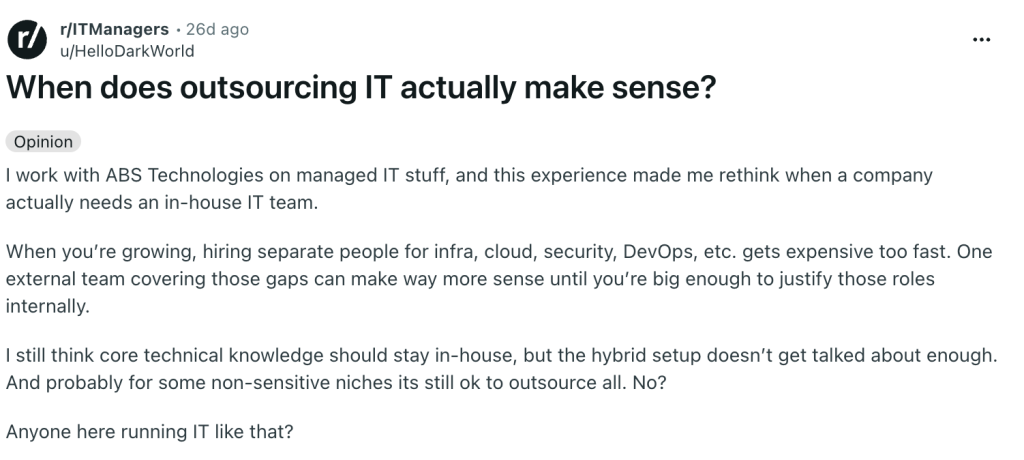
A discussion on Reddit’s r/ITManagers, IT professionals highlighted project-based outsourcing for work such as hypervisor and email migrations, as well as security assessments. Several participants favored a hybrid model, where internal staff retain business knowledge and external specialists fill skill gaps.
In-house IT vs. outsourced IT support: which model fits your business?
Outsourcing isn’t always cheaper, and an in-house team isn’t always better. The right model depends on how much work your IT team handles, which skills it needs, and how closely it must understand your business.
An in-house team brings direct control and knowledge of your systems. An outsourced team brings access to a wider pool of skills and can provide support without requiring you to hire every specialist yourself.
Here’s how the two models compare.
| Factor | In-house IT | Outsourced IT support |
| Cost | Salaries, benefits, training, tools, and hiring | Contract fees, project costs, and any excluded services |
| Expertise | Limited to the skills you hire | Access to a broader set of specialists, depending on the contract |
| Availability | Depends on team size and shift coverage | May include evenings, weekends, or 24/7 support |
| Business Knowledge | Builds deep knowledge of internal systems and teams | Requires onboarding, documentation, and ongoing communication |
| Control | Direct control over priorities and daily work | Control depends on the agreement and how responsibilities are divided |
| Scalability | Often requires hiring as needs grow | Can add services or capacity within the provider’s offering |
| Accountability | Managed internally | Shared through contracts, service targets, and regular reviews |
A hybrid model can offer the best of both approaches. Your internal team keeps ownership of business-critical systems, priorities, and long-term plans. An MSP handles agreed tasks such as routine support, monitoring, security operations, or specialist projects.
The Reddit discussion mentioned earlier reflects this approach. Participants pointed out that outsourcing can work well when a company lacks a specialist skill, but it becomes risky when nobody inside the business can guide the provider or judge the quality of its work.
The key is to decide what your business must own internally and what another team can manage effectively.
A more useful way to make the decision:
Before choosing a provider, answer these five questions.
| Question | If your answer is yes: |
Do we lack the skills needed to manage our systems safely? | Consider outsourcing specialist work or using a co-managed model |
| Does our team struggle to cover the hours our business operates? | Compare providers that offer the required support hours |
| Are IT problems slowing down employees or customers? | Review your support process and consider an MSP or better help desk |
Do we have projects that require skills we rarely use? | Outsource those projects rather than hiring for a short-term need |
| Can someone inside the business manage the provider and review its work? | You are better placed to use an outsourced or hybrid model effectively |
If you answer yes to several questions, outsourcing deserves serious consideration. If your current IT team handles these areas well, you may need only targeted external help.
If you choose to keep IT in-house
Not every company wants an MSP, and that is fine. If you plan to keep running IT yourself, a help desk gives you the structure an MSP would otherwise provide. It collects every request in one place, assigns each one to an owner, and tracks how long it takes to close.
That structure matters even more if you outsource part of the work. A shared help desk lets your team and your provider see the same tickets, so nothing gets lost in a handoff.
Desk365 is a help desk built for teams like this. It works inside Microsoft Teams, so employees can ask for help where they already chat. You can set SLAs, route tickets to the right person, and track how your team and your provider perform. Whether you run IT alone or share it with an MSP, Desk365 keeps requests organized and visible.
Find Desk365 helpful? Set us as a preferred source on Google to see more of our content in search results.