Every support ticket needs attention, but not every support ticket needs it right now.
A company-wide outage, software installation request and a printer issue may all enter your help desk within minutes of each other. Treating them with the same level of urgency can slow down critical resolutions, overload agents and lead to missed SLA targets.
That’s why ticket triage is more than assigning priorities. It’s about ensuring every request reaches the right team with the right level of urgency. As ticket volumes increase and support channels multiply, automation and AI help teams make these decisions consistently and at scale.
In fact, the global Ticket Triage AI market is projected to grow from USD 1.22 billion in 2024 to USD 9.16 billion by 2033, highlighting the increasing focus on smarter ticket management.
Whether you manage an internal IT help desk or customer support operation, having a clearly defined ticket triage process is no longer optional.
What ticket triage really means
Ask any experienced service desk manager about their biggest operational challenge and you’ll hear a familiar answer: deciding which ticket deserves attention first.
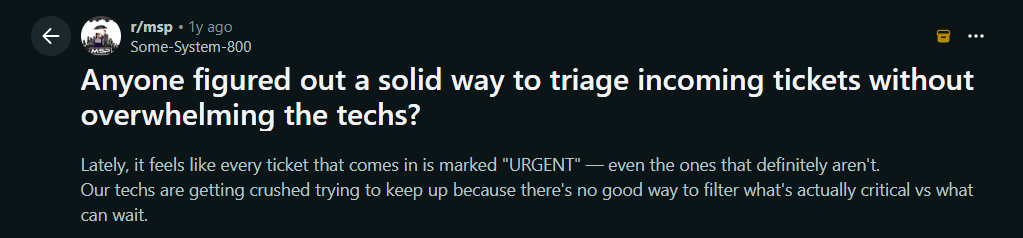
These discussions bring in the challenge every growing support team eventually faces. As tickets arrive through email, chat, support portals, Microsoft Teams, phone calls and web forms, some are business-critical incidents, while others are routine requests.
Ticket triage is the process of evaluating, categorising, prioritising and assigning incoming support requests based on their business impact, urgency and the expertise required to resolve them. Instead of simply working through tickets as they arrive, it helps support teams focus on the right issues first, route requests to the right people and ensure service commitments are met.
From manual triage to intelligent ticket triage
Manual ticket triage works well when ticket volumes are low. As organisations grow, manual decision-making becomes slower and less consistent. Automation and AI help standardise prioritisation, routing and SLA management while reducing repetitive work.
| Ticket Triage Process | Manual Ticket Triage | Automated Ticket Triage |
|---|---|---|
| Ticket Intake | Agents review each ticket manually and understand the issue. They also gather missing information | AI and structured ticket forms capture, categorize and enrich ticket information automatically at the time of creation. |
| Ticket Prioritization | Priorities are decided based on agent’s perspective and judgement | Predefined automation rules are applied based on urgency, impact and ticket attributes |
| Ticket Routing and Assignment | Tickets are manually assigned to agents | Tickets are instantly routed to the appropriate group or agent based on the ticket attributes |
| SLA Management | Response and resolution timelines and deadlines are tracked manually | SLA policies, business hours, reminders and automated escalations keep tickets progressing without delay |
| Agent Productivity | Agents spend time reading lengthy conversations and performing repetitive triage tasks | AI summarizes conversations, suggests responses and automates repetitive actions so agents can focus on resolving issues |
| Improvement | Identifying recurring issues and process bottlenecks often requires manual analysis | Reports, analytics, AI insights and knowledge base suggestions help teams continuously optimize their triage process |
The anatomy of an effective ticket triage process
Every support ticket follows a series of decisions before it is resolved. An effective ticket triage process ensures that each request is captured with the right context, accurately prioritised, assigned to the right team and tracked through to completion.
The following stages form the foundation of an efficient triage process.
Capture complete context
The quality of ticket triage depends on the quality of the information collected. When requests arrive with vague descriptions or missing details, agents spend valuable time following up instead of resolving the issue. What could have been a five-minute fix often turns into multiple back-and-forth conversations.
A structured ticket intake process captures key details such as the issue category, affected service, urgency, screenshots, device information and other organisation-specific fields.
Customizable ticket forms and custom fields will help to standardise every incoming request, regardless of the channel from which the ticket is raised.
Prioritise tickets based on impact
Not every support request deserves the same level of urgency. A password reset, for example, shouldn’t compete with a company-wide system outage simply because both arrived at the same time.
Effective ticket triage prioritises work based on business impact rather than arrival order. A structured evaluation helps teams make faster and more consistent decisions.
Consider every ticket through these four questions:
- Scope – How many users or business units are affected?
- Criticality – How essential is the affected service to day-to-day operations?
- Continuity – Is there a workaround that allows users to continue working?
- Business Impact – What operational or customer consequences could result if the issue isn’t resolved quickly?
Once you’ve identified a high-priority ticket, the focus shifts to resolving it efficiently while minimizing business disruption
Support platforms that combine ticket categories, priority levels, automation rules and custom fields help standardize these decisions, ensuring every request is evaluated using the same criteria instead of individual judgment.
Route tickets rightly
Even the highest-priority ticket loses value if it reaches the wrong team. Every unnecessary reassignment adds delays, increases resolution times and frustrates both agents and requesters.
An effective triage process routes tickets based on attributes such as issue category, department, product, location, or custom field values, ensuring they reach the right expertise from the start.
Automation Rules instantly assign tickets to the appropriate group or agent, while Round Robin Assignment balances workloads across available agents. This reduces unnecessary handoffs and keeps tickets moving efficiently.
Keep tickets on track with SLAs
Assigning a ticket is only the beginning. Without clear service targets and automated follow-ups, even well-prioritised requests can sit unnoticed until deadlines are missed.
SLA policies define response and resolution targets based on factors such as ticket priority, customer type, or service category.
Modern help desks make SLA compliance easier through automated reminders, business hours, escalation workflows and time-based automation. Instead of reacting after an SLA breach occurs, teams receive timely notifications that help keep every ticket moving toward resolution.
Improve insights with AI and analytics.
Ticket triage doesn’t end with ticket assignments. Every resolved request generates insights that help teams refine workflows, improve automation and make better triage decisions over time.
Desk365 helps teams continuously optimise their triage process through:
- AI powered assistance – AI Agent resolves common and repetitive queries using your knowledge base, reducing ticket volume before requests reach an agent. For tickets that require human intervention, AI Copilot summarizes conversations, drafts responses, and assists in creating knowledge base articles, helping agents resolve issues more efficiently.
- Reports & Analytics – Tracks recurring issues, SLA performance, response times, workloads and team productivity to uncover improvement opportunities.
Turn ticket triage into a support strength
Effective ticket triage is no longer just about organising support requests, it’s about creating a faster, more consistent and scalable support operation. As ticket volumes grow, structured workflows, automation and AI help teams make better decisions, improve SLA performance and deliver a better customer experience.
Putting these best practices into action requires more than individual effort, it requires the right tools. Desk365 brings together customizable ticket forms, intelligent automation, SLA management, omnichannel support, AI-powered assistance and reporting capabilities to help support teams build a faster and more consistent ticket triage process.
The faster your team can make the right triage decisions, the faster every customer gets the support they need.
Ready to simplify your ticket triage process? Start your free trial with Desk365 today and see how intelligent automation can help your support team work smarter.
Frequently asked questions
Ticket prioritization is one step within the broader ticket triage process. Prioritization determines how urgent a ticket is based on factors such as business impact and urgency. Ticket triage goes further by evaluating the request, categorizing it, assigning the correct priority, routing it to the right team or agent, and ensuring it is managed according to SLA policies.
Automation eliminates repetitive manual work by categorizing tickets, assigning priorities based on predefined rules, routing requests to the appropriate team, and triggering SLA reminders and escalations. This helps support teams reduce response times, maintain consistent decision-making, and handle higher ticket volumes without increasing agent workload.
An effective ticket triage process ensures that critical issues are identified, prioritized, and assigned to the right team as soon as they are created. By combining structured workflows with automation and SLA policies, support teams can reduce delays, prevent missed deadlines, and improve both customer satisfaction and operational efficiency.