TL;DR: Freshdesk vs Freshservice
Freshdesk is built to support customers. Freshservice is built to support employees. Both start at $19 per agent per month, but that number hides a lot. For Freshdesk, $19 buys the email-first version, and multichannel Freshdesk Omni starts at $29. Freshdesk’s email-first plans run to $89 and Omni’s to $119, while Freshservice’s run to $99 before custom pricing. AI add-ons sit on top of all of them.
If your tickets come from customers over email and messaging, Freshdesk is the closer fit. If they come from staff and you need incident, change, and asset management, look at Freshservice. If you need both, or your team already works in Microsoft Teams, Desk365 covers customer and internal requests in one helpdesk from starting $12 per agent per month with the highest being $32.
In today’s fast-paced digital world, customer expectations are at an all-time high. Whether it’s lightning-fast support, seamless self-service, or personalized assistance, businesses are under constant pressure to deliver top-notch customer and employee experiences. And at the heart of all this? A powerful, intuitive helpdesk system.
Choosing the right helpdesk software isn’t just a technical decision, it’s a strategic move that can define your brand’s ability to build trust, resolve issues quickly, and stand out in a crowded marketplace. With so many options flooding the SaaS landscape, you must have come across two names from the same vendor often: Freshdesk vs Freshservice.
At first glance, they might seem similar, they’re both products from Freshworks, after all. But dig a little deeper, and you’ll discover they’re built for very different purposes and audiences. Whether you’re managing customer support tickets or streamlining IT operations, knowing which platform to choose can save your team hours of work and dramatically improve the quality of your support.
In this blog, we’re diving into the core differences between Freshdesk and Freshservice, breaking down their unique features, benefits, and real user feedback.
By the end, you’ll not only understand the key distinctions between the two, but you’ll be able to confidently choose the one that fits your organization like a glove.
Let’s get started!
Freshdesk and Freshservice at a glance
One thing to know first: Freshworks sells Freshdesk as two products. Freshdesk is the email-first version. Freshdesk Omni is the multichannel version, with chat, social, phone, and messaging in one inbox. Prices are per agent per month on annual billing.
Dimension | Freshdesk | Freshservice |
Built for | External customer support | Internal IT and employee service management |
Main teams | Customer service and support | IT, HR, facilities, and finance |
Starting price | $19 (email-first Growth), $29 (Omni Growth) | $19 (Starter) |
All plans | Email-first: Growth $19, Pro $55, Enterprise $89. Omni: Growth $29, Pro $79, Enterprise $119 | Starter $19, Growth $49, Pro $99, Enterprise custom |
Channels | Email-first covers email. Omni adds chat, social, phone, and messaging | Email, phone, chat, and widget on all plans |
Incident, problem, and change management | Not a core focus | Incident on all plans, problem and change on Pro and above |
Asset management | Not a core feature | Built-in IT asset management, with asset units licensed separately beyond the included 100 |
AI | Freddy AI Agent with the first 500 sessions included. Copilot is a $29 add-on on Pro and Enterprise | Freddy AI Copilot is a $29 add-on on Pro and above. Freddy AI Agent (Classic) is included on Enterprise |
Free option | Free Program for up to two agents for six months (email-first only, not Omni) | No free plan listed |
Free trial | 14 days, full feature access | 14 days, unrestricted access to all features |
G2 rating | 4.4 out of 5 (3,713 reviews) | 4.6 out of 5 (1,311 reviews) |
Best for | Teams answering customers | Teams answering employees |
Freshdesk vs Freshservice: What's the key difference?
At its core, the main difference between Freshdesk and Freshservice lies in their purpose, it’s the classic distinction between a helpdesk and a service desk. Simply put, Freshdesk is built for external customer support, while Freshservice is designed for internal service management. But let’s take a closer look to understand what that really means.
Reviewers on G2 describe the split plainly. Freshdesk is for supporting external customers across channels like email, chat, and phone. Freshservice is an ITSM platform for supporting employees internally, with incident management, service catalogs, and IT asset management. One contributor sums it up as a question of whether you’re serving customers or running internal IT.
Here’s the G2 discussion: https://www.g2.com/discussions/what-is-the-difference-between-freshdesk-and-freshservice
What does Freshdesk offer?
Freshdesk is a powerful, cloud-based customer service platform designed to help businesses manage support from a single place. Freshworks sells it in two versions. Freshdesk Omni is the multichannel version, so your team can handle inquiries from email, chat, social media, phone, and messaging apps in one unified inbox. Freshdesk (the email-first version) suits teams that mainly run support through email.
Both versions include AI-powered tools and smart automations to handle repetitive questions, route tickets, and escalate issues efficiently. Freddy AI Agent, Freshworks’ AI chatbot, comes with the first 500 sessions included on every plan. Freshdesk also includes a self-service portal where customers can find answers through knowledge base articles, reducing ticket load while enhancing user satisfaction.
What sets Freshdesk apart is its focus on performance and insights. You get access to analytics and reporting to track agent productivity, resolution times, and customer satisfaction. Built-in tools like CSAT surveys and article feedback help you continually improve your support experience. Plus, with hundreds of integrations available, Freshdesk fits into your existing workflows, making it an ideal choice for businesses of all sizes looking to deliver fast, reliable, and personalized customer service.
What does Freshservice offer?
Freshservice is an intelligent, cloud-based IT service management (ITSM) solution tailored for internal support teams, especially in IT, HR, facilities, and finance. Unlike Freshdesk, which is customer-facing, Freshservice is designed to streamline internal operations, manage employee support tickets, and automate complex workflows. It offers features like incident, problem, change, and asset management, along with a powerful service catalog to help teams manage requests efficiently. With AI-powered automations, it reduces manual work and ensures the right tasks get to the right people at the right time.
Freshservice also includes a knowledge base, making it easy for employees to find answers on their own. It comes packed with analytics and reporting tools that help IT leaders measure service performance and identify bottlenecks. One of its standout features is IT asset management, allowing teams to track and manage hardware and software across the organization. Freshservice includes a ServiceBot for Microsoft Teams and Slack and a marketplace of integrations, making it a great fit for organizations that want a modern, scalable, and compliant internal service desk.
To make it easy, here is a feature-level, head-to-head comparison table:
Feature
Freshdesk
Freshservice
Primary focus
Customer support
Internal IT and employee service management
Target users
Customer service teams
IT, HR, Facilities, Finance teams
Channels
Email (email-first), or email, chat, social, phone, and messaging (Omni)
Email, phone, chat, and widget
Ticket types
Customer inquiries and issues
Incidents, problems, changes, service requests
AI & automation
Chatbots, ticket workflows
Workflow automation, approval systems
Self-service options
Customer knowledge base and portal
Employee self-service portal and service catalog
Asset management
Basic (via integrations)
Full IT asset lifecycle management
Integrations
CRM, eCommerce, communication tools
Productivity suites, project/IT tools
Best for
External support teams, customer engagement
Internal operations, ITIL-aligned workflows
Similarities between Freshdesk and Freshservice
Both Freshdesk and Freshservice are products of Freshworks, sharing a common foundation that offers:
- User-friendly interface: Both platforms are praised for their intuitive design, making them accessible even to non-technical users.
- Automation capabilities: They offer automation features to streamline workflows, such as ticket routing and SLA management.
- Knowledge base: Each provides tools to create and manage a knowledge base, facilitating self-service for users.
- Integration options: They support integrations with various third-party applications, enhancing their functionality.
- Analytics and reporting: Both platforms offer reporting tools to monitor performance metrics and improve service delivery.
Key differences between Freshservice and Freshdesk
While they share common features, their core purposes differ significantly:
Primary focus:
- Freshdesk: Designed for external customer support. The email-first version handles email, and Freshdesk Omni adds chat, social media, phone, and messaging.
- Freshservice: Tailored for internal IT service management (ITSM), focusing on employee support and IT operations.
Ticket management:
- Freshdesk: Manages customer tickets, emphasizing SLA adherence and customer satisfaction.
- Freshservice: Handles internal tickets, including incident, problem, change, and asset management.
Asset management:
- Freshdesk: Offers basic asset tracking through integrations.
- Freshservice: Provides comprehensive IT asset management, tracking hardware and software assets throughout their lifecycle.
Customization and workflow:
- Freshdesk: Offers customizable workflows suitable for customer service scenarios.
- Freshservice: Includes advanced workflow automation tailored for IT processes, including approval workflows and change management.
What users are saying on Reddit
When it comes to real-world usage, Reddit users often provide unfiltered and experience-based insights. Here’s a quick glimpse at what some Redditors had to say about Freshdesk vs. Freshservice:
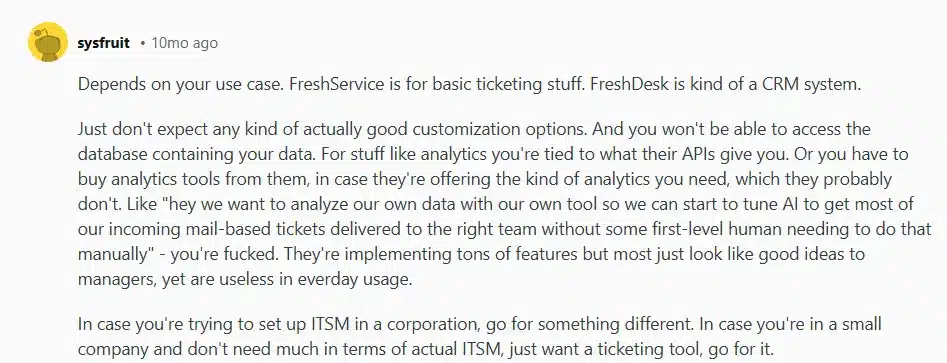
Use case matters: According to a Redditor, the choice between Freshdesk and Freshservice really depends on your use case. Freshservice is ideal for simple internal ticketing, while Freshdesk leans more toward CRM-style external support. However, they also caution about limitations in customization and analytics capabilities.
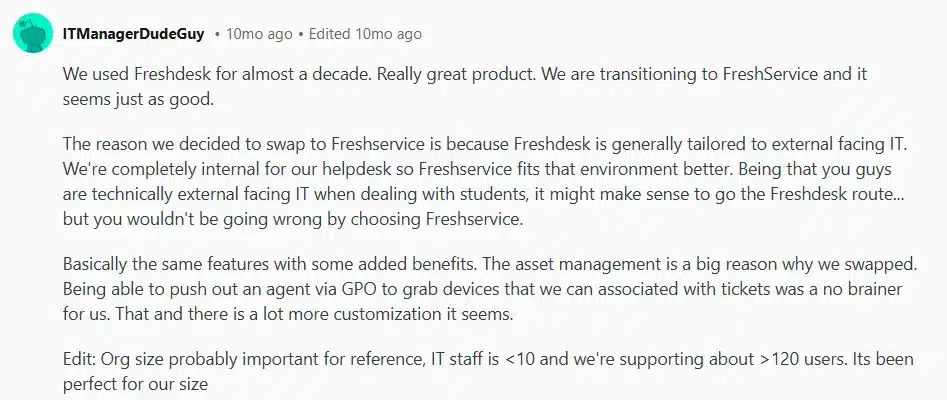
Internal vs. external helpdesks: Another user shared that their organization used Freshdesk for nearly a decade before switching to Freshservice, mainly because Freshservice is better suited for internal IT support and offers better asset management features.
Size & simplicity: Smaller teams with straightforward needs may find both platforms adequate, but as complexity grows (especially with ITSM requirements), Freshservice may have a slight edge.
Here’s what they had to say:
Pricing is the most common complaint. A 2026 roundup of ITSM opinions from r/sysadmin and r/ITManagers reports that Redditors most often complain about costs climbing as agents and features pile up, with some feeling nickel-and-dimed on integrations at lower tiers. That fits what Freshworks lists on its own pages, where AI Copilot costs $29 per agent per month on top of your plan.
Which is better: Freshdesk or Freshservice - User reviews and feedback
Freshdesk
- Users appreciate its ease of use and the ability to manage customer queries from various channels in one place.
“Easy to use, its user friendly interface makes it minimal training making it accessible even for non technical users, its workflow automation features, canned responses & ticket creation/assignment rules help reduce repetitive tasks & improve productivity & SLAs. It allows teams handling customer queries from email, chat & phone all in one place.”
Source: G2
- The automation features and self-service options have led to increased productivity and customer satisfaction.
“The platform makes it incredibly easy to manage a high volume of tickets, especially during peak seasons. Features like canned responses, SLA management, and the ability to customize workflows have streamlined our operations, saving us countless hours. The self-service options, such as the knowledge base and chatbot integration, have empowered our customers to resolve their issues independently, resulting in a noticeable 15% reduction in L1 queries. Additionally, the robust analytics and reporting tools provide actionable insights, helping us make data-driven decisions to improve overall support performance.”
Source: G2
- However, some users find the advanced features complex to set up, requiring additional training.
“One drawback of Freshdesk is that its advanced features can be complex to set up and may require additional training for the team. Additionally, the mobile app has limited functionality compared to the desktop version, which can sometimes lead to delays in customer support.”
Source: G2
- The mobile app has limited functionality compared to the desktop version.
“The mobile app, while its useful, has fewer features compared to the desktop version limiting its usability for on the go support. At least for admin users the features should be at par with Desktop usage. “
Source: G2
Freshservice
- The platform is praised for streamlining IT operations and being user-friendly, even for non-technical staff.
“Freshservice offers a wide range of functionalities designed to streamline IT operations. This also makes it a good solution for B2B support.”
Source: G2
- The integration capabilities with tools like Slack and Outlook enhance real-time communication.
“We integrated Freshservice with Slack and Outlook so whenever there is an update on the ticket, the watchers will be notified and take action immediately.”
Source: G2
- However, some users feel that complex workflow automation is limited and requires manual intervention.
“I feel like complex workflow automation like assigning a task to the next user based on the bandwidth is not possible. This is done manually by verifying the scope of each user on the board.”
Source: G2
- The mobile app does not support all desktop features, limiting its functionality and a few basic analytical features are missing.
“The mobile app does not support all the desktop features.”
“There are a few basic features missing from Analytics.”
Source: G2
Recommended Reading: Freshdesk Reviews 2026: The Good, the Bad, and the Ugly
Pros and cons of Freshservice vs Freshdesk
Freshdesk
Pros:
- User-friendly interface suitable for non-technical users.
- Efficient multi-channel support.
- Affordable pricing for small to medium businesses.
Cons:
- Limited advanced customization options.
- Reporting features may not meet complex analytical needs.
Recommended Reading: Freshdesk alternatives
Freshservice
Pros:
- Comprehensive ITSM features, including asset and change management.
- Intuitive design facilitating quick adoption.
- Effective workflow automation for internal processes.
Cons:
- Some advanced features may require a learning curve.
- Customization options can be limited in specific areas.
The pricing comparison
When evaluating Freshdesk and Freshservice, understanding their pricing structures is crucial to determine which platform aligns best with your organization’s needs and budget. Here’s a comprehensive overview, supplemented with user feedback.
How much does Freshdesk cost?
Freshdesk starts at $19 per agent per month on annual billing, but only for the email-first version. If you need chat, social, phone, or messaging, you need Freshdesk Omni, which starts at $29. Freshdesk’s prices have gone up since this post last listed them, so older numbers you see elsewhere may be out of date.
Here are the plans for Freshdesk (email-first), per agent per month on annual billing:
- Growth: $19. Includes ticketing, a shared inbox, a customer portal, a knowledge base, analytics, threads and tasks, roles and permissions, and Freddy AI Agent with the first 500 sessions included
- Pro: $55. Adds a multilingual helpdesk, custom dashboards, intelligent routing, multiple SLA policies, and external collaborators
- Enterprise: $89. Adds Freddy AI Insights, skill-based routing, a sandbox, audit logs, and IP whitelisting
And here are the plans for Freshdesk Omni, the multichannel version:
- Growth: $29. Adds omnichannel support to the core ticketing, portal, and knowledge base features
- Pro: $79. Adds a multilingual helpdesk, advanced analytics, intelligent routing, external collaborators, and a team availability dashboard
- Enterprise: $119. Adds Freddy AI Insights, skill-based routing, custom objects, a sandbox, and audit logs
Freddy AI Copilot is a separate $29 per agent per month add-on on Pro and Enterprise, and extra AI Agent sessions cost $49 per 100. That’s why a $55 email-first Pro seat becomes $84 with Copilot, and a $79 Omni Pro seat becomes $108.
You can pay monthly, quarterly, half-yearly, or annually, and Freshworks advertises 20% savings on annual billing, so check which number you’re comparing.
Freshdesk also runs a Free Program for up to two agents for six months. It’s available on the email-first version only, not Omni, and some features and configurations are lost if you switch to it from a higher plan during your trial. Here’s the Freshworks help article
Recommended Reading: Freshdesk pricing: The complete guide
User feedback on Freshdesk pricing:
According to Capterra, Freshdesk is recognized for its affordability, especially benefiting small to mid-sized businesses. It is a top-rated helpdesk software with a value-for-money rating of 4.4 out of 5. But user feedback suggests that pricing can be a concern, especially when scaling up. While the base pricing appears competitive, costs can escalate with the addition of essential features considered add-ons.
“Pricing becomes a factor as more features and team members are added which could become quite expensive for small businesses.”
Source: Capterra
“Certain advanced automation tools or integrations are locked behind higher priced plans which may be a constraint for opting such tools.”
Source: G2
How much does Freshservice cost?
Freshservice starts at $19 per agent per month on annual billing
- Starter: $19. Includes incident management, knowledge management, task management, a support portal, and ServiceBot for Microsoft Teams and Slack
- Growth: $49. Adds a service catalog, SLA management, on-call management, and cloud management
- Pro: $99. Adds problem management, change management, major incident management, workload management, release management, and employee journeys
- Enterprise: custom pricing. Adds a sandbox, audit logs, Freddy AI Agent (Classic), and Freddy AI Insights
Three extras are worth budgeting for. Freddy AI Copilot is $29 per agent per month. A Business Agent license for non-IT teams like HR, facilities, and finance is $49 per agent per month. And IT asset management uses separately licensed asset units beyond the 100 included.
User feedback on Freshservice pricing:
Users on Capterra have highlighted Freshservice’s cost-effectiveness and scalability. Some reviewers find Freshservice to be a cost-effective solution with a fast adoption rate and low-cost implementation and onboarding. They appreciate its affordability, excellent customer support, and the ability to reduce costs by consolidating multiple tools into one.
“Great support, great price point. We love being able to make support requests so simple to open and work on across the company.”
Source: Capterra
However, it’s worth noting that some users have found the pricing structure to be on the higher side.
“The one thing that turned us away was its price. The main reason we decided not to continue using their service was the price. As a small business, the cost they were asking for was higher than we could fit into our budget, especially for purchase orders. Once the trial period ended, we stopped using their service.. As a small business, they were asking for a price higher than we could add to the budget to use it, mainly for purchase orders. As soon as the trial ended, we no longer used them”.
Source: Capterra
Software Advice analyzed 656 verified reviews on pricing and value. It found slightly more positive sentiment toward Freshdesk’s pricing (74%) than Freshservice’s (69%). Here is the Software Advice comparison.
Both platforms provide a 14-day free trial, allowing you to explore their features before committing.
What do the headline numbers leave out before you choose?
Before the verdict, here are three numbers from this comparison that deserve a second look.
Three numbers get quoted in almost every Freshdesk vs Freshservice comparison, and each one leaves out something important.
- The price. Both tools start at $19 per agent per month. But Freshdesk’s Pro plan is $55, and Freddy AI Copilot is a $29 add-on, so a Pro seat with Copilot costs $84 per agent per month. Freshservice’s Pro plan is $99, and the same add-on takes it to $128. The starting price tells you where you can begin, not what a team that uses the AI features will pay.
- The rating. G2 rates Freshdesk 4.4 out of 5 and Freshservice 4.6 out of 5. It’s tempting to read that as Freshservice being the better product. But Freshservice’s reviews come mostly from mid-market teams, while nearly half of Freshdesk’s come from small businesses. You’re comparing two different groups of buyers. A rating tells you how one kind of user felt, not whether the tool fits your kind of team. We wrote about the same trap with CSAT scores in Your Customer Survey Isn’t Really Measuring Customer Satisfaction. The score flattens the story, and the comments bring it back.
- The trial. Freshdesk’s 14-day trial gives you its Enterprise plan. Freshservice’s gives you every feature for 14 days. That’s generous, but you could spend two weeks falling for features that sit above the plan you’ll actually buy. Before the trial ends, test the plan you’ll actually pay for. Set up one SLA policy, one automation, and one report, and check that each works on that tier.
Final verdict: Which one should you choose?
Choosing between Freshdesk and Freshservice ultimately comes down to who you’re supporting and how your teams operate.
If your primary focus is on delivering fast, personalized customer service through multiple channels like email, chat, and social media, Freshdesk is your best bet. It’s built for customer-facing teams and excels in handling high-volume external support with powerful automations, intuitive UI, and cost-effective pricing.
On the other hand, if you’re managing internal operations, whether it’s IT support, HR queries, or facilities requests, Freshservice is the clear winner. With ITIL-aligned workflows, robust asset and change management, and smart automations, it’s tailored for internal service management and employee experience.
Why consider Desk365 instead?
Desk365 is a helpdesk and IT service management platform that runs inside Microsoft Teams. It handles customer tickets and internal requests in one place, which is the exact gap this comparison keeps running into.
Here’s what stands out to me. If your team already works in Teams, agents can manage tickets without leaving it, and the people asking for help don’t need another tool. Our Microsoft Teams integration guide shows how it works.
Pricing is the other piece. Plans are billed annually:
- Standard: $12 per agent/month. Includes email, Microsoft Teams, a support portal, web forms, SLA management, workflow automation, a knowledge base, and custom roles.
- Plus: $22 per agent/month. Adds change and approval management, CSAT surveys, Microsoft Entra ID sync, multilingual helpdesk, and AI Copilot.
- Premium: $32 per agent/month. Adds asset and software management, Microsoft Intune sync, audit logs, and HIPAA controls.
You can start with a 21-day free trial and no credit card. Afterward, a free plan covers 50 tickets a month. The AI Agent is a separate add-on at $50 per 1,000 credits, with limited free credits on Plus and Premium.
If asset management is what’s pulling you toward Freshservice, Premium covers it. Desk365 syncs managed devices from Microsoft Intune, either computers, mobile devices, or both, on a weekly schedule you pick. You can also trigger a manual sync once every 12 hours. Our Intune setup guide walks through the steps, including how to map Intune fields to your asset fields.
Customer feedback matters here too. Surveys are available from the Plus plan, and you can send them when a ticket is resolved or closed, so the comments stay tied to the interaction.
Here’s what 10 agents cost on annual billing, before add-ons:
Mid-tier plan | Monthly cost |
Desk365 Plus | $220 |
Freshservice Growth | $490 |
Freshdesk Pro | $550 |
If you’re coming from Freshdesk, our guide on migrating data from Freshdesk to Desk365 covers the move.
“It is VERY easy to administer, very easy to implement especially to our end users who are already using Teams. There is a ton of flexibility in how the software works for you as it is very customizable. It is also nice to see development for the software continuing, they are constantly adding new features. I’ve had to reach out to customer support on only a few occasions and they were very responsive and always cleared the issue I was having. I am super happy that I found this software and will never switch to anything else (unless it gets expensive, which it is NOT now)”.
Source: G2
“It was extremely easy to customize and implement into our firm. Desk365, continues to make quarterly enhancements and are very responsive to our questions/issues if we have any”.
Source: G2
Perhaps the better question isn’t Freshdesk or Freshservice. It’s who your support team actually serves, and whether you want to pay for two tools to serve them.
If you’re comparing further, our Freshdesk alternatives guide and best customer service software comparison are good next reads.
Disclaimer: Desk365 publishes this blog and competes with Freshdesk and Freshservice. Competitor prices and features come from Freshworks’ public pricing page and can change. Confirm current details with each vendor before you buy.