


Managed services providers play a central role in keeping businesses running. They manage everything from daily IT support to long-term infrastructure planning, which means they need to stay organized, responsive, and ready to solve issues before they turn into bigger problems. To keep up with this level of responsibility, MSPs rely on software that helps streamline their operations and bring clarity to all the moving parts in their workflow.
That is where MSP software comes in. It gives teams the tools they need to manage tickets, automate routine tasks, communicate with clients, and maintain a steady support process. In this blog, we will look at what MSP software is, how it works, the benefits it offers, and why it has become an essential part of modern IT service management.
TL;DR - Best MSP software
We reviewed the top MSP platforms and narrowed it down to 5 tools that are genuinely powerful, easy to use, and well-suited for modern IT service teams.
- Desk365 – Ideal for MSPs that rely on Microsoft Teams and email. Offers AI-powered ticketing, a unified inbox, automation, SLAs, and omnichannel support. Simple to set up and great for streamlining multi-channel requests.
- ConnectWise – A robust all-in-one MSP suite with RMM, PSA, security, billing, and automation. Best for larger MSPs that need enterprise-grade tools and deep workflow customization.
- NinjaOne – A clean, modern platform with strong RMM, automation, patching, remote access, and reporting. Great balance of power and simplicity, especially for endpoint-heavy environments.
- Atera – All-in-one RMM + PSA with predictable per-technician pricing. Includes remote access, ticketing, patching, billing, and automation. Excellent for growing MSPs wanting transparent, scalable pricing.
- Syncro – Combines RMM, PSA, ticketing, billing, and Microsoft 365 management with flat per-user pricing. Strong automation and scripting tools, plus a helpful MSP community.
What is MSP software?
MSP software is a platform that helps managed services providers run their day-to-day operations more efficiently. It brings together tools for ticketing, communication, automation, reporting, and customer management so MSP teams can handle support requests and ongoing services from a single place.
Instead of managing emails, chats, and tasks across different systems, MSP software centralizes everything and gives technicians a straightforward way to track work and deliver consistent support.
At its core, MSP software is designed to reduce manual effort and improve visibility. It helps teams respond faster, avoid duplicate work, and stay on top of both reactive support issues and proactive maintenance.
Whether an MSP supports a handful of clients or manages hundreds, the right software provides the structure and automation needed to keep operations running smoothly.
Recommended Reading: Best MSP ticketing system
How does MSP software work?
MSP software works by bringing all client requests, internal workflows, and service activities into one unified system. Instead of switching between different tools for email, chat, tasks, asset tracking, and reporting, technicians manage everything from a single platform.
Most MSP software follows a simple flow. When a client submits a request, it is captured as a ticket through channels like email, a client portal, chat, or tools such as Microsoft Teams.
The system then organizes and prioritizes these tickets, assigns them to the right technician, and triggers any automations that help move the work forward. Automations can include creating tasks, routing requests, sending updates, or applying rules based on issue type or client.
Throughout the process, the platform keeps a record of actions taken, communication exchanged, and time spent. This gives MSPs full visibility into their workload and makes it easier to track performance, plan resources, and keep clients informed.
Over time, the software builds a complete picture of service history and helps teams deliver faster and more consistent support.
What to look for in MSP software
When you’re choosing MSP software, you’re not just buying a tool. You’re choosing how your team will work every single day. The right platform should make it easier to handle chaos, keep clients happy, and scale without burning everyone out.
Here are the features that actually matter in the real world.
1. One place for all client requests
Most MSPs don’t struggle with a lack of tickets — they struggle with tickets coming from everywhere.
Email, Microsoft Teams, customer portals, maybe even phone notes floating around in someone’s notebook. The result? Duplicate requests, missed follow-ups, and technicians playing “where did this request come from?”
Look for MSP software that:
Pulls emails, Teams messages, and portal requests into a single, unified inbox
Automatically converts messages into tickets (especially email-to-ticket and Teams-to-ticket)
Keeps the full conversation in one thread, no matter where it started
If a client sends three emails and drops a Teams message about the same issue, your tool should be smart enough to treat it like one problem, not four.
2. Automation as a first-class citizen
Almost every MSP says “we need automation,” and for good reason.
You’re handling things like:
Password resets — reduced with a password manager that securely stores and shares client credentials
Onboarding/offboarding
Patching and routine maintenance
Repetitive triage and routing
Good MSP software doesn’t just give you a few canned rules; it lets you design the way work flows through your team.
Look for:
Automation rules that can trigger on channel, subject, customer, priority, or keywords
Automatic assignment and routing to the right tech or team
SLAs, escalations, and reminders that run in the background
The ability to chain actions together (for example: when a ticket comes from X customer with Y keyword, tag it, assign it, set priority, and send an acknowledgment)
Your goal: fewer clicks, fewer “did anyone pick this up?” messages, and more time spent actually solving problems.
3. Deep Microsoft Teams and email workflows
From your customer insights, this is huge: Teams and email aren’t just “nice integrations” — they’re where support actually happens.
So instead of forcing users into yet another portal, your MSP software should:
Let end users open and reply to tickets directly from Teams
Turn Teams chats and messages into tickets without copy-paste
Handle email-to-ticket cleanly, with smart threading and minimal duplicates
Keep agents working from one interface, even if the customer is using different channels
If your clients live in Microsoft 365 all day, your helpdesk should meet them there, not fight against it.
4. AI that actually helps, not just buzzwords
AI is one of the things your customers see as a real differentiator: auto-drafting replies, summarizing long threads, and generating knowledge base articles.
Useful AI in MSP software looks like:
Reply suggestions that draft a first version based on ticket history
Ticket summaries so a technician can catch up on a long thread in seconds
Article generation from resolved tickets to quickly build out your knowledge base
The goal isn’t to replace your team. It’s to remove the “blank page” problem and speed up repetitive writing so techs can focus on diagnosis and resolution.
5. Simple, customizable workflows (without needing a consultant)
Your customers repeatedly call out customization and simplicity as key.
That means:
You can tweak fields, forms, statuses, and views without coding
You can adapt workflows to how your MSP operates, not how the vendor thinks you should
Technicians don’t need a week of training to perform basic actions
Too many tools are either powerful but clunky or simple but rigid. You want the middle ground: flexible enough for complex environments, but still easy for a new tech to learn.
6. Strong foundations: monitoring, security, and reporting
Under all the collaboration and automation, the basics still matter a lot.
Look for MSP software that either includes or integrates cleanly with:
Monitoring and alerting for endpoints, servers, and services
Security tools like threat detection, access controls, and audit trails
Reporting and analytics that show ticket trends, response times, SLA performance, and customer health
Your reporting shouldn’t just be for leadership. It should help you make better day-to-day decisions and give you something tangible to show clients during reviews.
7. Built to scale with your client base
As your MSP grows, you’ll add:
More technicians
More clients
More devices
More services
Your software should handle that without turning into a bottleneck.
Things to watch for:
Performance doesn’t crumble as ticket volume increases
Pricing that makes sense for your business model (per device, per agent, or MSP-specific plans)
The ability to support new services and channels without replatforming
5 best MSP software for managed IT services
Here are the MSP software platforms that stood out the most after comparing features, workflows, pricing models, and real-world usability. For each one, we have put together a simple, easy-to-read breakdown that covers what the platform does well, where it may fall short, the MSP-specific capabilities it offers, and the types of teams it’s best suited for. Some of these tools offer transparent pricing or generous trials, while others hide their numbers behind sales calls — so I’ve highlighted exactly what to expect before you commit.

1. Desk365
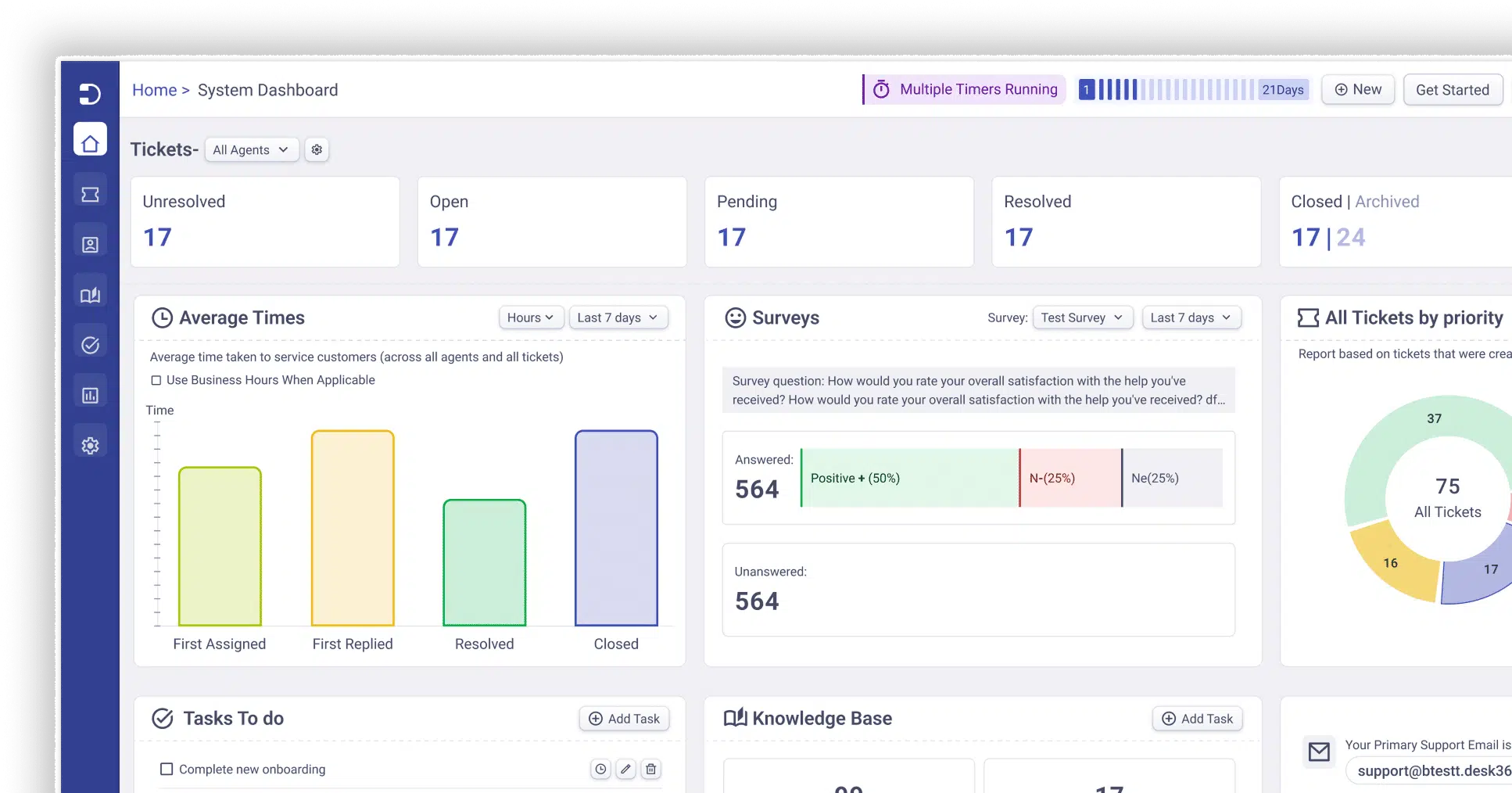
Desk365 is an AI-powered helpdesk and support platform that’s especially popular with MSPs, IT service teams, and businesses that care about automation and smooth ticketing. It’s built to unify support channels — like Microsoft Teams, email, web portals, and forms- so teams don’t miss anything.
Rating: 4.8/5
Here’s why Desk365 earned its spot on the list:
Desk365 earns a top place in this list because it focuses on simplifying MSP workloads, especially the chaos of multi-channel ticketing and repetitive admin tasks, while giving MSPs modern AI assistance and deep Teams integration that many traditional tools lack
What customers are saying
For over a year, my team has been utilizing Desk365, which has proven to be a valuable asset for all users. The implementation process was swift and straightforward, allowing us to start using the application within days. As interest from other teams grew, we have now expanded our user base to 25 agents, a significant increase from the initial 4. This expansion has led to sourcing, finance, and vendor support teams adopting the tool to enhance and streamline their processes. Users appreciate the tool’s user-friendly interface, while from an agent’s standpoint, we have successfully leveraged the API and Automations to enhance and broaden our work capabilities in the field.
Desk365 features:
1. AI-powered ticket responses
Desk365 enhances agent efficiency by utilizing AI to generate quick, contextual replies. These AI-powered responses are based on historical ticket data and knowledge base articles, allowing agents to respond faster and with more accuracy. This significantly reduces the time spent on routine inquiries.
2. Unified Inbox
Desk365 consolidates all customer support requests from various channels into a single, easy-to-use inbox. This feature allows agents to collaborate efficiently and manage requests without toggling between different communication platforms.
3. Service Level Agreements (SLAs)
Desk365 ensures timely resolution of tickets by monitoring SLAs. It provides periodic reminders to agents about upcoming due dates and alerts them when SLA infractions occur, helping teams stay on track and avoid delays.
4. Round-robin ticket assignment
To ensure a balanced workload, Desk365 includes a round-robin ticket assignment feature. This automatically distributes tickets to agents in a balanced way, improving response times and preventing any one agent from becoming overwhelmed.
5. Automations
Desk365 offers a wide range of automation tools to improve productivity. For example, automation macros can be triggered when a ticket is created or updated, ensuring that routine tasks are handled automatically based on predefined conditions (such as ticket properties or customer events).
6. Omnichannel support
Desk365 integrates with multiple channels, making it easy for customers to reach you through the medium they prefer. Channels include:
- Microsoft Teams: Customers can create tickets, check statuses, and respond to agents all within Teams.
- Email: Incoming emails are converted into tickets, and agents can respond directly from the platform.
- Web Widget: A customizable widget that can be embedded on your website for easy ticket creation.
- Web Form: A configurable iframe form that can also be added to your website for seamless ticket creation.
7. Powerful analytics
- The system generates reports on response times, resolution rates, common issues, and technician performance.
- MSPs use these insights to improve efficiency and service quality.
Pros
Great for MSPs that rely heavily on email and Teams for support channels.
AI features that feel genuinely useful instead of gimmicky.
Easy setup and intuitive for teams new to helpdesk platforms.
Cons
- Not as feature-rich for deep IT infrastructure management (like RMM or scripting) compared with some competitors.
2.ConnectWise
ConnectWise is one of the most established MSP platforms, powering thousands of MSPs globally with a full suite of tools covering RMM, professional services automation (PSA), cybersecurity, data protection, and business management.
Rating: 3.9/5
Here’s why ConnectWise earned its spot on the list:
ConnectWise earned its reputation by offering a true all-in-one MSP platform that scales from small teams to enterprise MSPs — backed by an ecosystem of integrations, partner programs, and continuous innovation.
What customers are saying
What I like most about ConnectWise PSA is that it brings everything into one place. It simplifies ticketing, time tracking, projects, and billing, which cuts down on manual work and keeps things organized. The automation and clear visibility really help me stay on top of issues and deliver faster support.
ConnectWise features:
Unified platform combining RMM, PSA, and security tools — so MSPs can monitor, manage, bill, and secure from one place.
AI and automation to reduce manual tasks and help teams anticipate issues.
Shared services and common UI, which helps MSPs avoid tool sprawl and keep workflows consistent.
Community, training, and support ecosystem (like IT Nation), which helps MSPs grow their business beyond the tool itself.
ConnectWise pricing:
ConnectWise doesn’t publicly list pricing — you contact sales for a customized quote. The total cost generally depends on modules, number of technicians, and integrations
ConnectWise Pros
Extremely comprehensive feature set covering business, technical, and security needs.
Strong community, events, and peer support.
Deep automation and PSA capabilities.
ConnectWise Cons
Can be complex and require training to fully leverage the platform.
Pricing is typically custom and enterprise-oriented, which may be high for smaller MSPs.

3. NinjaOne
NinjaOne is a unified IT management platform designed to simplify endpoint management, automation, and helpdesk processes for MSPs. It’s often praised for its usability and modern interface.
Rating: 4.7/5
Here’s why NinjaOne earned its spot on the list:
NinjaOne consistently ranks high for its balance of power and simplicity — giving MSPs automation, patching, remoting, and reporting without an overly steep learning curve.
What customers are saying
NinjaOne is amazing and versatile. I can troubleshoot tickets, run scripts to resolve issues, perform specific tasks, and apply patches with ease. It is a well-rounded product. Being able to remote into a user’s computer and chat with them simultaneously is highly convenient. With Windows 10 at end-of-life, I can upgrade all our devices at once with a single script. I also love the library of scripts.
NinjaOne features:
Remote monitoring and management (RMM) across Windows, macOS, and Linux.
Strong automation with pre-built scripts and templates.
Integrated ticketing and backup so MSPs can run most tasks from a single dashboard.
Scalable endpoint management that grows with your MSP as client count rises
NinjaOne pricing:
NinjaOne typically prices per device/endpoint, with volume discounts and flexible terms. It doesn’t show full pricing online, so MSPs contact sales for details
NinjaOne Pros
Easy for new technicians to learn quickly.
Unified platform that can replace several tools.
Flexible pricing and scalability.
NinjaOne Cons
Pricing isn’t fully public and varies by device count; you usually need a quote.
Some advanced enterprise features may require higher tiers or add-ons.
4. Atera
Atera is an all-in-one MSP and IT management tool that combines RMM, helpdesk, billing, patch management, and automation — all under a per-technician pricing model, which is especially friendly for growing MSPs.
Rating: 4.6/5
Here’s why Atera earned its spot on the list:
Atera’s biggest strength is its predictable per-tech pricing and all-inclusive package, making it easier for new or smaller MSPs to adopt without worrying about per-endpoint costs.
What customers are saying
Atera has significantly improved my workflow, making tasks both simpler and quicker. What stands out most for me is the instant “hawk view” available right when I log in. With all the crucial client data presented on a single dashboard, I can quickly spot issues and organize tasks without having to juggle multiple programs. This level of efficiency has allowed us to expand our client base without needing to hire additional staff, resulting in time and cost savings that have directly increased our profitability.
Atera features:
RMM and PSA in one platform — including ticketing, billing, reporting, and automation.
Remote access and network discovery capabilities.
Custom dashboards and alerts that help MSPs respond faster.
Atera pricing
Plans start around $129 per technician per month when billed annually, with a free trial available.
Atera Pros
Transparent, predictable per-technician pricing.
Good breadth of features for smaller to mid-sized MSP teams.
Built-in helpdesk, billing, and ticketing.
Atera Cons
Some users find deeper automation or enterprise-grade tools less powerful than others.
Support quality and integrations can vary.
5. Syncro
Syncro is a unified MSP platform combining RMM, PSA, ticketing, billing, Microsoft 365 management, and automation in one package — with flat per-user pricing. It’s designed to simplify MSP operations without juggling multiple tools.
Rating: 4.5/5
Here’s why Syncro earned its spot on the list:
I really appreciate all the automation features included in the system—like scripting, patch management, and proactive monitoring that catch issues early. I also find the ability to schedule reminders and set up recurring invoices very useful, especially since everything (ticketing, remote access, and billing) is in one easy-to-use platform. The fair per-tech pricing means no surprises as my client base grows, and the community support is fantastic!
What customers are saying
I really appreciate all the automation features included in the system—like scripting, patch management, and proactive monitoring that catch issues early. I also find the ability to schedule reminders and set up recurring invoices very useful, especially since everything (ticketing, remote access, and billing) is in one easy-to-use platform. The fair per-tech pricing means no surprises as my client base grows, and the community support is fantastic!
Syncro features:
Unified RMM and PSA with automated ticketing, billing, and reporting.
Microsoft 365 management with multi-tenant support and identity automation.
Automation & scripting to reduce manual tasks.
Remote monitoring, patching, and alerts for endpoints
Syncro pricing
Syncro typically starts around $129 per user per month (Core plan) while more advanced tiers go higher.
Syncro Pros
Flat, transparent per-user pricing.
Good balance of ticketing, monitoring, and billing features.
Useful Microsoft 365 management tools.
Syncro Cons
Interface and aesthetics may feel dated to some users.
Some advanced reporting or customization can require a learning curve
Free MSP software selection criteria
Picking MSP software isn’t just about checking off a features list — it’s about finding a platform that supports the way your team actually works. Here are the key criteria to keep in mind as you evaluate your options:
1. Ability to handle multi-channel support
Your technicians need one place to manage everything. The best MSP tools consolidate requests from email, chat, Microsoft Teams, and your customer portal, making it easier to avoid duplicate tickets and missed messages.
2. Strong automation capabilities
Automation is essential for MSPs. Look for tools that can automate:
ticket routing and assignment
status updates and notifications
repetitive maintenance tasks
SLAs and escalations
The more automation you have, the more time your team gets back.
3. Robust RMM and monitoring tools
If you want an all-in-one platform, make sure it offers:
device monitoring
patch management
remote access
health alerts
This reduces the need for extra tools and keeps your clients’ environments running smoothly.
4. Integrations with your existing tech stack
Your MSP software should fit into your ecosystem — not force you to rebuild it. Look for integrations with:
Microsoft Teams and Microsoft 365
PSA tools
billing systems
documentation platforms
cloud services (Azure, AWS, etc.)
A tool that plays nicely with others will save you headaches later.
5. Usability and setup time
Your technicians should be able to pick up the tool quickly. Prioritize solutions that offer:
clean, intuitive interfaces
easy configuration
minimal training requirements
If your team resists using it, the tool won’t help you.
6. Customization and flexibility
Every MSP has its own workflows. The ideal software lets you customize:
fields and forms
ticket categories
automation rules
dashboard views
SLAs and response times
Flexibility ensures the software adapts to you — not the other way around.
7. Security and compliance
You’re responsible for protecting your clients’ data, so the platform must offer:
strong encryption
role-based access controls
audit trails
compliance support (SOC 2, HIPAA, GDPR, etc.)
Security should never be an afterthought.
8. Reporting and analytics
Insights matter. Good reporting helps you:
track performance
identify recurring issues
show value to clients
improve workflows
Clear dashboards and automated reports are a big plus.
9. Pricing transparency and value
MSP tools vary wildly in cost. Look at:
whether pricing is per device, per technician, or custom
what’s actually included at each tier
hidden upgrade costs
whether the value matches your budget
The best choice isn’t always the cheapest; it’s the one that saves your team time and supports how you work. Read more about other free helpdesk ticketing systems that are worth trying in 2026.
Frequently asked questions
The truth is, there’s no single “best MSP software” for every team — the right choice depends on your size, workflows, and the services you deliver. That said, a few platforms consistently rise to the top. Desk365 stands out first for MSPs that prioritize streamlined, omnichannel ticketing, powerful automation, and deep Microsoft Teams integration. ConnectWise is a strong pick for larger MSPs needing a full enterprise suite, while NinjaOne wins points for its clean interface and robust automation. Atera offers predictable per-technician pricing and an all-in-one toolset, and Syncro provides a balanced mix of RMM, PSA, automation, and Microsoft 365 management. The “best” MSP software ultimately comes down to which platform fits naturally with how your team works and supports your growth.
MSP software is a set of tools designed to help Managed Service Providers (MSPs) run and automate their day-to-day IT operations. It combines features like remote monitoring, ticketing, automation, reporting, security, and customer management into one platform so MSPs can support multiple clients efficiently.





 AI Agent
 Asset Management
 Knowledge Base
 Automations
 SLAs
SLAs
 Customization
 Ticket Assignment
 Reports & Analytics
 Approval Management
 Helpdesk Security
 Explore All Features
 Banking and Finance
 Healthcare
 MSP
MSP Government
  Non Profit
 IT Services
 Customer Support
 Human Resources
 Facilities







