TL DR;
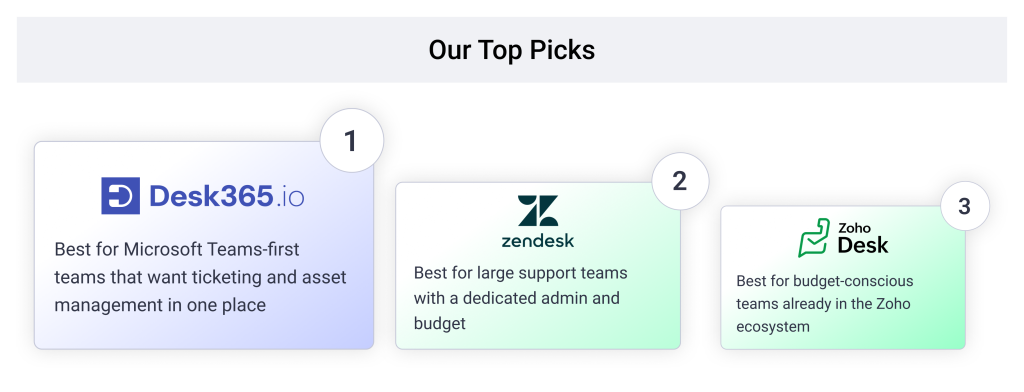
- Desk365: Best for IT teams that want a helpdesk inside Microsoft Teams with IT asset management in the same product
- Zendesk: Best for large customer support teams with a dedicated admin and budget
- Zoho Desk: Best for budget-conscious teams already using Zoho apps
- HappyFox: Best for teams that want customer support and IT service management from one vendor
- Jira Service Management: Best for IT teams already working in Atlassian tools
- ServiceNow ITSM: Best for large enterprises with mature IT processes
- HubSpot Service Hub: Best for support teams that need CRM data on every ticket
- Help Scout: Best for small teams that support customers mostly by email
- Front: Best for teams that share one inbox across support, sales, and account management
- Fin (formerly Intercom): Best for chat-first teams that want an AI agent to answer first
- Gorgias: Best for ecommerce brands on Shopify
You’re probably not here because Freshdesk stopped working. You’re here because the deal changed. Maybe the free plan you built your workflow around now has an end date. Maybe your renewal invoice came in 40% to 50% higher than the price on your billing page, and no email warned you first.
Both are happening to real teams. On Reddit, sysadmins and managed service providers describe free tiers going away and renewal discounts expiring without notice. Some say the new paperwork arrived after the higher charge had already gone through. The AI side draws the same complaint. Freddy AI Copilot costs about $29 per agent per month on top of your plan, and Freshworks only sells it on the Pro and Enterprise tiers.
This list covers what IT and support teams switch to when the problem isn’t a missing feature. The problem is a bill they can no longer predict. We researched 11 tools, checked their current pricing pages, and read recent G2 reviews for each one.
Disclaimer
Full disclosure, Desk365 is on this list, and we ranked it first for teams that work in Microsoft Teams and need IT asset management. We still call out a real limitation for every tool here, including ours. The reviews and pricing pages are linked throughout so you can check our work. Read more about our review methodology.
How I ranked the best Freshdesk alternatives
We ranked each tool on what it costs once you turn on the features you’re switching for. That meant checking four things: whether AI ships in the plan or as a paid add-on, whether IT asset management sits in the same product, how the tool works with Microsoft Teams, and how long setup takes.
A tool that hid AI, SLAs, or asset tracking behind a separate product or a much pricier tier ranked lower, even with a strong feature list. That’s the same pattern pushing teams off Freshdesk, so we held every alternative to it. Pros and cons come from recent G2 reviews, linked in each entry. Prices are per agent or seat per month, billed annually, as of September 2026.
11 best Freshdesk alternatives for IT and support teams
| Alternative | Best for | G2 rating | Starting price | Free trial or plan |
|---|---|---|---|---|
| Desk365 | Teams-native helpdesk with IT asset management | 4.9/5 | $12/agent/month | 21-day trial, free plan |
| Zendesk | Large customer support teams | 4.4/5 | $19/agent/month | 14-day trial |
| Zoho Desk | Budget teams in the Zoho ecosystem | 4.4/5 | $7/agent/month | Free plan, up to 3 agents |
| HappyFox | Support and ITSM from one vendor | 4.4/5 | $24/agent/month | 14-day trial |
| Jira Service Management | IT teams on Atlassian | 4.3/5 | $20/agent/month | Free plan, up to 3 agents |
| ServiceNow ITSM | Large enterprise IT | 4.4/5 | Custom quote | Demo on request |
| HubSpot Service Hub | Support tied to CRM data | 4.4/5 | $15/seat/month | Free plan, up to 2 users |
| Help Scout | Small, email-first teams | 4.4/5 | $25/user/month | 15-day trial |
| Front | Shared-inbox collaboration | 4.6/5 | $25/seat/month | 7-day trial |
| Fin (formerly Intercom) | AI-first chat support | 4.5/5 | $29/seat/month | 14-day trial |
| Gorgias | Ecommerce support | 4.6/5 | $10/month (50 tickets) | 7-day trial |
1. Desk365, best for a Microsoft Teams helpdesk with IT asset management in one place

4.9/5

4.9/5
Desk365 is the best Freshdesk alternative for teams that already work in Microsoft Teams and need to track IT assets. It’s a helpdesk built for Microsoft 365, so employees raise tickets in Teams and agents work them there too. Asset management sits in the same product, so there’s no second tool to buy, set up, or connect.
Why I chose Desk365 to lead this list
Freshdesk asks IT teams to piece together three things: a support plan, an AI add-on, and Freshservice for assets. Desk365 puts ticketing, Teams, AI, and asset management under one login and one bill. On price, the entry plan costs $12 per agent per month, compared with $19 for Freshdesk Growth. The bigger gap shows up higher up. Desk365 Premium includes asset management at $32 per agent, while Freshservice starts asset tracking at $49 per agent with a 100-asset cap.
Desk365 features:
1. Microsoft Teams ticketing
Employees create tickets from a Teams chat, and agents assign, update, and resolve them without leaving Teams. Email, the support portal, and web forms feed the same queue. That matters because most internal requests already start as a Teams message.
2. IT Asset Management
Desk365 tracks hardware, software licenses, and other assets from purchase to retirement, including vendor records and depreciation. Agents link assets to tickets, so the laptop history sits right next to the laptop problem. For IT teams leaving Freshdesk, this is the feature Freshworks sells as a separate product.
3. Desk365 AI
The Plus plan adds AI ticket summaries and knowledge base article drafts. The AI Agent answers repeat questions in the portal and in Teams, using your own knowledge base. It runs on credits at $50 per 1,000, and Plus and Premium include a monthly allotment.
4. Automation and SLAs
Workflow automation, SLA reminders, and escalations come with the Standard plan. Plus adds round-robin and load-based assignment, so tickets spread across agents without anyone sorting them by hand.
5. Security and compliance
Desk365 is SOC 2 Type II certified and GDPR compliant, with EU data centers available. Premium adds data redaction and encrypted fields for sensitive personal and health data.
6. Freshdesk data migration
Desk365 has a built-in Freshdesk importer for tickets, contacts, companies, and knowledge base articles. First, export your data from Freshdesk as XML or JSON. Then upload the ZIP file, up to 30 MB, under Settings > Integrations > Migration in Desk365.
Adding your Freshdesk API key during setup gives you a more complete move. It brings over ticket attachments, CC and BCC details, and note visibility, and it matches custom field types for you. Desk365 checks your data before the import starts, which usually takes about 30 minutes. The Freshdesk to Desk365 migration guide walks through each step.
What customers are saying about Desk365
Pros
- Easy to use
- Great customer support
- Lowest price with AI included, no agent cap on any paid plan
- Deep Microsoft 365/Teams integration
Cons
Reporting features are not strong enough
- Fewer native integrations than category giants
Desk365 pricing
- Free: up to 50 tickets a month
- Standard: $12/agent/month
- Plus: $22/agent/month
- Premium: $32/agent/month
- AI Agent credits: $50 per 1,000
4.4/5
4.4/5
Why I'd consider Zendesk:
Zendesk is the step up from Freshdesk for customer support teams that need advanced routing, omnichannel messaging, and a large app marketplace. It’s built for teams with an admin who can own the setup. The catch is price. AI Copilot costs about $50 per agent per month on top of a Suite plan, so Suite Professional with AI runs about $165 per agent. Teams leaving Freshdesk over add-on costs will meet the same pattern here, at a higher number.
Zendesk key features
- Omnichannel Agent Workspace for email, chat, social, and messaging apps
- Triggers, macros, and automations for routing at scale
- Zendesk Explore reporting and a large integration marketplace
Pros
- Instagram, WhatsApp, and Facebook messages land in the same workspace as regular tickets, so any available agent can pick them up (review)
- Slack and Shopify integrations put alerts and order data next to the ticket (review)
- Workflows, views, automations, and reports can match a team’s own process (review)
Zendesk pricing
- Support Team: $19/agent/month (email only)
- Suite Team: $55/agent/month
- Suite Growth: $89/agent/month
- Suite Professional: $115/agent/month
- Copilot add-on: about $50/agent/month on Suite plans
4.5/5
4.4/5
Why I'd consider Zoho Desk:
Zoho Desk has the lowest-priced entry price on this list at $7 per agent per month, plus a free plan for up to three agents that doesn’t expire. It fits teams that already run Zoho CRM or other Zoho apps, since contacts and data flow between them. The full Zia AI suite, though, sits on the $40 Enterprise plan. Zoho Desk is cheap to start and gets less cheap once AI enters the picture, which is the same trap many teams hit on Freshdesk.
Zoho Desk key features
- Email, chat, phone, and social channels in one ticket view
- Blueprint process automation for step-by-step ticket workflows
- Zia AI for reply help, sentiment, and answer bots on higher plans
Pros
- Email, chat, phone, and social channels come together in one organized interface (review)
- Strong value for money from small businesses to large ones (review)
- The free plan includes tools other vendors keep for paid tiers (review)
- Routing, assignment rules, and SLA tracking help organize support work (review)
Cons
Zoho Desk pricing
- Free: up to 3 agents
- Express: $7/agent/month (up to 5 users)
- Standard: $14/agent/month
- Professional: $23/agent/month
- Enterprise: $40/agent/month
4.5/5
4.4/5
Why I'd consider HappyFox:
HappyFox covers the same customer support ground as Freshdesk and sells a separate HappyFox ITSM product for internal IT. That makes it a like-for-like swap for teams used to the Freshdesk and Freshservice setup, just with a different vendor. It also offers an unlimited-agent plan, which suits teams with large or seasonal headcounts. Keep in mind that support and ITSM are still two products here, so the two-tool problem doesn’t go away.
AI Answers bills separately at seventy-five cents per resolution. A team running five hundred automated resolutions a month adds three hundred seventy-five dollars on top of their seat price, the same add-on stacking pattern that sends people looking for a Freshdesk alternative to begin with, just with a different meter.
HappyFox key features
- Ticketing across email, chat, phone, and a self-service portal
- Smart rules and canned actions for repeat work
- Multi-brand help desk and an unlimited-agent pricing option
Pros
- Fast setup with little training, and one reviewer went live within 24 hours (review)
- A clean interface that balances customization with simplicity (review)
- Automation and quick replies make ticket work easy, backed by a responsive support team (review)
- Multiple brands can run in one help desk at a reasonable cost (review)
HappyFox pricing
- Basic: $24/agent/month
- Team: $49/agent/month
- Pro: $99/agent/month
- Unlimited-agent plans: custom quote
4.5/5
4.3/5
Why I'd consider Jira Service Management:
Jira Service Management (JSM) makes sense when your developers already live in Jira and your IT team needs to hand issues to them without copy-pasting. Requests, SLAs, and automation sit in one place, and the Standard plan includes 5,000 free Assets objects for tracking hardware and software. That’s a real advantage over Freshdesk for IT work. The trade-off is setup effort, since JSM rewards teams with someone who enjoys configuring workflows.
Jira Service Management key features
- Service desk with customizable queues, SLAs, and automation rules
- Assets for tracking hardware, software, and configuration items
- Native links between service requests and Jira software issues
Pros
- Requests, workflows, automation, and SLAs are handled in one place from start to finish (review)
- Requesters check ticket status in one portal instead of chasing emails (review)
- It fits easily with other Atlassian products and works for non-IT teams too (review)
- Custom queues and drag-and-drop reassignment speed up incident handling (review)
Cons
- The learning curve is steep, and settings are spread across many tabs (review)
- Poorly planned workflows and permissions become hard to manage (review)
- Reporting is rigid, and SLA data takes extra filters and exports (review)
- Licenses can’t be bought in small batches, and renewals are expensive (review)
Jira Service Management pricing
- Free: up to 3 agents
- Standard: $20/agent/month
- Premium: $51.42/agent/month
- Enterprise: custom quote
4.5/5
4.4/5
Why I'd consider ServiceNow:
ServiceNow IT Service Management is the enterprise end of this list. It handles incidents, requests, problems, and changes on one platform, and its configuration management database (CMDB) shows how systems depend on each other. It’s the right move when a large IT organization has outgrown mid-market tools and has budget for implementation. For a small IT team leaving Freshdesk, it’s usually more platform than the job needs.
ServiceNow key features
- Incident, problem, change, and request management in one platform
- CMDB that maps dependencies between services and systems
- Generative AI for incident summaries and knowledge article drafts
Pros
- Incidents, requests, problems, and changes are managed together (review)
- Workflow automation, SLA tracking, and self-service cut resolution times (review)
- CMDB links show upstream dependencies and recent changes during a major incident (review)
- AI incident summaries and article drafts reduce closure time (review)
ServiceNow pricing
ServiceNow doesn’t publish prices. You’ll need a custom quote from its sales team, and implementation is often a separate cost.
4.4/5
4.4/5
Why I'd consider HubSpot Service Hub:
HubSpot Service Hub links every ticket to the same customer record your sales and marketing teams use. When a support email arrives, the agent sees the contact’s deal and marketing history right away. That’s a strong reason to switch if your company already runs on HubSpot CRM. It’s a weak one for internal IT support, and the jump from Starter to Professional costs six times as much per seat plus an onboarding fee.
HubSpot Service Hub key features
- Tickets tied to HubSpot CRM contact and deal records
- Shared inbox, knowledge base, and feedback surveys
- Breeze AI for reply drafts and ticket insights
Cons
- Custom reporting and advanced automation are locked to higher plans (review)
- Some fields can’t be changed, and there are no separate boards for different service types (review)
- Round-robin can send repeat emails from one client to different agents (review)
- Agents can’t see when a teammate is already working a ticket (review)
HubSpot Service Hub pricing
- Free: up to 2 users
- Starter: $15/seat/month
- Professional: $90/seat/month, plus a $1,500 one-time onboarding fee
- Enterprise: $150/seat/month, plus a $3,500 one-time onboarding fee
4.6/5
4.4/5
Why I'd consider Help Scout:
Help Scout feels like a shared email inbox, not a ticketing portal. Customers get normal email replies, and agents get a clean workspace with saved replies and a built-in knowledge base. It suits small customer support teams that found Freshdesk heavier than they needed. It isn’t built for internal IT, though. There’s no asset tracking, and AI Answers bills per resolution, so costs grow with ticket volume.
Help Scout key features
- Shared inbox with saved replies, assignments, and collision detection
- Built-in knowledge base and Beacon help widget
- AI Answers, billed per resolution
Pros
- A clean, simple interface that doesn’t look like a ticketing system to customers (review)
- The shared inbox keeps client conversations organized and pairs well with HubSpot (review)
- Assigning conversations and tracking customer satisfaction scores are straightforward (review)
- The support team is helpful, and product updates aren’t pushy (review)
Help Scout pricing
- Standard: $25/user/month
- Plus: $45/user/month
- Pro: $75/user/month
- AI Answers: $0.75 per resolution
4.5/5
4.6/5
Why I'd consider Front:
Front is built around a shared inbox instead of a formal ticket queue. Support, sales, and account managers can all see the same customer conversation, comment on it, and hand it off without forwarding emails. It fits cross-functional teams better than dedicated support desks. The Starter plan caps at 10 seats, and AI tools like Copilot cost extra below Enterprise, so the entry price tells only part of the story.
Front key features
- Shared inbox with assignments, internal comments, and collision alerts
- Rules-based automation across email, chat, and social channels
- AI Copilot, Smart QA, and Smart CSAT as add-ons
Pros
- Shared inboxes, comments, and clear assignment keep teams aligned without forwarding emails (review)
- Comments and tags inside a thread stop things from being missed (review)
- A clean, intuitive interface makes onboarding simple (review)
- Automations, auto-tagging, and folders help teams move quickly (review)
Front pricing
- Starter: $25/seat/month (up to 10 seats)
- Professional: $65/seat/month
- Enterprise: $105/seat/month
4.5/5
4.5/5
Why I'd consider Fin:
Intercom renamed itself Fin in May 2026, after its AI agent. Salesforce then completed its acquisition of Fin on September 10, 2026. The AI agent is the reason to pick it. Fin answers customers from your help content across chat, email, and other channels, and hands harder cases to people. It suits SaaS and consumer teams where chat is the main channel. The bill is the hardest to predict on this list, because every AI resolution adds a fee on top of seats.
Fin key features
- Fin AI agent that resolves conversations using your knowledge base
- In-app and website messenger built for chat-first support
- Help center, workflows, and reporting on seat-based plans
Fin pricing
- Essential: $29/seat/month
- Advanced: $85/seat/month
- Expert: $132/seat/month
- AI resolutions: $0.99 each, with a 50-resolution monthly minimum
4.6/5
4.6/5
Why I'd consider Gorgias:
Gorgias is built for online stores. It connects to Shopify and similar platforms, so agents see order history and handle refunds or returns inside the ticket. Pricing runs on ticket volume with unlimited seats, the opposite of Freshdesk’s per-agent model. That works well for a growing store with seasonal staff. It doesn’t work for internal IT, and overage charges add up fast once you pass a plan’s ticket cap.
Gorgias key features
- Native Shopify integration with order data inside every ticket
- One inbox for email, chat, and social messages
- Unlimited agent seats, with pricing tied to monthly ticket volume
Gorgias pricing
- Starter: $10/month (50 tickets)
- Basic: $60/month (300 tickets)
- Pro: $360/month (2,000 tickets)
- Advanced: $900/month (5,000 tickets)
How do you choose the right Freshdesk alternative?
Start with where your requests come from and who handles them. The right tool for an internal IT team looks very different from the right tool for an ecommerce support team.
If you’re an IT team on Microsoft 365, look for Teams ticketing [/blog/microsoft-teams-ticketing-system/] and asset management [/blog/it-asset-management-software/] in the same product. Desk365 covers both. Jira Service Management fits if your developers already use Jira, and ServiceNow fits large enterprises with implementation budgets.
If you’re a customer support team, weigh channel coverage against the real cost of AI. Zendesk and Zoho Desk offer the broadest channels. Help Scout and Front suit smaller teams that work mostly in email. HubSpot Service Hub makes sense only if HubSpot is already your CRM.
If you handle both IT and customer support, count the products you’d need. Freshworks, HappyFox, and Atlassian each split support and IT service management into separate products or bundles. Desk365 handles both in one helpdesk.
Whichever way you lean, price the plan you’ll actually use, not the entry tier. Add the AI you need, the asset tracking you need, and any second product. Then compare totals. A low starting price that hides the feature you’re switching for isn’t low. It’s just delayed.
Frequently asked questions
The best Freshdesk alternative depends on who you support. Desk365 is the strongest fit for IT and support teams that work in Microsoft Teams and need asset management in the same tool. Zendesk suits large customer support teams, and Help Scout suits small email-first teams.
Zoho Desk has the lowest paid entry price at $7 per agent per month, with a free plan for up to three agents. Desk365 starts at $12 per agent per month and includes Microsoft Teams ticketing, automation, and SLAs on that entry plan.
Yes. Desk365 is built for Microsoft Teams, so employees raise tickets in a Teams chat and agents resolve them there. Freshdesk connects to Teams through a Marketplace app that each agent has to install.
Freshworks positions Freshdesk for customer support and Freshservice for IT service management. Freshservice includes asset management from its Growth plan at $49 per agent per month, capped at 100 assets. IT teams that want tickets and assets together without a second product can look at Desk365, where asset management comes with the $32 Premium plan.
Yes. Desk365 has a free plan for up to 50 tickets a month with no end date. Zoho Desk and Jira Service Management offer free plans for up to three agents, and HubSpot Service Hub has a free plan for up to two users.