

Imagine this: it’s Monday morning, the traffic feels heavy. After what seems like an endless drive, you finally make it to the office. You walk in, only to discover your support team’s control tower has vanished overnight. No ticket queues. No customer history. No reports.
Sounds like pandemonium, doesn’t it?
A ticketing system is the spine holding the business upright. The challenge isn’t finding a ticketing system anymore. It’s finding one that does the job and makes your team’s lives better.
What features make a ticketing system indispensable?
Here are the most important features of a ticketing system that enable better customer experiences.
Omnichannel support with a unified Inbox
Customers prefer different channels. Someone might choose to send an email, while another might fill out a web form. If you don’t have one single inbox, your agents will be left hunting for conversations rather than solving problems.
That’s why the modern ticketing system brings email, calls, web forms, Microsoft Teams, web widget, and the customer support portal into a single unified inbox.
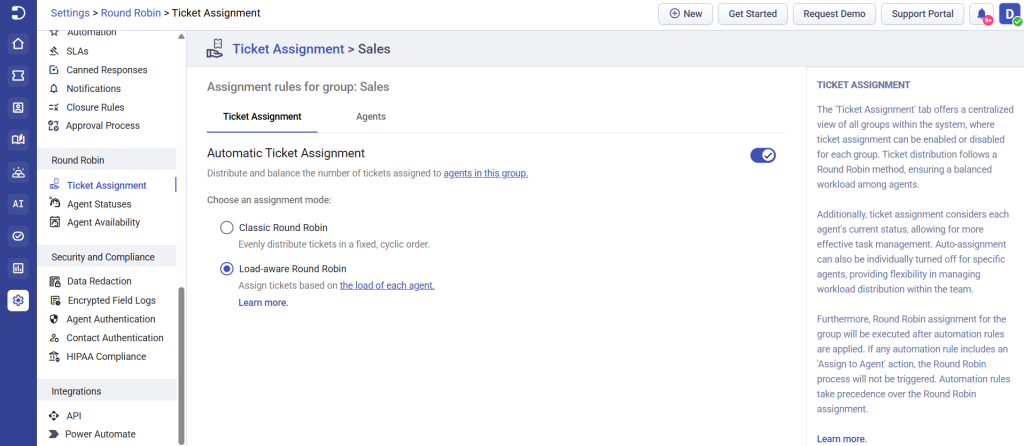
Automatic ticket routing and assignment
You can’t control ticket volume, but you can ensure the right ticket gets assigned to the agent with related expertise. Ticket routing automatically assigns tickets to the appropriate agents based on department, issue type, priority level, and customer segment. And these are parameters you can set customized to the structure of your company.
This eventually streamlines agent workflows and shortens the first response time in ticket handling. Instead of playing traffic controller all day, your team can finally focus on truly helping customers.
Microsoft Teams integration
If your team natively uses Microsoft Teams, you know customers will be raising tickets from there. That shouldn’t mean customer issues get buried under dozens of messages.
The ideal ticketing system should have integration with Microsoft Teams and other business tools, so you have a more connected support ecosystem.
We’ve seen this feature become so essential to a ticketing system that support teams actively discuss it in online forums, often citing it as a key factor in improving efficiency.
Read more about the 7 best Microsoft Teams ticketing system
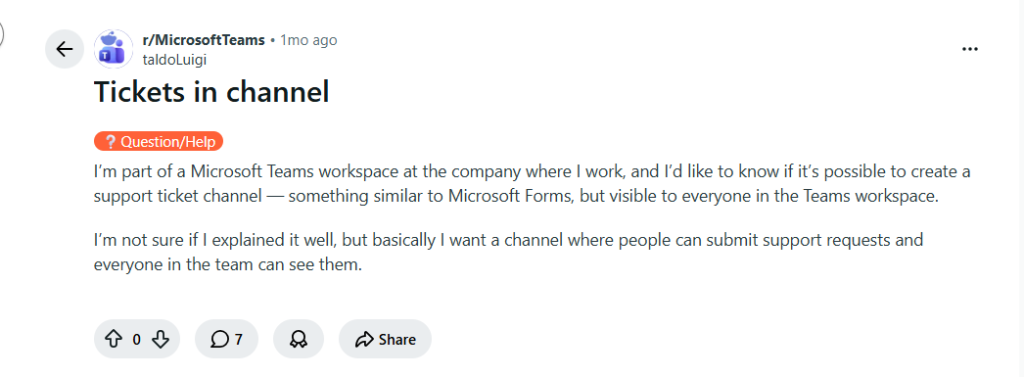
Source: Reddit
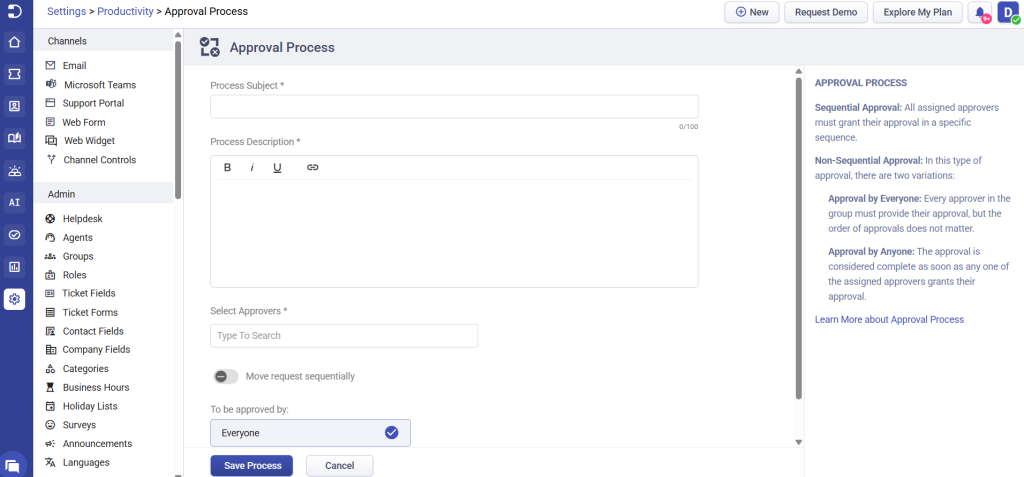
Approval Management
If you manage a team of agents and manage project approvals, you know there are too many factors to be considered before green-lighting an issue. Often nuanced details of what’s being requested and why gets lost in long mail threads.
Approval management, when integrated as a feature within your helpdesk, makes it easier to adhere to compliance guidelines and process control by confirming that the right people authorize a request.
Without this feature, agents will need to chase approvals manually, and so requests get delayed or lost in the process.
Knowledge base and a self-service portal
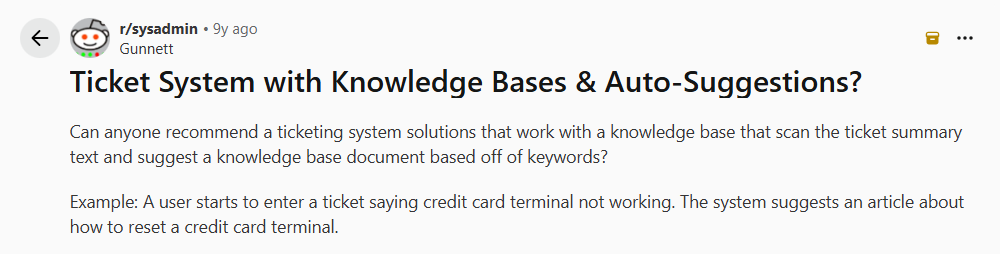
Source: Reddit
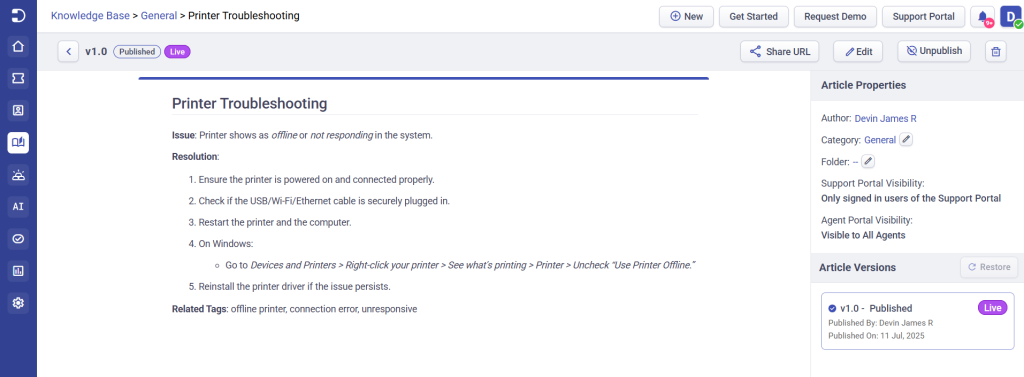
Sometimes the best support ticket is the one that never gets created.
Custom ticket forms and fields
Not every support request is the same, so why should every ticket form be? Custom ticket forms and fields ensure you collect the right information before the ticket even reaches an agent.
By gathering relevant information like request types, product details and other business-specific data upfront, agents gain better context, reduce back-and-forth communication, and resolve issues faster.
Multi-Factor Authentication (MFA)
Gone are the times when passwords alone were enough to protect sensitive data. You need an additional security layer, such as Multi-Factor Authentication (MFA), in your ticketing system.
MFA requires users to verify their identity through an extra authentication method like a one-time passcode or an authenticator app. This feature provides stronger protection against unauthorized access or cybersecurity attacks.
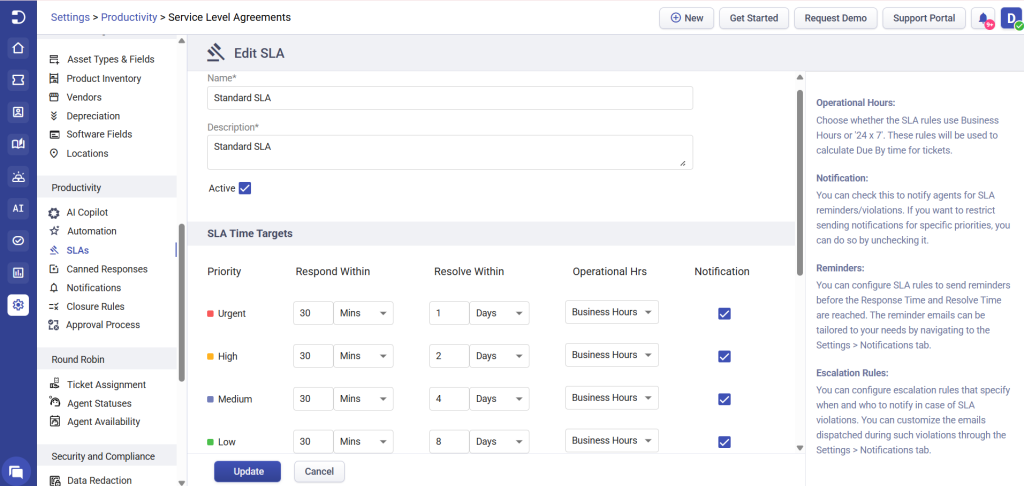
SLA management
Reporting and analytics
Whether it’s to analyze helpdesk performance, evaluate agent productivity, or present key metrics to top management, your helpdesk platform should aggregate all your data. Reports become essential to growing teams to be aware of their own processes.
First response time, average resolution time, SLA compliance, agent performance, ticket volume trends and customer satisfaction scores are some of the key data points to look for in a report.
Beyond ticketing system features: The numbers you need to know
According to a survey of 285 people by HigherLogic, nearly 79% of customers expect to have self-service support tools to help them find answers to their concerns. 92% of customers expect a knowledge base in a ticketing system, and around 84% try to solve issues on their own before contacting customer support portals.
Data from Techradar reveals that nearly 47% of IT requests are made outside business hours, increasing the need for automation, AI agents, and self-service capabilities.
As customer expectations continue to evolve, features in your ticketing system can make or break up your support processes. The real value of a ticketing system doesn’t come from having the longest feature list; it comes from having the right combination of features working smoothly together.
Frequently asked questions
SLA (Service Level Agreement) management helps support teams define response and resolution time targets, track deadlines, automate escalations, and maintain consistent service quality.
Custom ticket forms collect relevant information before a ticket is submitted, reducing back-and-forth communication and helping agents resolve issues more efficiently.
A knowledge base enables customers to find answers independently through FAQs, guides, and tutorials. This reduces ticket volume, improves customer satisfaction, and allows agents to focus on more complex issues.





 AI Agent
 Asset Management
 Knowledge Base
 Automations
 SLAs
SLAs
 Customization
 Ticket Assignment
 Reports & Analytics
 Approval Management
 Helpdesk Security
 Explore All Features
 Banking and Finance
 Healthcare
 MSP
MSP Government
  Non Profit
 IT Services
 Customer Support
 Human Resources
 Facilities







