
“Price is an object, but we know we’re going to pay something for the service.” That’s how one sysadmin put it in an r/sysadmin thread about replacing a self-hosted helpdesk. Two technicians, 75 employees, and a clear goal: “We figure it’s worth it to not host a server in-house.”
That’s the trade-off most teams face. They’ll pay for a helpdesk, but they want to know what they’re paying for. Pricing pages make that hard. You see one price per agent and a trial button, and the real cost shows up later, when the feature you needed sits two plans up or the AI you tested starts billing per conversation.
This guide ranks nine helpdesk and IT service desk tools from the lowest to the highest starting price and shows what each price actually gets you. We checked every number against the vendor’s own pricing page in November 2026. Prices change often, so confirm them before you buy.
TL;DR
- Helpdesk software costs about $7 to $124 per agent per month on annual billing in 2026. Most small teams land between $12 and $25.
- The starting price rarely matches the final bill. SLAs, change approvals, asset management, audit logs, and AI often sit on higher plans or cost extra.
- The hidden costs to watch are monthly billing premiums, AI usage meters, asset-based pricing, and paid add-ons for change management.
- Desk365 gives small IT teams the most per dollar. SLAs and automation start at $12, approvals and AI drafting come in at $22, and asset management with Intune sync is included at $32.
- Compare tools on the cheapest plan that covers everything you need, not on the cheapest plan on the page.
How much does helpdesk software cost in 2026?
Paid helpdesk plans start at $7 per agent per month and top out around $124 on annual billing. Zoho Desk has the cheapest paid seat, Desk365 is the cheapest plan that includes SLAs and automation, and SolarWinds Service Desk has the highest published price.
| # | Tool | Starting price (per agent/month) | What the starting plan gets you | Top published plan | Free option |
|---|---|---|---|---|---|
| 1 | Zoho Desk | $7 Express | Email, social media, and web form tickets, basic workflows, and AI agents free up to 30 million tokens a month | $40 Enterprise | Free for 3 agents |
| 2 | Desk365 | $12 Standard | Email, Microsoft Teams, portal, web form, and widget tickets, workflow automation, SLA reminders and escalations, custom fields, forms, and roles, a knowledge base, and reports | $32 Premium, with asset management and Intune sync | Free plan, 50 tickets a month |
| 3 | ManageEngine ServiceDesk Plus Cloud | About $13 Standard | IT service desk with incident and request management. AI included. Paid pricing starts at a 10-technician pack | About $67 Enterprise, with change management | Free for up to 5 technicians |
| 4 | Freshdesk | $19 Growth | Ticketing, a shared inbox, a customer portal and knowledge base, reports, roles, and the first 500 AI Agent sessions | $89 Enterprise | 14-day trial |
| 5 | Freshservice | $19 Starter | Incident management, a knowledge base, tasks, a support portal, a Teams and Slack bot, and CSAT surveys | $99 Pro (Enterprise by quote) | 14-day trial |
| 6 | Zendesk | $19 Support Team | Email ticketing, routing, automations and triggers, prebuilt dashboards, and canned responses | $115 Suite Professional (Enterprise by quote) | 14-day trial |
| 7 | Jira Service Management | About $21.50 Standard | Asset management with 5,000 objects, audit logs, a branded help center, and Rovo AI credits | Enterprise by quote | Free for 3 agents |
| 8 | Help Scout | $25 Standard | Multiple inboxes, live chat, one basic SLA policy, basic workflows, and an AI inbox assistant | $75 Pro (10-user minimum) | Free for 5 users |
| 9 | SolarWinds Service Desk | $39 Essentials | Incident, change, and asset management, a CMDB, a service catalog, SLAs, and custom roles | $124 Premier | 30-day trial |
Prices are per agent per month, billed annually. Where tools start at the same price, the one with the lower top plan comes first. ManageEngine prices are worked out from its published annual packs, and Jira Service Management’s price shifts with team size.
Four of these tools are built mainly for IT service management: ManageEngine, Freshservice, Jira Service Management, and SolarWinds Service Desk. They cost more at the top end because they bundle change, asset, and problem management. Desk365 sits between the two groups, priced like a helpdesk but with approvals and asset management on its higher plans.
How do helpdesk vendors price their plans?
Every tool on this list charges per agent. You pay for each person who works tickets, and the employees or customers who submit them are free. Where vendors differ is what they stack on top of that seat price.
AI usage meters. AI is the newest line on the invoice and the hardest to predict. Zendesk bills $1.50 to $2.00 per automated resolution, Help Scout bills $0.75 per resolution, and Freshdesk sells AI Agent sessions at $49 per 100. Desk365 uses credits at $50 per 1,000. These charges grow with ticket volume, not headcount.
Asset-based pricing. IT service desks often charge for the devices you track as well as the people. ManageEngine prices its Professional and Enterprise plans by technicians and assets, starting at 250 assets. Freshservice sells asset management in packs of 500 asset units. Jira Service Management includes 5,000 asset objects on Standard, then charges $0.02 per object per month.
Paid add-ons. Some features look included until you read the fine print. Zendesk sells Copilot for $50 per agent. Freshdesk and Freshservice sell Freddy AI Copilot for $29 per agent. ManageEngine charges $2,395 a year to add change management below its Enterprise plan.
Tier gates. Vendors hold back key features to move you up a plan. A team that needs one specific feature can end up paying two or three times the starting price.
Which helpdesk features cost extra?
Change approvals, asset management, audit logs, and AI help for agents are where prices split apart most. The table shows the cheapest plan that includes each one.
| Tool | Change approvals | Asset management | Audit logs | AI help for agents |
|---|---|---|---|---|
| Desk365 | Plus ($22) | Premium ($32), with Intune sync | Premium ($32) | Plus ($22) |
| ManageEngine ServiceDesk Plus | Enterprise (about $67), or a $2,395 yearly add-on | Professional (about $27), priced by assets | Not listed on pricing page | Included on all plans |
| Freshdesk | Not listed | Not offered | Enterprise ($89) | Copilot add-on, $29 per agent |
| Freshservice | Pro ($99) | Sold separately in asset units | Enterprise (quote) | Copilot add-on, $29 per agent |
| Zendesk | Suite Enterprise (quote) | Not listed | Not listed | Copilot add-on, $50 per agent |
| Jira Service Management | Premium ($55.28) | Standard ($21.50), 5,000 objects | Standard ($21.50) | Rovo credits included |
| SolarWinds Service Desk | Essentials ($39) | Essentials ($39) | Advanced ($99) | Advanced ($99) |
A small IT team that needs change approvals pays $22 per agent on Desk365, $39 per agent on SolarWinds, $55.28 per agent on Jira Service Management, about $67 per agent on ManageEngine, and $99 per agent on Freshservice. On Zendesk, it has to talk to sales.
Zoho Desk and Help Scout are left out of this table because they’re built for customer support. You won’t find IT asset management or change approvals on their pricing pages.
What hidden costs don't show on the pricing page?
The biggest hidden costs are billing terms, seat rules, asset counts, and usage meters. None of them appear in the headline price, and together they can add hundreds or thousands of dollars a year.
Monthly billing costs more. Every price in this guide is an annual rate. Paying monthly on Zendesk moves Support Team from $19 to $25 and Suite Professional from $115 to $149. Desk365 saves up to 25% on yearly plans, Freshdesk 20%, and Jira Service Management up to 17%. SolarWinds Service Desk lists annual billing only.
Seat minimums and packs set your floor. Help Scout’s Pro plan needs at least 10 users. ManageEngine’s paid Standard pricing starts at a 10-technician pack, so a 3-person team either stays on the free plan or pays for seats it won’t use.
Asset counts can raise the bill. On ManageEngine, Freshservice, and Jira Service Management, adding more devices to track can move you into a higher price band. SolarWinds says network-capable devices count toward an asset limit but quotes asset pricing on request.
Security features may need their own subscription. On Jira Service Management, SAML single sign-on needs a separate Atlassian Guard subscription below the Enterprise plan. Help Scout sells SSO as an add-on below its Pro plan.
AI usage grows with volume. Per-resolution and per-session pricing looks cheap during a trial. At a few thousand conversations a month, the AI line can pass the cost of your seats. When you compare AI helpdesk software, check whether you can cap AI spending. Help Scout lets you, for example.
Setup fees vary. SolarWinds includes onboarding services on every plan, and Desk365 lists no setup fees and includes data migration. Other vendors may charge for guided onboarding, so ask before you sign.
Helpdesk pricing by tool, from lowest to highest
Each tool below is ordered by its starting paid price, with what every plan adds as you move up.
1. Zoho Desk: from $7 per agent
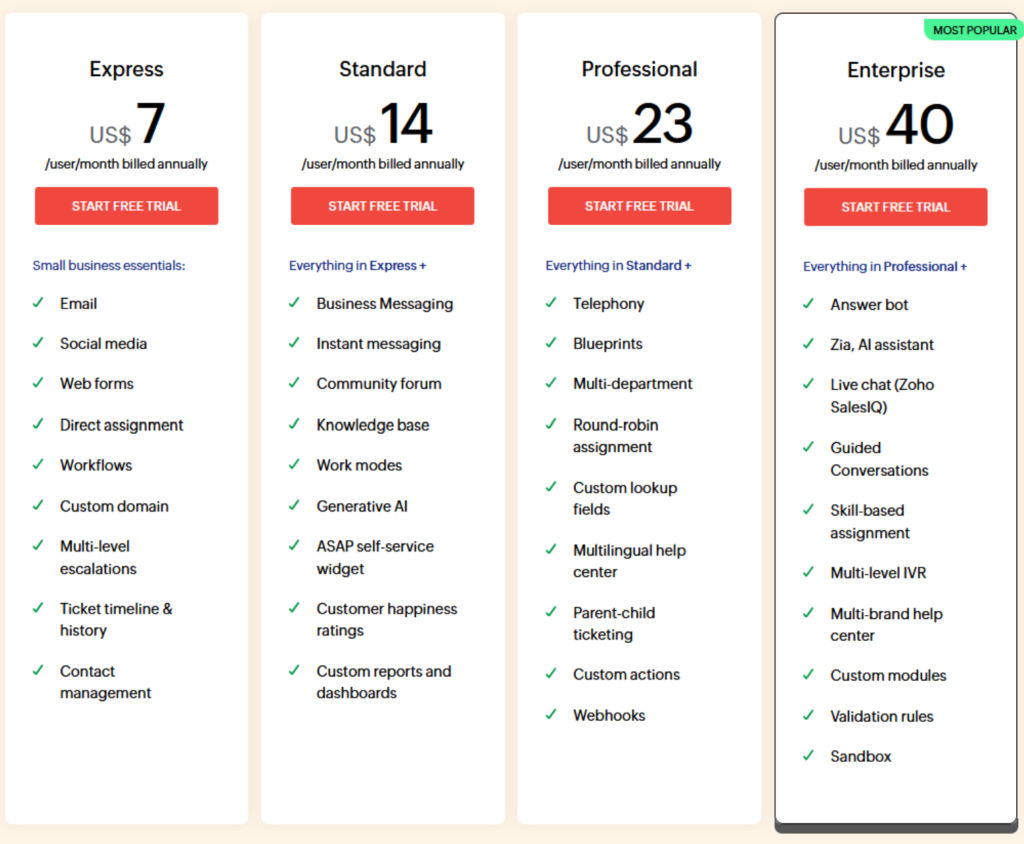
Zoho Desk costs $7 to $40 per agent per month on annual billing, with a free plan for up to three agents. It’s one of the lowest-cost options for customer support, especially for businesses already using Zoho apps.
Express at $7 covers email, social media, web forms, and basic workflows for very small teams. Standard at $14 adds a knowledge base, live chat, a community forum, and custom reports. Professional at $23 adds Zia AI, telephony, round-robin assignment, and multiple departments. Enterprise at $40 adds skill-based assignment and a sandbox.
Zoho Desk’s plans are shown in your local currency, with taxes added on top. There’s no IT asset management, so internal IT teams often pair it with a second tool.
Best for: Budget-focused customer support teams, especially those already using Zoho.
2. Desk365: from $12 per agent
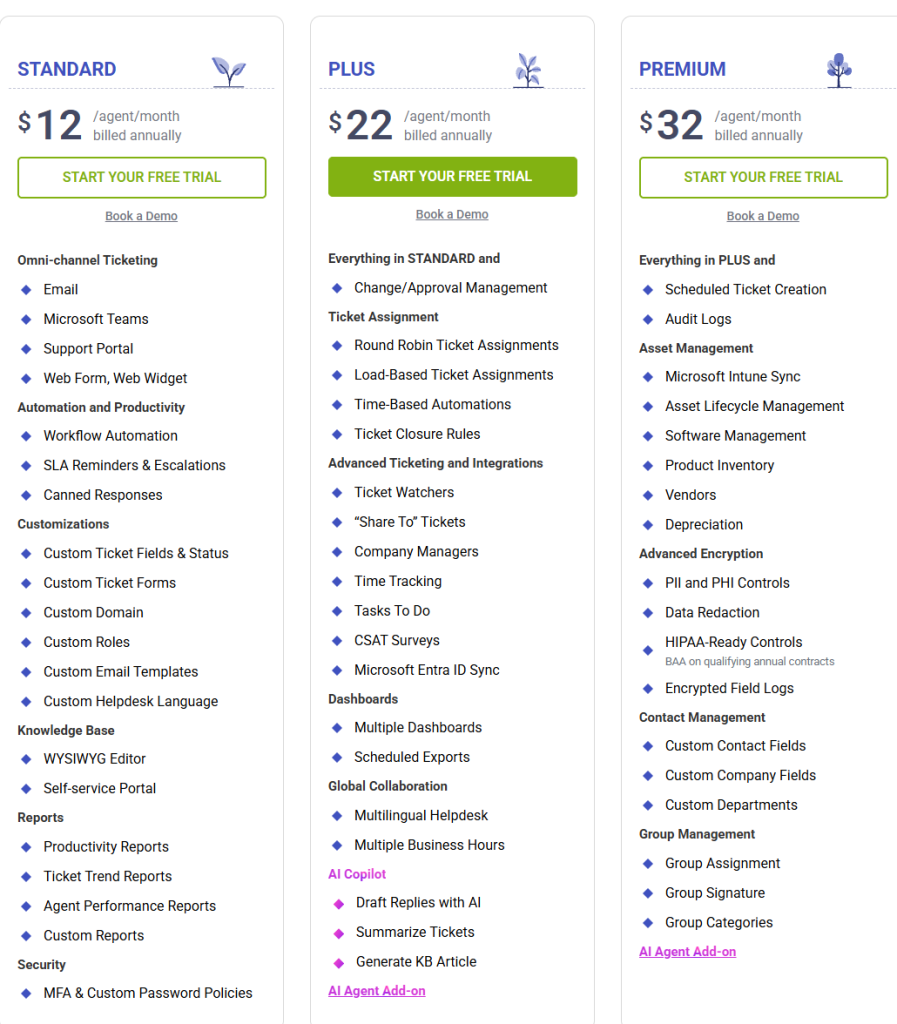
Desk365 costs $12, $22, or $32 per agent per month on annual billing. There’s a free plan for up to 50 tickets a month and a 21-day trial with no credit card. It runs inside Microsoft 365, so it fits teams that already work in Teams, Outlook, Entra ID, and Intune.
Standard at $12 covers more than most starting plans. You get tickets from email, Microsoft Teams, a support portal, web forms, and a web widget, plus workflow automation, SLA reminders and escalations, custom fields and forms, custom roles, a knowledge base, reports, and multi-factor authentication. Many tools hold back SLA policies and custom roles for a higher plan.
Plus at $22 adds change and approval management, round-robin and load-based assignment, time-based automations, CSAT surveys, Entra ID sync, and multiple business hours. It also adds AI that drafts replies, summarizes tickets, and turns ticket threads into knowledge base articles, plus 100 free AI Agent credits a month.
Premium at $32 adds IT asset management with Microsoft Intune sync, software license tracking, vendor records, and depreciation. It also adds audit logs, encrypted fields for personal and health data, sensitive data redaction, and HIPAA-ready features. That’s a rare mix for a HIPAA-ready helpdesk at this price.
Extra costs are limited. The AI Agent add-on uses credits at $50 per 1,000, with free credits on Plus and Premium. Desk365 lists no setup fees and includes migration help. Its switch-at-renewal program lets you onboard on an extended trial and start paying when your current contract ends, at a price locked in at signup.
That value shows up in real buying decisions. In an r/sysadmin thread, a two-technician IT team supporting 75 employees went looking for a cloud helpdesk. In their follow-up, they said they’d settled on Desk365 for the “best feature set (for US) that I could find at a very attractive price.”
Best for: IT and internal support teams on Microsoft 365 that want a Microsoft Teams ticketing system with SLAs, approvals, and asset management at a small-team price.

3. ManageEngine ServiceDesk Plus: from about $13 per technician
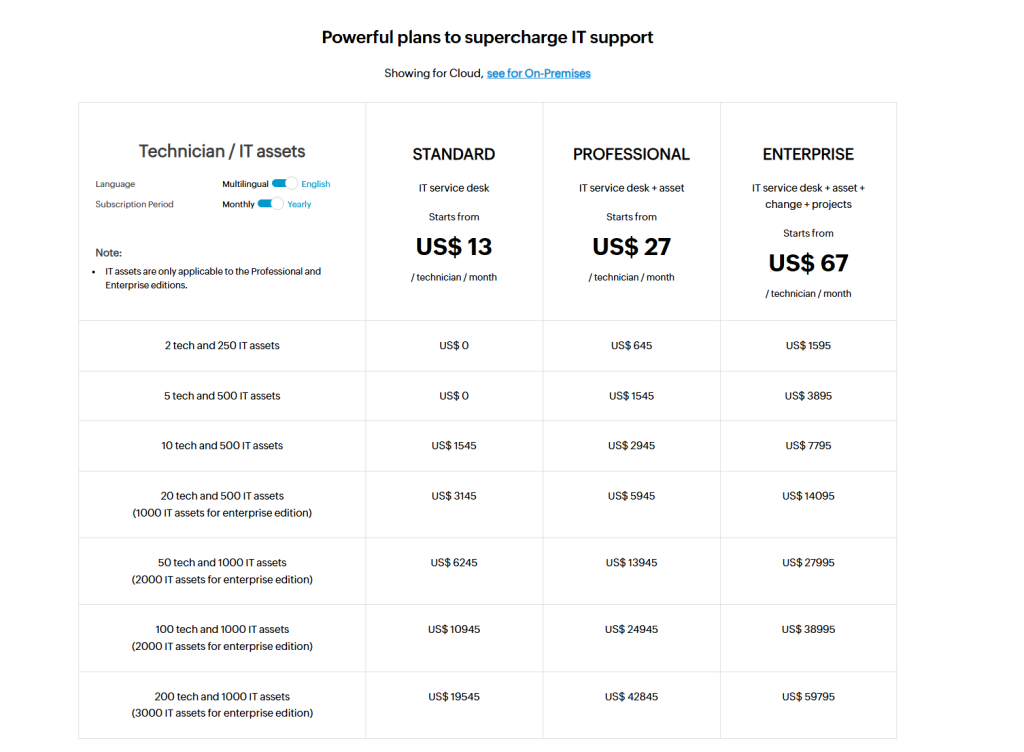
ServiceDesk Plus Cloud is free for up to five technicians. Paid Standard pricing starts at $1,545 a year for 10 technicians, which works out to about $13 per technician per month. It’s a full IT service desk with a long track record in IT departments.
Standard covers the core service desk. Professional adds asset management and starts at $645 a year for 2 technicians and 250 assets, or about $27 per technician per month. Enterprise adds change management and project management and starts at $1,595 a year for 2 technicians and 250 assets, or about $67 per technician per month. AI features are included on every plan.
The main extra costs come from assets and add-ons. Your price rises as you track more devices, and change management costs $2,395 a year as an add-on below Enterprise. See our ManageEngine ServiceDesk Plus pricing guide for the full breakdown.
Best for: IT teams that want ITIL-style processes and don’t mind pricing tied to asset counts.
4. Freshdesk: from $19 per agent
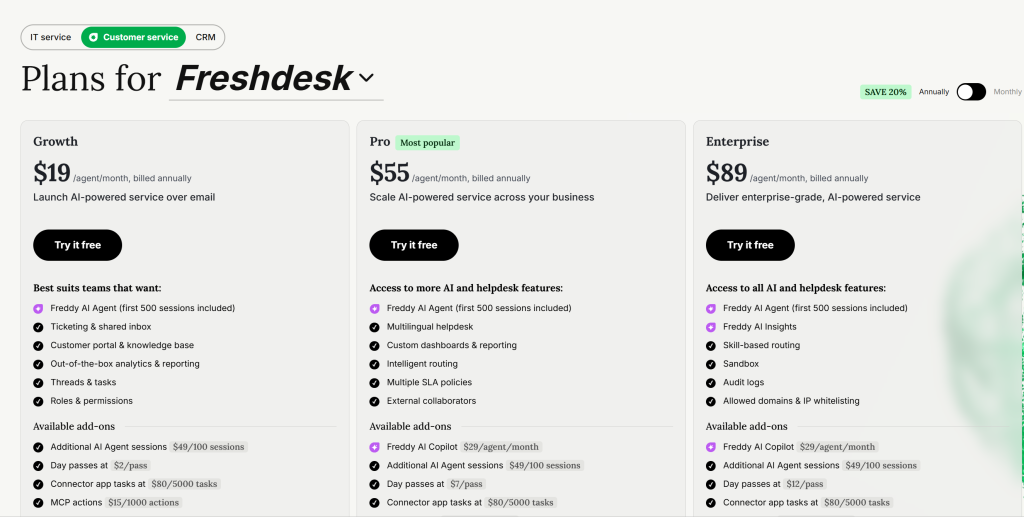
Freshdesk costs $19, $55, or $89 per agent per month on annual billing. Every plan includes the first 500 Freddy AI Agent sessions.
Growth at $19 covers ticketing, a shared inbox, a customer portal, and basic roles. Pro at $55 adds custom dashboards, intelligent routing, and multiple SLA policies. Enterprise at $89 adds skill-based routing, a sandbox, and audit logs.
After the included sessions, AI Agent costs $49 per 100 sessions, and Freddy AI Copilot costs $29 per agent on Pro and Enterprise. Our Freshdesk pricing guide covers the add-ons in more detail.
Best for: Customer support teams that want a familiar, mid-priced helpdesk.
5. Freshservice: from $19 per agent
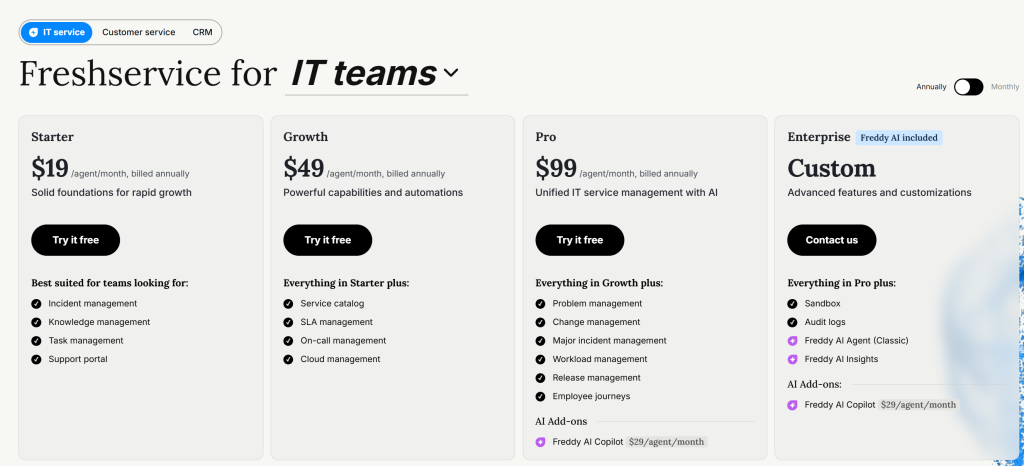
Freshservice costs $19, $49, or $99 per agent per month on annual billing, with Enterprise sold by quote. It’s Freshworks’ IT service desk, built around ITIL processes.
Starter at $19 covers incidents, a knowledge base, tasks, and a support portal. Growth at $49 adds SLA management and a service catalog. Pro at $99 adds problem, change, and release management. Audit logs and a sandbox are Enterprise only.
Asset management is sold separately in packs of 500 asset units, and Freddy AI Copilot adds $29 per agent. Once you add those, Freshservice pricing for a full setup often lands well above the plan you started on.
Best for: Mid-sized IT teams that follow ITIL closely and have budget for the Pro plan.
6. Zendesk: from $19 per agent
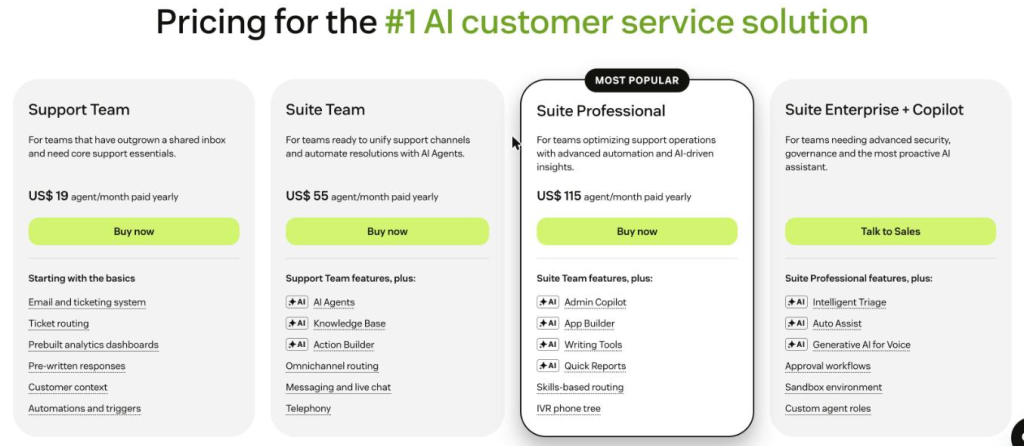
Zendesk costs $19 to $115 per agent per month on annual billing, with Suite Enterprise sold by quote. It’s one of the most complete customer service platforms, and its price climbs quickly as needs grow.
Support Team at $19 covers email ticketing, routing, automations, and dashboards. Suite Team at $55 adds messaging, live chat, a knowledge base, telephony, and AI agents. Suite Professional at $115 adds skills-based routing, IVR phone trees, and AI writing tools.
Zendesk’s pricing gets expensive for IT teams. Approval workflows and custom agent roles appear only on Suite Enterprise. Copilot costs $50 per agent on top of your plan. Each plan includes 5 to 10 AI resolutions per agent per month, and extra ones cost $1.50 committed or $2.00 pay-as-you-go.
Best for: Customer-facing teams that handle chat, phone, and social support at scale.
7. Jira Service Management: from about $21.50 per agent
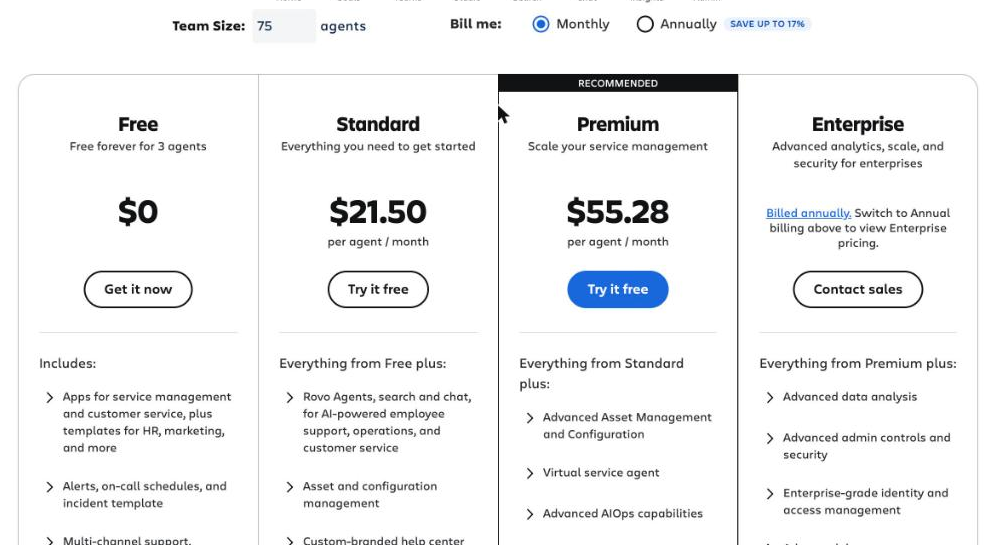
Jira Service Management is free for up to three agents, then about $21.50 per agent on Standard and $55.28 on Premium. Enterprise is sold by quote. Atlassian sells it inside its Service Collection, and the per-agent price shifts with team size.
Standard includes asset management with 5,000 objects, audit logs, and Rovo AI credits. Premium adds change management with approval workflows, advanced incident and problem management, a virtual service agent, and a 99.9% uptime SLA.
Extra costs are mostly usage-based. Asset objects past your limit cost $0.02 each per month, and virtual agent conversations past 1,000 a month cost $0.30 each. SAML single sign-on needs Atlassian Guard below Enterprise. Our Jira Service Management pricing guide goes deeper.
Best for: Teams already on Jira and Confluence that want IT and engineering in one place.
8. Help Scout: from $25 per user
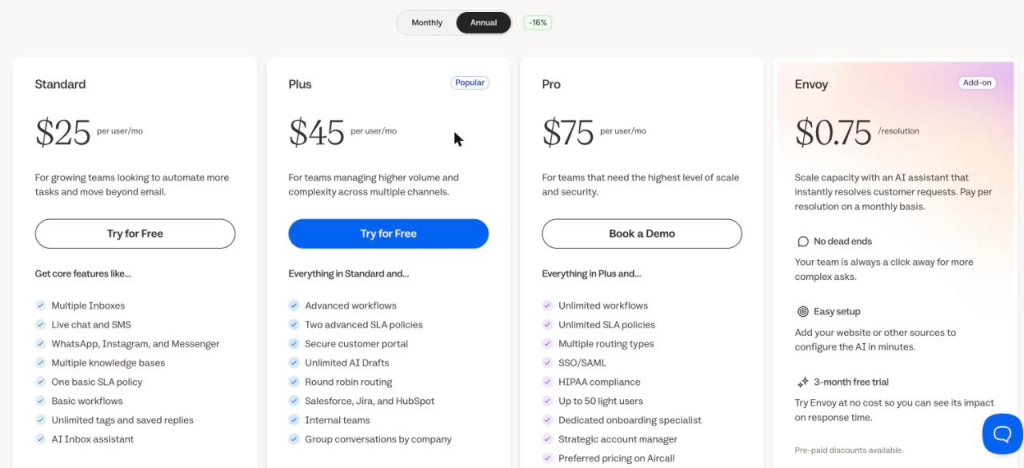
Help Scout costs $25, $45, or $75 per user per month, with a free plan for up to five users and one inbox. It’s built around an email experience that feels close to a regular inbox.
Standard covers multiple inboxes, live chat, one basic SLA policy, and basic workflows. Plus adds advanced workflows, two advanced SLA policies, round-robin routing, and Salesforce, Jira, and HubSpot integrations. Pro adds unlimited SLA policies, SSO, HIPAA-ready, and a dedicated onboarding specialist.
The Envoy AI assistant costs $0.75 per resolution, and you can cap that spend each month. Pro needs at least 10 users, and extra inboxes cost $10 a month each.
Best for: Small customer support teams that live in email.
9. SolarWinds Service Desk: from $39 per technician
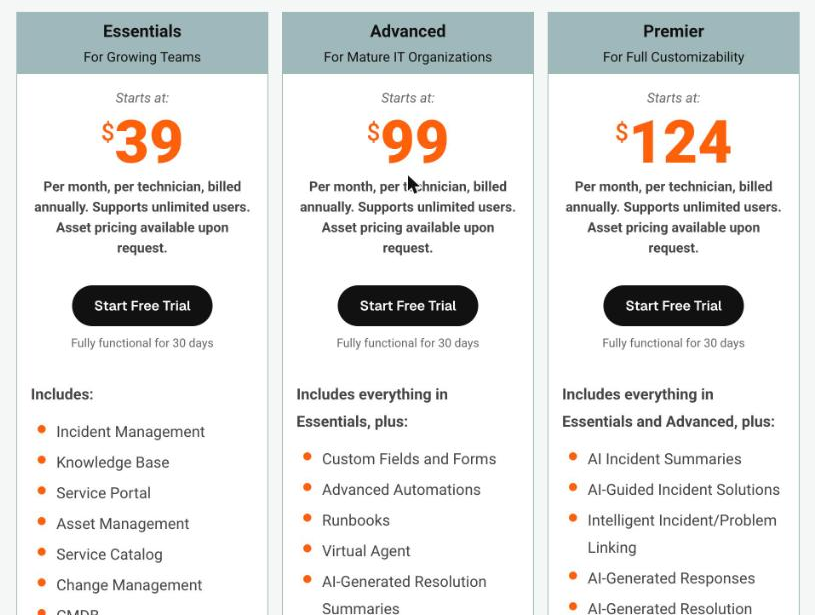
SolarWinds Service Desk costs $39, $99, or $124 per technician per month, billed annually, with a 30-day trial. It’s the cloud IT service desk from SolarWinds, and users and requesters are unlimited.
Essentials at $39 includes more ITSM features than most starting plans. You get incident, change, and asset management, a CMDB, a service catalog, SLAs, custom roles, and onboarding services. Advanced at $99 adds advanced automations, a virtual agent, AI resolution summaries, network discovery, audit history, and API access. Premier at $124 adds the full set of AI features, a visual CMDB with dependency mapping, and a sandbox.
The jump from Essentials to Advanced is steep, and features like audit history and automation sit on that higher plan. Asset limits apply to network devices, and asset pricing is quoted on request.
Best for: IT teams that want full ITSM features on day one and can budget $39 or more per technician.
What do teams really pay? Two worked examples
Annual totals tell you more than per-agent prices. Both examples below use each vendor’s published annual rates.
Example 1: A 2-person IT team supporting 75 employees
This setup comes from a real r/sysadmin thread. Two technicians at a manufacturing company supported 75 employees on a self-hosted helpdesk and wanted to move to the cloud without losing custom workflows. Price mattered, but they expected to pay something to stop running a server in-house. The team needs SLAs and automation now and may want approvals and asset tracking later.
| Tool | Starting plan with SLAs, per year | Plan with approvals and asset management, per year |
|---|---|---|
| Desk365 | $288 (Standard) | $768 (Premium) |
| SolarWinds Service Desk | $936 (Essentials) | $936 (Essentials), asset limits apply |
| Jira Service Management | $0 (Free, community support only) | $1,326.72 (Premium) |
| ManageEngine ServiceDesk Plus | $0 (Free, up to 5 technicians) | $1,595 (Enterprise, 250 assets) |
| Freshservice | $1,176 (Growth) | $2,376 (Pro) plus asset units |
| Zendesk | $456 (Support Team) | Enterprise, by quote |
Jira Service Management and ManageEngine are the cheapest ways to start, thanks to their free plans. Once the team needs approvals and asset management, Desk365 Premium is the lowest at $768 a year, followed by SolarWinds Essentials at $936.
Example 2: A 10-agent support team that wants AI help
This team uses the cheapest plan that includes AI help for agents.
| Tool | Plan | Per year |
|---|---|---|
| ManageEngine ServiceDesk Plus | Standard (AI included, no asset management) | $1,545 |
| Jira Service Management | Standard (Rovo credits included) | $2,580 |
| Desk365 | Plus (AI drafting, approvals, and 100 AI Agent credits a month) | $2,640 |
| Zoho Desk | Professional (Zia AI included) | $2,760 |
| Help Scout | Plus (plus $0.75 per AI resolution) | $5,400 |
| Freshservice | Growth (Copilot extra at $29 per agent) | $5,880 |
| Zendesk | Suite Team (plus AI resolutions past the included amount) | $6,600 |
| Freshdesk | Pro plus Copilot | $10,080 |
| SolarWinds Service Desk | Advanced | $11,880 |
The gap between the lowest and highest totals is more than $10,000 a year for the same team. Most of it comes from plan tiers and AI add-ons, not the base helpdesk.
Which helpdesk gives the best value for your team?
The best value depends on who you support and what you need on day one. Here’s where each tool fits best on price.
- Small IT teams on Microsoft 365: Desk365. SLAs and automation start at $12, approvals at $22, and asset management with Intune sync at $32. No other tool here covers all three for less.
- The tightest budgets: Zoho Desk Express at $7, or a free plan. Jira Service Management and Zoho Desk are free for 3 agents, and ManageEngine ServiceDesk Plus Cloud is free for 5 technicians. Expect limits on features and support.
- IT teams that need full ITSM from the start: SolarWinds Service Desk Essentials at $39 includes change management, asset management, and a CMDB. ManageEngine Enterprise covers similar ground at about $67, with pricing tied to asset counts.
- Teams already on Jira and Confluence: Jira Service Management. Keeping IT and engineering in one platform can outweigh a higher Premium price.
- Email-first customer support: Help Scout. Its per-resolution AI can be capped each month, which keeps costs predictable.
- High-volume, multi-channel customer support: Zendesk or Freshdesk. Both cost more as you add AI and advanced routing, but they handle chat, phone, and social at scale.
- Teams that follow ITIL closely with budget to match: Freshservice Pro at $99. Plan for asset units and Copilot on top.
How do you choose the best-value helpdesk for your budget?
Start with the features you need, then compare prices. A cheap plan that’s missing one key feature becomes an expensive upgrade within months.
- List your must-haves first. Write down the five or six things you can’t work without, such as SLAs, approvals, asset tracking, or Teams support. Then find the cheapest plan on each tool that covers all of them.
- Count only real agents. Requesters are free on every tool here, so count the people who work tickets.
- Price the full year. Multiply by 12 and add any add-ons, asset charges, or setup fees you’d need in month one.
- Model your AI use. Estimate monthly conversations and the share AI might handle, then check whether the vendor bills per resolution, session, or credit.
- Ask about renewal. Find out whether your price is locked and what it costs to add agents mid-term.
- Test with your own tickets. Run the free trial on real workflows, not a demo dataset.
Frequently asked questions
Zoho Desk has the cheapest paid plan at $7 per agent per month. Jira Service Management and Zoho Desk are free for up to three agents, ManageEngine ServiceDesk Plus Cloud is free for up to five technicians, and Desk365 has a free plan for up to 50 tickets a month. The cheapest paid plan that includes SLAs and workflow automation is Desk365 Standard at $12.
Some AI is usually included, and heavy AI use costs extra. Desk365 includes AI drafting and summaries on Plus and Premium, plus free AI Agent credits each month. ManageEngine includes AI on all plans, and Freshdesk includes 500 AI Agent sessions. Zendesk and Help Scout charge per resolution once you pass any included amount.
Yes, usually by about 15% to 25%. The trade-off is a one-year commitment, so avoid buying seats you aren’t sure you’ll use.
You can, but you may end up paying for two tools at once. Desk365’s switch-at-renewal program lets you onboard on an extended trial, migrate your data at no cost, and start paying only when your current contract ends.