
TL;DR:
A HIPAA compliant helpdesk protects patient data with encryption, role-based access, audit logs, and a signed Business Associate Agreement (BAA). No software carries an official HIPAA certification, so you still need to set the tool up the right way and train your team. This guide compares six ticketing systems that are HIPAA compliant: Desk365, Hiver, Zendesk, Help Scout, Giva, and OneDesk. Most tools offer HIPAA support and the BAA behind only on a higher-tier paid plan, so the price on a pricing page may not always be the price you pay. HIPAA-ready plans in this list range from about $32 to $115 per agent per month, billed annually, before add-ons. Before you choose, check which plan includes the BAA, how the vendor protects and logs access to ePHI, and how much setup your team needs to do.
Healthcare providers handle highly sensitive patient data daily, and safeguarding this information is a critical part of their operations. Whether it’s through electronic health records (EHR), patient communications, or internal administrative processes, managing patient data comes with a heavy responsibility to comply with regulations designed to protect patient privacy and security.
One of the most important regulatory frameworks in healthcare when it comes to safeguarding patient information is the Health Insurance Portability and Accountability Act (HIPAA). HIPAA mandates that healthcare organizations adopt strict measures to ensure the privacy and security of patient information. This includes compliance across various systems, including communication platforms, data storage systems, and helpdesk software.
When it comes to the best healthcare helpdesk software for healthcare providers, it’s essential to select a ticketing system that complies with HIPAA. A HIPAA compliant helpdesk system ensures that all communications and transactions related to patient care, queries, or support requests are secure and privacy-conscious, helping to protect the organization from fines, penalties, or reputational damage. Read more about the ticket management system.
Why HIPAA compliance matters for helpdesk systems?
HIPAA compliance is crucial because healthcare providers manage a wealth of sensitive information, known as electronic protected health information (ePHI). Any breach or improper handling of this information, even if unintentional, could have serious legal consequences. If a ticketing system doesn’t meet HIPAA standards, it can expose ePHI to unauthorized access, which may lead to costly violations of patient privacy.
A small misstep, whether it’s a data breach, accidental disclosure, or improper handling of sensitive information, could result in significant penalties for your organization. These penalties can range from hundreds of thousands to millions of dollars, depending on the nature and severity of the violation.
Moreover, beyond the legal and financial consequences, improper handling of ePHI can damage your organization’s reputation and erode patient trust. In healthcare, trust is paramount, and safeguarding patient data is central to maintaining that trust.
Understanding ePHI (Electronic protected health information)
ePHI refers to any health-related information that is stored, processed, or transmitted electronically. Under HIPAA, ePHI includes any form of protected health information (PHI) that is maintained in an electronic format, such as:
- Patient names
- Addresses
- Phone numbers
- Social security numbers
- Medical records
- Treatment history
- Payment information
- Insurance details
- Diagnosis information

Any data that can be used to identify a patient, and that is associated with healthcare services, falls under the umbrella of ePHI.
HIPAA’s security and privacy rules require healthcare organizations to ensure that any ePHI is protected through appropriate technical, administrative, and physical safeguards. This includes ensuring that any software systems like a helpdesk ticketing system can store, transmit, and process this sensitive data securely.
The three types of HIPAA safeguards
The HIPAA Security Rule, groups its requirements into three types of safeguards. A helpdesk plays a part in each one.
- Technical safeguards are the controls built into the software. Examples are encryption, unique user logins, automatic logoff, and audit logs.
- Administrative safeguards are the policies and agreements around the software. Examples are a signed BAA, staff training, risk assessments, and rules about who can see ePHI.
- Physical safeguards protect the places where data is stored, such as data centers. With a cloud helpdesk, your vendor handles most of these. With a self-hosted tool, you handle them yourself.
How to ensure a helpdesk is HIPAA compliant
When selecting a ticketing system for your healthcare organization, it’s essential to make sure that the platform complies with HIPAA’s stringent security and privacy regulations. Here are the key factors to look for:
- Data encryption: Ensure that the ticketing system encrypts all ePHI data, both at rest (when stored) and in transit (when being sent across networks), to protect it from unauthorized access.
- Access controls: The system should offer granular control over who can access different types of data. Only authorized personnel should have access to ePHI based on their role and responsibilities.
- Audit trails: The system should create detailed audit logs of all interactions with ePHI, including who accessed the data, when, and what actions were taken. These logs can be critical for monitoring compliance and responding to potential security incidents.
- Business associate agreement (BAA): Any vendor providing a ticketing system that handles ePHI must be willing to sign a Business Associate Agreement (BAA). This agreement outlines the vendor’s responsibilities to protect patient data and ensures compliance with HIPAA regulations.
- User authentication: Look for multi-factor authentication (MFA) or other advanced authentication methods to ensure only authorized users are accessing sensitive information.
- Secure data storage: The system must store ePHI in a secure manner, whether in cloud storage or on-premise servers, and ensure that the data cannot be easily compromised.
- Incident response plan: The ticketing system should have a defined process for incident management – handling data breaches and security incidents, and should include mechanisms for notifying affected parties in the event of a breach.
- Compliance certifications: Verify that the ticketing system provider is compliant with HIPAA and other relevant healthcare regulations, such as HITECH (Health Information Technology for Economic and Clinical Health Act).
What to set up before you go live
Signing up for a HIPAA-compliant helpdesk is only the first step. The setup is what keeps your ePHI safe. Before agents start working on support tickets, run through this list.
- Sign the BAA before any ePHI enters the system.
- Mark every field that holds health details as ePHI and turn on encryption for it.
- Give each role only the access it needs.
- Turn on multi-factor authentication (MFA) for all support agents.
- Limit who can email your helpdesk, and check that auto-replies do not repeat sensitive details to unknown senders.
- Turn on data redaction if your plan includes it.
- Review audit logs on a regular schedule.
No feature list makes a tool compliant on its own. The right tool, the right setup, and the right habits work together.
What IT managers say about choosing a HIPAA compliant ticketing system
IT managers ask about this on Reddit all the time. In an r/ITManagers thread on ticketing systems, one user asked for a ticketing system that is HIPAA compliant and has an easy interface. Three replies stand out.
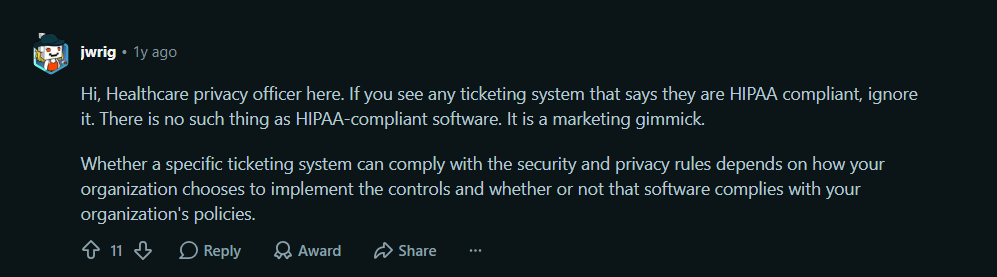
A healthcare privacy officer (u/jwrig) told readers to be careful with vendor claims. They wrote that there is “no such thing as HIPAA-compliant software”. In their view, compliance depends on how your organization sets up the controls and whether the tool fits your policies. That is why this guide covers certification and setup.
Another user, u/BodybuilderSmall1340, said their tool “has HIPAA compliant options if you get the right tier”. Plans matter. HIPAA support often sits on a higher plan, so check which tier includes the BAA before you buy.
A third user, u/dark_hunter_01, said Desk365 “seems to be a good product” and that it handles their team’s work well.

Ease of use came up too. The original poster asked for an easy interface, and several replies praised tools for a clean design and plenty of customization.
What this means for you: choose a tool your support agents find easy to use, confirm which plan includes the BAA, and plan to set up the controls yourself.
Top 6 HIPAA compliant helpdesk
Here is a quick comparison of the six helpdesks before we look at each one in detail.
| Helpdesk | Best for | HIPAA-ready plan | Starting price for that plan | Standout HIPAA features |
|---|---|---|---|---|
| Desk365 | IT and customer support teams in healthcare, especially Microsoft 365 and Teams users | Premium | $32 per agent per month | ePHI field encryption, role access, data redaction, audit and encrypted field logs |
| Hiver | Teams that work from Gmail | Elite | $85 per user per month | Gmail-based shared inboxes, encryption in transit, role-based access, BAA |
| Zendesk | Larger teams that need a full customer service suite | Suite Professional or higher | $115 per agent per month | AI redaction, data masking, access logs, BAA addendum |
| Help Scout | Teams that handle high email volume | Pro (or Plus with an add-on) | $75 per user per month | Shared inbox, encryption at rest and in transit, role-based access, BAA |
| Giva | Healthcare IT and call center teams | Professional or Enterprise | $76 per agent per month | Encryption, real-time access monitoring, continuous backups, BAA |
| OneDesk | IT teams that want help desk and project management in one tool, or need on-premise hosting | HIPAA-enabled account | $32.99 per user per month | AWS hosting, on-premise option, audit logs, two-factor authentication, BAA |
Prices are per agent or user per month, billed annually, and were checked on October 12, 2026. Prices change, so check each vendor’s pricing page before you buy.
To help you ensure that your organization is following HIPAA guidelines and maintaining the highest standards of privacy and security, we’ve compiled a list of some of the best HIPAA compliant ticketing systems. These systems are built with strong encryption, audit logs, secure storage, and other key features to ensure that your helpdesk can handle sensitive patient data with confidence.
By investing in a HIPAA compliant helpdesk ticketing system, you’re not only protecting your organization from legal and financial risks, but also ensuring that your patients’ sensitive information is handled with the care and respect it deserves.
Selecting a HIPAA compliant helpdesk ticketing system is crucial for healthcare providers. Ensuring that your ticketing system meets HIPAA’s requirements is not just about avoiding penalties but also about building trust with your patients. Properly safeguarding electronic protected health information (ePHI) should always be a top priority, and investing in a secure, compliant system is a critical step in doing so. By making informed decisions about your helpdesk software, you can protect patient data and help your organization maintain the highest standards of privacy and security.
1. Desk365
Desk365 is a helpdesk ticketing system with built-in tools to help you handle ePHI. You can mark ticket fields as ePHI, encrypt them, control who can see them, mask sensitive details, and track every change in audit logs. All Desk365 data is encrypted at rest and in transit. Desk365 is SOC 2 Type II certified and GDPR compliant, and you can choose a US or EU data center. HIPAA features and BAAs come with the Premium plan.
Best for: IT and customer support teams in healthcare, especially teams that already work in Microsoft 365 and Microsoft Teams.
Key features of Desk365 for HIPAA compliance
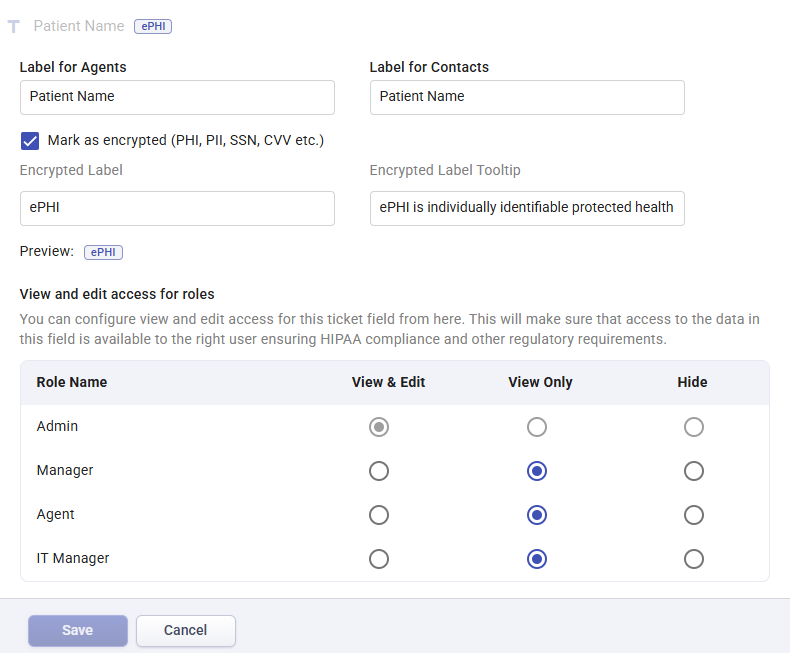
1. ePHI ticket field creation and encryption
One of the most significant features of Desk365 is the ability to create and encrypt fields that store electronic Protected Health Information (ePHI). With this feature, businesses can easily identify and protect sensitive health data.
How it works:
- Go to Settings > Admin > Ticket Fields.
- Select Encrypted text input under Encrypted field types.
- Name the field for agents and contacts, then check the Mark as ePHI box.
- Set which roles can see the field and save.
- When you add an ePHI field to a form, encryption turns on automatically. This sits on top of the encryption Desk365 applies to all data.
2. Encrypted data storage and transmission
Desk365 takes security seriously by ensuring that all data, including ePHI, is encrypted both during storage and while being transmitted over the internet.
How it works:
- All data within Desk365 is encrypted at rest and in transit, protecting ePHI from unauthorized access.
- This ensures that sensitive information remains confidential and secure, both on Desk365 servers and while being transferred across networks.

3. Role-Based Access Control (RBAC)
Desk365 provides a robust role-based access control system that allows organizations to define who has access to specific ePHI fields and ticket data. This feature ensures that only authorized personnel can access sensitive health information.
How it works:
- Users can create custom roles within the Desk365 platform to restrict or grant access to specific ePHI fields.
- Permissions can be set at the field level, ensuring that only authorized agents or team members can view or modify sensitive data.
- Admins can also control who can edit ticket properties, making it easier to monitor and maintain security.
- Each role has a Compliance permission called “Access to encryption configuration”. Roles with it can create, edit, and use encrypted fields. Roles without it see encrypted fields marked as Restricted.
- This permission is on by default for Admin roles.
- Turn on “Can modify displayed fields in ticket properties” to control which ePHI fields show on the ticket details page.
4. Business Associate Agreement (BAA)
To ensure full HIPAA compliance, Desk365 offers the option to sign a Business Associate Agreement (BAA) with organizations that use the platform to store or manage ePHI.
How it works:
- BAAs are available with the Premium plan.
- Email help@desk365.io to request a BAA and check your eligibility.
- The BAA sets out what Desk365 and your organization are each responsible for when handling ePHI.
- Sign it before you store any ePHI in your helpdesk.
5. Secure email controls
Control who can reach your helpdesk with Allowed Domains. In Helpdesk Access, you choose between two options: Users from any domain, or Users from Allowed Domains only. When you pick Allowed Domains only, you add the domains you trust, such as your own company domain. Only users from those domains can create tickets through any of your support channels, sign up for the Support Portal, and check the status of their tickets. Desk365 does not send auto-responses to emails from other domains, so ticket details stay away from unknown senders. You can also turn off the email channel completely with channel controls.
How it works:
- Go to Settings > Admin > Helpdesk Access.
- Select Users from Allowed Domains only.
- Add each trusted domain in the Allowed Domains field.
- Save your changes.
6. Audit logs and encrypted field logs
Audit logs record activity across your helpdesk, including ticket updates, configuration changes, and access events. Encrypted field logs go further for sensitive data. They show who created or changed an ePHI field, changed its visibility, or edited role permissions. Each entry also shows the IP address, date, time, and ticket number. Both are part of the Premium plan.
How it works: go to Settings > Security and Compliance > Audit Logs > Encrypted Fields.
7. Data redaction
Data redaction automatically masks sensitive details such as email addresses, SSNs, phone numbers, credit card numbers, and IP addresses. It works in ticket subjects, descriptions, replies, forwards, and internal notes. Agents keep working as usual. Data redaction is part of the Premium plan.
How it works: go to Settings > Security and Compliance > Data Redaction, turn it on, and pick the rules you want.
Tip: you can reach all of these settings in one place at Settings > Security and Compliance > HIPAA Compliance.
Pros
- Desk365 keeps ePHI safe with strong security features like encryption and role-based access.
- Built-in tools mean you do not need third-party apps to protect ePHI.
- Custom access controls ensure only the right people can view sensitive data.
- Offers a BAA with the Premium plan.
- Data redaction masks sensitive details in tickets, replies, and notes.
- Audit logs and encrypted field logs give you a clear record for reviews and audits.
- SOC 2 Type II certified, with a choice of US or EU data centers.
- Scales with your business, whether small clinics or large hospitals.
- Dedicated support is available to assist with security and compliance.
Pricing
Premium plan: $32 per agent per month, billed annually. This is the plan that includes HIPAA compliance, PII and PHI controls, data redaction, audit logs, and encrypted field logs. Standard starts at $12 per agent per month and Plus is $22 per agent per month. HIPAA features are part of Premium. The 21-day free trial includes all features, so you can test your HIPAA setup before you pay.
Want the full HIPAA setup steps for Desk365?
Our help article shows you how to create ePHI fields, set roles and permissions, control email access, and turn on data redaction.
Ready to ensure HIPAA compliance with Desk365?
2. Hiver

Hiver is a customer service collaboration software that integrates directly into Gmail, offering a familiar environment for teams to manage customer queries, including emails, and chats. It’s particularly useful for healthcare organizations that need to adhere to HIPAA (Health Insurance Portability and Accountability Act) guidelines while engaging with patients and handling sensitive information.
Best for: teams that work from Gmail.
Key ticketing system features
- AI chatbot (Harvey): Automates basic tasks and closes reopened conversations due to non-actionable responses.
- AI summarizer: Converts long emails into brief summaries to speed up resolutions.
- Collision alerts: Prevents multiple agents from working on the same query.
- Collaboration tools: Offers Notes and @mentions to improve team communication.
- Automation: Automates repetitive tasks like ticket assignment and message handling.
- Secure email management: Integrated directly into Gmail with strong encryption.
Pros
- Enhances team communication with notes, mentions, and conversation followers.
- Reduces manual work with automated ticket assignments and actions.
- Ensures compliance with encryption and BAAs for handling PHI.
- Integrates directly with Gmail for a familiar and efficient workflow.
- Offers round-the-clock customer support for global teams.
HIPAA compliance
- Ensures secure communication by encrypting emails containing Protected Health Information (PHI) during transit.
- Provides a BAA, sharing responsibility with healthcare organizations for HIPAA compliance.
- Role-based access controls (RBAC) help restrict PHI access to authorized personnel only, ensuring data confidentiality.
Pricing
HIPAA support is on the Elite plan at $85 per user per month, billed annually. Lower plans start at $25 per user per month.
3. Zendesk
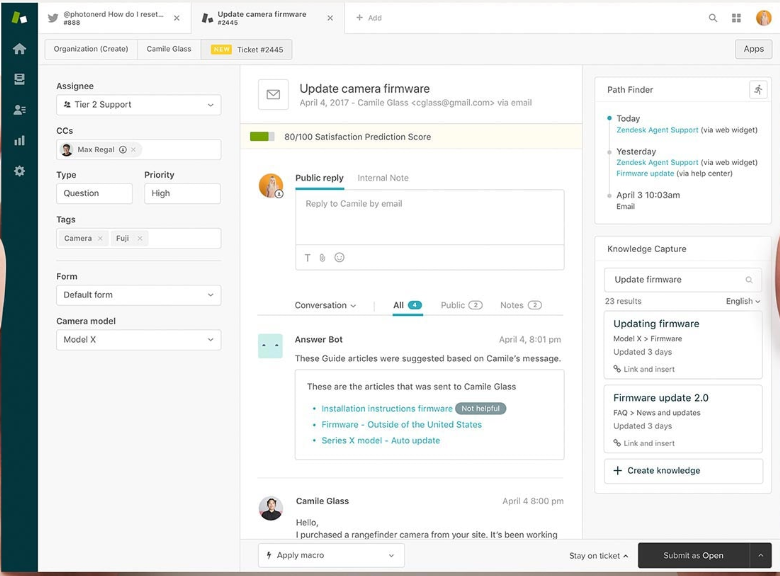
Zendesk is a customer experience platform designed to streamline customer support, sales, and workforce productivity. It offers solutions to meet healthcare organizations’ needs for handling Protected Health Information (PHI) through specific service plans and configurations.
Best for: larger teams that need a full customer service suite.
Key ticketing system features
- Omni-channel support: Centralizes communication from multiple channels such as email, live chat, and knowledge base.
- Advanced automation: Automates workflows to help manage and prioritize support tickets efficiently.
- AI-powered redaction: Uses AI to automatically detect and redact sensitive personal data.
- Data masking: Customizes data access based on user roles, ensuring only essential information is visible.
- Access logs: Monitors which users access specific data for added security and accountability.
Pros
- Tailor dashboards and reports to track relevant KPIs.
- Easily adapts as organizations grow with its advanced automation and customizable features.
- Offers an open API and integrates with many third-party tools.
- Combines customer relationship management and ticketing into one platform.
HIPAA compliance
- Zendesk offers HIPAA-compliant service plans and add-ons, such as the Advanced Data Privacy and Protection Add-On, to ensure secure handling of PHI.
- Zendesk provides a BAA “one-size-fits-all” addendum that outlines the terms for compliance.
- To be HIPAA-compliant, organizations must configure Zendesk services to meet security safeguards like user authentication and automatic logoff.
- Zendesk places specific restrictions on using personal mobile devices to access PHI, requiring user training for compliance.
Pricing
HIPAA eligibility starts with Suite Professional at $115 per agent per month, billed annually. The Advanced Data Privacy and Protection add-on costs about $50 more per agent per month. Suite Enterprise pricing comes from Zendesk sales.
Learn more about Zendesk
4. Help Scout
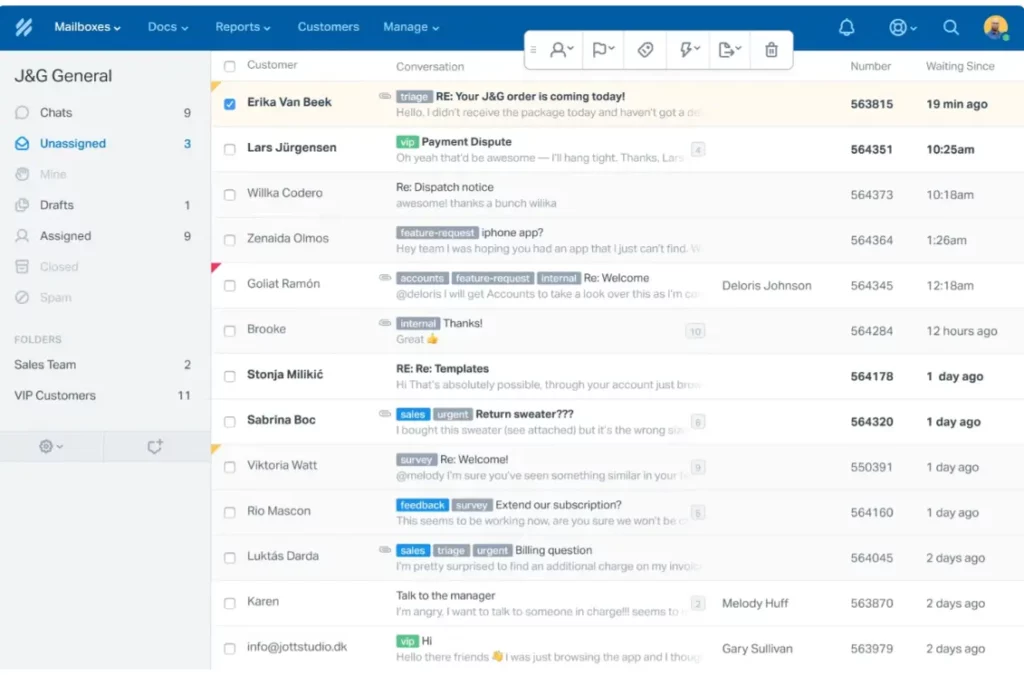
Help Scout is a customer support platform that offers a wide range of features to streamline communication, including support for email, live chat, and integration with various third-party systems. It is especially useful for organizations that need to handle sensitive data, including Protected Health Information (PHI), and is fully capable of supporting HIPAA compliance when configured correctly.
Best for: teams that handle large volumes of email.
Key ticketing system features
- Omni-channel support: Centralizes communication from email, live chat, and other channels for seamless customer support.
- AI and workflow automation: Leverages AI to automate repetitive tasks and improve efficiency.
- Data security: Provides 256-bit SSL encryption for all communications and ensures secure data handling at rest and in transit.
- Customizable user access: Allows detailed role-based access to sensitive data, ensuring that only authorized personnel can view or manage PHI.
Pros
- Offers a clean and user-friendly interface, making it easy for teams to manage customer support tickets.
- Built-in encryption, multi-factor authentication (MFA), and regular risk assessments help ensure compliance with HIPAA.
- Supports various third-party integrations, such as CRM systems, while maintaining data security.
- Ability to create custom workflows and automate ticket handling based on specific rules.
HIPAA compliance in Help Scout
Help Scout offers HIPAA-compliant service plans to ensure that healthcare organizations can securely handle PHI. To use the platform in compliance with HIPAA, organizations must sign a Business Associate Agreement (BAA), which Help Scout provides as part of their Pro plan.
- BAA requirements: Help Scout provides standard BAAs for both subcontractors and covered entities, which must be signed to enable HIPAA support on your account.
- Security features: Help Scout’s platform supports encryption at rest and in transit, ensuring that sensitive data, including PHI, is securely handled. Additionally, multi-factor authentication (MFA) and VPNs for internal access help maintain data integrity.
- Integrations: When integrating with third-party systems, organizations must ensure that any external applications also comply with HIPAA regulations. Help Scout encrypts data during integration, but third-party systems storing PHI may require separate BAAs.
Pricing
HIPAA compliance is included in the Pro plan at $75 per user per month. You can also add it to the Plus plan, which costs $45 per user per month. Standard starts at $25 per user per month. Pro lists a 10-user minimum.
5. Giva

Giva is a cloud-based IT help desk solution designed specifically for healthcare organizations and other highly regulated industries that require secure, HIPAA-compliant solutions. Giva offers a streamlined ticketing system, a knowledge base, robust reporting, a self-service portal, and other features that enhance support operations while ensuring compliance with strict data privacy regulations.
Best for: healthcare IT teams and call center teams that turn phone calls into tickets.
Key ticketing system features
- Automatic ticket creation: Emails are automatically converted into tickets and routed to the appropriate agents, reducing manual work and speeding up response times.
- AI copilot: An AI tool that pulls from the knowledge base to assist agents in drafting replies, summarizing tickets, extracting key details, and analyzing customer sentiment, all of which help to resolve issues more quickly. Unlimited AI Copilot use is included in all plans.
- SLA management: Automatic escalations ensure that agents meet strict service-level agreements (SLAs), improving response times and user satisfaction.
- Macros & task scheduling: Agents can set up macros for standardized responses and schedule tasks to ensure efficient handling of tickets.
- Unified dashboard: Giva provides a unified dashboard to view and manage support tickets across various communication channels such as live chat, email, phone, and social media.
Pros
- Unlike other complex enterprise solutions, Giva is relatively easy to use and deploy.
- The AI Copilot feature helps agents work more efficiently by summarizing tickets and analyzing customer sentiment, leading to quicker resolutions.
- Giva ensures the safety and privacy of sensitive health information through data encryption, continuous backups, and real-time access monitoring.
- Giva offers round-the-clock technical support with fast bug fixes and regular platform improvements.
HIPAA compliance in Giva
Giva takes HIPAA compliance seriously, offering a secure environment for handling protected health information (PHI). The platform includes several features to ensure compliance:
- Giva offers BAAs to healthcare organizations, which is essential for HIPAA compliance.
- All data is encrypted both in transit and at rest using HIPAA-compliant storage solutions, ensuring the security of sensitive information.
- Continuous backups and robust recovery plans help prevent data loss and ensure business continuity.
- Giva offers real-time access monitoring to enhance security and prevent unauthorized access to PHI.
Pricing
The Professional plan is $76 per agent per month for up to 10 agents. The Enterprise plan is $98 per agent per month for larger teams. Both are billed annually, include a BAA, and require at least five licenses.
6. OneDesk

OneDesk is a cloud-based platform that combines both patient support and project management in one system. This makes it ideal for healthcare teams to handle projects and workflows. OneDesk offers a range of customizable features designed to make managing both support tickets and projects more efficient.
Best for: IT teams that want a help desk and project management in one tool, or need on-premise hosting.
Key ticketing system features
- OneDesk allows patients to contact support through email, web forms, and live chat, based on their preference.
- Patients can track their tickets and view updates in a single, easy-to-use portal.
- A self-service knowledge base helps patients find answers to common questions, reducing the need for direct support.
- OneDesk combines help desk and project management, enabling teams to plan projects, assign tasks, and track progress in one platform.
- Team members can securely collaborate on tasks and projects through linked internal discussions.
- OneDesk offers a unified view to manage both tickets and tasks using Gantt charts, Kanban boards, lists, or calendars.
HIPAA compliance in OneDesk
- Access to data is controlled by user-level permissions, ensuring that only authorized individuals can view sensitive information.
- Track actions with audit logs, providing accountability and transparency for all interactions.
- All patient data is encrypted both during transmission and while stored, and it is hosted on AWS’s HIPAA-compliant cloud infrastructure. You also have the option to choose on-premise hosting if needed.
- Frequent backups ensure that data is protected and can be recovered in case of any issues.
- For added security, OneDesk uses two-factor authentication, reducing the risk of unauthorized access.
- A secure client portal lets users submit requests and track ticket status.
- OneDesk shares setup guidance so you can configure your account in line with HIPAA.
Pricing
HIPAA-enabled accounts start at $32.99 per user per month, billed annually. They include the signed BAA and enterprise features. HIPAA pricing is separate from OneDesk’s standard plans, so you need to request a quote. People who submit tickets (end users) are free.
Choosing the right HIPAA compliant helpdesk ticketing system is crucial for healthcare organizations to ensure secure management of sensitive patient data while delivering exceptional customer support. With powerful features such as seamless integrations, automation, and robust security, helpdesk systems provide the tools you need to enhance team efficiency and meet compliance standards. To see if Desk365 works best for your organization, we encourage you to start a 21-day free trial today. This risk-free trial allows you to explore all the features and capabilities of the ticketing system, helping you make an informed decision to streamline your operations and maintain HIPAA compliance with ease.
Frequently asked questions
No. HIPAA has no official certification for software, so no vendor can certify your helpdesk as compliant. A vendor can sign a BAA and give you safeguards such as encryption, role-based access, and audit logs. Your organization still has to set up the tool correctly and train your team.
Yes, if your helpdesk will create, receive, store, or send ePHI. A BAA is a contract that spells out how the vendor will protect that data. Sign it before any ePHI goes into the system. Many vendors only offer a BAA on certain plans, so check the plan first.
Desk365 gives you the tools to use your helpdesk in a HIPAA compliant way. These include ePHI fields with encryption, role-based access, Allowed Domains, audit logs, encrypted field logs, data redaction, and encryption of all data at rest and in transit. BAAs are available with the Premium plan. As with any tool, you need to set it up correctly. Follow the HIPAA setup guide in the Desk365 help center.
Among the six tools in this guide, HIPAA-ready plans start at about $32 per agent or user per month, billed annually. That is Desk365 Premium and OneDesk’s HIPAA plan. Prices go up to $115 per agent per month for Zendesk Suite Professional, before add-ons. Hiver, Help Scout, and Giva fall in between. Always confirm which plan includes the BAA.