To understand how Asset Panda performs as an IT asset management platform, we looked at its core features, usability, support experience, reporting options, ROI claims, and user feedback across review platforms.
Asset Panda is a cloud-based asset management software designed to help businesses track, manage, and organize physical assets across different users, departments, and locations. It is commonly used for IT assets, equipment, tools, furniture, and other business-critical items that need clear visibility throughout their lifecycle.
One of Asset Panda’s biggest strengths is its flexibility. Instead of forcing every team into the same fixed structure, the platform allows businesses to customize fields, workflows, asset records, reports, and actions based on how they already operate. This makes it useful for organizations with more complex tracking needs.
The platform also includes mobile access, barcode and QR code scanning, asset history, maintenance tracking, and reporting tools. These features can be especially helpful for teams that manage assets across multiple offices, schools, healthcare facilities, warehouses, or field locations.
Asset Panda also positions itself as a tool that can improve accountability, reduce asset loss, and streamline everyday workflows. The company claims customers see an average 800% return on investment, with ROI achieved in around 14 months. While actual results will depend on the size of the organization, number of assets, and how consistently the system is used, this claim suggests that Asset Panda is aimed at teams that want asset management to deliver measurable operational value, not just basic tracking.
That said, Asset Panda may not be the simplest option for every team. Its customization options can take time to set up, and some users have mentioned that certain workflows, reporting processes, or account changes are not always as straightforward as they would like. Pricing is also not clearly listed on the website, so businesses need to request a quote based on their needs.
In this article, we’ll look at its features, ease of use, pricing, support, pros and cons, and competitors to help you decide whether it is the right fit for your business.
Asset Panda: Customer support and onboarding
One of the first things you notice when evaluating a product like Asset Panda is how much help you actually get when you need it. With asset management tools, especially ones that can be customized deeply, solid support can make a big difference.
Asset Panda offers a few different ways to get help. You can reach out to the support team by email or phone, and many customers also get access to onboarding assistance when they first sign up. That onboarding help is particularly useful because setting up custom fields, workflows, and reports can feel overwhelming at first if you are used to spreadsheets or simpler tools.
On top of direct support, Asset Panda maintains a knowledge base packed with how-to articles, step-by-step guides, and video tutorials. These resources are handy when you want to troubleshoot something on your own or learn how to implement a feature without waiting for a support ticket to be answered.
Real users also highlight how helpful the support team is in practice. Here is what the G2 reviewer shared:
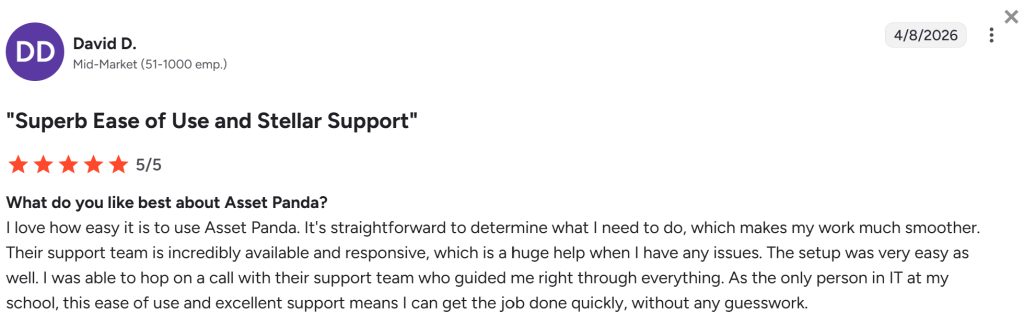
However, support feedback is not entirely one-sided. While many users appreciate the help they receive during setup, some reviews suggest that certain account or technical requests may require extra effort. For example, one reviewer mentioned that their organization had a growing fleet but could not easily upgrade storage or space online. Instead, they had to contact a representative to make the change. This may be inconvenient for teams that want to manage account upgrades quickly without waiting for a sales or support response.

Source: G2
Overall, Asset Panda appears to offer useful onboarding and support resources, but teams should also consider how easy it is to make account changes, resolve technical issues, or scale their usage as their asset list grows.
Ease of use
Asset Panda is flexible, which is one of its biggest strengths, but that flexibility also means it may take a bit of setup to get things running smoothly. If your team is looking for a simple plug-and-play asset tracker, you might need some time to adjust at first. Teams with more complex asset tracking needs are likely to appreciate how customizable the platform is, from creating unique workflows to setting up custom fields and reports.
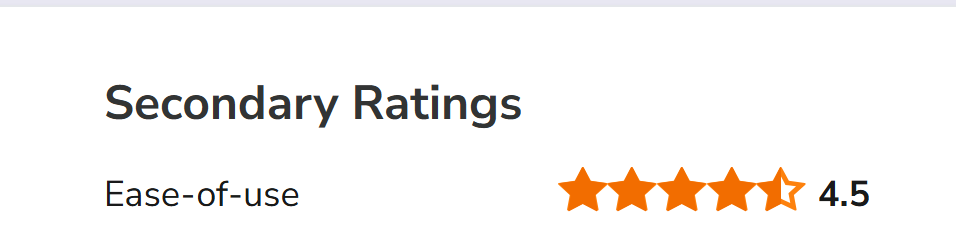
The platform’s interface is generally clean and intuitive. Most users find it straightforward to navigate once the system is configured to match their workflows. In fact, Asset Panda has received a 4.7 out of 5 for ease of use on Software Advice, reflecting that most users find it user-friendly while still offering powerful features.
Overall, there is a slight learning curve during setup, but the payoff is a system that adapts to your business instead of forcing your team to adapt to it.
Asset Panda: Plans and Pricing
When it comes to pricing, Asset Panda takes a different approach than some other asset management software. The company does not list fixed prices on its website, so there isn’t a one-size-fits-all number you can point to. Instead, pricing is quote-based, which means you need to contact the team for a custom plan tailored to your organization’s needs.
Most of the cost is determined by the number of assets your business wants to track rather than the number of users. This can be a major advantage for companies with large teams because Asset Panda allows unlimited users without extra charges. That means everyone from IT staff to facilities managers can access the system without worrying about per-user fees.
Asset Panda also offers demo sessions, so you can see the platform in action before committing. While there isn’t a traditional free trial available, the demo is helpful to understand how workflows, reporting, and mobile tracking would work for your team.
This pricing model tends to work best for medium to large businesses that manage a significant number of assets and need a highly customizable system. Smaller teams or businesses with only a handful of assets might find it harder to justify the cost unless they anticipate rapid growth or need the advanced tracking features.
Read more: Asset Panda pricing: How much does it cost
Asset Panda: Features
Asset Panda is designed to handle the full lifecycle of your assets, from tracking and maintenance to reporting and mobile access. Here’s a closer look at the core features:

Asset tracking
Users can track assets by location, assigned user, condition, and status. The system allows you to create detailed records for each asset, including photos, serial numbers, and purchase information. This helps reduce lost items and makes auditing easier.
Some users appreciate the level of detail Asset Panda offers, but others feel that certain workflows can become more complicated than they need to be. For example, one reviewer mentioned that the lending library feature was not very functional and required too many steps for something as simple as checking out a device. This suggests that while Asset Panda is powerful, teams looking for very quick, low-click workflows may find some parts of the platform less convenient.

Source: Gartner
Barcode and QR code scanning
What stood out most during our review was Asset Panda’s barcode and QR code scanning experience. The platform lets teams scan assets directly from a phone or tablet, which helps speed up check-ins, check-outs, and field updates.
Mobile app
Asset Panda is designed to handle the full lifecycle of your assets, from tracking and maintenance to reporting and mobile access. The mobile app is a core part of the platform. It allows employees to manage assets while on the go, update asset details, upload photos, and verify locations. This is particularly useful for teams working across multiple sites, schools, healthcare facilities, or construction sites.
Custom workflows
Asset Panda is highly customizable. You can create unique workflows, custom fields, forms, and actions, so the system adapts to your business processes rather than forcing your processes to adapt to the software. This flexibility is a big selling point for organizations with complex tracking needs.
Maintenance and asset history
Every asset can have a full history log, including maintenance records, service dates, warranties, and depreciation of information. This helps teams plan maintenance proactively and reduces unexpected downtime.
Reporting
Asset Panda offers a range of reporting options. You can filter by asset type, location, status, or maintenance history and generate dashboards to visualize asset usage. Reports can be scheduled or exported for audits or management meetings.
That said, reporting is one area where feedback is a little mixed. While many users appreciate the visibility Asset Panda provides, some have raised concerns about how reports are generated and accessed. For example, one reviewer mentioned that asset data could only be exported through reports in PDF or CSV format, and that those reports were delivered by email rather than downloaded directly. They also noted that when reports were not arriving by email, the support response did not fully address the issue.

Source: G2
Asset Panda Competitors
Asset Panda is a strong option for teams that need flexible asset tracking, mobile access, barcode scanning, and customizable workflows. However, it may not be the best fit for every business, especially if you want a simpler setup, built-in IT helpdesk features, or more direct reporting and export options. Here are five alternatives worth considering.
1. Desk365
Desk365 is a good alternative for businesses that want asset management to work closely with IT support. Unlike Asset Panda, which focuses heavily on asset tracking and lifecycle management, Desk365 combines helpdesk ticketing with IT asset management. This makes it useful for teams that want to manage devices, assign assets to employees, track issues, and connect asset records with support tickets.
For example, if an employee reports a laptop issue, IT teams can view the related asset details and ticket history in one place. This makes Desk365 especially useful for IT teams, schools, startups, and growing businesses that want a more support-focused asset management setup.
Desk365 may not offer the same depth of asset customization as Asset Panda, but it is easier to approach for teams that want helpdesk and asset tracking together without building complex workflows from scratch.
Another point that makes Desk365 stand out is its pricing. Its Premium plan is listed at $32 per agent per month when billed annually, and includes asset management features such as asset lifecycle management, software management, product inventory, vendors, and depreciation tracking.
2. Snipe-IT
Snipe-IT is a popular asset management tool, especially for IT teams that want control over their asset database. It supports asset check-in and check-out, user assignments, licenses, accessories, consumables, and audit history.
One major advantage of Snipe-IT is that it offers an open-source option, which can appeal to technical teams with the resources to host and manage the software themselves. However, setup and maintenance may require more technical knowledge compared to cloud-based tools like Asset Panda or Desk365.
Snipe-IT is best suited for teams that want a practical IT asset management system and are comfortable with a more hands-on setup.
3. EZOfficeInventory
EZOfficeInventory is another strong competitor to Asset Panda, particularly for businesses that need asset reservations, check-ins, check-outs, maintenance tracking, and inventory visibility. It is often used by teams managing equipment across offices, schools, labs, construction sites, and event operations.
Compared with Asset Panda, EZOfficeInventory can feel more structured and easier to start with, especially for teams that want equipment booking and inventory management features. However, teams with highly unique workflows may still prefer Asset Panda’s deeper customization options.
EZOfficeInventory is a good fit for businesses that want asset tracking with strong equipment management and reservation features.
4. ManageEngine AssetExplorer
ManageEngine AssetExplorer is designed for IT asset management and is a strong option for businesses that need software asset management, hardware tracking, purchase order tracking, contract management, and lifecycle visibility.
It is especially useful for larger IT teams that already use other ManageEngine products. The platform gives teams detailed visibility into IT assets, but it may feel more technical compared with Asset Panda. Smaller teams may find it more than they need.
ManageEngine AssetExplorer works best for IT departments that want detailed asset discovery, compliance tracking, and IT-focused reporting.
5. Freshservice
Freshservice is a broader IT service management platform that includes asset management alongside incident management, service requests, change management, and automation. It is a good choice for companies that want asset tracking as part of a complete IT service desk.
Compared with Asset Panda, Freshservice is less focused on general asset customization and more focused on IT operations. This makes it a better fit for IT teams that want to connect assets with tickets, users, incidents, and service workflows.
Freshservice is a strong option for mid-sized and larger businesses that need both IT asset management and full helpdesk functionality.
Our take on Asset Panda
Asset Panda is a strong asset management platform for businesses that need detailed tracking, mobile access, barcode scanning, custom workflows, maintenance history, and reporting. Its biggest strength is flexibility. Teams can shape the platform around their own processes instead of being limited to a basic asset database.
That said, this flexibility also means Asset Panda may take time to set up properly. Some users may find certain workflows less straightforward, especially around reporting, exports, navigation, or support for specific technical issues. For smaller teams that want something simple and ready to use right away, the learning curve may feel a little heavy.
Overall, Asset Panda is best suited for organizations that manage a large number of assets across multiple users, locations, or departments. If your team needs deep customization and is willing to spend time configuring the system, Asset Panda can be a powerful choice.