TL;DR
Desk365 is an AI-powered help desk and ITSM tool for teams of all sizes. It handles tickets, SLAs, approvals, and assets, with an AI Copilot and a no-code AI Agent.
Serval is an AI-native platform for larger, tech-heavy teams. Its AI agents resolve requests, build workflows, and manage access.
On G2, the two tie on five of seven measures. Serval has far fewer reviews, so the comparison is early.
We also cover four other Serval alternatives: Freshservice, Jira Service Management, ServiceNow ITSM, and Atera.
Pick Desk365 for a clear price and a fast start. Pick Serval if access requests flood your queue and your team can review AI-built workflows. Not sure? Run a ticket mix test on your last 90 days of tickets.
Why are we comparing Desk365 vs Serval?
Desk365 and Serval both help IT teams answer employee requests. They take very different routes. Desk365 gives agents one fast help desk and ITSM tool with AI built in. The AI speeds up their work and answers customers. Serval uses AI agents that try to resolve requests without a person.
We are Desk365, so we have our point of view here. We built this comparison from both vendors’ websites, a G2 comparison, Capterra reviews, and public reporting. We also say plainly where Serval is the stronger choice.
We wrote this blog for IT managers at small and mid-sized businesses. If you run IT at a large enterprise, skip ahead to the access management section.
How does Desk365 approach its comparisons?
At Desk365, we aim to publish well-researched, practical content that helps IT teams decide with confidence. We look at product features, pricing, customer reviews, and real user experiences. We also say where a competitor is stronger. Read our review methodology to know more.
Find Desk365 helpful? Set us as a preferred source on Google to see more of our content in search results.
What is Desk365?
Desk365 is AI-powered ticketing system for teams of all sizes. It combines a help desk, ITSM, and AI tools in one product, so you do not need a separate system for approvals, SLAs, or assets. Tickets come in by email, a support portal, web forms, a web widget, and Microsoft Teams.
Desk365 has three paid plans, and it prices each one per agent. Standard covers ticketing, a knowledge base, workflow automation, and Service Level Agreement (SLA) reminders. Plus adds change and approval management, round robin and load-based assignment, and the AI Copilot. Premium adds IT asset management with Microsoft Intune sync, audit logs, and HIPAA support. A free plan covers up to 50 tickets each month. You can see every feature on the Desk365 pricing page.
Desk365 uses AI in two ways. The AI Copilot helps agents draft replies, summarize long tickets, and turn ticket threads into knowledge base articles. The AI Agent is no-code. You build it, test it, and deploy it on your support channels to be available 24/7 and answer questions automatically. It answers customer questions in chat and hands tickets to a human when needed. It runs as an add-on at $50 per 1,000 credits, and Plus and Premium include free credits each month.
Desk365 is SOC 2 Type 2 certified and HIPAA and GDPR compliant.
What Desk365 features help with IT support ticketing?
Desk365 covers the full ticket lifecycle for IT teams. Tickets arrive by email, portal, web form, widget, or Microsoft Teams, and land in one shared inbox. Agents reply with canned responses, merge duplicates, and keep private notes. Custom fields and forms capture the details your team needs.
Automation starts on Standard. Rules run when a ticket arrives or changes, and SLA reminders and escalations flag overdue tickets. Plus adds round robin and load-based assignment, time-based automations, and ticket closure rules. It also adds time tracking, tasks, ticket watchers, and CSAT surveys. Explore the full set of help desk automations.
IT teams get more depth on higher plans. Plus includes change and approval management, so a change request follows set steps and approvers. Premium adds asset management. You can track hardware and software from purchase to retirement, sync assets from Microsoft Intune, and manage vendors and depreciation. Premium also adds audit logs and HIPAA support.
Every plan includes reports and a knowledge base with a self-service portal. Employees can solve simple issues without opening a ticket.
What is Serval?
Serval is an AI-native IT service management (ITSM) platform. Serval works through AI agents. The Help Desk Agent answers employee requests in Slack, Microsoft Teams, email, and a web portal. The Automation Agent builds workflows. Serval’s own site also lists an Insights Agent that finds problems before users report them. In August 2026, Serval launched Catalyst. It reads your ticket history and drafts new automations for an admin to approve, according to a Rezolve.ai review.
Why do teams shortlist Serval, and why do some look elsewhere?
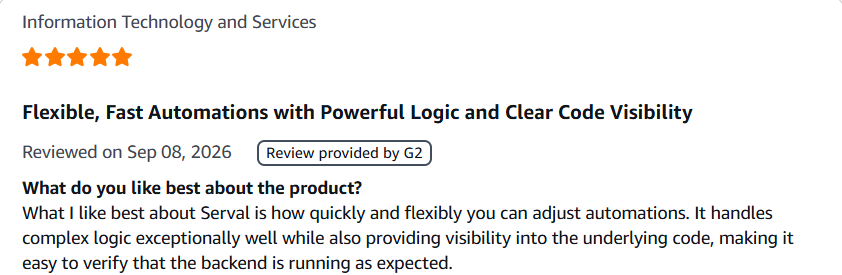
Teams look at Serval when ticket volume gets painful. Serval says it automates more than 50% of IT tickets for its customers. Few reviewers praise how fast they can change automations.
Others look elsewhere for practical reasons. Serval does not publish prices, and every deal starts with a pilot. Reviewers mention a learning curve. Independent writers also note that public reviews are limited.
Desk365 appeals to teams with a different goal. They want a help desk that works on day one, plus AI that helps agents and answers customers. The table below shows how each need plays out.
What is the difference between Desk365 and Serval help desk software?
| Area | Desk365 | Serval |
|---|---|---|
| Approach | AI-powered help desk and ITSM in one tool | AI-native service management with autonomous agents |
| Best fit | Teams of all sizes that want built-in AI and clear pricing | Larger, fast-growing, engineering-led IT teams |
| Where employees get help | Email, support portal, web form, web widget, Microsoft Teams | Slack, Microsoft Teams, email, web portal |
| Microsoft Teams | Ticket creation, tracking, notifications, and agent tools | AI help desk agent available in Teams |
| How AI helps | Drafts replies, summarizes tickets, writes knowledge base articles, and runs an optional AI Agent for customers | AI agents resolve requests, build workflows, and spot bottlenecks |
| Automation style | No-code rules, time-based triggers, and ticket assignment | Plain English workflows that become editable code, approved by admins |
| Integrations | Microsoft 365, Intune, Entra ID, Power Automate, and REST API | Okta, Entra ID, Jamf, Workday, ServiceNow, Jira, and other enterprise tools |
| Access management | Approvals, roles, and Microsoft Entra ID single sign-on | Just-in-time access, automatic removal, and access reviews |
| Asset management | IT asset management with Intune sync (Premium) | Hardware and software assets with a configuration management database (CMDB) |
| Reporting | Built-in reports, custom reports, and dashboards based on plan | Insights Agent identifies patterns and automation opportunities |
| Pricing | Public pricing: $12, $22, and $32 per agent per month, billed annually | Quote only, after a demo |
| Trial | 21 days, no credit card, then a free plan | Guided pilot run by Serval’s deployment team |
Choose Desk365 for structured ticket management, Microsoft Teams-based support, and familiar help desk automation. Choose Serval if you want AI to handle more IT tasks directly, especially access management.
How do G2 ratings compare Desk365 vs Serval
We analyzed G2’s side-by-side comparison of the two products. Scores below are out of 10.
| G2 measure | Desk365 | Serval |
|---|---|---|
| Meets requirements | 9.4 | 9.4 |
| Ease of use | 9.4 | 9.2 |
| Ease of setup | 9.4 | 9.2 |
| Ease of admin | 9.7 | 9.7 |
| Quality of support | 9.7 | 9.7 |
| Good partner in doing business | 10 | 10 |
| Product direction (% positive) | 10 | 10 |
The two tools tie on five of seven measures. Desk365 leads by 0.2 on ease of use and ease of setup.
Sample size matters here. Desk365 has about 28 reviews on G2 and a 4.9 out of 5 star rating. Serval is newer and has far fewer. Read the ties as a sign that early users of both tools are happy. They do not prove the tools do the same job.
The G2 comparison also lists feature-level scores for Desk365 only. We can’t compare them head to head, but they show where Desk365 is strongest and where you should test it in a trial.
| Desk365 feature on G2 | Score |
|---|---|
| Workflow management | 10 |
| Workflow | 9.5 |
| Ticket creation experience | 9.4 |
| Email to case | 9.4 |
| User, role, and access management | 9.2 |
| Third-party integrations | 9.0 |
| SLA management | 9.0 |
| Customization | 8.8 |
| AI text generation | 8.5 |
| AI text summarization | 8.1 |
| Chat and live support | 8.0 |
| Mobile user support | 7.6 |
| Reporting | 7.5 |
Desk365 scores highest on workflow and ticket creation. Reporting and mobile support score lowest. If either matters to you, check them by signing up for a a 21-day free trial.
How do Desk365 and Serval pricing and subscription plans compare?
Desk365 publishes every price. It sells subscriptions per agent, billed monthly or yearly. You can add or remove agents at any time, and Desk365 pro-rates the fee. Here is what a team of 10 agents pays on annual billing.
| Desk365 plan | Per agent each month | Team of 10, each month | Team of 10, each year |
|---|---|---|---|
| Standard | $12 | $120 | $1,440 |
| Plus | $22 | $220 | $2,640 |
| Premium | $32 | $320 | $3,840 |
Monthly billing costs more, and Desk365 says yearly plans save up to 25%. The AI Agent add-on is extra at $50 per 1,000 credits. Plus includes 100 free credits each month, and Premium includes 200. Desk365 also offers a switch at renewal guarantee. You start now, pay when your current contract ends, and migrate your data at no extra cost.
Serval works differently. It quotes a single platform fee after a demo, with no per-resolution charges, according to Rezolve.ai’s summary of Serval’s pricing page. Before you sign, ask four things. What does the fee cover as you add departments? How does Serval measure its 50% automation guarantee? What happens if it misses? What are the renewal caps? Ask whether access management costs extra too.
A 10-agent Desk365 team can know its yearly bill before the first call. With Serval, you need a demo first.
Which is better for small business IT departments: Desk365 or Serval?
Desk365 is the better fit for most small IT departments. You can start free, set it up yourself, and know your cost before you buy.
Here is a small-team example: Three agents on Standard pay $36 each month, or $432 a year, on annual billing. Three agents on Plus pay $66 each month, or $792 a year. Desk365 also offers a free plan for up to 50 tickets each month and a 21-day trial with no credit card.
Serval targets larger teams. Its named customers are mostly fast-growing tech companies. Pricing needs a demo, and every deal starts with a pilot. Reviewers mention a learning curve, and Rezolve.ai says Serval suits engineering-led IT teams.
What other Serval alternatives should you consider?
Serval suits teams that want AI to resolve most tickets and can work with code. Not every team fits that profile. Desk365 is the alternative this blog covers from start to finish. If you want to look wider, here are four more tools that compete for IT support buyers.
1. Freshservice
Freshservice is Freshworks’ IT service management platform. It suits mid-market IT teams that want full ITIL processes without an enterprise implementation. Every plan includes incident, knowledge, and task management, plus a ServiceBot for Microsoft Teams and Slack. Growth adds SLA management and a service catalog. Pro adds problem, change, release, and major incident management. Asset management with 100 asset units comes on every plan.
Teams like the built-in ITIL processes and the clear upgrade path. A Business Agent license also lets HR, finance, and facilities teams use the platform. The trade-off is that the strongest features sit on higher plans. Change management starts on Pro, the Freddy AI Copilot is a paid add-on, and the Freddy AI Agent (Classic) comes only with Enterprise. Plans start at $19 per agent each month on annual billing, with a 14-day free trial. See the Freshservice pricing page for current details
2. Jira Service Management
Jira Service Management is Atlassian’s service management tool, sold inside its Service Collection. It suits teams already on Jira that want ITSM tied to engineering work. Even the Free plan covers alerts, on-call schedules, and request management through a portal, email, Microsoft Teams, Slack, and a widget. Standard adds Rovo AI agents, search, and chat, plus asset and configuration management with 5,000 objects included. Premium adds a virtual service agent, change management, and AIOps.
A free plan for small teams and a natural fit with Jira are the main draws. The catch is that change management, the virtual service agent, and the 99.9% uptime SLA start on Premium. Virtual service agent conversations cost extra after the first 1,000 each month. Atlassian lists a free plan for up to three agents and paid plans from $21.50 per agent each month on its pricing page. Our Jira Service Management pricing guide has a deeper breakdown.
3. ServiceNow IT Service Management
ServiceNow ITSM is the enterprise option on this list. It suits large organizations with dedicated ServiceNow admins. Its ITSM pricing page lists three packages called Foundation, Advanced, and Prime. Every package includes service catalog and request management, Now Assist and Platform AI, and Moveworks for ITSM. Advanced adds Platform Analytics Advanced, and Prime adds AI Agents for ITSM.
The strengths are deep enterprise coverage and AI in every package. The trade-offs are cost and effort. ServiceNow publishes no prices, so you need a sales quote. Most companies budget three to five times the license cost for implementation, training, and support in year one, according to our ServiceNow pricing guide. The platform works best when you have admins to run it.
4. Atera
Atera combines remote monitoring and management with a built-in help desk. It suits lean IT teams and managed service providers that manage many devices per technician. Every plan covers patch management, remote access, IT automation and scripting, and ticketing with SLA management and a service portal. Atera Copilot is included at no extra cost. Asset management starts on Expert, and custom reports start on Master.
Atera is strongest when a few technicians support many devices, because pricing is per technician with unlimited devices. Single sign-on is Enterprise only, and Network Discovery costs extra. Per-technician pricing can cost more for large help desk teams that manage few devices. Plans start at $149 per technician each month on annual billing, according to Atera’s own pricing guide for IT departments. A 30-day free trial is available.
Which help desk should you choose between these Serval alternatives?
If you want deep ITSM with serious automation, look at Freshservice or ServiceNow. If your engineers live in Jira, start with Jira Service Management. If you manage many devices per technician, look at Atera. If you want a clear price and a fast start, Desk365 covers that case.
Run a ticket mix test before you decide. Pull your last 90 days of tickets and sort them into four groups. Access requests. How-to questions. Device and software problems. One-off issues that need a person.
If access requests and repeat tasks make up more than half of your volume, Serval’s model can pay off. This is our rule of thumb, not a published benchmark. If most tickets are mixed and need a human reply, a faster desk helps you more than deeper automation.
Then check three things. Do you want AI and ITSM tools in one product? Can someone on your team review and fix workflow code? Do you need a price you can budget today?
Choose Desk365 if you run a standard IT or support desk and want AI built in without a long rollout. You get a clear price, a free trial, and ticketing, approvals, SLAs, and asset management in one place.
Choose Serval if you are a fast-growing, engineering-led company. It fits you if access requests flood your queue, you want to automate more than half your tickets, and you have the people to review workflows.
Still weighing other help desks? Read our Desk365 vs Tikit comparison or our Desk365 vs Spiceworks comparison.
Ready to try Desk365 for your IT team?
Frequently asked questions
Desk365 is easier to price. It starts at $12 per agent each month on annual billing, and every plan is public. Serval does not publish prices and quotes one platform fee after a demo. Compare that quote with your own ticket volume.
Yes. Serval’s Help Desk Agent works in Slack, Microsoft Teams, email, and web portals. Serval built its early features around Slack, so test the Teams experience during your pilot.
Usually not. Serval targets enterprise and fast-growing tech teams, and reviewers mention a learning curve and a pilot-led start. Small teams often get more value from a help desk they can set up themselves.
Both score 9.4 for meets requirements and 9.7 for ease of admin. Desk365 leads by 0.2 on ease of use and ease of setup. Serval has far fewer reviews, so the comparison is early.
Yes. You get a 21-day trial with every feature and no credit card. After the trial, a free plan covers up to 50 tickets each month.
Desk365 is stronger for Teams. It turns Teams messages into tickets, sends notifications, and offers an agent portal and bots in Teams. Serval also works in Teams but started around Slack.