
Flow by ServiceNow is a new AI service desk that runs inside Microsoft Teams, Slack, and email. ServiceNow launched it on October 1, 2026, as a standalone product, so you don’t need a ServiceNow instance to use it.
It’s built for two groups. The first is smaller companies buying their first service desk. The second is single teams inside larger ServiceNow customers that want their own desk up and running quickly. Pricing is usage-based. After a 30-day free trial, new customers pay $2 per conversation with a $10,000 yearly minimum.
TL;DR
- What it costs: Free for 30 days, then $2 per conversation and $1 per automation run, with a $10,000 yearly minimum for new customers.
- Who it fits: Teams with no service desk today, and satellite teams inside existing ServiceNow customers.
- Watch out for: No change management, problem management, or configuration management database (CMDB). You also pay for every issue, even the ones a person resolves.
- Alternatives: Desk365, Atomicwork, Serval, Console, and Agentforce IT Service.
What is Flow by ServiceNow?
Flow by ServiceNow is a conversational AI service desk. An employee asks for help in a chat thread. Flow answers the question, takes an action, or hands the request to a person, all in that same thread.
ServiceNow describes Flow as a startup inside the company. It runs on its own multi-tenant cloud, separate from the main ServiceNow platform. Existing customers can connect Flow to their ServiceNow instance for two-way sync. New customers can buy it and turn it on without one.
Flow by ServiceNow vs. Flow Designer
The two share a name and little else. Flow Designer is the long-standing low-code tool that admins use to build workflows inside a ServiceNow instance, such as approval chains and notifications. Flow by ServiceNow is a separate product that employees talk to in chat.
If an article talks about building flows, triggers, and actions inside the Now Platform, it’s about Flow Designer.
Flow vs. EmployeeWorks (formerly Moveworks)
ServiceNow also sells EmployeeWorks, which grew out of its Moveworks acquisition. Both give employees chat-based help in Teams and Slack, so buyers often mix them up.
ServiceNow draws the line this way. EmployeeWorks is a front door for the whole company. It routes requests to IT, HR, finance, and legal, and to the systems each team already uses. Flow is a self-contained service desk for one team. It tracks and resolves its own requests.
How does Flow by ServiceNow work?
Flow works in three steps. An employee asks in chat, Flow answers or acts, and anything it can’t close goes to a person.
- Ask. Employees post in a Teams or Slack channel, message Flow directly, or send an email. Other bots and AI assistants can reach Flow through application programming interfaces (APIs) or Model Context Protocol (MCP).
- Resolve or hand off. Flow answers from your connected knowledge or runs an automation if one exists. Complex or sensitive requests go to an agent. Agents work from one web queue, and their replies post back into the employee’s thread.
- Automate. After an agent resolves something new, they can type /automate and describe the fix in plain language. Flow builds the automation, so the next identical request runs without a person.
This is a form of conversational ticketing. The chat thread becomes the ticket, and nobody has to fill out a portal form.
Setup is light by ServiceNow standards. You connect single sign-on, your Teams or Slack workspace, and your knowledge sources. ServiceNow says a team can be live in less than a day. It also notes that setup slows down when the person configuring Flow isn’t the admin of those other systems.
Key features of Flow by ServiceNow
- Chat-first support in Microsoft Teams, Slack, and email
- AI answers drawn from connected knowledge, with nothing to migrate
- Actions inside connected systems, not just links to help articles
- A plain-language automation builder, including /automate right after a fix
- Automations that can start from a schedule, webhook, API call, or system event
- Usage insights that flag repeat requests worth automating
- 100+ prebuilt integrations, per ServiceNow
- Two-way sync with a ServiceNow instance, which pulls in knowledge and asset context for existing customers
Who is Flow by ServiceNow built for?
ServiceNow names two buyers. The first is organizations new to ServiceNow that want to start with one team, usually IT. The second is teams inside existing ServiceNow customers that want their own service desk running fast, such as a remote office or a newly acquired unit.
ServiceNow calls the first group the “Fortune 500,000.” These are small and midsize companies that would never take on a full ServiceNow rollout but still want structured support.
Flow is a weaker fit for teams that need change management, problem management, or a CMDB-driven process. ServiceNow says those customers should stay on ServiceNow IT service management (ITSM), and existing customers can run both side by side.
What IT practitioners are saying about Flow
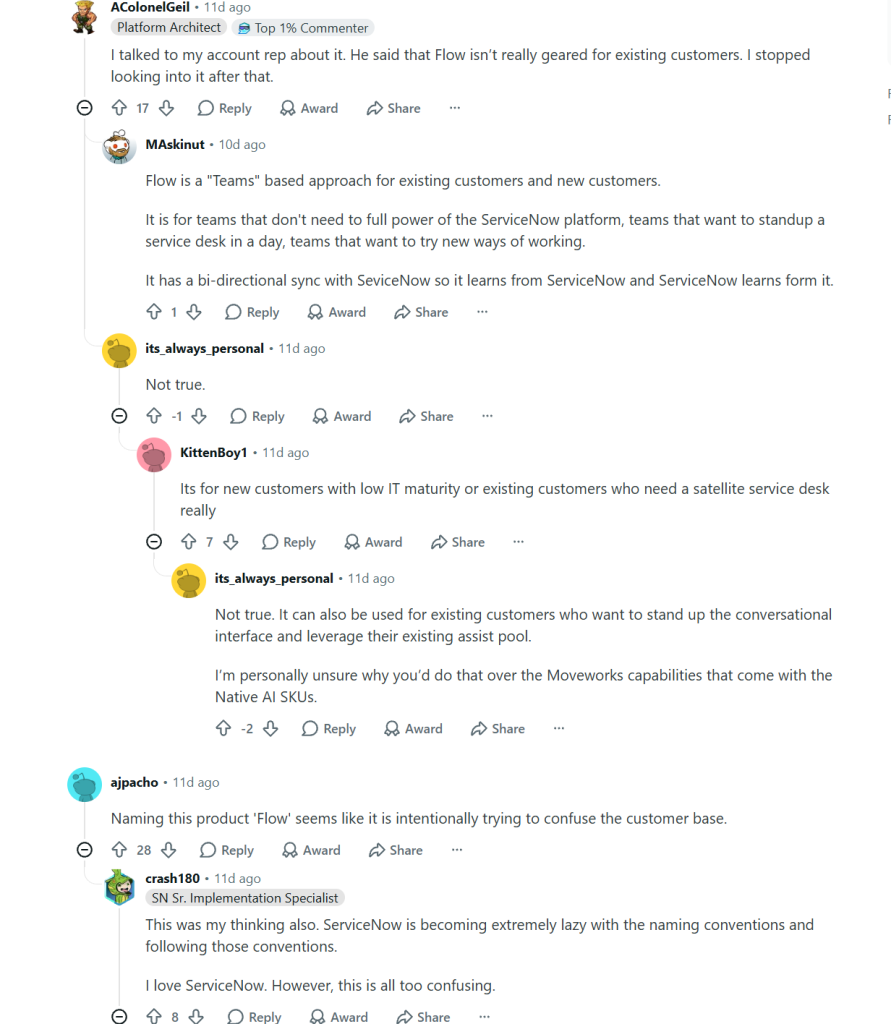
Early reactions show some confusion about who Flow is really for. In an r/servicenow thread, a platform architect said their account rep told them Flow wasn’t really aimed at existing customers, so they stopped looking into it.
Other commenters disagreed. One described Flow as a Teams-based option for both new and existing customers who don’t need the full platform. Another said it’s mainly for new customers with low IT maturity, or for existing customers who need a satellite service desk.
If you already run ServiceNow, ask your account team directly how Flow fits next to the licenses you own. Don’t assume the answer from marketing pages.
How much does Flow by ServiceNow cost?
| New Flow customers | Existing ServiceNow customers | |
|---|---|---|
| Free trial | 30 days, no credit card | 30 days, no credit card |
| Per conversation | $2 | 10 Assists |
| Per automation run | $1 | 5 Assists |
| Commitment | $10,000 a year, auto-renews, $1,000 top-ups | Assists you own or buy from your rep |
| How to buy | Credit card in the product, or through sales | Through your ServiceNow account team or partner |
Flow is free for 30 days with no credit card. After that, new customers pay $2 per conversation and $1 per automation run, with a $10,000 annual commitment. Existing ServiceNow customers pay with Assists, the AI usage credits they already own.
Source: Flow pricing page, checked November 6, 2026.
What counts as a conversation in Flow?
A conversation is one issue, and it’s charged once whether AI or a person handles it. That second part matters. You pay $2 for every issue that enters Flow, including the ones your agents resolve by hand.
Automations that run inside a conversation are free. The separate $1 charge applies only when an automation is triggered outside a conversation, such as through an API, MCP, or another agent.
ServiceNow hasn’t published a dollar value for an Assist. If you’re an existing customer, ask your rep what an extra Assist costs once your current pool runs out. Our guide to ServiceNow pricing covers how the main platform is licensed.
What Flow costs at different volumes
The table below is an illustration. It counts conversations only, with no automation runs outside conversations.
| Conversations per month | Conversations per year | Usage at $2 each | What you pay per year |
|---|---|---|---|
| 300 | 3,600 | $7,200 | $10,000 (annual minimum) |
| 417 | 5,004 | $10,008 | $10,008 |
| 800 | 9,600 | $19,200 | $19,200 |
| 1,500 | 18,000 | $36,000 | $36,000 |
The $10,000 minimum covers 5,000 conversations a year, or about 417 a month. Below that, you pay the full $10,000 anyway. Above it, cost rises in step with volume.
That makes the bill harder to forecast. An outage, an onboarding wave, or a rollout that gets more employees asking for help will all push it up. Per-agent pricing works the other way. Cost follows the size of your support team, not the number of requests, so it’s easier to budget when request volume swings.
What Flow by ServiceNow doesn't do (yet)
Flow is a chat-first service desk, not a full ITSM platform, and ServiceNow says so itself. Here’s what that means in practice.
- No change management, problem management, or CMDB. ServiceNow says teams that need these should stay on ServiceNow ITSM. Flow can pull asset context from a connected ServiceNow instance, but it doesn’t handle IT asset management on its own.
- Three employee channels. ServiceNow lists Slack, Microsoft Teams, and email. Phone and walk-up requests aren’t on that list.
- Every issue costs money. Flow charges the same $2 for a conversation a person handles as for one the AI resolves.
- Availability is still rolling out. Flow is in controlled availability. ServiceNow expects general availability in North America and Europe, the Middle East, and Africa (EMEA) in Q4 2026.
- Little independent proof so far. Flow launched on October 1, 2026. Review sites like G2 and Capterra don’t have meaningful user reviews yet, so most claims still come from ServiceNow.
Questions to ask before choosing Flow
- How many conversations will we have each month? Count current requests from email, chat, phone, and walk-ups, not just one channel.
- Do we need change approvals, problem management, or assets tied to requests? If yes, Flow alone won’t cover it.
- How will we track response and resolution times against our service level agreements (SLAs)? Check what reporting Flow gives you today.
- Who owns the systems Flow connects to? Setup speed depends on having admin access to each one.
- If we already run ServiceNow, how many Assists do we have left, and what does an extra Assist cost?
- Where will requests that don’t start in chat go?
Flow by ServiceNow alternatives
The five alternatives below take different routes to the same goal. Desk365 is a Teams-native helpdesk with per-agent pricing. Atomicwork and Serval are AI-native ITSM platforms. Console is an AI-native ITSM platform that Palo Alto Networks acquired in September 2026. Agentforce IT Service is Salesforce’s ITSM product. For a wider list, see our roundup of ServiceNow alternatives.
| Tool | Chat channels | Service desk depth | Pricing model | Starting price |
|---|---|---|---|---|
| Flow by ServiceNow | Teams, Slack, email | Requests and incidents in chat, no change management or CMDB | Per conversation | $10,000/year minimum |
| Desk365 | Teams, email, portal, web form | Ticketing, SLAs, change approvals, IT asset management | Per agent | Free plan, paid from $12/agent/month |
| Atomicwork | Teams, Slack, voice, email, portal | Full ITSM, IT asset management, CMDB | Usage or outcome based | From $25,000/year |
| Serval | Slack, Teams, email, phone, portal | Full ITSM, asset management, CMDB, access management | Pilot, then custom proposal | Not published |
| Console | Slack (others not documented) | Ticketing, workflow automation, access governance, asset management | Not published | Not published |
| Agentforce IT Service | Slack, Teams, email, web, voice | Full ITSM with incident, problem, and change management and CMDB | Per user, plus AI credits | $75/fulfiller/month, $15/requester/month |
1. Desk365
Desk365 is a helpdesk built to run inside Microsoft Teams, with email, a support portal, and web forms as extra channels. It’s the closest fit for organizations that already live in Microsoft 365 and want a cost they can budget for.
Flow is a chat layer that bills per issue. Desk365 is a full Microsoft Teams ticketing system billed per agent, with unlimited end users. Your bill doesn’t change when more employees start asking for help.
What you get:
- Tickets created from Teams messages, a support bot for employees, and an agent bot so technicians can work without leaving Teams
- SLA management with reminders and escalations, plus workflow automation
- Change and approval management on the Plus plan
- IT asset management on Premium, with Microsoft Intune sync, software license tracking, and depreciation
- AI Copilot on Plus and Premium that drafts replies, summarizes tickets, and turns conversations into help articles
- An AI Agent that answers questions inside Microsoft Teams, your support portal, or your website, and escalates to a ticket when a person is needed
Pricing: A free plan covers up to 50 tickets a month. Paid plans are $12 (Standard), $22 (Plus), and $32 (Premium) per agent per month, billed annually. The AI Agent includes 100 free credits a month on Plus and 200 on Premium, and extra credits cost $50 per 1,000. Every paid plan has a 21-day free trial.
For a sense of scale, five agents on Plus cost $1,320 a year. On Premium, the same team costs $1,920 a year. Neither figure includes AI Agent credits beyond the free monthly allowance. This isn’t a like-for-like comparison with Flow. Flow’s price includes AI resolution. Desk365’s AI Agent runs on credits, with a free monthly allowance on Plus and Premium.
The trade-off: Desk365 doesn’t support Slack. If your company runs on Slack, Flow or another tool on this list will suit you better.
2. Atomicwork
Atomicwork is an AI-native ITSM and enterprise service management (ESM) platform. It runs AI “coworkers” on its own service desk, or on top of ServiceNow or Jira Service Management (JSM) without a migration.
Unlike Flow, Atomicwork includes full ITSM, IT asset management, and a CMDB. It works in Teams and Slack, plus voice, email, and a portal.
Pricing: The Professional plan starts at $25,000 a year for up to 250 end users, with two AI coworkers and 25,000 credits. Outcome-based plans charge $1 per knowledge answer (minimum 25,000 outcomes a year), $2 per access request (minimum 12,000 outcomes a year), and from $3 per service resolution (minimum 8,000 outcomes a year). Running Atomicwork on top of ServiceNow or JSM has no platform fee, and you pay per outcome.
Atomicwork suits mid-size companies that want full ITSM with AI built in. If the $25,000 entry price is too high, there are cheaper Atomicwork alternatives.
3. Serval
Serval is an AI-native ITSM platform that positions itself as a ServiceNow replacement. It covers requests, incidents, problems, changes, HR journeys, hardware and software assets, and a CMDB.
Its standout feature is Catalyst, an agent that reviews ticket history, finds repeat requests, and drafts automations for admins to review and publish. Catalyst became generally available in August 2026. A separate help desk agent resolves employee requests in Slack, Microsoft Teams, email, or phone, using only the workflows admins have approved.
Serval can also run as an automation layer on top of your existing ITSM, so you can automate requests before you migrate. Pricing isn’t published. Every engagement starts with a pilot, and Serval then builds a custom proposal. The company raised a $150 million Series C at a $3 billion valuation in October 2026.
Serval suits fast-growing, tech-forward companies that are ready to replace their ITSM.
4. Console
Console is an AI-native ITSM platform. It covers ticketing, workflow automation written in plain language, access governance, and asset management. Its assistant handles routine requests such as password and MFA resets, app access, and onboarding, and it started out inside Slack.
Palo Alto Networks announced its acquisition of Console on September 1, 2026, and plans to bring the technology into Cortex, its AI security platform. Console’s website still sells the product through demos, and pricing isn’t published. Palo Alto Networks hasn’t shared a roadmap for Console as a standalone IT tool. Ask about long-term support before you sign a multi-year contract.
5. Agentforce IT Service
Agentforce IT Service is Salesforce’s ITSM product, built on the Salesforce Platform. Salesforce describes it as Slack-first and Teams-ready, with email, web, and voice channels as well.
It includes an IT service desk with incident, problem, and change management, AI agents, 100+ connectors, and an embedded CMDB. It became generally available in October 2025. In February 2026, Salesforce said more than 180 organizations had selected it within four months.
Pricing: Salesforce lists the IT Service Desk at $75 per fulfiller per month on the Enterprise Edition and $150 on the Unlimited Edition. AI agents for employees cost $15 per requester per month, and some advanced AI use draws on consumption credits.
Agentforce IT Service suits organizations that already run on Salesforce and Slack.
Is Flow by ServiceNow right for your team?
Flow makes sense if you have no service desk today, your requests are small in number and repeatable, and you’re comfortable with usage-based billing. It also fits ServiceNow customers with spare Assists and one team that needs its own desk now.
Look elsewhere if you need change management, asset tracking, or SLA reporting in one tool. The same goes if your request volume is high or growing, or if finance wants a fixed yearly number.
For Microsoft Teams organizations that want ticketing, SLAs, and IT assets in one place at a per-agent price, Desk365 is the more predictable option. Slack-first teams should start with Flow, Atomicwork, or Serval.
Frequently asked questions
There’s no new purchase, but usage isn’t free. Customers on a ServiceNow plan that includes AI can turn Flow on without a new procurement cycle. Each conversation still uses 10 Assists, and each automation run outside a conversation uses five.
No. Flow runs as a standalone product on its own cloud. Existing ServiceNow customers can connect it to their instance, but it isn’t required.
Yes. Employees can raise and resolve requests in Teams, Slack, or email. Agents reply from a web queue, and Flow posts the answer back in the employee’s thread.
ServiceNow says a team can be live in less than a day. You connect single sign-on, your Teams or Slack workspace, and your knowledge sources. It takes longer when the person setting it up isn’t the admin of those systems.
ServiceNow says a team can be live in less than a day. You connect single sign-on, your Teams or Slack workspace, and your knowledge sources. It takes longer when the person setting it up isn’t the admin of those systems.
Flow is in controlled availability now, and anyone can request access at letsflow.ai. ServiceNow expects general availability in North America and EMEA in Q4 2026.