TL DR;
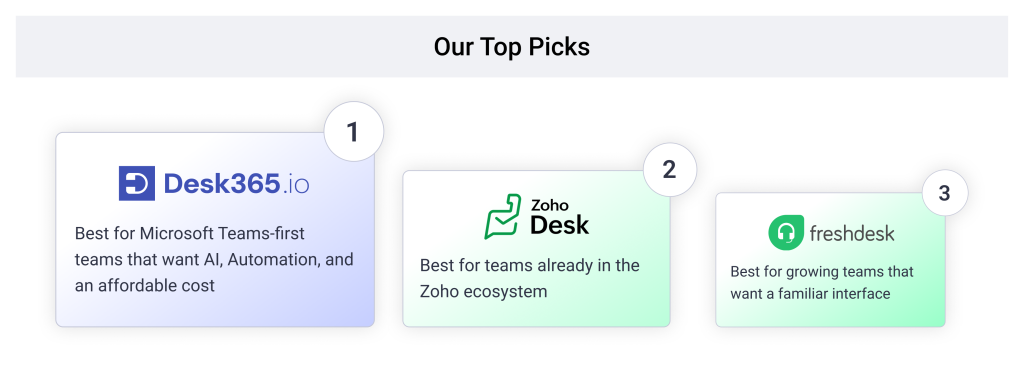
- Desk365: A Microsoft Teams-focused helpdesk with core ticketing features at up to 72% lower cost than Zendesk.
- Zoho Desk: Best for teams already in the Zoho ecosystem
- Freshdesk: Best for balanced ticketing without a steep learning curve
- Front: Best for shared-inbox collaboration across teams
- Help Scout: Best for small, email-first support teams
- Helpshift: Best for gaming and mobile-first player support
- Jira Service Management: Best for ITSM workflows
- ServiceNow: Best for enterprise governance and cross-department workflows
- Gorgias: Best for ecommerce support billed by ticket volume
- Intercom: Best for AI-first chat and messaging support
- HubSpot Service Hub: Best for support tied directly to CRM data
If you’re comparing Zendesk alternatives, you’re probably trying to solve one of three problems: the bill keeps climbing every renewal, support tickets to Zendesk itself take days to get answered, or your team spent a quarter on setup and still doesn’t trust the automations. This guide ranks 11 real alternatives against those three problems, using pricing pages plus current G2 and Capterra review data, not just a feature checklist.
Disclaimer
Full disclosure, we evaluated ourselves in this list. Desk365 sits at number one on price and Microsoft Teams support, and by our own comparison tool, teams can save up to 72% versus Zendesk with the same core features and better customer support. That said, we’ve called out a real limitation for every tool here, including ours: a smaller review sample, thinner reporting, and a real automation ceiling once workflows get complex. We’ve linked the reviews and pricing pages throughout so you can check our work.
How I ranked the best Zendesk alternatives
To rank these tools, we focused on what actually changes your monthly bill: whether automation and AI ship at the entry price or sit behind a pricier tier, and whether Microsoft Teams support is native or missing entirely, the same test worth applying to Zendesk itself. We weighed real G2 and Capterra ratings against where each platform’s own pricing page contradicts its marketing.
A tool that gated service level agreement (SLA) management, AI, or a real Teams integration behind a paid upsell ranked lower on transparency, even with a strong base feature set. That’s the exact pattern that pushes teams off Zendesk in the first place, so we didn’t let an alternative get away with it either.
A cheap-looking entry price that hides the features you actually need isn’t low. It’s just delayed.
All ratings are pulled from G2 and Capterra, current as of August 2026, and sourced throughout this guide, not composite scores we invented.
| Alternative | Best for | G2 rating | Starting price | Free trial |
|---|---|---|---|---|
| Desk365 | Microsoft Teams-first support teams | 4.9/5 | $12/agent/month | 21 days |
| Zoho Desk | Teams already using the Zoho ecosystem | 4.4/5 | $14/agent/month | 15 days |
| Freshdesk | Balanced ticketing without a steep learning curve | 4.4/5 | $15/agent/month | 14 days |
| Front | Shared-inbox collaboration across teams | 4.7/5 | $19/user/month | 7 days |
| Help Scout | Small, email-first support teams | 4.4/5 | $20/user/month | 15 days |
| Helpshift | Gaming and mobile-first player support | 4.3/5 | $150/month for 250 issues | Demo on request |
| Jira Service Management | ITSM workflows for IT and engineering | 4.3/5 | Free up to 3 agents; paid from $20/agent/month | 7 days |
| ServiceNow | Enterprise governance and cross-department workflows | 4.5/5 | Custom quote, typically $10,000+/year | Demo on request |
| Gorgias | Ecommerce support billed by ticket volume | 4.6/5 | Volume-based, from $10/month | 7 days |
| Intercom | AI-first chat and messaging support | 4.5/5 | $29/seat/month (annual) | 14 days |
| HubSpot Service Hub | Support tied directly to CRM data | 4.4/5 | Free tier; paid from $15/seat/month | Free plan available |
11 best Zendesk alternatives for your business
1. Desk365, best for Microsoft Teams-first support teams

4.9/5

4.9/5
If your support requests already start in Microsoft Teams and you want ticketing where the work actually happens, Desk365 is the best Zendesk alternative for that job. It’s built for internal IT and shared services teams that care about adoption and simplicity: tickets get created, assigned, and resolved without agents ever leaving Teams for a separate portal. By Desk365’s own pricing comparison, teams switching from Zendesk save up to 72% while keeping the same core features and getting better customer support. That, plus not gating support access behind a higher plan, is why it sits at number one here.
Why I chose Desk365 to lead this list
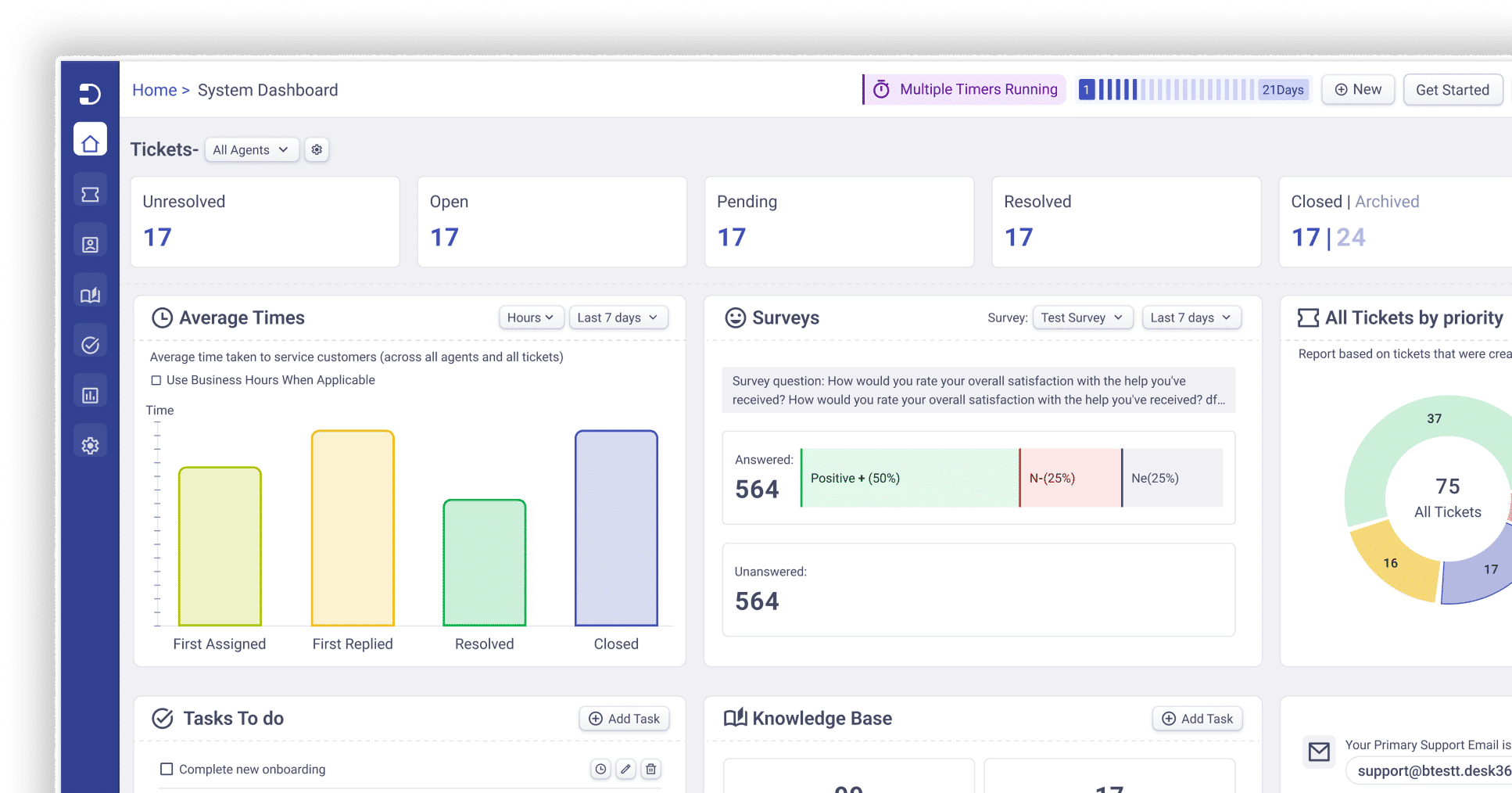
Desk365 is an AI-powered helpdesk built natively for the Microsoft 365 ecosystem, especially Microsoft Teams, enabling organizations to manage support tickets, assets, and service workflows without leaving Teams. Its deep Teams integration lets users and agents create, update, assign, and track tickets conversationally through bots, while omnichannel channels like email, portal, and web forms are unified into one system. AI-powered ticketing automates classification, prioritization, and response drafting to boost productivity, and built-in ITSM capabilities such as asset management, knowledge base, SLAs, and workflow automation provide a complete service desk. Desk365 is often a better alternative for Microsoft-centric organizations.
Desk365 features:
1. Desk365 AI
Build and deploy multiple AI Agents trained on your knowledge to chat with customer, answer repetitive questions and deflect L1 tickets. Deploy your AI Agents on your websites, support portal and more. Along with an AI Copilot that supports your human agents in the background by drafting replies, summarizing tickets, and generating knowledge base articles, your team can focus on complex issues.
2. IT Asset Management
Track and manage hardware, software, consumable and all IT assets in one place. Link assets directly to tickets for instant context, maintain clean inventory records, and manage the full asset lifecycle as your operations scale.
3. Helpdesk Security & Compliance
Protect customer and organizational data with advanced security controls built into Desk365. Features like data redaction, advanced encryption, audit logs, and access controls help teams stay HIPAA compliant and ensure sensitive information is handled securely.
4. Automations
5. Round-robin ticket assignment
To ensure a balanced workload, Desk365 includes a round-robin ticket assignment feature. This automatically distributes tickets to agents in a balanced way, improving response times and preventing any one agent from becoming overwhelmed.
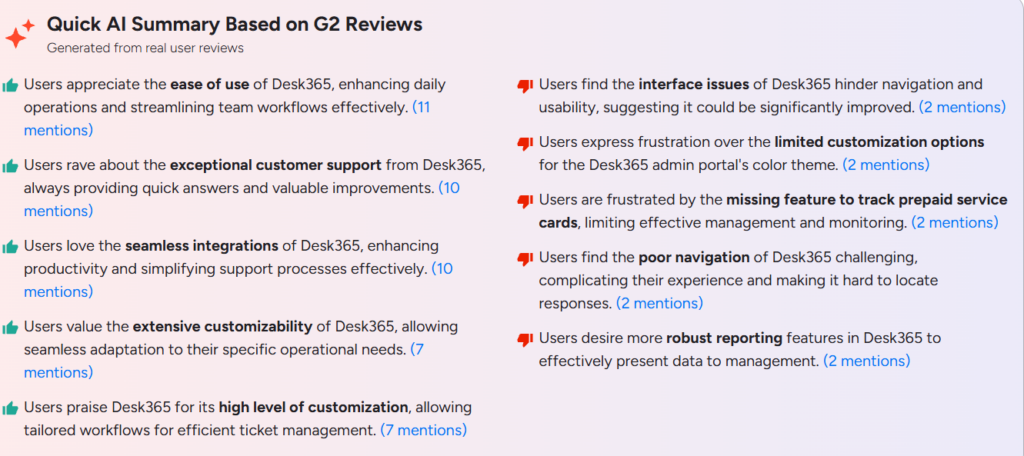
What customers are saying about Desk365
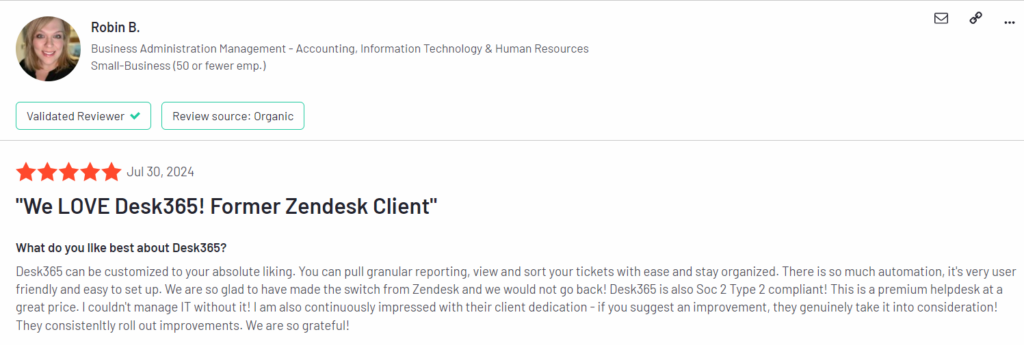
Here’s what a former Zendesk client had to say about Desk365 on G2.
Pros
Easy to use
Great customer support
Smooth integrations with other tools
Highly customizable
Helps create efficient ticket workflows
Cons
Reporting features are not strong enough
Limited color/theme customization in admin portal
Pricing:
Lowest Paid Plan: $12/agent/month
Highest Paid Plan: $32/agent/month
Free trial available.
2. Zoho Desk, best for teams already in the Zoho ecosystem
4.5/5
4.4/5
Why I'd consider Zoho Desk
Zoho Desk is the strongest fit if your team already runs on Zoho CRM, Zoho Books, or other Zoho apps, since ticket context pulls directly from those tools without custom integration work. It also carries the largest review base of any tool on this list, which makes its 4.4 average genuinely load-bearing.
Zoho Desk key features
- Zia, an AI assistant that handles sentiment analysis, anomaly detection, and reply suggestions
- Multi-department ticket management with workflow automation and assignment rules
- Self-service portal and knowledge base built into every plan
Pros
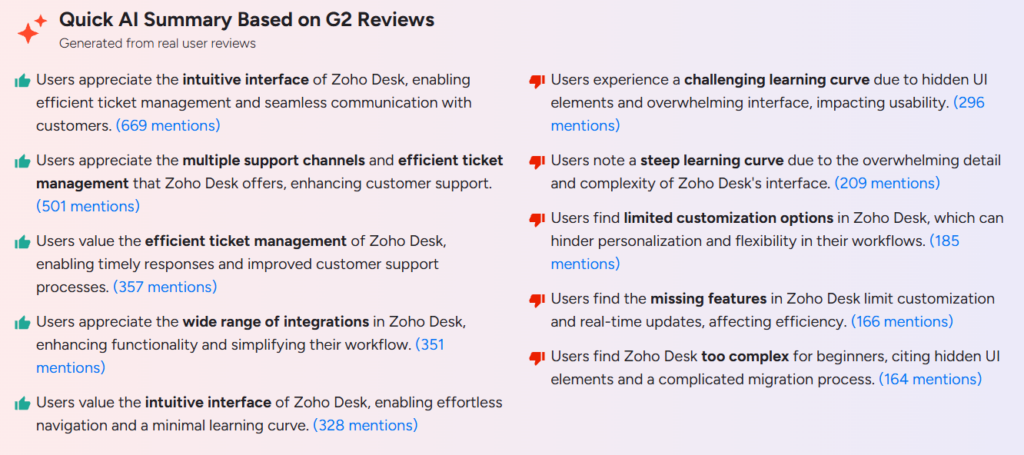
Intuitive and easy-to-use interface
Supports multiple support channels
Efficient ticket management
Many integrations with other tools
Helps teams respond faster
Cons
Steep learning curve for beginners
Interface can feel complex/overwhelming
Some customization options are limited
Missing some advanced or real-time features
Pricing:
Standard: $14/user/month
Professional: $23/user/month
Enterprise: $40/user/month
3. Freshdesk, best for balanced ticketing without a steep learning curve
4.5/5
4.4/5
Why I'd consider Freshdesk
Freshdesk sits in the same category as Zendesk in terms of what it covers: email, chat, portal, and phone in one system, with automation and reporting baked into the core plans rather than sold as add-ons. It’s the closest like-for-like swap for a team that wants Zendesk’s breadth without Zendesk’s price curve.
Freshdesk features
- Omnichannel ticketing across email, chat, and self-service portal
- AI chatbots for basic deflection and routing
- SLA management and workflow automation available from the entry-level paid tier
Pros
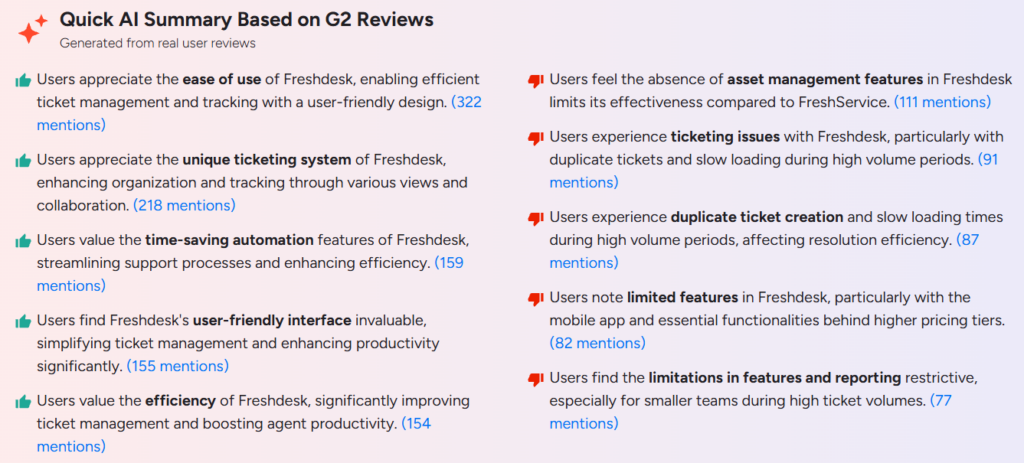
- Easy to use and user-friendly
- Strong ticketing system with multiple views
- Good automation that saves time
- Improves team efficiency and productivity
- Well-designed interface
Cons
- No built-in asset management
- Duplicate tickets and slower loading at high volume
- Some features limited or behind higher pricing tiers
- Mobile app has limited functionality
- Reporting and advanced features can feel limited
Pricing:
Growth: $19/agent/month
Pro: $55/agent/month
Enterprise: $89/agent/month
4. Front, best for shared-inbox collaboration across teams
4.5/5
4.6/5
Why I'd consider Front
Front is built around a shared inbox rather than a traditional ticket queue, which suits teams where support, sales, and account management all need visibility into the same customer conversation without switching tools. It’s the strongest option here for cross-functional teams specifically, not just support agents.
Front features:
- Shared inbox with assignments, internal notes, and visibility into who’s handling what
- Rules-based automation for incoming messages across email, chat, and social channels
- CRM-style context alongside each conversation
Pros
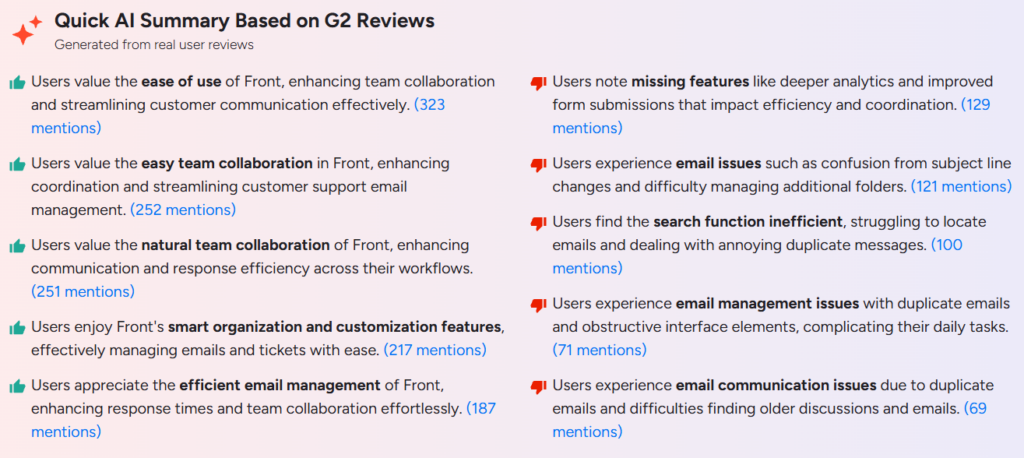
Easy to use
Great for team collaboration
Helps organize emails and tickets well
Customizable workflows
Efficient email management and faster responses
Cons
Missing some advanced features (like deeper analytics/forms)
Email issues (duplicate emails, subject confusion)
Search function is weak
Interface can feel cluttered
Hard to find older emails and discussions
Pricing
- Starter: $19/user/month
- Growth: $59/user/month
- Scale: $99/user/month
- Premier: $229/user/month
Learn more about Front
5. Help Scout, best for small, email-first support teams
4./5
4.4/5
Why I'd consider Help Scout
Help Scout strips out the complexity that Zendesk and Freshdesk carry by design. There’s no sprawling admin panel to configure. It’s a shared inbox with a knowledge base attached, and reviewers consistently rate it highest on the exact thing small teams need most: getting live in minutes, not weeks.
Help Scout features:
- Shared inbox with saved replies, collision detection, and simple workflows
- Built-in knowledge base to deflect repeat questions before they become tickets
- Fast, guided onboarding that most teams complete without vendor help
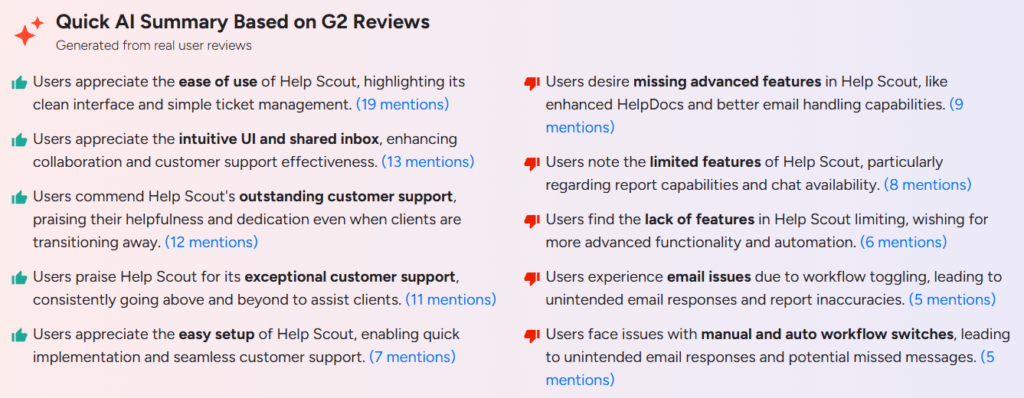
Pros
Easy to use with a clean interface
Intuitive UI and shared inbox for teamwork
Excellent customer support
Helpful and dedicated support team
Quick and easy setup
Cons
Missing some advanced features
Limited reporting and chat features
Lacks deeper automation and functionality
Pricing:
- Standard: $20/user/month
- Plus: $40/user/month
- Company: $65/user/month
6. Helpshift, best for gaming and mobile-first player support
3.9/5
4.3/5
Why I'd consider Front
Helpshift is an AI-native player engagement platform built specifically for gaming studios and live-service titles, and part of Keywords Studios. Its flagship agentic AI, Care AI, is deployed as a team of specialists, each configured with its own role, approved knowledge, personality, and guardrails, covering issues like missing rewards, ban appeals, purchase failures, and game-breaking bugs.
Care AI resolves more than 70% of player conversations autonomously, which means support teams can handle high volumes without scaling headcount. Anything it should not handle alone escalates to a human agent with full context attached.
If your team runs gaming or mobile app support and wants a Zendesk alternative built around player experience rather than generic ticketing, Helpshift is designed for exactly that. It works with 500+ game studios across 2bn+ devices.
Helpshift features:
- Care AI: Resolves 70%+ of player conversations end to end, grounded in the studio’s own approved knowledge.
- Native in-game SDK: Lets players get support directly inside the game across mobile, web, PC, and console.
- QR code console-to-mobile handoff: Moves console players to mobile with full context, no re-authentication, and no lost conversation history.
- Care AI Agent Analytics: Native dashboard tracking Issues Resolved, CSAT, Time to Resolve, Time to First Response, Reopen Rate, and Issue Touches.
- Human Services: Gaming specialists handling escalations, VIP care, and quality oversight alongside the AI agents.
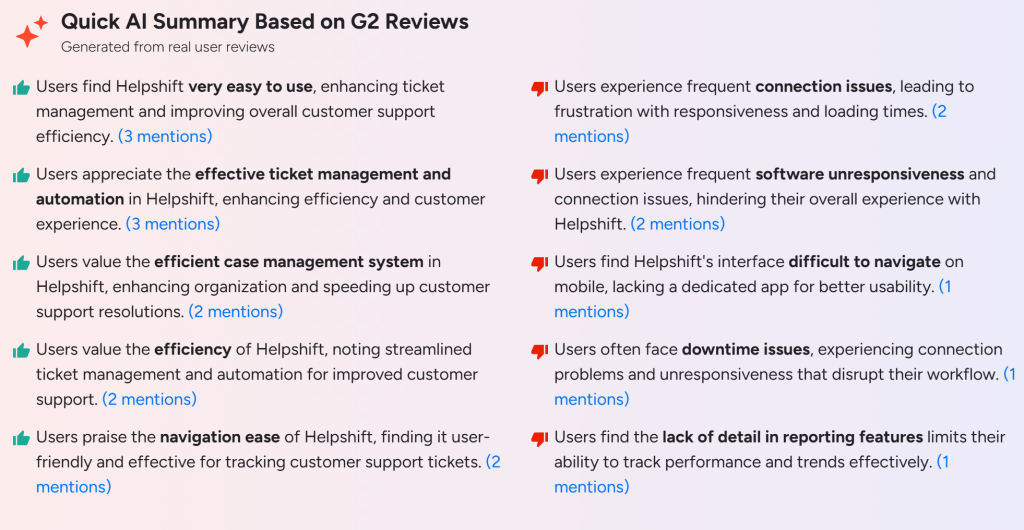
Pros
- Very easy to use, with a clean interface for tracking and managing support tickets
- Strong ticket management and automation that improves team efficiency
- Purpose-built for gaming with deep domain AI knowledge
- Patented console-to-mobile handoff that no other platform offers
- Per-issue pricing that scales well with seasonal volume spikes
Cons
- Gaming only, not suitable for teams outside gaming or mobile apps
- Frequent connection and responsiveness issues reported by some users
- Reporting features lack depth for tracking performance trends
- Mobile interface is harder to navigate and there is no dedicated mobile app
Pricing:
Helpshift uses a price-per-issue model with unlimited agent seats and no per-channel fees. The Starter plan covers 250 issues a month at $150, with overages charged at $0.45 per issue. Growth and Enterprise plans are priced on custom contracts based on volume and selected modules.
7. Jira Service Management, best for ITSM workflows
4.4/5
4.3/5
Why I'd consider Jira Service Management
If your team already lives in Jira and Confluence, Jira Service Management extends that same environment into formal ITSM processes: incident management, change control, and approval flows, without asking IT and engineering to adopt a separate tool.
Jira Service Desk Management features
- Built-in incident, problem, and change management workflows
- Native integration with Jira Software and Confluence
- Customizable SLAs, queues, and request forms
Pros
- Intuitive self-service portal for end users
- Seamless integration with Jira Software and Confluence
- Customizable workflows, SLAs, and automation
- Strong queue and dashboard reporting
- Well suited to teams already on Atlassian tools
Cons
- Steep learning curve for beginners
- Complex initial setup
- Interface can feel complex or overwhelming
- Migration from another platform can take longer
- Heavier than needed for teams without formal ITSM needs
AI Summary of Jira Service Management reviews on G2
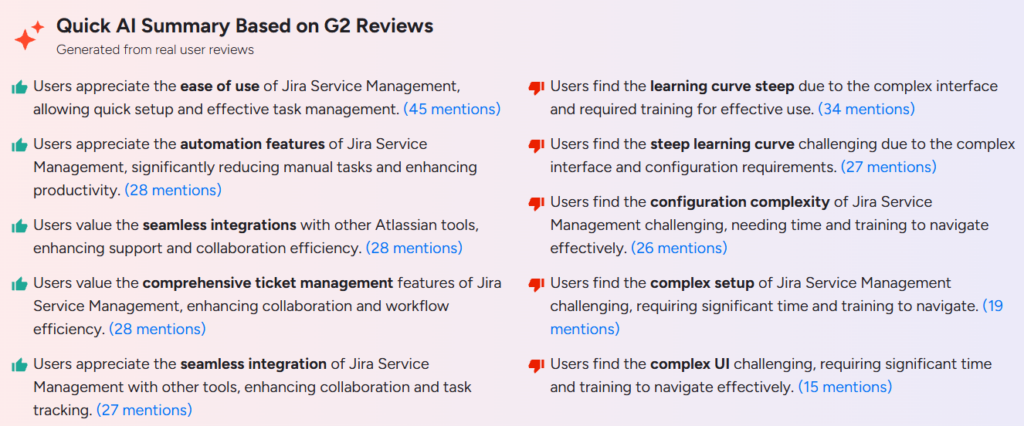
Read more about Jira Service Management reviews on G2
Pricing:
Free: Forever free plan (up to 3 agents)
Standard: $20/agent/month
Premium: $45/agent/month
Enterprise: Custom plan
Learn more about Jira Service Management
8. ServiceNow, best for enterprise governance and cross-department workflows
4.5/5
4.4/5
Why I'd consider ServiceNow
ServiceNow is built for large organizations that need IT, HR, facilities, and legal all running structured workflows on the same governed platform, with the compliance and audit controls that come with that scale. It’s the only tool on this list currently ranked the #1 Leader in its own G2 category.
ServiceNow features
- Enterprise ITSM with configuration management database (CMDB) for asset and dependency tracking
- Workflow automation that spans departments, not just support tickets
- Strong governance, audit, and compliance tooling built for regulated industries
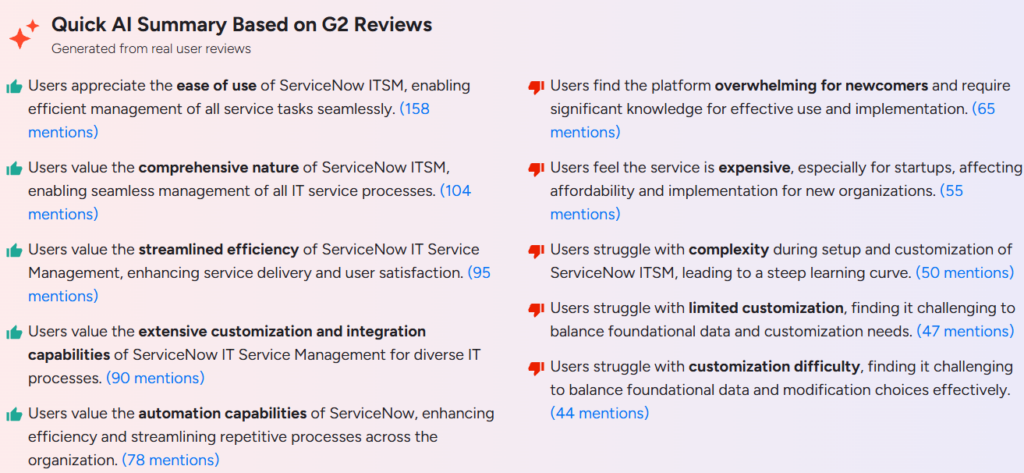
Pros
- Centralizes IT services in one governed platform
- Very comprehensive and powerful platform
- Improves efficiency and service delivery at scale
- Strong automation and CMDB features
- Highly customizable with many integrations
Cons
- Expensive, especially for small companies
- Complex and overwhelming for beginners
- Difficult setup and customization
- Steep learning curve
- Needs significant expertise to implement
Pricing
Custom quote-based pricing only
Learn more about ServiceNow
9. Gorgias, best for ecommerce support billed by ticket volume
4.6/5
4.6/5
Why I'd consider Gorgias
Gorgias is purpose-built for ecommerce, with deep native integrations into Shopify and similar platforms so agents can see order history and process returns without leaving the ticket. It’s tied with Front as the highest G2 score on this list among general support platforms.
Gorgias features
- Native Shopify, Magento, and ecommerce platform integrations
- Multi-channel inbox covering email, chat, and social
- Pricing tied to ticket volume rather than agent seats
Pros
Easy to use and quick to set up
Strong Shopify integration
Good automation for support tasks
Helpful customer support
Simplifies customer service workflows
Cons
Expensive for some businesses
Missing some features (CRM, integrations)
Limited reporting and integrations
Setup can have a learning curve
Ticketing glitches and add-on costs
Pricing
Pricing depends on ticket volume rather than per-seat, which makes it attractive when volume patterns are predictable.
10. Intercom, best for AI-first chat and messaging support
4./5
4.5/5
Why I'd consider Intercom
Intercom rebranded itself as Fin in May 2026 around its AI agent of the same name. Weeks later, on June 15, 2026, Salesforce signed a definitive agreement to acquire the company for approximately $3.6 billion. As of this writing, the deal is signed but not closed, with Salesforce targeting a close in the fourth quarter of its fiscal 2027, subject to regulatory approval. Whatever happens with the acquisition, Fin’s resolution rate is real and well-documented, making Intercom the strongest AI-first pick here for teams whose primary channel is chat, not email or Teams.
Intercom features
- Fin AI agent, billed separately from seats, for autonomous conversation resolution
- Modern in-app messenger widget built for proactive, chat-first support
- Workflow automation and a public help center on every seat-based plan
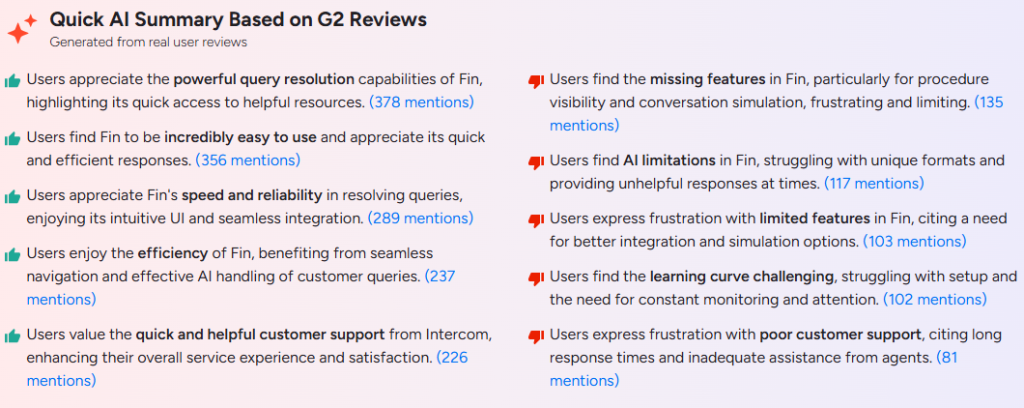
Pros
- Modern, easy-to-use messenger interface
- Strong Fin AI resolution quality
- Wide range of integrations (Slack, HubSpot, Salesforce, and more)
- Good for proactive, chat-first engagement
- Scales well for growing SaaS teams
Cons
Pricing is high compared to alternatives
Per-resolution AI fees make the bill hard to predict
Nearly every advanced feature sits behind an upsell
No permanent free plan
Initial configuration can feel complex
Pricing
Essential: $29/seat/month (annual)
Advanced: $85/seat/month (annual)
Expert: $132/seat/month (annual)
Plus $0.99 per Fin AI resolved conversation
Learn more about Intercom
11. HubSpot Service Hub, best for support tied directly to CRM data
4.4/5
4.4/5
Why I'd consider HubSpot Service Hub
HubSpot Service Hub makes sense when your support team needs the same customer record your sales and marketing teams see, since tickets, deals, and marketing history live in one CRM rather than three disconnected tools. It’s the only tool on this list where that CRM tie-in is the product, not an integration bolted on afterward.
HubSpot Service Hub features
- Tickets tied natively to HubSpot’s CRM contact and deal records
- AI-powered support tools (Breeze) for drafting and summarizing
- Free tier available for up to two users before you need a paid seat
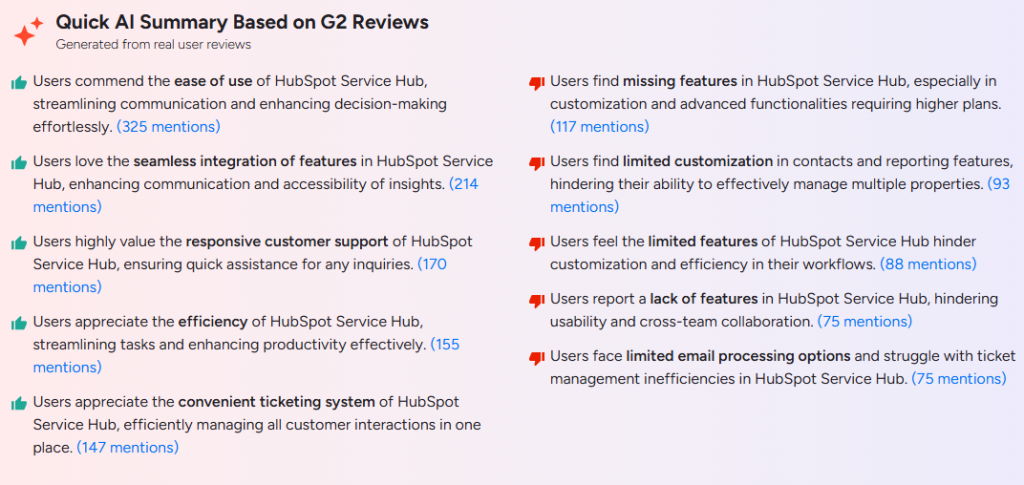
Pros
- Tickets tied directly to CRM contact and deal data
- One platform for tickets, chat, and reporting
- Useful free tier for very small teams
- AI drafting and summarizing tools included
- Familiar interface for teams already on HubSpot
Cons
- SLA management weaker than dedicated ITSM tools
- Ticket collaboration less deep than Jira Service Management
- Mandatory onboarding fee at the Professional tier
- Professional and Enterprise pricing scales quickly
- Best value tied to already using HubSpot’s CRM
Pricing
- Free tier: $0/month (up to 2 users)
- Starter: from $15/seat/month
- Professional: from $90/seat/month, plus a $1,500–$3,500 one-time onboarding fee
Learn more about HubSpot Service Hub
What are the considerations for choosing the best Zendesk alternatives?
Match the tool to where your support actually happens, not to the longest feature list or the highest star rating in isolation. A team drowning in Microsoft Teams messages doesn’t need Gorgias’s Shopify integrations, and an ecommerce brand doesn’t need Jira’s change-management workflows.
Then read the review data the way you’d read a reference check: what do reviewers agree on, and what’s the honest trade-off they keep repeating? Every tool on this list has one.
Desk365 trades deep reporting for setup speed, and by its own pricing comparison, teams switching from Zendesk save up to 72% while keeping the same core features and getting better customer support. Intercom trades AI quality for a hard-to-predict bill. ServiceNow trades implementation time for governance most teams don’t need yet. Pick the trade-off you can live with, not the one with zero complaints, because that tool doesn’t exist.
Frequently asked questions
There isn’t a single best option, since the right pick depends on where your team actually works. Desk365 is the strongest fit for Microsoft Teams-first internal IT and support teams, and by its own pricing comparison, teams switching from Zendesk save up to 72% while keeping the same core features and getting better customer support. Freshdesk and Zoho Desk suit general-purpose ticketing on a budget, and Front or Help Scout fit smaller, collaboration-first teams.
Desk365 has the lowest entry price on this list at $12 per agent per month, followed by Zoho Desk at $14. By Desk365’s own comparison against Zendesk, switching teams save up to 87% while keeping the same core features and getting better customer support. Jira Service Management and HubSpot Service Hub both offer usable free tiers if your team is small enough to stay within their limits.
Yes. Desk365 is built natively for Microsoft 365 and Microsoft Teams, letting agents create, update, and resolve tickets without leaving Teams.
By G2 review volume and score together, Zoho Desk (4.4/5 across 7,838 reviews) and Intercom (4.5/5 across 3,720 reviews) carry the most statistically meaningful ratings. By score alone, Desk365 (4.9/5) and Front (4.7/5) rate highest, though Desk365’s sample is far smaller.
The most common reasons are rising per-agent costs as teams scale, features locked behind higher-priced tiers, inconsistent vendor support, and a setup process that takes longer than the sales demo suggested.



 AI Agent
 Asset Management
 Knowledge Base
 Automations
 SLAs
SLAs
 Customization
 Ticket Assignment
 Reports & Analytics
 Approval Management
 Helpdesk Security
 Explore All Features
 Banking and Finance
 Healthcare
 MSP
MSP Government
  Non Profit
 IT Services
 Customer Support
 Human Resources
 Facilities