TL;DR - Best Internal ticketing systems
- Best overall for Microsoft 365 organizations: Desk365. Employees raise and track tickets inside Microsoft Teams on every plan, starting at $12 per agent per month.
- Best value for a full ITSM toolset: InvGate Service Management, at $500 per agent per year on its Pro plan.
- Best flat pricing for small IT teams: Jitbit, with tiers from $29 per month that include several agents.
- Best for deep ITSM and CMDB: SysAid or Halo, if your team needs change management, discovery, and a CMDB from day one.
- Best if you also need RMM and patching: Atera, priced per technician with unlimited devices.
Most internal IT teams don’t have a ticket problem. They have an intake problem. Requests show up as Teams messages, forwarded emails, and a quick “got a minute?” at someone’s desk. None of it gets logged, so nobody can see the real workload, and the same password reset gets solved five times a week.
An internal ticketing system fixes that by giving every employee request one front door and one queue. The hard part is picking a tool that fits.
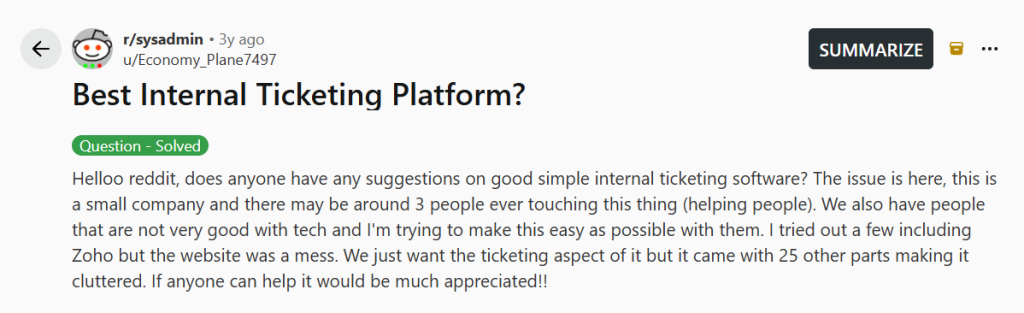
One r/sysadmin post sums up the problem well. The admin worked at a small company where about three people would ever handle tickets, and many employees weren’t comfortable with tech. They tried a few tools, including Zoho, and walked away frustrated: “We just want the ticketing aspect of it but it came with 25 other parts making it cluttered.”
That’s the trade-off most IT teams face. Enterprise ITSM suites take months to set up. Customer support tools are built for outside customers, not employees. This list sits in between.
We looked at seven mid-market tools that IT managers actually shortlist. For each one, we checked the public pricing page, how employees raise tickets, whether asset management is included, and what it costs once you add the features most IT teams need.
How we ranked these internal ticketing systems
We focused on what matters to an IT manager running a team of 2 to 50 agents:
- Employee intake. Can employees raise and track tickets where they already work, especially in Microsoft Teams? Is it included or an add-on?
- IT depth. Does the tool include asset management, approvals, and SLAs, or will you need a second product?
- Setup effort. Can a small team get it running without a consultant?
- Real price. What does it cost once the features above are switched on?
We reviewed each vendor’s public pricing and feature pages in October 2026. Prices change often, so check the linked pages before you buy.
Pros and cons for each tool come from real G2 reviews, and each one links to the review it came from. We used reviews about internal or employee ticketing where we could find them. Ratings are each product’s overall G2 rating as of October 2026.
Disclaimer
Desk365 is our product, and we put it first. We’ve also listed a real limitation for every tool, including ours, and linked to each vendor’s pricing page so you can check our work. Read more about our review methodology.
Internal ticketing systems compared
| Tool | Best for | Starting price | Microsoft Teams ticketing | Asset management | Key consideration |
|---|---|---|---|---|---|
| Desk365 | Microsoft 365 organizations that want core ITSM without a long rollout | $12/agent/month | Yes, every plan | Premium plan, with Intune sync | Approvals need Plus, asset management needs Premium |
| InvGate Service Management | Full ITSM at a mid-market price | $500/agent/year (Pro) | Pro plan and above | Through InvGate Asset Management | Teams and change management start at Pro |
| Jitbit | Small IT teams that want flat pricing | $29/month (1 agent) | Yes, Teams bot on all plans | Built in | Lighter ITSM depth |
| HappyFox Service Desk | Teams that want ITSM modules with asset limits | $69/agent/month (Team) | Through the Assist AI add-on | 500 assets on Team, 2,000 on Pro | AI, Teams, and workflows are add-ons |
| SysAid | AI-heavy ITSM with CMDB | $89/agent/month (Professional) | Yes, included | 250 assets included, CMDB | Highest entry price per agent here |
| Halo | Mature ITSM with everything in one license | £66/agent/month (UK list) | Yes, Teams bot | CMDB and discovery included | Paid onboarding package required |
| Atera | IT teams that also need RMM and patching | $149/technician/month | Through third-party connectors | Device inventory through its RMM agent | Expensive if you only need ticketing |
7 best internal ticketing systems for IT teams

4.9/5

4.9/5
Desk365 is the best SolarWinds Service Desk alternative for IT teams that work in Microsoft 365 and want asset management without a second tool. It is built for Microsoft Teams, so employees raise tickets in Teams and agents work them there too. Microsoft Teams ticketing is on every plan, including the $12 Standard plan.
Why Desk365 leads this list
Desk365 is built around Microsoft Teams. Employees raise tickets, check their status, and get updates from a Teams bot, so they don’t need to learn a new portal or remember a support email address. IT agents can work tickets from Teams too. That matters for adoption, because the request that used to arrive as a Teams DM now becomes a tracked ticket in the same place.
The second reason is price. Teams ticketing, email ticketing, SLAs, automation, a knowledge base, and reporting are all on the $12 Standard plan. Most tools on this list either charge more per agent or sell Teams support as an add-on.
How Desk365 handles internal IT support
Internal IT support requests. Employees can report incidents, ask for access, request hardware, or raise any IT issue through Microsoft Teams, email, a self-service portal, a web form, or a web widget. Every request lands in one queue, so your team works from a single list no matter where the request started.
Microsoft Teams ticketing. The Desk365 Support Bot lets employees create tickets and get push updates inside Teams. Agents can turn any Teams message into a ticket, and the Agent Bot lets them reply, add notes, and change ticket status without leaving Teams. Desk365 can also notify an employee through Teams when their ticket changes. All of this is included on every paid plan.
Centralized ticket management for IT, HR, and operations. IT doesn’t have to be the only team using it. HR, facilities, and operations can run their own groups, ticket forms, categories, and business hours inside the same helpdesk. Employees still use one place to ask for help, and each team only sees the work assigned to it.
Workflow automation. Automation rules act on ticket creation and ticket updates, so you can route by category, set priority, and send notifications without touching each ticket. The Plus plan adds round-robin and load-based assignment, time-based automations, and approval workflows for changes and access requests. For anything outside the helpdesk, Desk365 connects to Microsoft Power Automate.
ITSM capabilities. Desk365 covers the IT service management practices most mid-sized IT teams run day to day, without the setup of a full ITSM suite:
- Incident management. Every reported issue becomes a ticket with a priority, an owner, and an SLA timer. Escalation alerts fire before a breach, and agents can merge duplicate reports of the same outage into one ticket.
- Service request management. Custom ticket forms with multi-level fields let you build separate request types, such as new laptop, software install, or access to a shared drive. Each form collects the details IT needs up front.
- Change and approval management. On the Plus plan, you can attach approval workflows to tickets. Approvals can run in sequence, like a department head signing off on budget before the IT manager confirms stock, or in parallel, where everyone or anyone must approve. Closure rules can stop a ticket from being resolved until its approvals are complete, and every decision is logged.
- Asset-linked troubleshooting. On Premium, agents can attach a laptop, server, or software license to a ticket and see its owner and history while they work. That ties incidents back to the devices behind them.
- Routine and scheduled work. Premium supports scheduled ticket creation for recurring jobs, like monthly patch checks or quarterly access reviews. The Plus plan adds task checklists inside tickets, ticket watchers, and time tracking.
- Audit trail. Premium includes audit logs that record actions across the helpdesk, which helps when you need to show how a change or access request was handled.
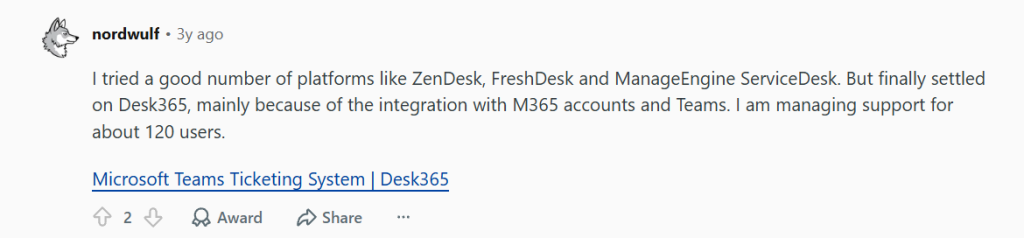
What a Reddit user says about moving from SolarWinds to Desk365
In the same r/sysadmin thread about internal ticketing platforms, one IT admin shared what they picked after testing several tools:
Cons
- The page sometimes doesn’t reload after a ticket is assigned, which can lead to double replies (G2 review)
Desk365 pricing
- Free: up to 50 tickets a month, no end date
- Standard: $12/agent/month
- Plus: $22/agent/month
- Premium: $32/agent/month
- AI Agent credits: $50 per 1,000
A 21-day free trial is available, and no credit card is needed. Pricing page
START YOUR FREE TRIAL · REQUEST DEMO
See how customers use Desk365 to streamline internal operations, support external users, and scale efficiently with a helpdesk that truly delivers.
4.6/5
4.6/5
Why I'd consider Invgate:
InvGate covers the ITIL basics on every plan. You get incident and problem management, a service catalog, SLAs and OLAs, approvals, automation, and support for multiple departments. End users and approvers are free, which helps when HR or finance managers need to sign off on requests.
The pricing is easy to read. Starter is a flat $1,499 per year for five agents. Pro costs $500 per agent per year, which works out to about $42 per agent per month, and covers teams of 5 to 50 agents.
The catch is that the most useful internal IT features start at Pro. Microsoft Teams ticketing, the no-code workflow builder, change management, and the AI virtual agent are not on Starter.
InvGate key features
- Incident, problem, and service request management
- SLA and OLA tracking
- Approval management and multi-department support
- Microsoft Teams and WhatsApp request handling (Pro and above)
- Workflow builder and change management (Pro and above)
- On-premise hosting (Enterprise only)
InvGate pricing
- Starter: $1,499 per year, fixed price, 5 agents
- Pro: $500 per agent per year, from $2,500 per year, 5 to 50 agents
- Enterprise: Custom, from $12,000 per year
30-day free trial available. Pricing page
4.7/5
4.3/5
Why I'd consider Jitbit:
Jitbit sells plans that include a set number of agents instead of charging for every seat. The Company plan gives you seven agents for $129 a month, which is hard to beat for a small IT team. If your organization wants to host its own helpdesk, Jitbit also offers a self-hosted version.
Asset management is built in. You can track hardware and software, assign assets to users or tickets, and see the incident history for each device. Jitbit also connects to Lansweeper and Snipe-IT if you already use one of them.
Jitbit added a two-way Microsoft Teams bot in August 2026. Employees can open a ticket from a form in Teams, turn a Teams message into a ticket, and list their open requests. It’s included on all plans.
Jitbit key features
- Email-to-ticket conversion and automation rules
- Built-in asset management with Lansweeper and Snipe-IT integrations
- Microsoft Teams bot for creating and tracking tickets
- Knowledge base with AI article suggestions
- Cloud or self-hosted deployment
Jitbit pricing
- Freelancer: $29 per month (1 agent)
- Startup: $69 per month (4 agents)
- Company: $129 per month (7 agents)
- Enterprise: $249 per month (9 agents, $29 per extra agent, HIPAA BAA)
Annual billing lowers each plan, for example $108.25 per month for Company. Free trial available. Pricing page
4.6/5
4.5/5
Why I'd consider HappyFox:
HappyFox sells a separate Service Desk product for internal IT, apart from its customer support Help Desk. The Team plan includes incident and service request management, a service catalog, SLAs, automation, a knowledge base, and 500 assets. The Pro plan adds problem, change, and release management, 2,000 assets, and removes the agent cap.
Some features internal IT teams want are sold separately. HappyFox lists its native Microsoft Teams integration for Service Desk as coming soon. Today, Teams and Slack support comes through the Assist AI add-on. AI and advanced workflows are also separate products.
HappyFox key features
- Incident, service request, and service catalog management
- Problem, change, and release management (Pro and above)
- Asset management with 500 to 5,000 assets, depending on plan
- SLA management and work schedules
- Azure AD contact sync and single sign-on
HappyFox pricing
- Team: $69 per agent per month
- Pro: $89 per agent per month
- Enterprise PRO: Custom pricing
- Extra assets: $100 per month for every 500 assets
Trial available after a demo. Pricing page
4.5/5
4.5/5
Why I'd consider SysAid:
SysAid packs a lot into its Professional plan. Incident, request, change, and problem management are all included, along with a CMDB, network discovery, and asset management for 250 assets. It also includes AI Copilot for agents and employees and more than 100 prebuilt AI agents.
Employees can submit tickets, check status, and get AI answers inside Microsoft Teams. SysAid’s AI agents also connect to Entra ID, Intune, and Microsoft 365, so they can act on common requests like account changes.
The trade-off is cost and process. At $89 per agent per month, it’s the most expensive per-agent entry price on this list, and you go through a quote to buy. Patch management, remote support, and extra asset packs cost more.
SysAid key features
- Incident, request, change, and problem management
- CMDB, network discovery, and asset management (250 assets included)
- AI Copilot for agents and employees, plus prebuilt AI agents
- Microsoft Teams app for submitting and tracking tickets
- Workflow Designer and SLA escalation rules
SysAid pricing
- Professional: $89 per agent per month (quote required)
- Enterprise: Custom, starting at 20 agents
- Add-ons: Patch management, Splashtop remote support, Lansweeper discovery, and asset packs
Free trial available. Pricing page
3.9/5
4.8/5
Why I'd consider Halo:
Halo, formerly marketed as HaloITSM, sells one license with no tiers or add-ons. Every agent gets incident, request, change, problem, and major incident management, plus a CMDB, asset discovery, software asset management, approval workflows, and Halo AI. HR, finance, and facilities teams can use the same platform.
Halo’s Microsoft Teams bot lets agents create tickets from Teams messages and search for tickets. Agents can also chat with or call employees from inside a ticket.
Halo has grown quickly and was named a Challenger in the 2026 Gartner Magic Quadrant for ITSM Platforms. That depth comes with setup work, and Halo requires a paid onboarding package with every purchase.
Halo key features
- Full ITSM and enterprise service management in one license
- CMDB, asset discovery, and software asset management
- Microsoft Teams bot and Teams chat or calls from tickets
- Named or concurrent licenses at the same price
- Free access for end users and portal users
Halo pricing
- One plan: $99 per agent per month, billed annually
- Onboarding: Required, priced by scope
30-day free trial available. Pricing page
3.9/5
4.6/5
Why I'd consider Atera:
Atera is an IT management platform first and a helpdesk second. Every IT department plan includes ticketing, a service portal, remote monitoring and management, patching, remote access, IT automations, and an AI copilot. You pay per technician, not per device, so the price stays the same as your device count grows.
That makes Atera a strong pick if you’re replacing both a ticketing tool and an RMM tool. If you only need ticketing, the per-technician price is high compared to the other tools here.
We didn’t find a native Microsoft Teams app for employee ticketing on Atera’s site. The Teams ticket workflows we found run through connectors like Zapier and Zoho Flow.
Atera key features
- Ticketing and employee service portal
- RMM, patch management, and remote access
- Device inventory for every managed endpoint
- AI copilot and the Robin autonomous IT agent
- Unlimited devices per technician
Atera pricing
- Professional: $149 per technician per month, billed annually
- Expert: $189 per technician per month, billed annually
- Master: $219 per technician per month, billed annually
- Enterprise: Custom
30-day free trial available. Pricing page
What is an internal ticketing system?
An internal ticketing system is software that turns employee requests into tracked tickets. When someone reports a broken laptop, asks for access to a shared drive, or flags an outage, the request gets an ID, an owner, a priority, and a status until it’s resolved.
The main difference from customer support ticketing is the audience. Internal systems serve employees, so they need to plug into the tools staff already use, like Microsoft Teams and Entra ID. They also need IT-specific features, such as asset records, approvals for access requests, and SLAs that match internal priorities.
Read more– 21 Best IT Ticketing Systems for 2026
| Internal ticketing | Customer support ticketing | |
|---|---|---|
| Who raises tickets | Employees | Customers and external users |
| Typical requests | Access requests, hardware issues, incidents, onboarding | Product questions, refunds, bugs |
| Where requests come from | Microsoft Teams, email, internal portal | Email, live chat, web forms, social |
| Must-have extras | Asset management, approvals, directory sync | CRM context, multi-brand portals |
Difference between Internal and External ticketing system
Although both internal and external ticketing systems help track and manage requests, they are designed for different audiences and purposes. Read more about ticket management systems
Internal ticketing system: Used inside an organization. Employees log requests such as IT issues, HR questions, or finance approvals. The goal is to make sure staff get quick, organized support so they can work without interruptions.
External ticketing system: Used for customers or clients. This type of system handles product support, sales inquiries, and complaints. The focus is on improving customer satisfaction, building trust, and resolving issues efficiently.
Must-have features in an internal ticketing system
Look for these features before you shortlist a tool for internal IT:
- Intake where employees work. Microsoft Teams, email, and a self-service portal should all create tickets in the same queue.
- Routing and assignment rules. Tickets should reach the right group based on category, location, or request type without manual sorting.
- SLAs with escalations. Response and resolution timers by priority, with alerts before a breach.
- Approvals. Access requests and changes often need a manager’s sign-off inside the ticket.
- Asset records linked to tickets. Agents should see the device, owner, and history while they troubleshoot.
- A knowledge base. Self-service articles cut repeat tickets for password resets, VPN setup, and printer issues.
- Directory sync and single sign-on. Entra ID or Active Directory sync keeps employee records current.
- Reporting. Ticket volume, SLA performance, and agent workload, so you can make the case for more headcount.
Frequently asked questions
Yes. Desk365, Jitbit, SysAid, and Halo all let employees or agents create tickets from Teams. Desk365 includes this on every plan. InvGate includes it on Pro and above, and HappyFox Service Desk offers it through its Assist AI add-on.
Yes. Desk365, InvGate, Halo, and SysAid all support multiple departments in one system. Each team gets its own queue, forms, and SLAs, while employees still use one place to ask for help.
Desk365 has a free plan for up to 50 tickets per month, which can work for a very small team. Most other tools on this list offer free trials rather than a free plan.
For a mid-sized IT team, expect roughly $12 to $90 per agent per month for a cloud helpdesk or ITSM tool. Desk365 starts at $12, InvGate Pro works out to about $42, and SysAid starts at $89. Atera costs more per technician because it includes RMM and patching.
An internal ticketing system handles requests from employees, like access requests and hardware issues. An external system handles customer support. Internal tools need features like asset management, approvals, and directory sync that customer support tools usually don’t focus on.