
Email Ticketing System
Turn messy inboxes into organized, trackable workflows and help your team respond smarter and faster with Desk365’s email ticketing solution.
No credit card required
Many support teams today are overwhelmed by scattered messages, overflowing inboxes, and a constant struggle to keep track of who said what and when. Customer emails turn into a maze of manual follow-ups, duplicate tickets and missed conversations. Add in multiple channels plus the pressure to respond quickly and the workload becomes even harder to manage.
In this post, we’ll look at how modern support teams can finally streamline their workflows by using automation and smarter ticket management. We’ll explore how automatic email-to-ticket conversion reduces clutter, how a unified inbox keeps every channel organized, and how integrations like Microsoft Teams help teams stay aligned. Most importantly, we’ll show how these tools help you focus on what matters most, delivering fast and consistent support without drowning in the process.
What is an email ticketing system?
An email ticketing system is a support tool that automatically turns incoming customer emails into organized, trackable tickets. Instead of dealing with a cluttered shared inbox, every message is captured, assigned, and managed inside a central dashboard where teams can prioritize work, collaborate, and track progress.
The system links follow-up messages to the same ticket to prevent duplicates and keeps the entire conversation in one place. It also allows teams to automate routing, add notes, monitor response times, and connect other channels like chat or Microsoft Teams. Overall, an email ticketing system helps support teams stay efficient, avoid missed messages, and deliver faster and more consistent service.
Read more – 9 Free Ticketing Systems You can Trust in 2026
Why do you need an email ticketing system?
You need an email ticketing system for keeping your support process organized, efficient, and free from the chaos of a crowded shared inbox. As customer emails increase, it becomes harder to track conversations, assign ownership, and respond on time. A ticketing system ensures every message is captured and handled properly from start to finish.
1. No more lost or buried emails
A ticketing system ensures every customer message is captured and tracked so nothing slips through the cracks.
2. Avoids duplicate responses
Tickets keep all replies together, so multiple agents don’t answer the same email by accident.
3. Organizes support in one place
Instead of juggling shared inboxes, all requests are centralized with clear status, priority, and ownership.
4. Improves team collaboration
Agents can add internal notes, assign tickets, or escalate them without messy email forwarding.
5. Automates manual work
Automatic ticket creation, routing, and tagging save time and reduce repetitive tasks.
6. Provides visibility and accountability
Ticket statuses, SLAs, and activity logs show what’s been done, what’s pending, and who’s responsible.
7. Keeps conversation history in one thread
Follow-ups are linked to the same ticket, preventing duplicate tickets and scattered message trails.
8. Helps scale support as you grow
With structured workflows and automation, teams can handle more requests without losing quality.
9. Supports multiple channels
Email, chat, forms, and tools like Microsoft Teams can all feed into a single, organized workspace.
Using the right platform helps teams deliver faster, more reliable service, especially when adopting a modern email ticketing system for small business customer support.
How does an email ticketing system work?
An email ticketing system works by automatically capturing customer emails and converting them into organized, trackable tickets. Instead of managing support through a traditional inbox, the system streamlines the entire process from receiving a message to resolving it. Here’s how it typically works:
1. Customer sends an email
A customer emails your support address (like support@yourcompany.com)
2. System auto-creates a ticket
The email is instantly turned into a ticket with details like sender info, subject, timestamp and message content.
3. Ticket is added to a unified inbox
All new tickets appear in a central dashboard where support agents can see what needs attention.
4. Smart routing assigns the ticket
Automation rules can assign tickets to the right agent or department based on keywords, categories, or workload.
5. Agents respond inside the system
Agents reply from the ticketing platform, and the customer receives the message through email. All communication stays in one thread.
6. Duplicate prevention keeps everything clean
If the customer replies again or sends follow-ups, the system attaches those emails to the existing ticket instead of creating new ones.
7. Team collaborates internally
Agents can add private notes, escalate tickets, or tag other teammates without cluttering the customer’s inbox.
8. Ticket progresses through statuses
Tickets move through stages like Open, In Progress, Waiting on Customer, and Resolved.
9. Complete history stays in one place
Every message, action and update is logged, making it easy to track accountability and understand past interactions.
10. Reporting and analytics provide insights
You can monitor response times, backlog, SLAs, and agent performance to improve support operations.
Must-Have Features of an email ticketing system
An effective email ticketing system should include a set of essential features that keep support teams organized, efficient, and responsive. At the core, it needs automatic email-to-ticket conversion so every customer message is captured instantly, along with strong duplicate prevention to ensure follow-ups stay within the same thread.
A unified inbox is crucial for managing all communication channels in one place, including email, chat, forms, and tools like Microsoft Teams. The system should offer smart ticket assignment, priorities, statuses, and categories to streamline workflow, while internal notes and collaboration tools help teams work together without cluttering customer conversations. It must also include SLA timers, automation rules, searchable history, filters, and tagging so agents can work faster and stay compliant.
Integrations with key business tools, secure role-based access, and clear reporting and analytics round out the must-have features, giving teams full visibility into performance and helping them deliver consistent, high-quality support.



What’s the best email ticketing system?
Desk365 — Best for teams that rely heavily on email and want a clean, affordable system to automate email-to-ticket workflows.
Zendesk — Best for high-volume email support environments that need advanced automation, routing, and multi-team collaboration.
Spiceworks — Best for IT teams managing internal email requests and troubleshooting tickets through a simple IT-centric inbox.
Help Scout — Best for businesses that primarily support customers through email and want a shared inbox that feels natural and personal.
- Hiver – Best for teams using Gmail or Google Workspace who want to turn shared inbox emails into tickets without leaving their familiar email environment.
Freshdesk — Best for growing teams needing strong email-to-ticket automation, SLAs, and multi-channel expansion alongside email.
HubSpot Service Hub — Best for companies that want email support tightly connected with CRM, customer history, and automation sequences.
JitBit — Best for teams that want a straightforward, fast email ticketing solution with minimal setup and strong email parsing.
Front — Best for high-collaboration teams that manage customer conversations directly from a shared email inbox.
Zoho Desk — Best for email-centric support teams wanting custom workflows, tagging, and CRM integration without a high price tag.
HelpCrunch — Best for teams that use email plus chat and want unified communication threads with automated email follow-ups.
TeamSupport — Best for B2B companies handling complex email conversations that require detailed ticket histories and client context.
A comparison chart of the best email support ticket systems
The best email ticketing systems have the capabilities to help your team address customer inquiries. Our chart compares the best email support software so you can pick the right fit for your business.
Software
Price
Free trial
Key Features
Desk365
Starts at $12 /agent /month
21 days
- Shared Inbox
- Ticket Tracking and Escalation
- Collaborating on Tickets
- Automation Capabilities
- Collision Detection
- Reporting and Analytics
- CSAT Surveys
- Email Templates:
- Knowledge Base Integration
- SLA Management
Zendesk
Pricing scales from $55 to $115 /agent /month
14 days
- Ticketing
- Live chat
- Knowledge base
- Call center
- SLAs (Service Level Agreements)
- Reporting
- Automation
Spiceworks
Free
NA
- SLAs (Service Level Agreements)
- Live chat
- Knowledge base
- Call center
- Ticketing
- Reporting
- Automation
Help Scout
Starts at $20 - $65 /agent /month
14 days
- Collision Detection
- Live chat
- Knowledge base
- Call center
- SLAs (Service Level Agreements)
- Reporting
- Automation
Freshdesk
Starts at $15 - $65 /user /month
21 days
- Email-based ticket routing
- Live chat
- Knowledge base
- Multiple shared inboxes
- SLAs (Service Level Agreements)
- Reporting
- Automation
HubSpot Service Hub
Starts at $18 - $1200 /agent /month
N/A
- Conversation routing
- Live chat
- Knowledge base
- Multiple ticket pipelines
- SLAs (Service Level Agreements)
- Reporting
- Automation
JitBit
Starts at $29 - $249 /agent /month
14 days
- Built-in mailboxes
- Live chat
- Knowledge base
- Collision detections
- SLAs (Service Level Agreements)
- Reporting
- Automation
Front
Starts at $59 - 229 /user /month
7 days
- 50+ integrations
- Live chat
- Knowledge base
- Multichannel support
- SLAs (Service Level Agreements)
- Reporting
- Automation
Zoho Desk
Starts at $20 /agent /month
15 days
- Ticketing
- Live chat
- Knowledge base
- Macro-based workflows
- SLAs (Service Level Agreements)
- Reporting
- Automation
HelpCrunch
Starts at $12 - $495 /user /month
14 days
- Ticket management
- Live chat
- Knowledge base
- Multichannel support
- SLAs (Service Level Agreements)
- Reporting
- Automation
Team Support
Starts at $49 /user /month
14 days
- Web, mobile, and social messaging
- Live chat
- Knowledge base
- Ticket collaboration features
- SLAs (Service Level Agreements)
- Reporting
- Automation
Top 11 email ticketing systems for 2026
Email ticketing systems are a must-have for businesses that want to provide efficient and effective customer support. It can be difficult to select the right email ticketing system for your business among the many available options. In this section, we will explore the top 13 email ticketing systems to try in 2026.
1. Desk365
Desk365 provides a powerful cloud-based email ticketing system that is user-friendly and easy to implement. It offers a wide range of features, including ticket management, team collaboration tools, automation, SLA capabilities, and more. With Desk365, businesses can streamline their customer support operations, ensuring that each ticket receives prompt attention and resolution.
Shared inbox
One of the most useful features of email ticketing software is its shared inbox. With Desk365, you can have a shared inbox which allows multiple team members to access and manage customer emails from a unified centralized interface. It helps to ensure that no emails are missed or overlooked, and that all customer enquiries are responded to in a timely manner. Furthermore, Desk365 offers omnichannel support, which seamlessly consolidates customer conversations from various channels into the shared inbox.
Ticket creation and assignment
With Desk365, you can easily delegate emails to specific individuals or teams, ensuring that customer enquiries are handled by the most appropriate person. When a customer submits an enquiry via email, Desk365’s email ticketing system automatically converts it into a ticket. The system captures essential details such as the customer’s contact information, issue description, and any relevant attachments. The ticket is then assigned to an appropriate support agent for resolution.
AI-powered ticket responses
Desk365 enhances agent efficiency by utilizing AI to generate quick, contextual replies. These AI-powered responses are based on historical ticket data and knowledge base articles, allowing agents to respond faster and with more accuracy. This significantly reduces the time spent on routine inquiries.
Ticket categorization and prioritization
Desk365 allows you to categorize tickets based on the nature of the enquiry or the product/service involved. This helps support teams to prioritize and allocate resources accordingly. By assigning different levels of priority, urgent issues can be addressed promptly, preventing any potential escalations. This helps to ensure that customer enquiries are handled in the most appropriate manner.
Ticket tracking and escalation
Desk365 allows support agents to track the progress of each ticket from submission to resolution. This ensures transparency and accountability throughout the support process. In cases where a ticket requires escalation to a higher-level support agent or supervisor, our system provides an easy mechanism for such escalations.
You can configure SLA rules to send reminders before the Response Time and Resolve Time are reached. Also, you can configure escalation rules that specify when and who to notify in case of SLA violations.
Collaborating on tickets
Collaboration is an important aspect of Desk365. It allows team members to work together on customer issues, discuss the issue using private notes and comments, and provide feedback. This helps to ensure that all team members are on the same page and that customer conversations are handled efficiently and effectively. This promotes knowledge sharing and enhances problem-solving capabilities.
Round-robin ticket assignment
To ensure a balanced workload, Desk365 includes a round-robin ticket assignment feature. This automatically distributes tickets to agents in a balanced way, improving response times and preventing any one agent from becoming overwhelmed.
Automation capabilities
Desk365’s automation feature allows teams to automate repetitive tasks such as assigning tickets, sending notifications, setting SLAs, and more. With helpdesk automation, teams can streamline their workflows, reduce manual effort, and ensure that customer support processes run smoothly and effectively.
Reporting and analytics
Desk365 provides valuable insights through reporting and analytics features. Using Desk365, teams can track key metrics such as response times, resolution times, and customer satisfaction. This helps to identify areas for improvement and ensure that customer enquiries are handled effectively. Managers can access data on ticket trends, response times, resolution rates, and customer satisfaction metrics. By analyzing these metrics, businesses can determine how to improve customer response time, optimize support workflows, and make data-driven decisions to enhance overall customer satisfaction.
CSAT surveys
Desk365’s CSAT surveys are a valuable feature that allows teams to gather feedback from customers and measure their satisfaction levels. This helps to identify areas for improvement and ensure that customer needs are being met. With Desk365, you can easily create and send CSAT surveys to customers and track their responses in real-time.
Email templates
Desk365’s email templates are a useful feature that allows teams to create pre-written responses to common customer enquiries, saving time and increasing efficiency. With our canned responses feature, you can create and save templates for frequently asked questions, common issues, and more. This helps to ensure that responses are consistent and accurate, and that customers receive timely and helpful support.
Cheak out: 13 tips for writing customer service email effectively.
Omnichannel support
Desk365 integrates with multiple channels, making it easy for customers to reach you through the medium they prefer. Channels include:
- Microsoft Teams: Customers can create tickets, check statuses, and respond to agents all within Teams.
- Email: Incoming emails are converted into tickets, and agents can respond directly from the platform.
- Web Widget: A customizable widget that can be embedded on your website for easy ticket creation.
- Web Form: A configurable iframe form that can also be added to your website for seamless ticket creation.
Collision detection
Desk365’s collision detection features notifies team members when multiple people are working on the same ticket. This helps to prevent duplication of effort and ensure that customer enquiries are handled efficiently. With our collision alert feature, team members can avoid stepping on each other’s toes and work collaboratively to resolve customer issues.
Pricing
Standard Plan: $12/agent/month
Plus Plan: $20/agent/month
Free trial available.
Learn more about Desk365
2. Zendesk
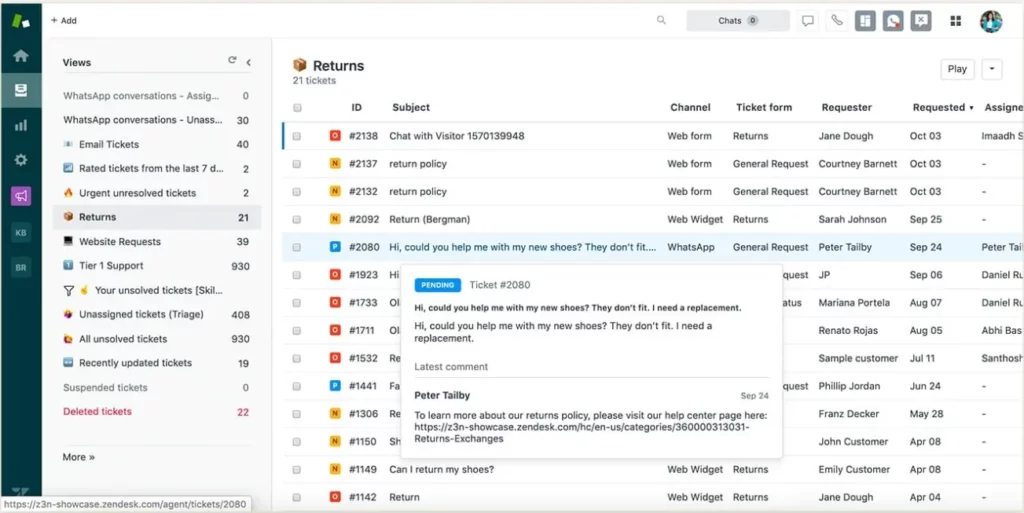
Zendesk, tailored for exceptional customer experience, streamlines customer service with automated email notifications upon receiving customer requests. AI-powered routing directs tickets to the appropriate agent based on criteria like priority, expertise, capacity, or availability.
The agent workspace in Zendesk consolidates tickets into a unified view, highlighting critical conversations and surfacing relevant customer information automatically.
The intelligent triage feature utilizes AI to predict customer language, sentiment, and intent, providing context for agents in the Zendesk Agent Workspace.
Additionally, Zendesk offers advanced reporting and analytics tools for effective team management, featuring native reports and customizable dashboards.
Features:
- Email templates
- Email tracking
- Macros for tickets
- Email triggers
- Unified agent workspace
- Ticket routing/categorization/tagging
- Context panel intelligence
- API & integrations
- Unlimited email addresses
- Knowledge base
Pricing:
Lowest Paid Plan: $19/agent/month
Highest Paid Plan: $99/agent/month
Recommended Reading- Freshdesk vs Zendesk: Which is the Best Helpdesk in 2025.
Learn more about Zendesk
- Freshdesk vs. Zendesk: Which is the Best Helpdesk in 2025
- 20 Zendesk Alternatives and Competitors
- 12 Key Zendesk Features in 2024 [+ Pros and Cons Breakdown]
- Zendesk Reviews 2024: The Good, the Bad and the Ugly
- Zendesk Pricing 2024: The Complete Guide
- Zendesk vs Zoho Desk: Which one is Best for your Business in 2024
3. Spiceworks
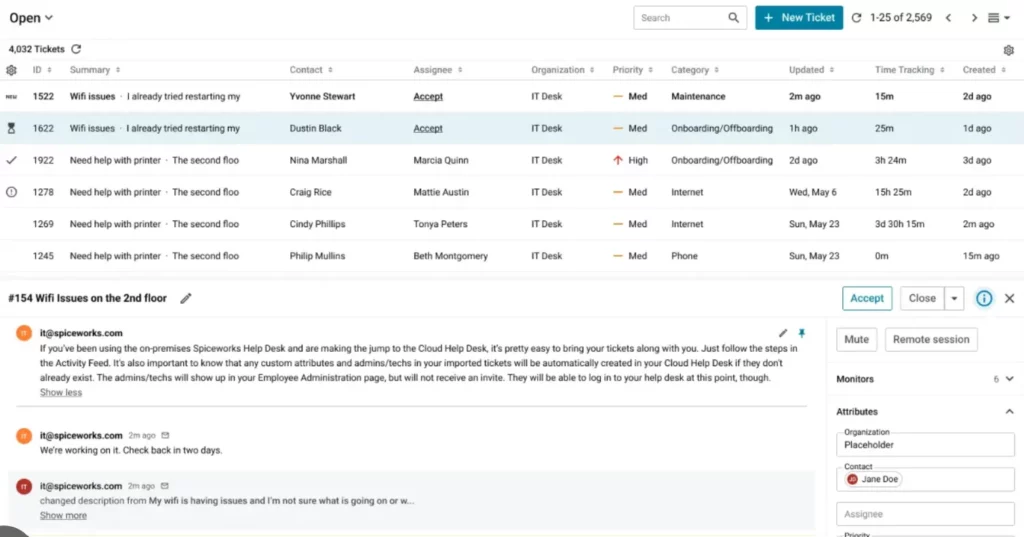
Spiceworks is a free email ticketing system that is designed for small businesses. It offers a range of features, including ticket management, team collaboration tools, and automation capabilities.
Utilize Spiceworks Help Desk to incorporate the User Portal, enabling users to effortlessly submit new tickets and track the progress of existing ones without continual communication. The Knowledge Base serves as a repository for frequently asked questions, saving time for both users and support teams.
No need for concern when customer service agents are away from their desks—Spiceworks Help Desk mobile app provides real-time ticket updates and push notifications directly on your phone or tablet.
Features:
- Customization
- Collaboration
- Self-Service
- Automation
- Remote Support
Pricing:
Lowest Paid Plan: Free
Highest Paid Plan: Free
Learn more about Spiceworks alternatives.
4. Help Scout
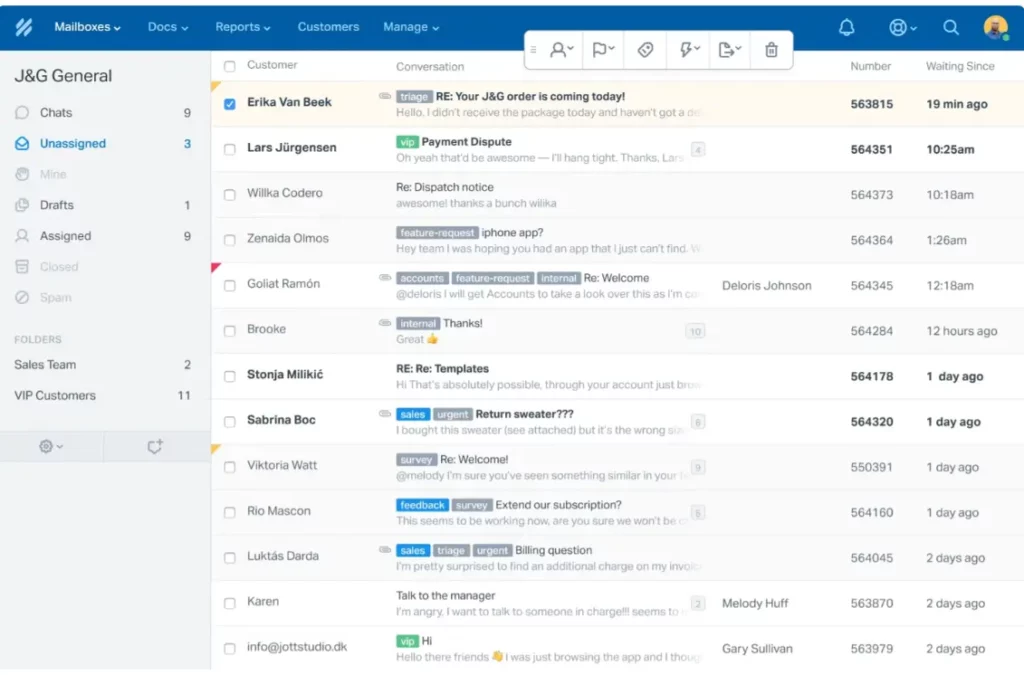
Help Scout , a widely used email-based ticketing system, simplifies the management of shared mailboxes for teams of all sizes. Boasting a user-friendly interface, it offers crucial features for streamlined team email management, including ticket routing, prioritization, automation, analytics, response templates, and tagging, among others.
In addition to its robust ticketing system, Help Scout provides customers with built-in functionalities such as a knowledge base and live chat. Moreover, its seamless integrations facilitate easy collaboration with both new and existing customer channels and databases.
Help Scout focuses on simplicity and collaboration, making it an excellent choice for small and medium-sized businesses. It offers a shared inbox that enables teams to collaborate on resolving customer inquiries effectively.
Features:
- Customizable Workflows
- Customer Feedback Mechanisms
- Team Collaboration Features
- Rule-based Automation
- Response Templates
- Robust Analytics
- Live Chat
- Knowledge Base
- Ticket Routing, Tagging, and Prioritization
Pricing:
Lowest Paid Plan: $20/agent/month
Highest Paid Plan: $65/agent/month
5. Hiver

Hiver is a modern AI-powered ticketing system platform that enables teams to manage support across all channels, including email, chat, Whatsapp, voice, text, and more—all from a single interface.
10,000+ teams use Hiver because of how it combines ease of use with powerful capabilities. There’s no extensive training or onboarding process. Everything from adding users, assigning queries, setting up workflows, and using its AI co-pilot happens without much friction.
Features:
- SLAs (Service Level Agreements)
- 24/7 Chat and Email Support
- Shared Inboxes
- Unlimited Email Templates
- Shared Drafts
- Email Notes
- Easy-to-Analyze Reports
- AI-powered assistance
Pricing:
- Lowest Paid Plan: $19/agent/month
- Highest Paid Plan: $49/agent/month
6. Freshdesk
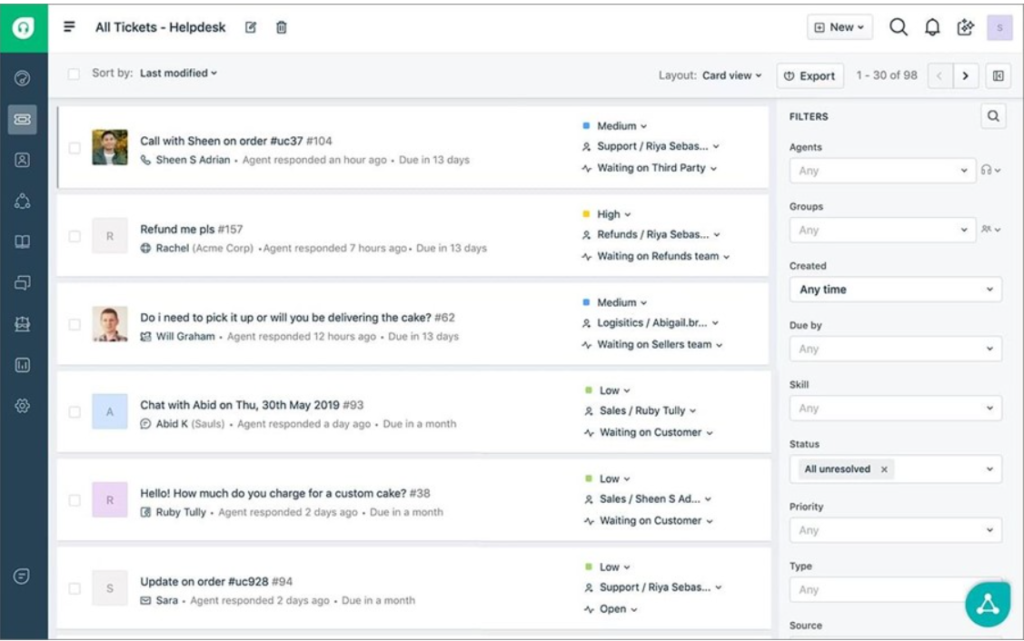
Freshdesk, the email-based ticketing software by Freshworks, transforms customer queries into manageable tickets for efficient tracking, prioritization, and collaboration among agents. It incorporates knowledge base publishing, collaboration tools, email and social ticketing, and rule-based ticket routing.
Expanding into FreshDesk’s Support Desk brings omnichannel functionality, including chatbot builders, social media messaging, advanced analytics, and SLA rules.
Freshdesk’s customer email management software elevates customer service by consolidating issues into a unified inbox. Agents can effortlessly handle customer conversations, gather feedback, analyze trends, and more.
Features:
- Proactive Collision Avoidance
- Help Desk Performance Analytics
- Email-based Ticket Routing
- Mobile Applications
- Connect with 500+ Apps
Pricing:
Lowest Paid Plan: $15/agent/month
Highest Paid Plan: $79/agent/month
Learn more about Freshdesk alternatives.
7. HubSpot Service Hub
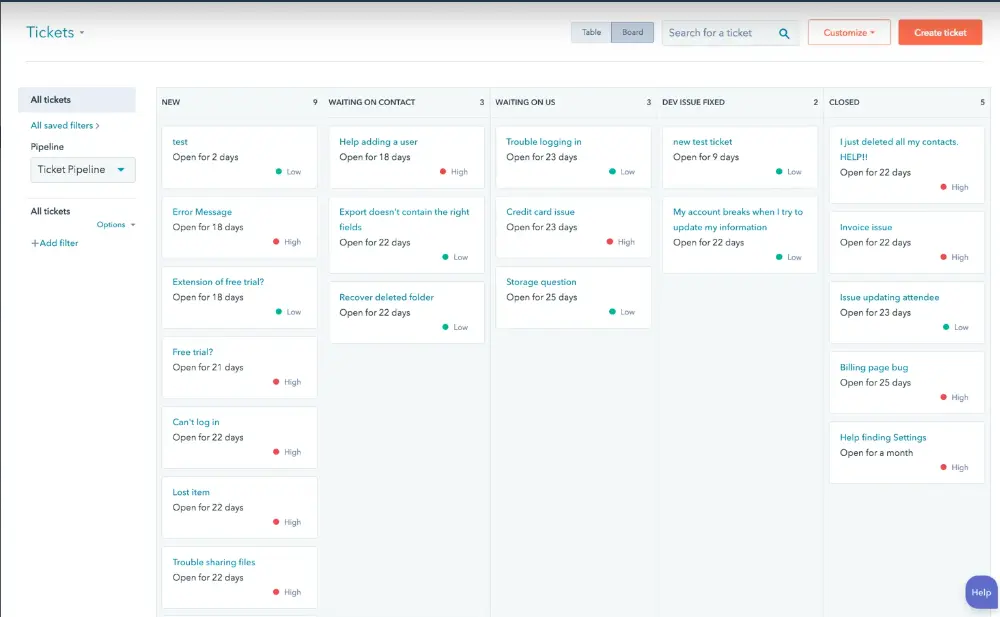
Hubspot Service Hub is an all-in-one email ticketing system that offers businesses a range of features to help manage customer enquiries and provide exceptional support.
It seamlessly integrates its ticketing system with the CRM, providing a robust solution for tracking customer service requests within a shared inbox.
This comprehensive platform, available through the Service Hub plan, offers essential features such as collaboration tools, prioritization rules, and ticket tagging.
Additionally, the platform introduces efficiency through automated ticket routing and task automation, enabling teams to manage repetitive actions with ease.
While a free plan is available, users opting for more advanced functionalities can leverage the Service Hub plan for a comprehensive and streamlined customer service experience.
Features:
- Integrated Ticketing System
- Collaboration Tools
- Prioritization Rules
- Ticket Tagging
- Customer Service Analytics
- Automated Ticket Routing
- Task Automation
Pricing:
Lowest Paid Plan: $30/month
Highest Paid Plan: $3600/month
8. JitBit
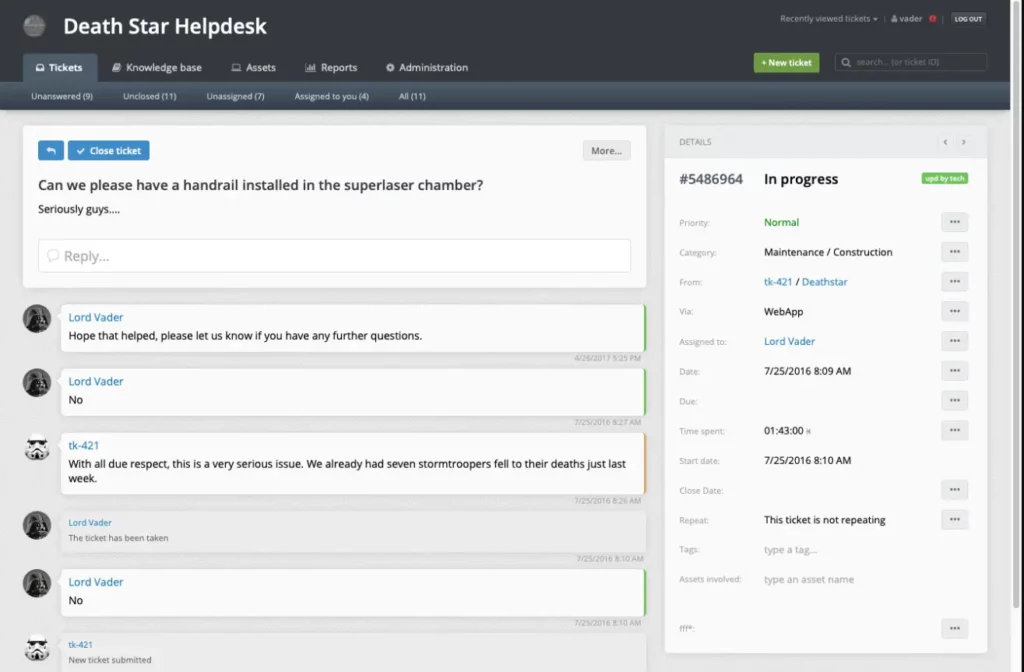
JitBit incorporates features like live chat, knowledge bases, chatbots, and integrations. The platform’s interface revolves around a shared inbox and includes advanced reporting tools, ticket organization capabilities, and effective ticket filters.
Jitbit facilitates efficient ticket management by enabling categorization, tagging, assignment, time tracking, and collision prevention for teams. Whether for service or help desks, it provides essential features such as shared inboxes, email assignments, collision detection, canned responses, tagging, reporting, and a knowledge base builder.
Features:
- Chatbots
- Shared Inbox
- Tagging of Tickets
- Assignment of Tickets
- Time Tracking for Tickets
- Canned Responses
- Knowledge Base Builder
- User-Friendly Interface
Pricing:
Lowest Paid Plan: $29/agent/month
Highest Paid Plan: $249/agent/month
Learn more about JitBit alternatives.
9. Front
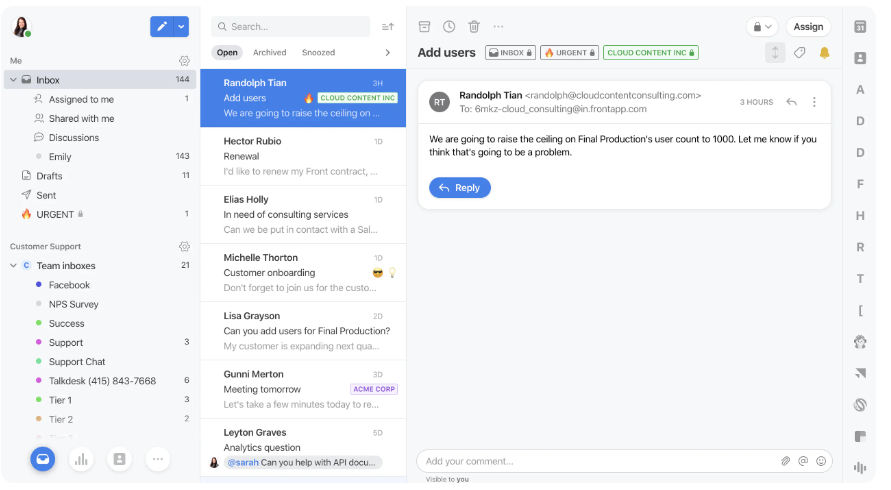
Front serves as a comprehensive customer service platform, seamlessly blending email with help desk functionality. The shared inbox feature allows your team to efficiently manage communication channels like email, messaging apps, SMS, and live chat all in one unified view.
This email ticketing system excels in routing conversations by automatically assigning and tagging representatives to handle specific issues. Collaboration is streamlined, enabling agents to work together on tickets and escalate priority issues for swift resolution.
In addition to its versatility in managing various channels, Front offers collaborative features such as email assignments, canned responses, shared drafts, and internal discussions. Tags, automations, and reporting dashboards further enhance ticket management.
Features:
- Shared Inbox
- Multichannel Support
- Effective Conversation Routing
- Collaboration on Tickets
- High-Priority Ticket Escalation
- Automations
- Reporting Dashboards
- Calendar Integration
Pricing:
Lowest Paid Plan: $19/agent/month
Highest Paid Plan: $229/agent/month
10. Zoho Desk
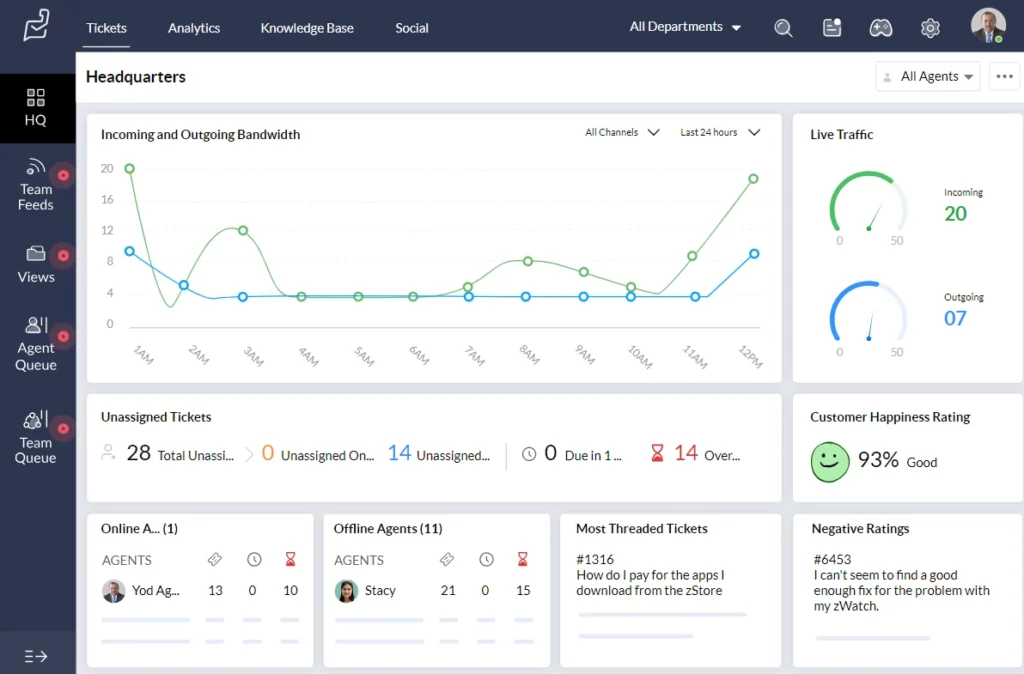
Zoho Desk email ticketing system facilitates seamless interaction between users and support teams via email, streamlining the process of ticket management within a shared inbox.
This system empowers teams by providing tools to prioritize and promptly address customer inquiries. With features like progress tracking, Zoho Desk ensures efficient monitoring of ticket resolution.
Moreover, the platform fosters conversations across diverse service channels, promoting a comprehensive and customer-centric support experience.
Zoho Desk enhances operational efficiency with valuable tools like workflow builders, task automation, and the flexibility of customizable automatic ticket views.
Features:
- Shared Inbox Management
- Ticket Prioritization
- Progress Tracking
- Multichannel Conversations
- Workflow Builders
- Task Automation
- Custom Automatic Ticket Views
Pricing:
Lowest Paid Plan: $20/agent/month
Highest Paid Plan: $50/agent/month
Learn more about Zoho Desk:
11. HelpCrunch
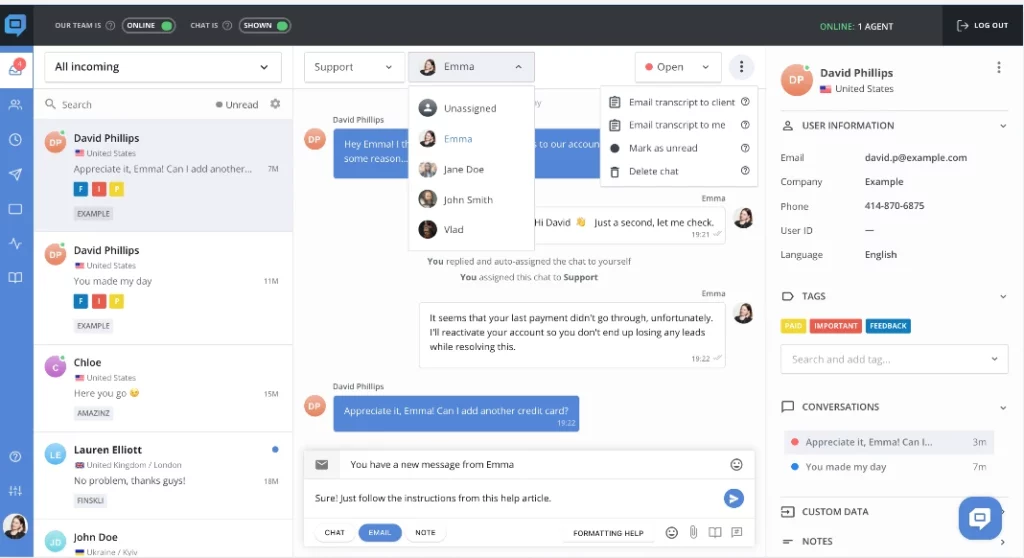
HelpCrunch offers a powerful email ticketing system that streamlines email communication between businesses and their customers. It offers features such as canned responses, automated workflows, and real-time notifications to help teams provide fast and efficient support. The system also offers a range of integrations, making it easy for businesses to connect it to their existing workflows and tools.
Features:
- Streamlined Communication
- Canned Responses
- Automated Workflows
- Real-time Notifications
- Fast and Efficient Support
- Integrations with Existing Workflows and Tools
Pricing:
Lowest Paid Plan: $12/agent/month
Highest Paid Plan: $495/agent/month
12. TeamSupport
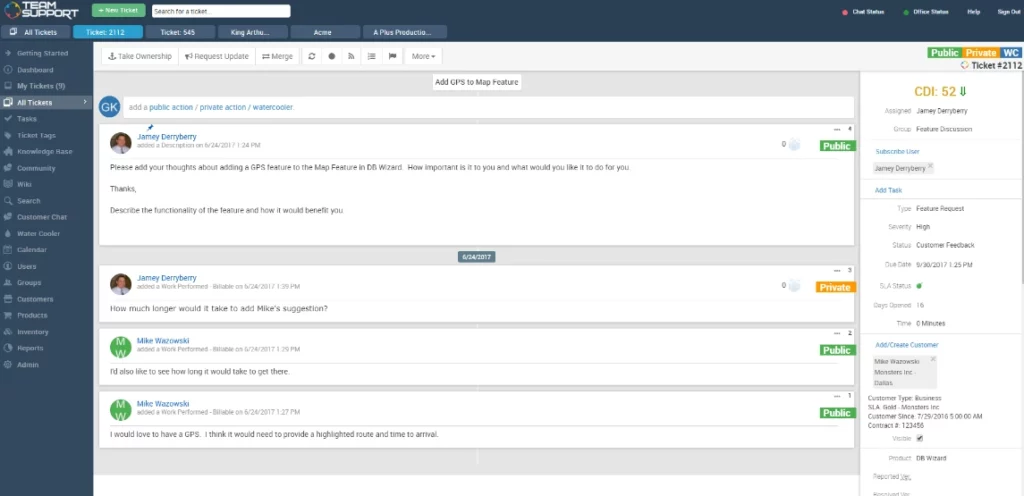
TeamSupport is a customer-focused email ticketing system designed to help businesses manage customer enquiries and provide exceptional support.
With features like ticket management, team collaboration tools, and reporting capabilities, TeamSupport makes it easy for teams to prioritize and respond to customer issues while tracking progress and facilitating seamless conversations across service channels.
Feature:
- Efficient Customer Inquiry Management
- Exceptional Support Capabilities
- Ticket Management
- Team Collaboration Tools
- Reporting Capabilities
- Progress Tracking
Pricing:
Lowest Paid Plan: $49/agent/month
Highest Paid Plan: $119/agent/month
What are the benefits of using an email ticketing system?
Using an email ticketing system offers several benefits for businesses and organizations. Here are some of the key advantages:
1. Streamlined communication and organization
An email ticketing system provides a centralized platform where all customer conversations are captured, eliminating the risk of emails getting lost or overlooked. Support agents can easily access and track the status of each ticket, ensuring timely responses and reducing the chances of customer dissatisfaction. By organizing customer queries systematically, businesses can improve efficiency and deliver consistent support experiences.
2. Enhanced customer service
With an email management system, businesses can provide faster response times and improved customer service. Agents can prioritize and categorize tickets based on urgency and type, ensuring that critical issues receive immediate attention. Additionally, historical ticket data and customer information are readily available, enabling agents to personalize their interactions and offer tailored solutions. This results in higher customer satisfaction and loyalty.
3. Efficient ticket management
Email ticketing systems offer a range of features to streamline ticket management. These include automated ticket routing, which assigns tickets to the most appropriate support agent based on predefined rules or criteria. This ensures that each ticket is handled by the agent with the necessary skills or expertise. Moreover, ticket categorization and prioritization enable agents to identify and address urgent issues promptly, ensuring efficient ticket resolution and customer satisfaction.
4. Better tracking and reporting
Email ticketing systems provide businesses with valuable insights into customer support inquiries. They can track response times, ticket volume, and customer satisfaction metrics, allowing them to identify areas for improvement and make data-driven decisions.
5. Cost-effective
Email ticketing systems can be a cost-effective solution for businesses of all sizes. They can help reduce the need for additional staff, increase productivity, and enhance the customer experience.
How can different teams use an email ticketing system?
- Customer Support: Support teams collaborate seamlessly to manage and resolve customer requests, keeping tabs on emerging issues and sharing valuable customer insights across the company using ticketing tools.
- IT: IT teams use the ticketing system to track and resolve technical issues reported within the organization. Additionally, they may employ it for tasks such as efficient asset management.
- Finance: Finance teams handle incoming messages related to billing, payroll, and expense reimbursements through ticketing systems, ensuring organized and timely responses.
- Marketing: Marketers, who often correspond with external collaborators like content creators and PR firms, use ticketing systems to document and streamline these communications.
- Human Resources: People operations teams utilize ticketing systems for managing employee and applicant communications, especially in processes related to hiring or benefits administration.
- Education: College and university departments, such as admissions, housing, and financial aid, rely on ticketing systems to streamline student requests, particularly during peak academic periods.
- Healthcare: Medical offices and insurance companies employ email ticket systems to securely track and manage patient communications, adhering to data security requirements like the Health Insurance Portability and Accountability Act (HIPAA). Regular email providers often lack the necessary security features for such sensitive information.
What are the best practices for using an email ticketing system?
To get the most out of an email ticketing system, businesses should follow these best practices:
- Define clear workflows and processes: Before implementing the system, map out your customer support workflows and processes. Define how tickets will be triaged, assigned, escalated, and resolved. Clear processes prevent confusion and ensure efficient ticket management.
- Prioritize urgent issues: Prioritize urgent issues and ensure that support agents work on resolving them first. This can prevent critical issues from being neglected and causing customer dissatisfaction.
- Categorize tickets: Categorize support tickets based on their nature and prioritize them based on their urgency. This can help support agents focus on resolving critical issues first.
- Define your SLA: Defining your Service Level Agreement (SLA) is crucial when implementing an email ticketing system. An SLA outlines the level of service that customers can expect and sets expectations for response and resolution times. Set clear response time expectations for your customers and ensure that your support agents meet them consistently. This can help build customer trust and satisfaction.
- Provide personalized support: Provide personalized support to your customers by addressing customers by name, email addresses, and company names and tailoring your solutions to their specific needs. This can build customer loyalty and satisfaction.
- Train support agents: Provide comprehensive training to your agents on how to use the email ticketing system effectively. This can include how to respond to inquiries, use internal notes, escalating tickets as well as your SLA and company policies. This can also help improve customer satisfaction and reduce the number of escalations.
- Monitor support data: Monitor support data regularly to identify areas for improvement and optimize customer support processes. This data can help you identify trends and areas for improvement and can also be used to set goals and benchmarks for your team. Consider adding additional agents or adjusting your support hours if necessary.
Additionally, you can implement surveys or rating mechanisms to assess customer satisfaction. By continuously improving, you can ensure that your email management system is meeting the needs of your customers and your team.
Why Desk365 is the best email ticketing system?
Desk365 nails that sweet spot between being simple to use, powerful under the hood, and budget-friendly. It’s built for teams who want to handle support tickets without dealing with clunky systems or sky-high costs. If your company already uses Microsoft 365, the deep Microsoft Teams integration is a huge plus — it basically turns Teams into your helpdesk.
Its AI-powered ticketing and workflow automation take a lot of the manual grunt work off your plate, so your team can focus on helping customers, not managing software. And unlike some of the more bloated platforms, Desk365 is clean, easy to navigate, and doesn’t require a week of training to get started.
With over 50 integrations, responsive 24/7 support, and pricing that starts at just $12 per agent per month, it’s a no-brainer for small to mid-sized teams looking for a modern, no-fuss helpdesk solution.
Looking for more details? Read more on our helpdesk. New here? Sign up for a free trial and explore everything Desk365 has to offer. Want a personalized walkthrough? Book a demo with our team and see how Desk365 can improve your customer experience.
Frequently asked questions about email ticketing systems
An email ticketing system differs from a traditional email client in that it is specifically designed for managing customer support requests. Unlike an inbox, a ticketing system allows you to organize, prioritize, and track support requests, ensuring that nothing falls through the cracks. If you find yourself struggling to manage customer support requests in your inbox, it may be time to consider switching to a ticketing system.
Absolutely! An email ticketing system can be suitable for small businesses. In fact, it can be particularly valuable for small businesses that don’t have a dedicated support team. By using a ticketing system, you can ensure that customer requests are properly tracked and managed, even if you don’t have a large team to handle them.
Email ticketing systems are better for customer support for a number of reasons. First, they allow you to track and prioritize support requests, ensuring that nothing falls through the cracks. Second, they enable you to collaborate with your team to resolve customer issues more efficiently. Finally, they provide valuable insights into customer behavior and preferences, which can help you improve your support processes over time.
Gmail does not have the advanced ticketing features of specialized email ticketing systems, but it can be customized with labels, filters, and collaboration tools to facilitate support workflows. You have the option to use your existing Gmail addresses with Desk365. You can configure forwarding rules for any Gmail addresses you may be using, so that emails sent to those addresses are also forwarded to Desk365 provided email. As a result, those emails will be automatically converted into tickets.
Outlook, as a standalone email client, does not have a built-in ticketing system. But, you have the option to use your existing Outlook addresses with Desk365. You can configure forwarding rules for any Outlook addresses you may be using, so that emails sent to those addresses are also forwarded to Desk365 provided email. As a result, those emails will be automatically converted into tickets.
 AI Agent
 Knowledge Base
 Automations
 SLAs
SLAs Customization
 Ticket Assignment
 Reports & Analytics
 Approval Management
 Explore All Features
 Banking and Finance
 Healthcare
 MSP
MSP Government
  Non Profit
 IT Services
 Customer Support
 Human Resources
 Facilities







